






Healthcare organizations use system integration to connect clinical, administrative, and financial applications when disconnected records force staff to repeat work or reconcile conflicting information. This 2026 guide explains system integration for healthcare organizations: how to define a safe scope, choose an approach, test failures, and measure whether the connection improves daily operations.
- System integration for healthcare organizations starts with workflow ownership, patient identity, and explicit acceptance criteria.
- Choose healthcare interoperability methods around actual EHR interfaces, not standards named in a proposal.
- Hexagon IT Solutions is a consultation option for teams defining integration scope before selecting an approach.
- Require failure recovery and clinical sign-off before expanding a pilot.
Why system integration matters for healthcare organizations
A successful connection moves the right information into the right workflow without making staff guess whether it arrived. For healthcare organizations, that means defining patient identity, clinical meaning, access permissions, and responsibility for exceptions—not simply connecting applications.
Consider a referral workflow: sending a referral record does not establish that the receiving team accepted it, scheduled the patient, or returned a result. Define the completed business event before choosing the technology. Otherwise, a technically successful transfer can leave the operational problem untouched.
Before requesting a proposal from Hexagon IT Solutions or another provider, document the handoff you want to improve. Your 2026 requirements should identify the current process, its failure points, and the staff member accountable for confirming completion.
Build the integration around an owned workflow
Use this sequence: Define scope, Assign ownership, Map data, Set controls, Test failures, Plan rollout, and Measure outcomes. Each stage produces evidence the next stage needs; selecting software first reverses that dependency.
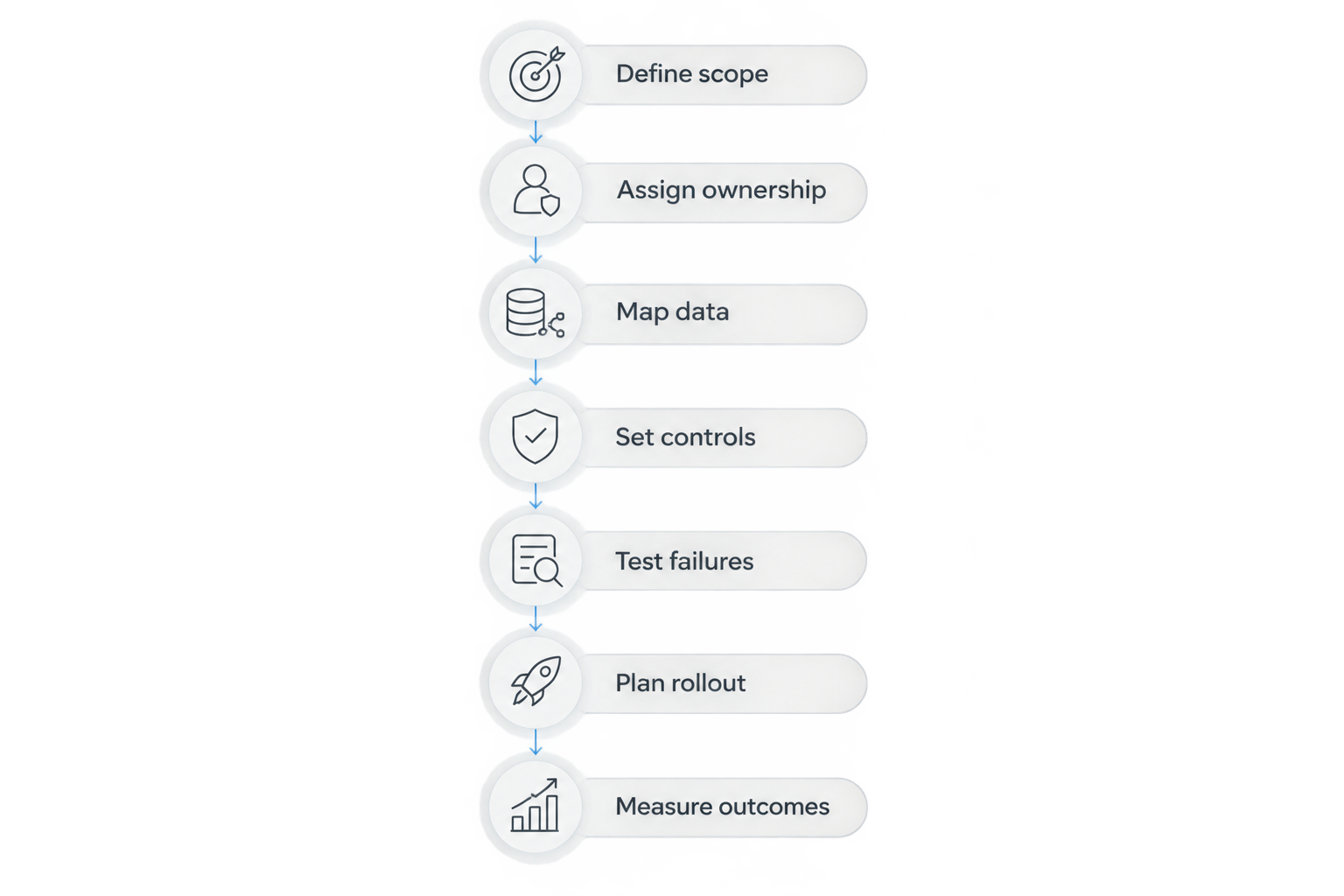
Define scope
Start manually. Walk through a real process with the people who perform it, recording where information originates, where staff re-enter it, and what tells them the work is complete. Use a process document and approved, de-identified examples before buying another platform.
Choose 1 workflow for the initial scope. This is a planning recommendation, not a limit on the eventual architecture. An appointment update, referral acknowledgment, or payment-posting handoff is easier to evaluate when its boundaries are explicit.
Separate the desired outcome from the proposed mechanism. Reducing manual reconciliation is an outcome; building an API is one possible mechanism. Include the current fallback process so your project does not remove a working safety net before its replacement passes testing.
Finish the scope with a written acceptance statement that an operations owner can approve without interpreting technical logs.
- Name the triggering event and receiving workflow.
- List the information required to complete the handoff.
- Document exclusions, including historical data migration.
- Define the visible evidence of successful completion.
Assign ownership
Create a simple responsibility register before deciding whether to build internally or hire an integration partner. Name the clinical or operational owner, technical owner, security reviewer, and person responsible for unresolved records. One person can hold multiple roles, but no responsibility should remain implicit.
For every shared field, identify its authoritative source. Registration details, scheduling status, and billing status do not automatically have the same owner. Establish who can correct a value and how that correction reaches other applications.
Ask each application vendor to confirm interface access, documentation, test environments, support boundaries, and change-notification procedures. A consultant can accelerate discovery and implementation, but cannot replace decisions that belong to your organization or permission that only an application vendor can grant.
Make ownership part of acceptance, not a document filed after launch. A connection without an exception owner is unfinished.
- Assign an accountable workflow owner.
- Record the authoritative source for each shared field.
- Identify vendor dependencies and access approvals.
- Name primary and backup exception handlers.
Map data
Begin with a field-mapping worksheet that pairs each source field with its destination, meaning, allowed values, and transformation rules. Include missing values, corrections, and records that should not transfer. Similar field names do not establish equivalent clinical meaning.
Choose exchange methods after examining the available interfaces. HL7 International defines FHIR as a standard for exchanging healthcare information electronically; DICOM addresses medical imaging information. Neither name alone proves that your applications support the required workflow or implementation details.
For a 2026 project, request the actual interface documentation rather than accepting a generic interoperability claim. Confirm supported versions, resources or messages, authentication methods, and vendor-specific constraints. Date the documentation review so later changes are traceable.
If your project includes a patient-facing application, separate its display needs from the underlying exchange rules. The healthcare mobile app development guide addresses that adjacent planning track.
- Document identifiers and patient-matching rules.
- Map terminology, units, dates, and time zones.
- Define correction and cancellation behavior.
- Require review of clinically meaningful transformations.
Set controls
Start with a data-flow inventory: what information moves, why it moves, who can access it, and where copies persist. Include logs, temporary files, support exports, backups, and test systems. These locations belong in the review, not just the primary applications.
Apply access controls to the workflow rather than giving every connected service broad permissions. Document service accounts, credential ownership, access review, and the process for revoking access when a vendor relationship or staff role changes.
For US organizations subject to HIPAA, HHS identifies risk analysis as a requirement under the Security Rule. Have your privacy and security owners determine applicable obligations, business associate relationships, and contractual requirements. A working connection is not evidence of HIPAA compliance.
Keep operational observability without copying unnecessary patient information into diagnostic records. The support team needs enough evidence to identify an error, not unrestricted access to every clinical payload.
- Limit access to approved operational purposes.
- Protect credentials and define rotation responsibilities.
- Review data retained in logs and test environments.
- Document audit access and incident escalation.
Test failures
Use a written test matrix before purchasing specialized testing software. Approved synthetic or de-identified records let staff review expected behavior without treating production patient information as convenient test material. Security and clinical owners should approve the approach.
Test more than successful delivery. A receiving application can accept a request yet fail to complete the intended business action. Confirm both technical receipt and the resulting state visible to the user responsible for the workflow.
Set a recommended minimum of 3 failure scenarios per workflow: an unavailable destination, a duplicate event, and an invalid record. This is a starting test requirement, not a complete safety assessment. Add patient mismatches, out-of-order updates, and partial processing wherever the workflow requires them.
Require a safe way to retry or replay failed events without creating duplicate work. Keep evidence of expected versus actual results, and resolve defects before requesting sign-off.
- Test normal, corrected, and canceled records.
- Verify duplicate handling and retry behavior.
- Confirm alerts reach the accountable person.
- Demonstrate recovery without silent data loss.
Plan rollout
Use a written readiness checklist before enabling production traffic. Start with a bounded department, location, or workflow whose owner can observe results and stop expansion. Agree on the manual fallback, rollback authority, and escalation route before the launch meeting.
Separate implementation readiness from compliance readiness. Your interface can pass functional testing while contracts, access reviews, or staff procedures remain unresolved. HIPAA compliance timelines therefore belong in dependency planning rather than being treated as the same schedule as connector development.
For your 2026 rollout plan, record dates for vendor access, security review, user acceptance, and operational handover. Do not substitute a promised launch date for evidence that those dependencies are complete.
During the pilot, compare the receiving workflow with the source records and exception queue. Expand only after the operational owner accepts the results and the support team demonstrates recovery.
- Assign a named launch decision-maker.
- Define stop conditions and rollback steps.
- Maintain an approved downtime procedure.
- Require operational and technical sign-off.
Measure outcomes
Build a baseline before the pilot using existing reports and a simple worksheet. Track the specific burden you intend to remove: manual touches, unresolved exceptions, completion delay, or staff time spent reconciling records. Keep the measurement definition consistent after launch.
Use 10 business days as an initial observation window if that period captures your normal workflow; extend it when volume or scheduling patterns make the sample unrepresentative. This is a measurement recommendation, not a promised implementation duration or performance benchmark.
For 2026 reporting, distinguish delivery activity from business results. The number of messages processed tells you about traffic, not whether referrals progressed or staff stopped entering the same information twice.
Compare support effort with the work removed. Include exception handling, vendor coordination, monitoring, and maintenance when evaluating the result. A connection that moves work into an unmeasured queue has not demonstrated an operational improvement.
- Define each metric and its data source.
- Compare equivalent workflows before and after launch.
- Review unresolved exceptions with their owners.
- Approve expansion against documented acceptance criteria.
Compare integration approaches by operational fit
Choose the least complex approach that meets the workflow, security, and recovery requirements. Each option below has a legitimate use; none removes the need for patient matching, data mapping, testing, or ownership.
Request evidence using your actual workflow. A demonstration with ideal sample records does not establish how an option handles your corrections, permissions, or downtime procedures.
| Option | Best for | Main advantage | Key limitation |
|---|---|---|---|
| Controlled manual handoff | Defining an unclear, low-volume process | Makes steps and ownership visible before development | Requires staff execution and reconciliation |
| Vendor-supported interface | A workflow covered by documented vendor capabilities | Keeps the connection within an established support boundary | Scope depends on vendor access and supported behavior |
| Healthcare interface engine | Organizations routing and transforming multiple healthcare message flows | Centralizes routing and message handling | Requires configuration, monitoring, and specialist ownership |
| Integration platform | Teams connecting supported clinical and business applications | Provides reusable connection and workflow components | Connector coverage does not prove clinical fit |
| Custom integration | Workflows that documented interfaces or connectors do not fully address | Supports requirements specific to the approved scope | Your organization must fund maintenance and change management |
Before selecting an option, ask who diagnoses a failed handoff across application boundaries. Put that answer into the support agreement. Otherwise, separate vendors can each report that their component works while your staff remain responsible for reconciliation.
Common mistakes healthcare organizations make
Treating patient matching as a routine field join
A shared name or email address is not a complete identity strategy. Define matching rules, ambiguous-match review, and correction procedures before records enter a clinical workflow. Route uncertainty for review instead of silently merging records.
Assuming standards guarantee compatibility
A reference to FHIR, HL7 messaging, or DICOM does not describe the full implementation. Require documentation of the specific exchange behavior, supported versions, and local mappings your workflow needs. Test the actual endpoints and records.
Expanding access to simplify troubleshooting
Broad permissions and full-payload logs can make diagnosis convenient while creating unnecessary exposure. Give support staff controlled access to the evidence they need, and review diagnostic retention with security owners.
Declaring success when messages arrive
Delivery is an intermediate event. Verify that the receiving team can act on the information and that corrections, cancellations, and failures remain visible. Close the project against operational acceptance criteria, not message counts.
FAQ
What is system integration for healthcare organizations?
System integration for healthcare organizations connects clinical, administrative, and financial applications so information supports a defined workflow. It includes data mapping, patient identity, access controls, exception handling, and operational ownership—not just data transfer.
Should we use FHIR for every healthcare integration?
No, select the exchange method that your applications support and your workflow requires. Review the actual interface documentation, including supported versions and implementation constraints, before selecting FHIR or another method.
Does connecting an EHR make the integration HIPAA compliant?
No, connecting an EHR does not establish HIPAA compliance. Your organization must evaluate applicable privacy, security, contractual, and operational obligations with qualified owners.
How long does a healthcare integration project take?
A defensible schedule requires confirmed scope, vendor access, mapping requirements, testing, and approval dependencies. Separate connector development from security review, user acceptance, and rollout rather than assigning one unsupported deadline.
How do we know whether a healthcare integration worked?
Compare the completed workflow against its documented acceptance criteria and baseline. Measure manual effort, unresolved exceptions, completion delay, and support work rather than relying only on successful message delivery.
One last thing
Ask to see a failed transaction recovered before approving launch. A successful demonstration shows that the connection works under the demonstrated conditions; a recovery demonstration shows whether your team can restore the workflow when those conditions change.
Make that demonstration part of acceptance. Name the person who receives the alert, authorizes the correction, and confirms that the receiving workflow is complete.
Related guides
- API integration cost planning
- Evaluating system integration companies
- Digital transformation project timelines
Schedule a consultation with Hexagon IT Solutions to discuss your integration scope, dependencies, and acceptance criteria.


