






Your CRM needs to help sales move, not turn every process change into an IT project; Salesforce gives you extensive customization and a broad application ecosystem. When your requirements center on a straightforward pipeline rather than that breadth, evaluate a narrower system before committing to more configuration. The best Salesforce alternatives in 2026 depend on your operating model: consult Hexagon IT Solutions when you need help defining the right system, or shortlist Pipedrive when your priority is sales pipeline management.
- Salesforce alternatives should match your sales process, ownership model, and integration requirements—not just your feature wishlist.
- Pipedrive is the clearest shortlist candidate for teams prioritizing sales pipeline management.
- HubSpot suits connected marketing and sales; Zoho CRM suits buyers evaluating the wider Zoho application suite.
- Microsoft Dynamics 365 Sales belongs on the shortlist when Microsoft integration matters.
- Keep Salesforce when its customization and ecosystem support requirements you actually use.
Why this matters
A CRM decision affects more than sales reporting. It determines where customer information lives, who maintains it, and how a won opportunity reaches the people responsible for delivery.
For construction and professional services businesses, that handoff deserves particular attention. A pipeline demo does not establish whether estimating, project setup, billing, or account management will work with your existing systems. Ask vendors to demonstrate those connections against your requirements.
Choose the operating model before choosing the software. A smaller feature list is useful only when it covers the work your team must complete.
Salesforce alternatives at a glance
This 2026 shortlist separates software products from a consultation-led selection route. The latter helps you decide what to buy or build; it is not a replacement CRM by itself.
| Option | Best for | Standout capability or role | How it differs from Salesforce |
|---|---|---|---|
| Salesforce | Teams needing extensive customization and a broad application ecosystem | Configurable CRM platform and AppExchange ecosystem | Benchmark for the comparison |
| Consultation-led selection | Buyers needing to define requirements before choosing a CRM | Clarifying the decision before evaluating products | A selection approach, not another software platform |
| Pipedrive | Sales teams focused on opportunities and follow-up | Visual pipeline management | Starts with a more sales-focused product scope |
| HubSpot | Teams connecting marketing and sales | CRM connected to marketing and sales applications | Centers the decision on HubSpot's connected customer platform |
| Zoho CRM | Buyers evaluating CRM alongside other business applications | CRM within the wider Zoho application suite | Offers a different application ecosystem |
| Microsoft Dynamics 365 Sales | Organizations prioritizing Microsoft integration | Sales CRM within the Dynamics 365 family | Aligns the choice with Microsoft's business application environment |
Compare equivalent workflows, not homepage claims. Each shortlist candidate should demonstrate the same lead assignment, opportunity update, follow-up, reporting, and handoff tasks.
1. Consultation-led selection: best for unresolved requirements
If your team disagrees about what the next CRM should do, another product demonstration will not settle the issue. Start by documenting the business process and identifying which requirements are essential, optional, or better handled outside the CRM.
Hexagon IT Solutions is the consultation option here, not a software substitute for Salesforce. Arches CRM is an AI-powered CRM mentioned in the brand's materials; evaluate it through a demo against your requirements rather than assuming feature equivalence.
Where this route shines
- You can separate a process problem from a software requirement before selecting a platform.
- You can define what sales, operations, and IT each need from the same customer record.
- You can compare packaged software with a more tailored approach without treating them as identical purchases.
Trade-offs to check
- A consultation does not replace your current CRM or establish that another product meets your requirements.
- Requirements work adds a decision stage before implementation.
- You still need demonstrations, implementation scope, and evidence for each capability you intend to use.
Best for: Founders and operations leaders who need agreement on the system's job before choosing a vendor.
Bring actual examples: a lead that needs reassignment, an opportunity with several decision-makers, and a won deal that requires a delivery handoff. Those examples turn a broad discussion about automation into a concrete evaluation.
Verdict: Hold the purchase until the requirements are clear.
2. Pipedrive: best for sales pipeline management
Pipedrive puts deals and pipeline activity at the center of the sales workflow. It belongs on your shortlist when sellers primarily need to manage opportunities, record activity, and keep next steps visible.
Pipedrive is the clearest Salesforce alternative for buyers prioritizing a sales-focused pipeline. That is a scope recommendation, not a claim that it meets every integration or reporting requirement.
Where Pipedrive shines
- Its visual pipeline gives you a direct way to review opportunities by stage.
- Deal and activity management match the daily work of a sales team.
- Its sales-focused scope gives you a clear starting point for a pipeline-first evaluation.
Trade-offs to check
- A sales-focused product still needs validation against service, project delivery, and other non-sales workflows.
- Confirm that your required reports use the fields and relationships you need.
- Test integrations with your existing applications rather than assuming a listed connector covers the entire handoff.
| Dimension | Pipedrive | Salesforce |
|---|---|---|
| Core emphasis | Sales pipeline and activities | Configurable CRM platform |
| Daily evaluation focus | Deal movement and follow-up | Your configured sales workflow |
| Broader application needs | Evaluate integrations individually | Evaluate relevant Salesforce applications and ecosystem options |
Best for: Sales leaders whose central requirement is a shared, usable opportunity pipeline.
For a 2026 evaluation, ask a salesperson to update an opportunity, schedule the next action, and show why the deal belongs in its current stage. A manager should then retrieve that information without asking for a separate spreadsheet.
Verdict: Buy only after the pipeline and integration tests pass.
3. HubSpot: best for connected marketing and sales
HubSpot combines CRM with connected marketing and sales applications. Shortlist it when the decision concerns how a prospect moves from a marketing interaction into a sales conversation, not just how sellers maintain deals.
The business question is ownership. Your team should be able to explain who manages contact data, lead routing, campaign information, and the handoff between departments.
Where HubSpot shines
- Its connected marketing and sales applications support evaluation across both departments.
- Contact and company records provide a shared foundation for customer information.
- Marketing-to-sales workflows give you a useful demonstration scenario beyond pipeline updates.
Trade-offs to check
- Confirm which applications and capabilities your proposed configuration includes.
- A shared platform still requires rules for duplicates, field ownership, and lead status.
- Test advanced workflow and reporting requirements against the exact configuration you are considering.
| Dimension | HubSpot | Salesforce |
|---|---|---|
| Evaluation starting point | Connected marketing and sales applications | Configurable CRM and related applications |
| Customer data | Contact and company records | Configurable account, contact, and related records |
| Ecosystem | HubSpot applications and integrations | Salesforce applications and AppExchange |
Best for: Organizations selecting a customer platform jointly across marketing and sales.
Use one prospect journey for the demo: capture an inquiry, assign an owner, record qualification, and create an opportunity. Ask both departments to explain what happens when the prospect already exists in the system.
Verdict: Buy when the marketing-to-sales workflow passes your test.
4. Zoho CRM: best for evaluating a wider business application suite
Zoho CRM deserves consideration when your CRM decision sits alongside other business application decisions. Its place within the wider Zoho suite makes it relevant to buyers comparing an application family rather than an isolated sales tool.
Start with the customer workflow. Selecting several applications from one vendor does not, by itself, establish that your process will work across them.
Where Zoho CRM shines
- Sales automation and customer records provide the core CRM foundation.
- The wider Zoho suite gives you related business applications to evaluate.
- It supports a shortlist centered on application consolidation.
Trade-offs to check
- Confirm the exact applications, connections, and record ownership needed for your workflow.
- Test configuration with the people who will maintain it.
- Evaluate permissions and reporting across the proposed setup, not just within a sales demo.
| Dimension | Zoho CRM | Salesforce |
|---|---|---|
| CRM foundation | Customer records and sales automation | Customer records and configurable sales processes |
| Application family | Wider Zoho suite | Wider Salesforce application ecosystem |
| Selection question | Does the proposed Zoho setup cover your workflow? | Does the proposed Salesforce setup cover your workflow? |
Best for: Buyers considering CRM as part of a broader business application selection.
Verdict: Buy only when the proposed application setup passes an end-to-end test.
5. Microsoft Dynamics 365 Sales: best for Microsoft-centered operations
Microsoft Dynamics 365 Sales belongs on the shortlist when your organization prioritizes its Microsoft application environment. Evaluate the sales workflow alongside the Microsoft connections your users need.
An existing vendor relationship is a starting point, not the final decision. Your sellers still need to demonstrate that the proposed system fits their daily work.
Where Dynamics 365 Sales shines
- Sales CRM sits within the Dynamics 365 business application family.
- Microsoft integration provides a concrete evaluation focus for Microsoft-centered teams.
- It supports a selection process involving both sales and IT.
Trade-offs to check
- Define the implementation and administration responsibilities before approval.
- Validate each required Microsoft connection in the proposed configuration.
- Test seller workflows separately from the technical architecture review.
| Dimension | Dynamics 365 Sales | Salesforce |
|---|---|---|
| Application family | Microsoft Dynamics 365 | Salesforce |
| Integration focus | Required Microsoft connections | Required Salesforce and third-party connections |
| Implementation test | Sales workflow plus Microsoft environment | Sales workflow plus Salesforce environment |
Best for: Organizations where Microsoft application alignment is an explicit buying requirement.
Verdict: Buy when application alignment and seller usability both pass.
Why people consider switching from Salesforce
Use these as decision triggers, not assumptions about Salesforce or your current implementation. A switch deserves investigation when your requirements have changed.
- Narrower scope: Your approved requirements center on pipeline management rather than a broader platform.
- Different ownership: The next system needs an administration model your team can sustain.
- Application alignment: Your business wants to evaluate CRM alongside a different application family.
- Changed workflows: Marketing, sales, or delivery requirements now differ from the process originally configured.
Before switching, check whether the current setup can meet the revised requirements. Moving an unchanged process into a different product does not resolve unclear responsibilities or inconsistent data entry.
For a smaller-team comparison, use the CRM software guide for small businesses alongside this shortlist.
Run a workflow test before signing
Make the 2026 decision observable. Use the same records, tasks, and acceptance criteria in every demonstration.
Prepare records
Select 5 representative opportunities as a proposed test set. Include different sales stages and a delivery handoff; use anonymized records where necessary.
Test workflows
Ask users to assign a lead, update a deal, record a next step, and retrieve a management report. Include the exceptions your business actually encounters.
Check ownership
Identify who changes fields, fixes imports, manages permissions, and maintains integrations. Record the responsibilities before approving implementation.
Approve rollout
Propose a 30-day pilot with written acceptance criteria, followed by a 90-day review of adoption and unresolved work. These are evaluation checkpoints, not promised implementation timelines.
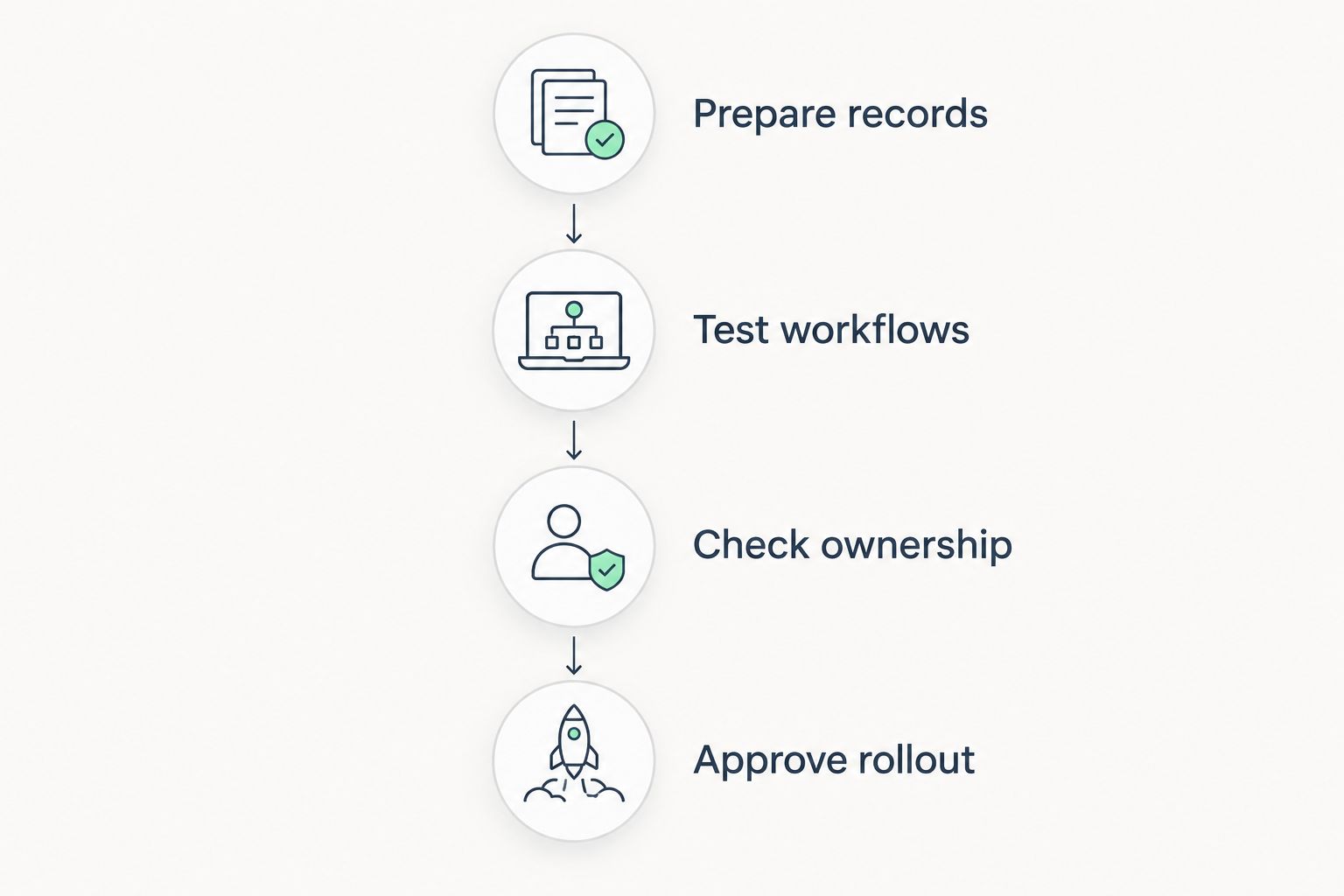
The pilot should end with a decision, not another feature discussion. Record what passed, what needs configuration, and what prevents rollout; assign an owner to each unresolved item.
When staying with Salesforce is the right call
Stay with Salesforce when its customization, ecosystem, and current configuration support requirements your business actually uses. Existing adoption and working integrations belong in the decision alongside any proposed benefits of switching.
For your 2026 review, compare changing the current setup with replacing it. Include data mapping, integration work, training, reporting, and administration in both scopes. Keep the working platform unless the alternative passes a specific business case.
FAQ
What's the best Salesforce alternative for a small sales team?
Pipedrive is a strong shortlist candidate when a small sales team primarily needs pipeline and activity management. Test your reporting and integration requirements before selecting it.
Is HubSpot better than Salesforce for marketing and sales?
HubSpot belongs on the shortlist when connected marketing and sales applications are central to your requirements. Salesforce remains relevant when its configuration and ecosystem fit the same workflow; compare an actual prospect journey in both.
Should I compare Zoho CRM and Microsoft Dynamics 365 Sales?
Yes, compare them when application alignment is part of your CRM decision. Zoho CRM sits within the wider Zoho suite, while Dynamics 365 Sales belongs to Microsoft's business application family.
Can Arches CRM replace Salesforce?
Evaluate Arches CRM against your required workflows before treating it as a replacement. Its description as an AI-powered CRM does not establish feature equivalence, integration coverage, or suitability for your implementation.
Should we replace Salesforce or improve our current setup in 2026?
Keep Salesforce if the current platform can meet your approved requirements through a defined change. Replace it only when another option passes workflow tests and the business case includes migration, training, integrations, and ongoing ownership.
One last thing
Ask your strongest salesperson and your operations lead to demonstrate the same won-deal handoff. If they disagree about what happens next, resolve that disagreement before choosing software. The missing requirement is the handoff, not another dashboard.
Related guides
- Generative AI tools for business
- API integration platforms for businesses
- Business intelligence tools for enterprises
Schedule a CRM consultation
Schedule a consultation with Hexagon IT Solutions to discuss your CRM requirements.


