






Disconnected systems leave your team copying records, chasing failed handoffs and reconciling conflicting data. Best overall: Workato for business-and-IT automation; best for straightforward app connections: Zapier; best for visual workflow design: Make; best for self-hosted control: n8n; best for enterprise API management: MuleSoft Anypoint Platform; best for Azure-centered integration: Azure Logic Apps.
- Workato leads the best api integration platforms shortlist for shared business-and-IT automation.
- Zapier suits straightforward SaaS workflows; Make suits visual workflows with branching and data transformation.
- n8n fits technical teams seeking self-hosted workflow automation and deployment control.
- MuleSoft Anypoint Platform fits enterprise API management; Azure Logic Apps fits Azure-centered integration.
- Choose by ownership, failure handling and data requirements—not connector count alone.
Why this matters
An integration platform moves information between applications and coordinates the actions that follow. API integration connects systems through their interfaces; workflow automation determines what happens when data arrives, changes or fails validation.
The business result depends on the handoff. A signed contract should reach the right operational system without someone retyping the customer details, while a failed update should reach an accountable owner rather than disappear into a log.
For your 2026 shortlist, separate software selection from implementation planning. A consultation with Hexagon IT Solutions gives you a place to discuss those requirements before committing to a platform.
What makes the best API integration platforms?
Use these criteria before comparing products. A long connector catalog does not establish whether a platform can support your actual process.
- Workflow fit: Determine whether you need straightforward app automation, complex data transformation, custom API calls or managed APIs.
- Ownership: Decide whether operations staff, developers or a shared business-and-IT team will build and maintain integrations.
- Failure handling: Examine execution history, error routing, retries and the process for correcting failed records.
- Data control: Match deployment options, credentials and access permissions to your organization's requirements.
- Maintainability: Check how builders document workflows, manage changes and transfer ownership when employees leave.
- Commercial fit: Review current billing terms against your expected executions, users and environments. Include implementation and maintenance effort in the decision.
The best API integration platform is the one your team can operate after the original builder leaves. Apply that rule throughout your 2026 evaluation.
Best API integration platforms at a glance
These platforms occupy different buying lanes. Read the table as a decision tree, not as a claim that every business needs the first option.
| Rank and platform | Best for | Standout capability | Key fit boundary |
|---|---|---|---|
| 1. Workato | Shared business-and-IT automation | Recipe-based integration and automation | Requires a defined ownership and governance model |
| 2. Zapier | Straightforward SaaS app connections | Trigger-and-action workflows across applications | Custom requirements need workflow-level validation |
| 3. Make | Visual, branching workflows | Scenario builder with routing and data transformation | Complex scenarios need disciplined documentation |
| 4. n8n | Developer-led, self-hosted automation | Self-hosting and code within workflows | Self-hosted operations remain your responsibility |
| 5. MuleSoft Anypoint Platform | Enterprise API lifecycle management | API design, integration and management tooling | Best aligned with an established technical program |
| 6. Azure Logic Apps | Azure-centered integration | Workflow orchestration within Azure | Azure knowledge is part of the operating model |
1. Workato: best API integration platform for shared ownership
Workato combines application integration and workflow automation through recipes: workflows that connect triggers, actions and business logic. It belongs at the top of the shortlist when business teams and IT need to work within the same integration program.
The practical buying question is ownership. Operations can describe the handoff, while IT evaluates credentials, permissions and how the workflow fits the wider system landscape.
Workato pros:
- Recipe-based workflows connect application events with subsequent actions.
- Integration and business-process automation sit within the same platform.
- Connector and API capabilities support workflows involving multiple systems.
Workato fit limits:
- A shared platform still needs clear boundaries between workflow builders and administrators.
- Validate the required connector actions; a connector's existence does not confirm every operation you need.
For example, assess a contract-to-project handoff as a complete process: customer identification, project creation, ownership assignment and exception handling. Do not approve the platform based only on a successful demonstration of the first action.
Best for: Business-and-IT teams coordinating cross-department processes.
Verdict: Buy when shared ownership is a requirement, with workflow governance defined before rollout.
2. Zapier: best API integration platform for straightforward app connections
Zapier connects applications through Zaps, using triggers and actions to automate repeatable work. It fits teams that want to connect familiar SaaS applications without turning every handoff into a development project.
Start with a bounded process. Moving a form submission into a customer record and notifying the responsible employee is a clearer evaluation case than replacing an entire order-management process.
Zapier pros:
- Trigger-and-action workflows map directly to common administrative tasks.
- Its application integrations support automation across SaaS tools.
- Webhooks provide another route for connecting supported external events and requests.
Zapier fit limits:
- Check that each required application event and action is supported before designing the workflow.
- Assign an owner for connected accounts and workflow changes; easy setup does not remove maintenance work.
Evaluate the exact fields your process needs, including custom fields and identifiers. A workflow that transfers a name and email address is not enough if your team also needs account ownership, project references and duplicate prevention.
Best for: Operations teams connecting straightforward SaaS workflows.
Verdict: Buy for clearly bounded app-to-app automation; hold for a pilot when custom API behavior drives the requirement.
3. Make: best API integration platform for visual workflow design
Make uses visual scenarios to connect applications, route data and apply transformations. It fits buyers who want to see the structure of a workflow rather than express the entire process in code.
Its routing and data-handling tools are relevant when different records require different paths. You can examine how a lead, invoice or project update moves through the scenario and where a branch changes the outcome.
Make pros:
- Visual scenarios make workflow branches visible.
- Routers and filters support conditional paths.
- Iterators and aggregators support work with collections of data.
Make fit limits:
- Large scenarios require naming and documentation conventions to remain understandable.
- Visual building still requires knowledge of data formats, conditions and application behavior.
Use Make when the business process has meaningful branching, not simply because the canvas looks accessible. Ask the future maintainer to explain the scenario without help from its original builder. That exercise exposes unclear conditions and undocumented assumptions.
Best for: Teams building visual workflows with branching and transformation.
Verdict: Buy when visual process design matches your maintainers' skills; hold until another owner can explain the workflow.
4. n8n: best API integration platform for self-hosted control
n8n provides node-based workflow automation, with self-hosted deployment and code steps available for technical builders. It fits teams that want to control their deployment while retaining a visual representation of the integration.
Self-hosting changes the responsibility model. Your organization owns the hosting, updates, backups and operational response rather than treating those tasks as someone else's problem.
n8n pros:
- Self-hosting gives technical teams control over the deployment environment.
- Code steps support custom workflow logic.
- HTTP requests support integrations beyond prebuilt application nodes.
n8n fit limits:
- Self-hosted deployments require ongoing infrastructure and application maintenance.
- Custom code creates a need for testing, documentation and developer ownership.
Before choosing n8n, name the person responsible for restoring the service and the person responsible for fixing workflow logic. Those are different jobs, even when the same employee handles both.
Best for: Technical teams seeking self-hosted workflow automation.
Verdict: Buy when deployment control matters and you have an accountable technical owner; skip self-hosting without that owner.
5. MuleSoft Anypoint Platform: best for enterprise API management
MuleSoft Anypoint Platform covers API design, integration and management. It fits organizations treating APIs as reusable interfaces across applications, teams and business processes—not just as connections inside individual automations.
That distinction matters when several departments depend on the same customer, order or project data. An API program establishes how those interfaces are defined, accessed and maintained.
MuleSoft Anypoint Platform pros:
- API design and management tooling support a broader API lifecycle.
- Integration tooling connects applications and data sources.
- Reusable APIs provide interfaces that multiple consuming systems can use.
MuleSoft Anypoint Platform fit limits:
- API lifecycle work requires technical ownership beyond a single workflow builder.
- Scope the implementation around an actual integration architecture, not an isolated administrative task.
Ask your technical team to distinguish the APIs you will publish from the systems you will connect. That answer clarifies whether you need API management, application integration or both.
Best for: Enterprises establishing governed, reusable API interfaces.
Verdict: Buy for an enterprise API program; skip when your requirement is only a straightforward SaaS handoff.
6. Azure Logic Apps: best for Azure-centered integration
Azure Logic Apps is Microsoft's workflow service for connecting applications, services and data. It fits organizations whose integration operating model already includes Azure resources, access management and cloud administration.
The business advantage is architectural fit. Your team can evaluate workflows alongside the Azure environment it already manages rather than introducing an unrelated operating model.
Azure Logic Apps pros:
- Workflows run within the Azure service environment.
- Connectors and HTTP operations support application and service integration.
- Workflow execution can be managed alongside other Azure resources.
Azure Logic Apps fit limits:
- Builders and operators need to understand the relevant Azure configuration.
- Review the requirements of the selected workflow hosting model before implementation.
For a 2026 evaluation, include the Azure administrator in the pilot. A working workflow is only part of acceptance; permissions, monitoring and deployment responsibilities also need agreement.
Best for: Organizations operating integrations within an Azure-centered architecture.
Verdict: Buy when Azure is your established operating environment; hold until the cloud owner approves the design.
How the platforms are ranked
This 2026 ranking follows the criteria above: workflow fit, ownership, failure handling, data control, maintainability and commercial fit. Workato is the default for shared business-and-IT automation; the other selections lead their distinct use cases.
The ranking is not a benchmark of execution speed or a claim that every connector behaves identically. Your actual applications, permissions and data determine whether a shortlisted platform fits.
Run a pilot before choosing a platform
Use the same acceptance process for every finalist. This makes the decision about business execution rather than presentation quality.
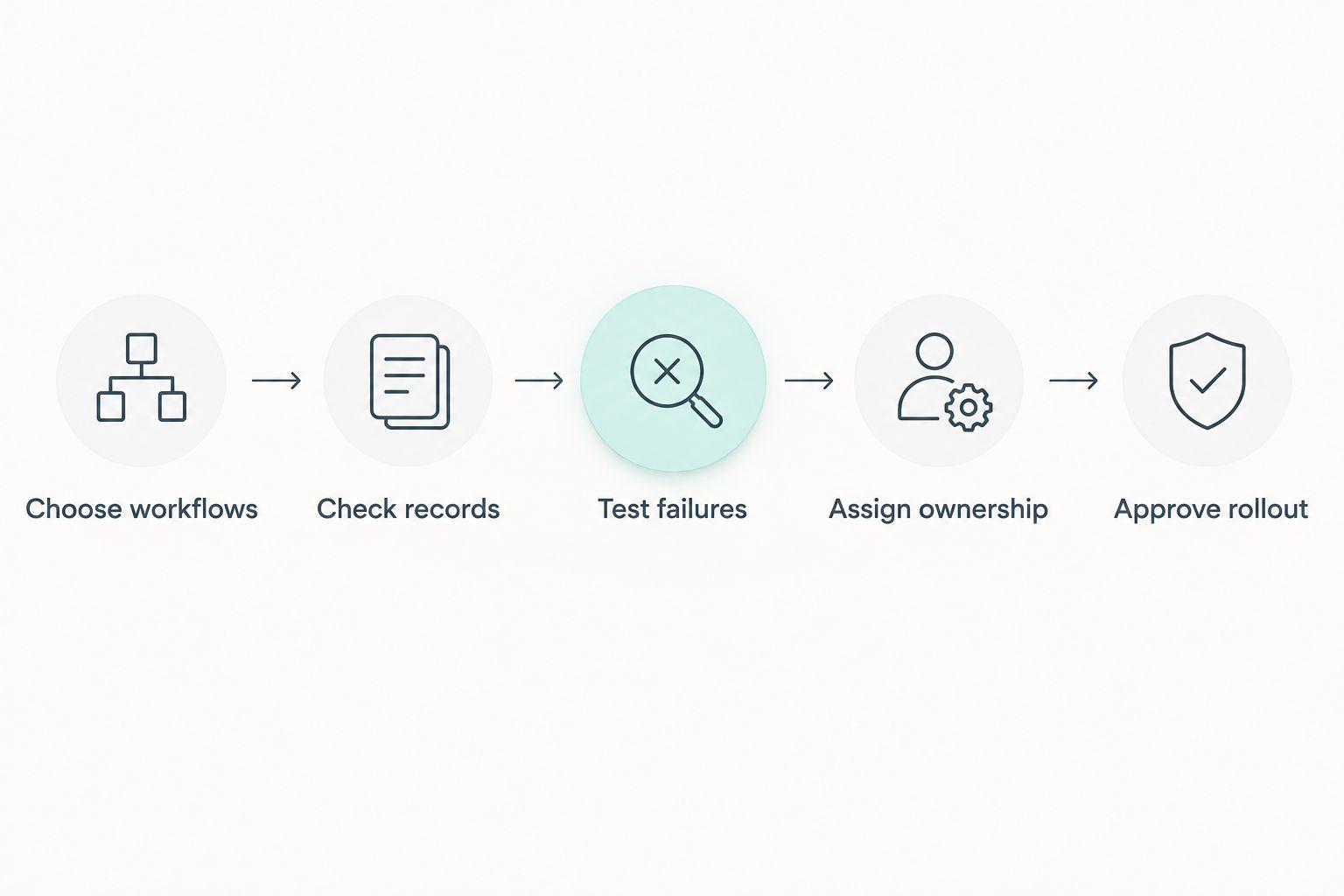
- Choose workflows. Select 3 workflows: a routine handoff, a workflow with branching and a workflow involving a custom API requirement. Keep the scope tied to real work.
- Check records. Prepare 10 sample records covering normal inputs, missing fields, duplicate identifiers and invalid values. These are suggested test quantities, not performance benchmarks.
- Test failures. Disconnect a credential or send an invalid request. Check what stops, what gets logged and how the owner receives the exception.
- Assign ownership. Document who maintains credentials, approves changes and resolves business-data errors. Ask someone other than the builder to follow the instructions.
- Approve rollout. Set an internal response target, such as reviewing failed records within 1 business day, and obtain agreement from the responsible team before launch.
Record the outcome of each test, including any manual correction. A clean demonstration with normal data is not evidence that your team can recover from an incomplete customer record or a failed write.
Also test duplicate prevention. Replaying a failed workflow should not create another customer, invoice or project merely because the first attempt partially succeeded.
Which API integration platform should you choose?
Start with Workato when business and IT need shared ownership of cross-application automation. Choose Zapier for straightforward SaaS connections, or Make when visual branching is central to the process.
Choose n8n when technical control and self-hosting are requirements. Choose MuleSoft Anypoint Platform for enterprise API lifecycle management, and Azure Logic Apps when integration belongs inside your Azure operating model.
For your 2026 decision, shortlist by operating model first and validate capabilities second. That order prevents you from selecting an impressive platform nobody has agreed to maintain.
FAQ
What's the best API integration platform for a business?
Workato is the default recommendation for businesses needing shared business-and-IT automation. Zapier, Make, n8n, MuleSoft Anypoint Platform and Azure Logic Apps fit different ownership and architecture requirements.
Is Zapier or Make better for business automation?
Zapier fits straightforward SaaS app connections, while Make fits visual workflows with branching and data transformation. Compare the exact triggers, actions and failure paths your process requires.
Which API integration platform supports self-hosting?
n8n supports self-hosted deployment. Choose that route only when your team accepts responsibility for hosting, updates, backups and operational recovery.
Do I need API management or workflow automation?
You need workflow automation to coordinate actions between systems, and API management to govern interfaces exposed to consuming applications. An organization can need both, but they solve different problems.
How should I compare API integration platform costs?
Compare current commercial terms against your expected workflow usage, users and deployment requirements. Include implementation, monitoring, maintenance and exception-handling effort rather than evaluating the subscription alone.
One last thing
A successful retry can still produce an incorrect business result. If the destination accepted the first request but the source did not receive confirmation, replaying the request can create a duplicate unless the integration handles that case.
Make this an acceptance test, not a post-launch surprise. Confirm how your workflow identifies an existing record before repeating a write.
Related guides
- Best CRM software for small businesses
- Best construction management software
- Best ERP software for manufacturing businesses
Schedule a consultation with Hexagon IT Solutions to discuss your integration requirements and implementation priorities.
Discuss your integration requirements
Bring your applications, workflow requirements and ownership questions to the consultation.


