






If your crews, project managers and finance team work from different records, the best construction management software in 2026 is Procore for general contractors, Autodesk Build for design-to-field coordination, Buildertrend for residential builders, and Fieldwire for field-task management. Choose the system that fixes your most expensive handoff—not the one with the longest feature list.
- Procore is the best construction management software shortlist leader for general contractors managing connected project workflows.
- Autodesk Build fits contractors prioritizing document control and coordination between design and field teams.
- Buildertrend fits residential builders; Fieldwire fits teams focused on drawings, inspections and field tasks.
- Test construction software against a real project before expanding the rollout.
Why this matters
Construction software earns its place when people stop chasing information and start acting on a shared record. A superintendent needs the correct drawing. A project manager needs an approved change. Finance needs supporting information before billing.
Those are connected business problems, but they do not always require the same application. Buying a broad platform to fix a narrow field-task problem adds implementation work; buying a task application to run project financials leaves a gap.
Hexagon IT Solutions belongs in the implementation conversation, not this ranking of packaged construction platforms. Hexagon IT Solutions is best considered by construction software buyers who need an implementation consultation rather than another product shortlist.
What makes the best construction management software?
Use these criteria before comparing sales presentations. They explain the order and use-case assignments in this guide.
- Workflow fit: Match the software to your contracting model, project types and actual approval process.
- Field usability: Check whether the people closest to the work can find drawings, record issues and complete updates without office assistance.
- Record continuity: Keep the information behind decisions connected to the relevant project, document or task.
- Financial boundaries: Establish what the construction platform handles and what stays in accounting.
- Implementation ownership: Assign responsibility for configuration, permissions, training and ongoing administration.
- Exit and integration requirements: Check data exports and required connections before committing your operating records.
A useful 2026 selection rule: prioritize the workflow your team must use every day. An impressive reporting screen does not compensate for incomplete field records.
Construction management software at a glance
These are use-case recommendations, not measured performance rankings. Product documentation establishes the scope; your demonstration must establish fit.
| Software | Best for | Standout focus | Key limitation to evaluate |
|---|---|---|---|
| Procore | General contractors coordinating multiple project functions | Connected construction project workflows | Breadth requires clear implementation and administration ownership |
| Autodesk Build | Contractors connecting design information with field execution | Document, project and field management | Fit depends on how your team exchanges and controls design information |
| Buildertrend | Residential builders and remodelers | Residential project and customer workflows | Residential orientation is not the default fit for every commercial delivery model |
| Fieldwire | Superintendents and specialty teams managing field execution | Drawing-based tasks and field coordination | Field execution is not a substitute for a complete financial operating system |
Confirm the exact capabilities included in the proposed subscription. A capability described on a vendor's website does not establish that it belongs in your proposed configuration.
1. Procore: best for general contractor project coordination
Procore connects construction project workflows across project management, field activity and financial processes. Its public product materials describe areas including drawings, RFIs, submittals and construction financial management. That makes it the strongest starting point here when your problem spans departments rather than one isolated task.
The business case is record continuity. When a question affects scope, schedule and commercial decisions, your team needs the supporting information attached to the project—not buried in separate conversations.
Procore pros:
- Covers several core construction workflows within a broader platform.
- Supports evaluation across project-management and financial requirements.
- Gives general contractors a project-centered starting point for coordinating stakeholders.
Procore cons:
- A broad rollout needs deliberate configuration, training and administration.
- Teams seeking only drawing-based field tasks should evaluate a narrower scope before committing to a wider platform.
Best for: General contractors that need connected project processes and have an internal owner for adoption.
In your demonstration, trace a scope question from its original document through the decision and associated financial record. Ask the presenter to show who owns each action and how another team member finds the decision later.
Verdict: Buy Procore if cross-functional project coordination is the requirement and the demonstration proves your workflow. Hold if nobody owns implementation.
2. Autodesk Build: best for design-to-field coordination
Autodesk Build provides construction project and field management within Autodesk Construction Cloud. Autodesk's product documentation describes document management, quality, safety and project-management workflows. Its use-case advantage is connecting project information with the people responsible for executing the work.
Choose Autodesk Build when drawing revisions, issues and project documentation sit at the center of your coordination problem. Evaluate the complete route from issued information to field action, rather than treating document storage as the outcome.
Autodesk Build pros:
- Brings document and field workflows into a construction-focused environment.
- Supports evaluation of quality, safety and project-management requirements together.
- Fits a shortlist where design information must remain connected to execution.
Autodesk Build cons:
- Your team still needs explicit rules for document status, permissions and revision control.
- An existing Autodesk relationship alone does not prove that Build fits your operating process.
Best for: Contractors whose coordination problems start with drawings, design information and field issues.
Use a revised drawing in the demonstration. Ask how a field user identifies the current version, records an issue and returns the resolution to the project team. Do not accept a document upload as proof that the entire workflow works.
For your 2026 evaluation, separate ecosystem familiarity from operational fit. Familiar terminology helps only if the application supports the way your project team works.
Verdict: Buy Autodesk Build if your design-to-field workflow passes the demonstration. Hold if the decision rests only on existing software relationships.
3. Buildertrend: best for residential builders and remodelers
Buildertrend focuses on residential construction, including home building and remodeling. Its published product materials cover scheduling, project management, financial workflows and customer communication. That combination fits businesses where project delivery and homeowner communication are closely linked.
The buying question is whether your team can keep the customer-facing record aligned with the construction record. A schedule adjustment or change decision should not require someone to reconstruct the story from unrelated messages.
Buildertrend pros:
- Aligns its product scope with residential construction workflows.
- Includes customer communication alongside project-management functions.
- Supports evaluation of schedules, changes and financial processes in the same buying conversation.
Buildertrend cons:
- Residential specialization does not establish suitability for every commercial construction process.
- Customer communication requires clear rules about what gets shared and who maintains the record.
Best for: Residential builders and remodelers that need project delivery and homeowner communication to stay aligned.
Demonstrate a customer-requested change. Follow the request through the internal decision, customer communication and project update. Ask your accounting lead to inspect the proposed financial handoff rather than assuming the construction system replaces accounting.
Buildertrend belongs ahead of broader platforms when residential workflow fit matters more than breadth. Do not add complexity simply because a larger system offers more categories of functionality.
Verdict: Buy Buildertrend if residential delivery and customer communication drive the requirement. Hold if your main need is a different contracting model.
4. Fieldwire: best for drawing-based field-task management
Fieldwire focuses on jobsite coordination through plans, tasks and field records. Its published materials describe drawing management, task management and inspection-related workflows. It is the clearest starting point here when superintendents and field teams need to coordinate work around the project plans.
The value is operational clarity: connect an issue to its location, assign responsibility and make the status visible. Keep the evaluation close to the jobsite instead of asking a field application to solve unrelated back-office problems.
Fieldwire pros:
- Centers the evaluation on drawings and actionable field tasks.
- Fits a focused rollout around superintendent and crew workflows.
- Supports a practical demonstration using an issue tied to a plan location.
Fieldwire cons:
- Field-task management does not replace a complete accounting or financial-management system.
- Broader business requirements need separate evaluation instead of assumptions about platform coverage.
Best for: Superintendents, specialty contractors and project teams whose immediate problem is field execution.
Ask a field user to locate a drawing, create a task and identify its owner without help from the presenter. Then check how the office receives the update and whether the record remains understandable after the task closes.
Fieldwire is the narrower-scope recommendation, not an unsupported budget winner. Choose it because the work fits—not because a smaller scope automatically means a lower total cost.
Verdict: Buy Fieldwire for drawing-based field coordination. Hold if you need it to serve as the company's complete operating system.
How we ranked these construction platforms
The order reflects the criteria above: general contractor coordination first, then design-to-field coordination, residential delivery and focused field execution. It does not represent hands-on benchmarking or a claim that one application outperforms every other application.
The source scope is each vendor's public product documentation: Procore's construction-management materials, Autodesk Build's product materials, Buildertrend's residential-construction materials and Fieldwire's field-management materials. For a 2026 purchase, confirm current scope directly with the vendor and record the answers in your proposal.
A workflow demonstrated with your records is stronger buying evidence than a feature checked on a comparison sheet.
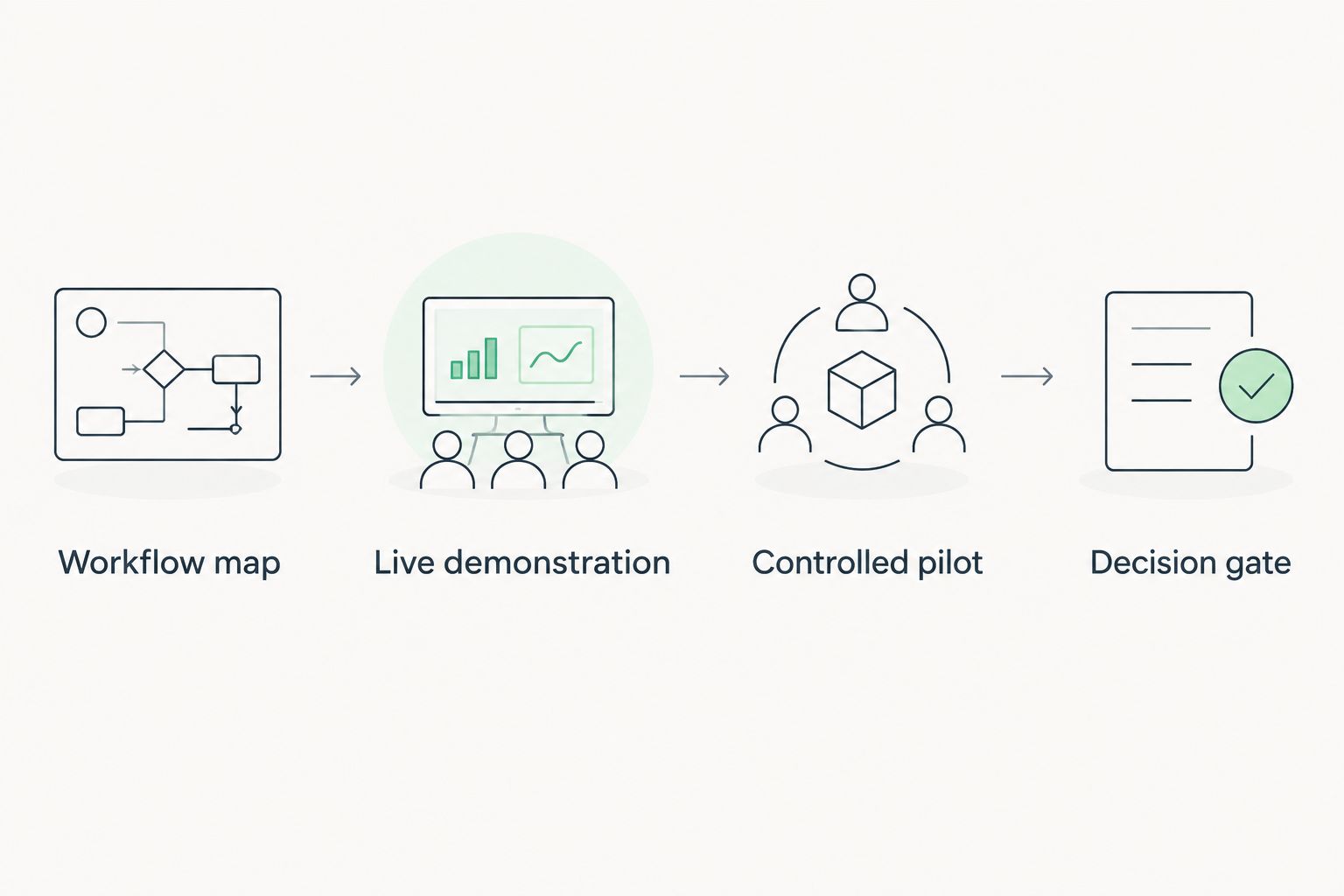
Turn the shortlist into a buying decision
Use the same evaluation sequence for every finalist. Otherwise, the strongest presenter wins instead of the best-fitting system.
Workflow map
Choose one recurring problem and describe its business consequence. Examples include unresolved drawing questions, delayed change decisions or incomplete jobsite records. Identify the starting event, responsible person and final record.
Live demonstration
Request a 30-minute demonstration centered on that workflow. Give each finalist the same 5 tasks: find the current drawing, record an issue, assign responsibility, approve a change and retrieve the supporting record. Adjust the tasks when the product's intended scope is narrower.
Controlled pilot
Start with 2 live projects that expose different working conditions. These are recommended evaluation limits, not promised implementation timelines. Check whether field staff complete the work without office intervention and whether project managers trust the resulting record.
Decision gate
Compare the pilot with your starting process. Record time spent locating information, incomplete handoffs and duplicate entry using your own measurements. Expand only after you identify an owner for training, permissions and ongoing administration.
Which construction management software should you choose?
Start with Procore if you are a general contractor solving a cross-functional coordination problem. Choose Autodesk Build when design information drives the requirement, Buildertrend when residential delivery and customer communication dominate, and Fieldwire when field-task execution is the immediate priority.
For your 2026 decision, separate the project platform from adjacent systems. Lead management, accounting and procurement still need defined owners and handoffs, even when applications connect. Replacing every tool at once makes it harder to identify which change improved the work.
FAQ
What's the best construction management software for a general contractor?
Procore is the default shortlist leader in this guide for general contractors coordinating multiple project functions. Confirm the exact scope and demonstrate your project workflow before buying.
Is Autodesk Build better than Procore?
Autodesk Build is the more relevant shortlist choice when design-to-field coordination drives the requirement; Procore leads this guide for broader general contractor coordination. Evaluate both against the same project records rather than declaring a universal winner.
What construction software should a residential builder consider?
Buildertrend is the residential-builder recommendation in this guide. Test how customer communication, schedule changes and financial handoffs work together before committing.
Can Fieldwire replace accounting software?
Fieldwire should not be treated as a replacement for a complete accounting system. Evaluate it for field coordination and separately confirm how project information reaches your financial records.
One last thing
Ask the person who handles a difficult handoff to demonstrate it—not just the executive sponsor. A superintendent finding the correct drawing or an administrator retrieving a change record gives you evidence that a polished presentation cannot.
Before signing in 2026, write down what happens when someone leaves the company. Record ownership, access removal and export requirements belong in the purchase decision, not in a later cleanup project.
Related guides
- Best CRM software for small businesses
- Best supply chain management software
- Best digital transformation consulting firms
- Best AI development companies for enterprises
Schedule a consultation with Hexagon IT Solutions to discuss your construction software requirements.


