






ERP implementation has no fixed duration: your timeline depends on the processes, data, integrations and business units included in the launch. If you need a dependable go-live date in 2026, require a scope-based schedule that includes testing, employee preparation and post-launch support—not just software configuration.
- How long does ERP implementation take? Scope, data readiness and acceptance criteria determine the schedule.
- Separate technical go-live from operational acceptance when planning your ERP implementation timeline.
- A phased ERP rollout limits initial scope but requires temporary coordination between systems.
- Discuss your launch scope and decision responsibilities with Hexagon IT Solutions before committing to a deadline.
How long does ERP implementation take?
An ERP implementation timeline should follow the work required to run your business, not a preset calendar promise. Start with the workflows you need at launch, identify their dependencies and require evidence that each workflow works before accepting it.
If ERP is part of a wider business change, distinguish its launch from the overall digital transformation project timeline. Replacing a finance system and redesigning every connected business process are different commitments.
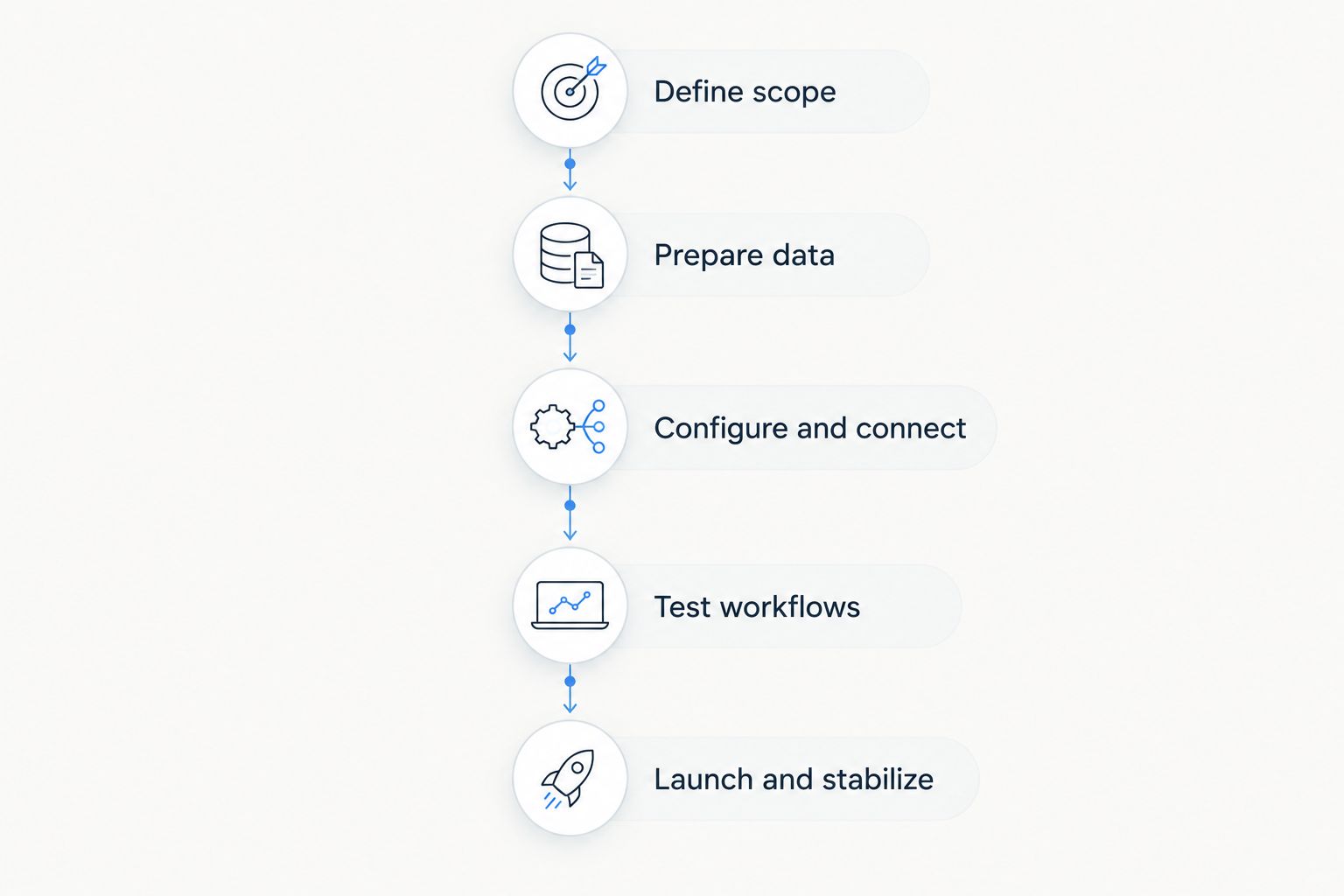
Use the following sequence to build an estimate you can defend:
- Define scope. Name the entities, locations, modules and workflows included in the first release.
- Inspect data. Review source records, ownership, cleanup requirements and reconciliation rules.
- Map dependencies. Identify integrations, business decisions and external systems that affect delivery.
- Schedule validation. Reserve time for business-user testing, corrections and retesting.
- Plan transition. Assign training, cutover, fallback and post-launch responsibilities.
Ask the implementation partner to explain what must be true for each milestone to hold. A date without those assumptions is not a usable commitment.
Why this matters
An ERP launch changes how people enter transactions, approve work and produce management information. A schedule that ends when configuration finishes leaves business readiness outside the plan.
For your 2026 business plan, define the outcome behind the deadline. Do you need reliable financial reporting, consistent job costing, purchasing control or a shared view of inventory? That answer determines what belongs in the launch and what can wait.
The useful deadline is the date your team can complete the agreed business workflows and trust the resulting records. Treat installation, operational acceptance and retirement of the old system as separate milestones.
Choose the rollout approach before committing to a date
Your rollout approach changes the work required before launch and the coordination required afterward. Compare the trade-offs before choosing the shortest-looking schedule.
| Approach | Best for | Scheduling advantage | Trade-off |
|---|---|---|---|
| Phased rollout | Businesses that can separate modules, locations or workflows | Limits the scope of the initial release | Requires temporary connections and procedures between old and new systems |
| Single cutover | Businesses that need connected processes to switch together | Avoids an extended period of split operations | Requires all launch-critical dependencies to pass testing together |
| Pilot rollout | Businesses with a representative team or location | Tests the operating model before broader deployment | Adds a pilot review and correction stage before expansion |
Phased rollout: a narrower initial commitment
A phased ERP rollout puts a defined portion of the business into production before the remaining scope. For example, you can evaluate whether finance can launch separately from other functions, but only after checking their shared data and transaction dependencies.
The benefit is a smaller initial acceptance boundary. The drawback is temporary complexity: someone must own transfers, reconciliations and reporting across the systems still in use.
Choose phased deployment when the release boundary is operationally workable, not merely easy to describe. A module is not independent if its essential inputs still depend on unfinished work elsewhere.
Single cutover: one coordinated transition
A single cutover moves the agreed scope into production together. This approach suits tightly connected workflows when splitting them would create unacceptable manual work or inconsistent records.
Its advantage is a clearer operating boundary after the switch. Its constraint is readiness: migration, integrations, permissions, training and support must align before the launch proceeds.
Require a rehearsed cutover plan with named decision-makers. Include explicit conditions for proceeding, pausing or restoring the previous operating process.
Pilot rollout: validate before expanding
A pilot introduces the ERP to a defined group before wider deployment. Select a group that exercises the workflows you need to validate rather than choosing only the easiest users.
A pilot creates an opportunity to correct configuration and training before expansion. It also adds work: the team must evaluate results, resolve issues and decide which changes apply to the wider business.
Choose a pilot when the learning will change the broader rollout. Define its exit criteria before it begins so the pilot does not become an indefinite trial.
Why ERP implementation timelines vary
The following factors determine the work in your ERP schedule. Review them during scoping and revisit them whenever a proposed change affects the launch.
- Process scope. Adding purchasing, inventory, project accounting or another business entity expands configuration and validation requirements. Identify the workflows the initial release must support.
- Data readiness. Duplicate records, inconsistent identifiers and unresolved balances require decisions before migration. Assign a business owner to approve the cleaned records.
- Integration dependencies. Connected systems need agreed field mappings, transaction rules and failure handling. Testing must cover rejected and repeated transactions as well as successful transfers.
- Customization. A business-specific requirement adds design, development and maintenance work when standard configuration cannot meet it. Require a business reason before approving it.
- Decision capacity. Finance, operations and IT must resolve questions and accept results. Reserve their time rather than assuming implementation decisions fit around existing workloads.
- Launch constraints. Reporting deadlines, operational peaks and supplier dependencies affect feasible cutover windows. Put those constraints into the schedule before selecting a date.
For a construction business, scope discussions can include job codes, committed purchasing and project reporting. For a professional services firm, they can include time entry, billing and project profitability. These are scoping questions, not a requirement to implement every function at once.
Build the schedule around acceptance gates
For a 2026 ERP plan, organize the schedule around evidence that the business can proceed. Each gate needs an accountable owner and a clear acceptance condition.
Define scope
Write down the workflows included in launch and the requests explicitly deferred. Identify who can approve changes and what happens to the schedule when scope expands.
Avoid requirements such as better reporting without examples. Name the report, the decisions it supports and the records needed to produce it.
Prepare data
Agree which system owns each record and what historical information must move. Separate data cleanup from the migration exercise; transferring inconsistent records does not resolve their underlying problems.
Require business owners to review migration results against agreed checks. A technically successful import is not proof that balances, relationships or reporting categories are correct.
Configure and connect
Translate approved workflows into configuration, permissions and integrations. Record business rules so testers can compare system behavior with an agreed requirement.
For every integration, specify what happens when a transaction fails or arrives again. Without those rules, a successful demonstration leaves important operating questions unanswered.
Test workflows
Have business users complete realistic end-to-end scenarios using representative records and their intended permissions. Include exceptions such as corrections, rejected transactions and approval changes where those situations apply.
Record defects with an owner and an agreed resolution. Retest the affected workflow before accepting it; a closed task is not the same as a verified correction.
Launch and stabilize
Rehearse the transition, confirm access and assign support responsibilities. Define which issues prevent launch and who makes the final decision.
After launch, check that staff can complete the agreed processes and produce accepted outputs. Keep operational support distinct from later requests for additional functionality.
Ask for a schedule that exposes dependencies
An implementation proposal should show more than a launch date and a list of activities. It should explain which decisions and deliverables control the next stage.
Ask the delivery team these questions before approving your 2026 schedule:
- What assumptions support the proposed go-live date?
- Which tasks depend on our employees, and when are those employees needed?
- What must pass testing before launch approval?
- Which integrations depend on outside providers?
- How will changes affect the agreed release?
- What support continues after the system goes live?
Require the schedule to distinguish elapsed time from staff effort. Work can remain blocked while waiting for approval even when nobody is actively configuring software.
Also ask how the team will report a missed dependency. A useful status update identifies the blocked outcome, its owner and the decision needed—not just whether a task is marked late.
Can you shorten an ERP implementation without cutting testing?
You can reduce planned work by narrowing launch scope, resolving decisions earlier and removing unnecessary customization. Do not treat a smaller testing allowance as equivalent to a smaller implementation.
Choose the minimum set of workflows needed for an operationally complete release. Defer an additional dashboard or optional workflow only after confirming that its absence will not break approvals, reporting or another essential process.
Resolve ownership questions before configuration begins. If departments disagree about customer records, approval authority or reporting definitions, document a decision rather than asking the delivery team to interpret conflicting instructions.
Protect business-user availability as well. A testing session on the calendar has little value if the people authorized to accept the workflow cannot attend.
Does ERP go-live mean implementation is finished?
ERP go-live means the system has entered production; it does not establish that every implementation obligation is complete. Define completion through accepted workflows, reconciled information, support ownership and agreed documentation.
Keep post-launch corrections separate from enhancements. A failed requirement belongs in the delivery discussion; a newly requested capability belongs in scope management.
Before retiring the previous system, confirm how your business will access required records and handle outstanding transactions. Do not assume the production switch automatically resolves historical access or retention needs.
FAQ
How long does ERP implementation take for a small business?
A small-business ERP timeline depends on launch scope, data readiness, integrations and employee availability. Define the workflows required at launch before accepting a calendar estimate; company size alone does not establish the work involved.
Is cloud ERP faster to implement than an on-premises system?
Cloud deployment does not remove the need for process decisions, migration, integration testing or employee preparation. Compare the actual responsibilities in each proposal rather than treating the hosting model as a complete timeline estimate.
Can we keep using our old system during ERP implementation?
You can plan continued use of the old system before cutover, but you need explicit rules for data ownership and the final transfer. If both systems remain active after launch, assign responsibility for synchronization and reconciliation.
What should we do when an ERP implementation falls behind schedule?
Identify the blocked dependency and its business owner before changing the launch date. Reassess scope, available staff and acceptance requirements, then approve a revised plan that explains the remaining risks.
What should an ERP implementation timeline include in 2026?
A 2026 ERP implementation timeline should include scope decisions, data preparation, configuration, integrations, business testing, training, cutover and stabilization. It should also name the owners, dependencies and acceptance conditions for the agreed release.
One last thing
Do not accept a faster schedule that simply moves unfinished work past go-live. Ask which business outcomes the proposed date includes and which responsibilities remain afterward.
That distinction makes proposals easier to compare. A configuration deadline and a business-ready deadline are not interchangeable, even when both are presented as implementation completion.
Related guides
- How long does CRM implementation take?
- How to connect Shopify to a custom ERP system
- QuickBooks to automated ERP reporting: complete workflow
Schedule a consultation with Hexagon IT Solutions to discuss your ERP scope, dependencies and launch requirements.
Discuss your ERP implementation plan
Bring your launch requirements, connected systems and unresolved process decisions.


