






Your CRM implementation timeline depends on the workflows, data, integrations, and teams you need ready at launch—not just the software you select. Set the launch date after you define and estimate that work, and include user training and post-launch support rather than treating account activation as completion.
- How long does CRM implementation take? Scope, data readiness, integrations, and approval dependencies determine the schedule.
- Separate software access, operational launch, and adoption when setting CRM implementation milestones.
- A phased CRM rollout limits initial scope but requires clear rules for work across systems.
- Approve the launch against business workflows, not a completed configuration checklist.
Why this matters
A CRM deadline affects more than your IT calendar. Sales leaders need reliable pipeline reporting, operations teams need usable handoffs, and employees need to know where customer records belong. Launching without those agreements moves unfinished project work into the working day.
For your 2026 plan, distinguish CRM implementation from a wider business transformation. If you are also changing finance, delivery, or customer service processes, use the digital transformation project timeline guide to frame that broader scope.
The useful deadline is the date your team can complete agreed business tasks correctly—not the date someone creates user accounts. Build the schedule around that distinction.
How long does CRM implementation take?
CRM implementation takes the time required to define your workflows, prepare customer data, configure the system, connect required applications, test real work, and prepare users. Some activities overlap; others must wait for decisions or completed work. Your schedule should show those dependencies explicitly.
Build the estimate from these steps rather than choosing a launch date and working backward without checking feasibility:
- Define scope. Name the teams, workflows, records, reports, and integrations included in the initial release.
- Assess data. Review source files, duplicate records, missing fields, ownership, and migration requirements.
- Configure workflows. Set up agreed fields, stages, permissions, assignments, and business rules.
- Connect systems. Establish how required applications exchange records and handle failures.
- Test outcomes. Ask business users to complete representative tasks and verify the results.
- Prepare launch. Complete training, cutover planning, support ownership, and release approval.
Each step needs an owner, an estimate, and an acceptance condition. Put unresolved decisions on the same schedule as technical tasks: an unapproved sales process blocks configuration just as an unfinished connection blocks integration testing.
Do not add every task estimate together automatically. Data cleanup and training preparation can proceed alongside configuration, while final migration checks depend on the agreed field mapping. The launch date follows the longest chain of dependent work.
Choose the implementation scope before the date
A rollout approach changes what must be ready before launch. Compare the approaches against business continuity, shared reporting, and the burden of working across systems—not just the appeal of an earlier date.
| Approach | Best for | Main advantage | Main limitation | Launch requirement |
|---|---|---|---|---|
| Focused rollout | A team with a clearly bounded workflow | Keeps the initial release narrow | Leaves other workflows outside the release | The selected workflow works from entry to completion |
| Phased rollout | Teams that can move in separate stages | Creates checkpoints between releases | Requires temporary cross-system rules | Each phase has its own scope and acceptance criteria |
| Coordinated rollout | Closely connected teams that need a shared transition | Avoids a planned period of split operation | Requires broader readiness before cutover | All essential teams and dependencies are ready together |
Focused rollout: contain the initial release
A focused rollout covers a defined business process, such as lead qualification and opportunity tracking. It is suitable when that process can operate without waiting for every department to change systems.
The limitation is coverage. If proposals, project handoffs, or customer support remain elsewhere, document those boundaries so employees do not mistake a narrow release for a complete operating platform.
Phased rollout: release in controlled stages
A phased rollout moves work in stages, with acceptance checks between releases. Define each phase by a usable outcome, such as a team completing its customer handoff without re-entering agreed information.
The trade-off is temporary complexity. Specify which system owns each record, where employees make updates, and how shared reporting works while the transition remains incomplete.
Coordinated rollout: prepare connected teams together
A coordinated rollout fits processes that require several teams to switch together. For example, sales and delivery may need the same approved handoff record available at cutover.
This approach concentrates launch risk. Rehearse the transition and define recovery actions before approval; a common launch date does not remove the need to verify each team's readiness.
Why CRM implementation timelines vary
Use these factors to challenge your 2026 implementation estimate. Each factor should connect to named work rather than appear as a vague allowance for complexity.
- Workflow clarity. Unresolved stage definitions, assignment rules, or handoffs leave the implementation team without an approved process to configure.
- Data readiness. Duplicate customers, inconsistent field formats, and unclear record ownership create cleanup and validation work before migration approval.
- Integration dependencies. Connected applications require decisions about data direction, matching rules, access, and error handling.
- Customization scope. Custom logic requires definition and testing beyond standard configuration. Separate essential business rules from preferences.
- Decision-maker access. Approvals remain unfinished when the people authorized to resolve questions are unavailable.
- User readiness. Employees need role-specific practice, working permissions, and a clear support route before they take over live work.
Ask the project owner to identify which factors control the launch date. A long task list does not explain a delay unless it shows what is blocked, who can resolve it, and which milestone depends on the result.
Build a schedule you can defend
For a 2026 CRM project, use milestones with visible evidence of completion. A status such as configuration underway tells an executive little; an approved opportunity workflow tells them what the team has settled.
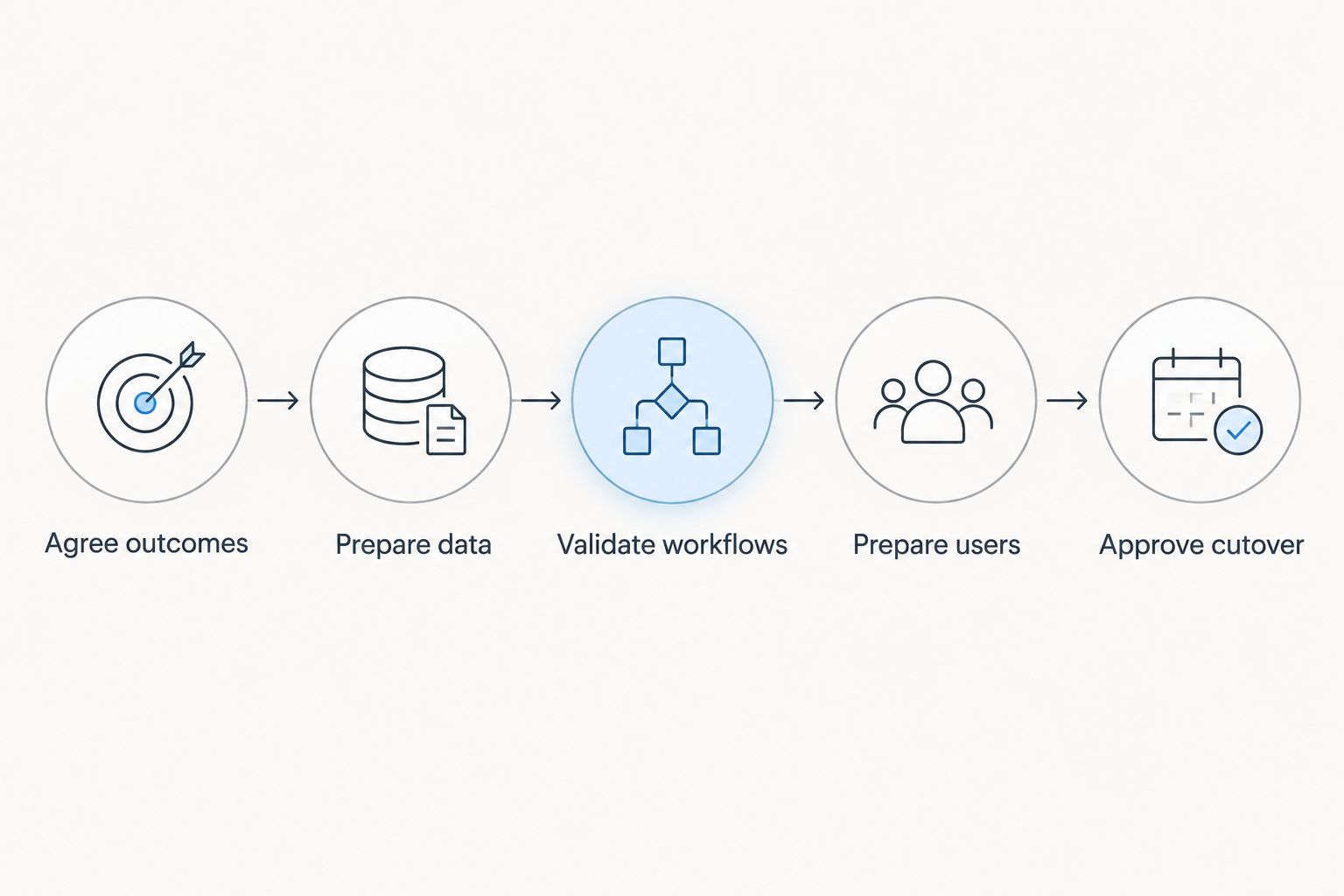
Agree outcomes
Write down the business tasks the CRM must support at launch. Examples include assigning an incoming inquiry, recording the next action, approving an opportunity stage change, and handing an accepted project to operations.
Keep the outcomes observable. Improve sales visibility is an objective; a sales manager can review open opportunities by owner and agreed stage is an acceptance condition.
Prepare data
Choose the records you need in the new system and identify their authoritative sources. Decide what to migrate, correct, archive, or exclude before treating the import as a purely technical task.
Then rehearse the migration using representative records. Check field mapping, relationships, ownership, and access so that a technically successful import does not conceal unusable customer information.
Validate workflows
Test complete business scenarios rather than isolated features. Follow a record through assignment, updates, handoffs, reporting, and any required connected applications.
Include exceptions. A duplicate inquiry, changed owner, missing required field, or failed transfer reveals handling rules that a clean demonstration does not exercise.
Prepare users
Train employees on their actual work and permissions. Sales representatives, managers, administrators, and operations staff need different instructions because they make different decisions inside the CRM.
Ask users to complete tasks themselves. Watching a demonstration is not evidence that an employee can update a live opportunity or resolve a blocked handoff.
Approve cutover
Specify how final changes reach the new system, when the previous process stops, and who confirms the release. Assign responsibility for launch-day questions and defects.
Approve cutover against agreed conditions. If an essential workflow fails, the decision is whether to fix it, remove it from scope with approval, or postpone the affected release—not simply mark the project almost complete.
What should your implementation estimate include?
Request a written estimate that separates delivery work from waiting time. Configuration effort and elapsed calendar time are different: a task can remain unfinished while the team waits for access, source data, or a business decision.
Your 2026 implementation plan should identify:
- Included scope: Teams, workflows, data sources, reports, and required connections.
- Client responsibilities: Decisions, access, cleanup, testing, and approval tasks your employees own.
- Dependencies: Work that cannot start until another task or decision finishes.
- Acceptance evidence: The result that proves a milestone is complete.
- Change control: How new requirements affect the schedule and approval process.
- Post-launch ownership: Who handles defects, administration, and further improvements.
Keep optional requests outside the launch commitment until you approve their effect on scope. A useful improvement can still be the wrong addition immediately before cutover.
How can you shorten CRM implementation without cutting corners?
Reduce launch scope before you reduce testing. A smaller working release gives you a clearer acceptance decision than a broad release with unresolved business processes.
Start by removing requirements that do not support the initial business outcome. Keep necessary permissions, data checks, and critical handoffs; defer cosmetic changes and optional automation through an explicit backlog.
Assign an accountable business decision-maker and agree how unresolved questions reach that person. Do not leave sales-stage definitions or ownership rules circulating between teams without a final approver.
Prepare source data before the migration rehearsal, and reserve employee time for testing. A project plan that assumes business users will validate workflows whenever they have a spare moment has not secured the resources that approval requires.
When is CRM implementation actually finished?
CRM implementation is finished when the agreed release meets its acceptance conditions and the business accepts operational ownership. That requires more than an available application: records, permissions, workflows, reporting, and support responsibilities must work as agreed.
Separate release completion from ongoing improvement. New dashboards, additional automation, and further departmental rollouts belong in a managed backlog unless they are necessary to meet the approved launch scope.
For a 2026 launch review, ask business owners to demonstrate the essential workflows. Then record who owns administration and support after the project team steps back.
FAQ
How long does CRM implementation take for a small business?
A small business's CRM implementation timeline depends on its workflows, data preparation, integrations, and user readiness. Define the initial release and estimate its dependencies before committing to a launch date.
Does migrating existing customer data make CRM implementation longer?
Migrating existing customer data adds work when records need cleanup, mapping, ownership decisions, or validation. Rehearse the migration and confirm that customer relationships and access remain correct before approving cutover.
Is a phased CRM rollout better than switching everyone at once?
A phased CRM rollout is better suited to workflows that can move separately without disrupting essential handoffs. A coordinated switch suits closely connected teams, but requires those teams to meet their launch conditions together.
Can employees keep working during CRM implementation?
Employees can continue working under an agreed transition plan that identifies the authoritative system for each record. Define where updates belong and how final changes reach the new CRM before cutover.
What should I ask before approving a CRM launch date?
Ask which workflows, records, integrations, and users must be ready, and what evidence will prove readiness. Confirm the dependencies, client responsibilities, acceptance owner, and support arrangements behind that date.
One last thing
A shorter implementation estimate can describe less work rather than faster delivery. Before comparing proposals, put their launch definitions side by side: included workflows, migration scope, integrations, training, testing, and support ownership.
Use a consultation with Hexagon IT Solutions to discuss your required business outcomes, dependencies, and launch acceptance criteria. Bring a list of the systems your team uses and the handoffs the CRM needs to support.
Related guides
- CRM development cost and scope
- CRM software for small businesses
- CRM development for insurance agencies
Schedule a consultation with Hexagon IT Solutions to define your CRM implementation scope before committing to a launch date.
Plan your CRM implementation
Discuss business workflows, data migration, integrations, and launch criteria.


