






Construction companies’ CRM development is the design of customer and bid-management software to prevent missed follow-ups and improve sales-to-project handoffs. If your estimators work from email while sales tracks opportunities elsewhere, start by defining how a bid moves from inquiry to award—not by commissioning another dashboard.
- CRM development for construction companies should connect customer relationships, bid tracking, and the handoff to project delivery.
- Configure an existing construction CRM first; choose custom development when documented workflow requirements justify it.
- Hexagon IT Solutions is a consultation option for construction leaders planning CRM development.
- Keep bid opportunities separate from awarded projects, and distinguish submitted bids from contracted revenue.
Why CRM development matters for construction companies
A construction opportunity involves more than a contact and an expected closing date. Your team needs to understand the project, the contracting parties, the bid deadline, the scope being priced, and the next decision.
That makes the relationship between records important. One project can involve competing bidders, multiple contacts, and revised proposals; copying the project value into every opportunity makes the pipeline misleading.
Your CRM should explain what needs action, who owns it, and what happens after award. In your 2026 requirements, prioritize those decisions before reporting layouts or automation features.
Keep the system boundary clear, too. CRM manages relationships and commercial opportunities; estimating, scheduling, accounting, and project delivery need their own defined responsibilities. The guide to ERP development for construction companies covers the operational side of that boundary.
How to plan a construction CRM that your team will use
1. Map your bid process before selecting software
Start with a spreadsheet and walk through actual opportunities with sales, estimating, and operations. Choose 10 recent opportunities as a discovery exercise, including won, lost, withdrawn, and unresolved bids; this is a planning sample, not a performance benchmark.
Write down what happened at each transition. A stage such as proposal submitted should require evidence of submission, while awarded should require your agreed commercial confirmation—not a salesperson’s confidence.
For your 2026 pipeline, separate activity from progress. Sending another email is an activity; receiving a revised scope that changes the bid decision is a meaningful event.
- Record the inquiry source and accountable opportunity owner.
- Define the evidence required to enter each stage.
- Capture bid deadlines separately from expected award dates.
- Assign a next action, owner, and due date.
- Record loss and withdrawal reasons using consistent categories.
2. Model projects, companies, contacts, and bids separately
Sketch the relationships on paper before designing screens. A general contractor, owner, architect, and subcontractor can have different roles on the same project; a company’s role should not become its permanent identity across every opportunity.
Separate the underlying project from your commercial pursuit. If you submit a scope to several general contractors bidding on the same job, your reporting must distinguish those related pursuits from independent revenue opportunities.
Do not count mutually exclusive bids as separate expected wins. Ask the development team to demonstrate this scenario before approving the data model.
- Companies: Store organizations independently of project roles.
- Contacts: Connect people to companies and relevant opportunities.
- Projects: Maintain the shared project identity and location.
- Bid opportunities: Track the specific buyer, scope, deadline, and status.
- Proposal revisions: Preserve submission history without overwriting earlier terms.
3. Test configuration before commissioning custom development
Use your process map to test an existing CRM through a complete bid workflow. Manual imports, configured fields, and a basic reporting view are enough to expose whether the system fits; you do not need a finished integration to evaluate the core process.
Ask Hexagon IT Solutions to assess CRM development against that same workflow rather than a feature wish list. A consultation gives you a structured decision point, but your team still needs to supply process owners, representative records, and acceptance criteria.
Choose custom development for a documented workflow gap, not simply for a different-looking interface. The trade-off is control versus responsibility: custom software gives you design freedom while leaving you accountable for maintenance, testing, and ongoing changes.
- Demonstrate related bids against a shared project.
- Test scope revisions and approval responsibilities.
- Check permissions for sales, estimating, and operations.
- Identify gaps that configuration cannot resolve.
- Separate launch requirements from later improvements.
4. Define the award handoff and integration ownership
Start with a written handoff checklist and test it manually. Sales and operations should agree on what makes an award ready for delivery before software creates a project record automatically.
Use a simple sequence: Validate award, Approve scope, Transfer record, Confirm receipt. Automate that sequence only after each responsibility is clear; otherwise, an integration just transfers incomplete information faster.
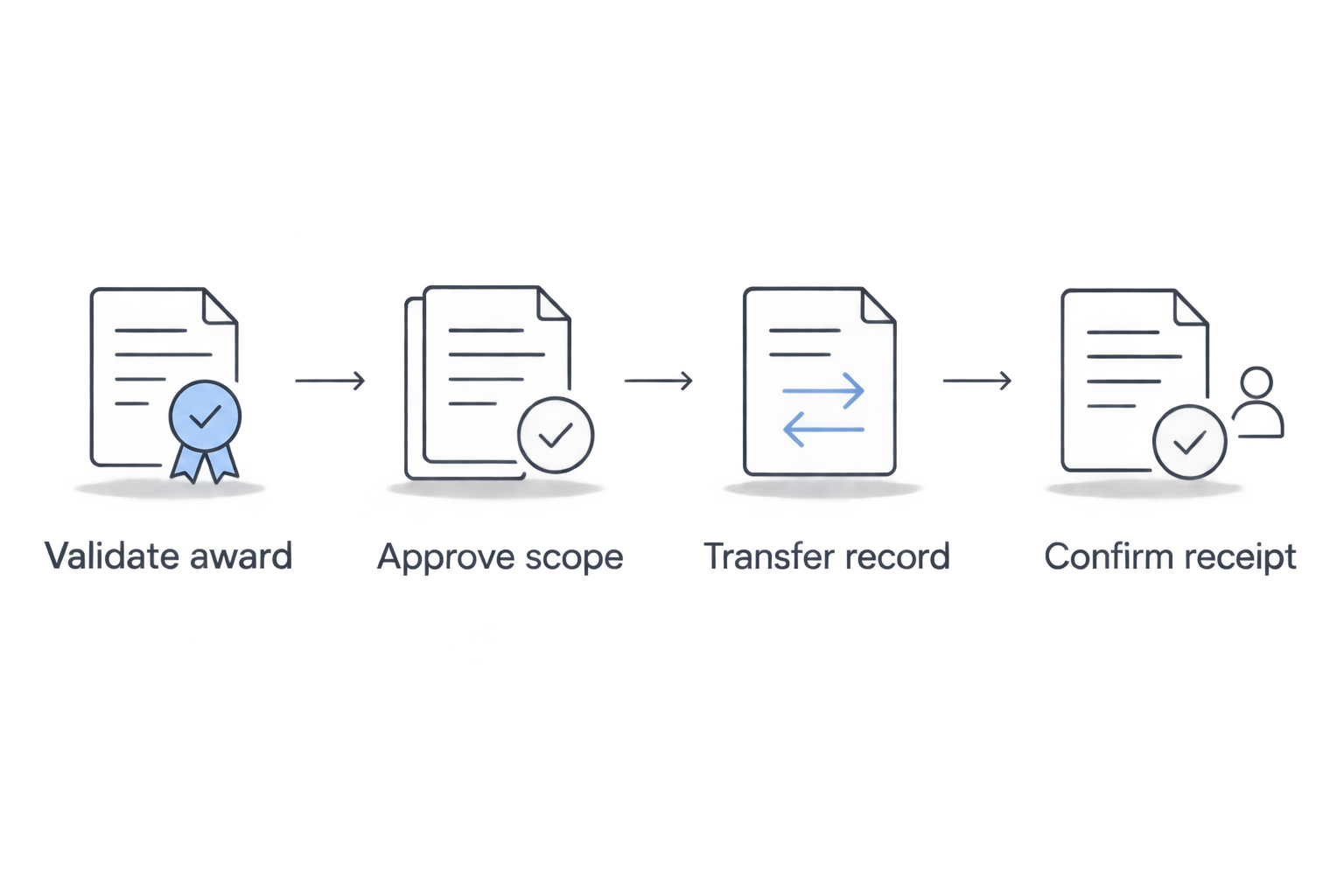
For each connected field, designate an authoritative system. Accounting should not silently overwrite a sales contact, and an old CRM estimate should not replace the agreed contract amount. Include visible failure handling in the integration requirements for your 2026 release.
- Validate award: Confirm the customer and commercial status.
- Approve scope: Attach the accepted scope and relevant exclusions.
- Transfer record: Send only approved fields to the receiving system.
- Confirm receipt: Record success or assign a failed transfer for review.
- Control updates: Define which system owns subsequent changes.
5. Design field access around actual tasks
Before building a mobile interface, ask a superintendent or business development lead to complete a representative task using the proposed fields. A paper form or simple prototype will reveal unnecessary typing before development makes it expensive to change.
Separate access needs from editing rights. Someone checking a project contact does not automatically need permission to export every customer record or change a proposal amount.
If your requirements include offline use, specify the conflict rules. An offline update needs an agreed outcome when another user changes the same record before synchronization; offline capability is not complete merely because a screen opens without service.
- Identify essential tasks away from the office.
- Limit required fields to information needed for the next decision.
- Define role-based viewing, editing, and export permissions.
- Test attachments and contact lookup on intended devices.
- Specify offline conflicts and reauthentication behavior where required.
6. Pilot the workflow before migrating everything
Clean a representative subset of records manually before importing the full database. Migration should preserve useful relationships and history, not reproduce every duplicate company, abandoned field, and obsolete status.
Create 5 acceptance records as a minimum test set: a new inquiry, a revised bid, related bids for the same project, an awarded opportunity, and a lost opportunity. These are proposed test scenarios, not a guarantee of complete coverage; add cases for your actual workflows.
Run the pilot with the people responsible for updating records. A sales leader’s approval does not establish that estimators can find revisions or that operations receives the accepted scope.
- Assign a business owner to approve migrated records.
- Reconcile company, contact, project, and opportunity relationships.
- Test access permissions using real job roles.
- Rehearse export, recovery, and cutover procedures.
- Record defects and require explicit acceptance before launch.
7. Measure outcomes before adding automation
Start with a manual baseline for the same workflow you intend to improve. A suggested 30-day observation window gives you a defined starting exercise, but extend it when your bid cycle needs more time to produce meaningful comparisons.
Track whether work moves correctly, not just whether people log in. Useful measures include overdue next actions, opportunities without owners, handoffs returned for missing information, and elapsed time between inquiry and first response.
For your 2026 review, distinguish contracted value from submitted bid value and label any weighted forecast assumptions. Add automated reminders or AI-assisted summaries only after users trust the underlying records; require human review before externally sending generated commercial content.
- Define each metric and its source before reporting it.
- Compare equivalent stages and opportunity types.
- Review stalled bids with the responsible owner.
- Measure handoff completeness alongside sales activity.
- Automate stable rules and keep exceptions visible.
Compare your construction CRM options
The best option is the least complex system that meets your documented requirements. Use the same sample bids to evaluate every route, and require demonstrations rather than accepting a list of claimed features.
| Option | Best for | Main advantage | Key limitation |
|---|---|---|---|
| Spreadsheet-led process | Mapping a workflow before software selection | Easy to inspect and change during discovery | Ownership, permissions, and revision control require manual discipline |
| Configured general-purpose CRM | Teams whose bid process fits configurable records and stages | Reuses an existing application structure | Complex project and bidder relationships need careful fit testing |
| Construction-focused CRM | Teams seeking a construction-oriented starting point | Provides a segment-specific evaluation route | The category label does not prove fit for your estimating or handoff process |
| Custom CRM development | Teams with essential requirements that configuration cannot satisfy | Gives control over the data model and workflows | Requires ongoing engineering, testing, security, and support ownership |
| Existing CRM with custom integrations | Teams satisfied with sales workflows but missing system connections | Preserves the current sales application | Integration failures and conflicting data ownership remain operational responsibilities |
Do not turn this into a feature-count contest. A system that handles your related-bid scenario correctly is more useful than one with extra dashboards that cannot distinguish overlapping opportunities.
Before approving the 2026 scope, document who maintains integrations, administers permissions, and approves changes after launch. Those responsibilities apply to configured software as well as custom development.
Common mistakes construction companies make
Counting every submitted bid as independent revenue
A subcontractor bidding the same scope to competing general contractors needs reporting that recognizes the shared project. Link the opportunities and define aggregation rules so the forecast does not treat mutually exclusive outcomes as independent awards.
Using the CRM as the estimating engine
Store the commercial context your sales team needs, but define where detailed takeoffs, assemblies, and estimate revisions belong. If estimating stays in another system, link the approved reference and establish which version supports the proposal.
Treating verbal selection as a completed handoff
A positive customer conversation does not establish that operations has the accepted scope, exclusions, and customer details. Define the award evidence and handoff requirements explicitly rather than relying on a stage name.
Migrating old contacts without checking relationships
A contact list alone does not explain who made the buying decision or which project a conversation concerned. Preserve the company, role, project, and opportunity relationships that make the history useful.
Automating follow-up without a stop condition
Construction bids change status, scope, and ownership. Every reminder or outbound sequence needs clear pause and cancellation rules so your system does not chase a withdrawn bid or contact the wrong stakeholder.
FAQ
What's the best way to start CRM development for construction companies?
Start by mapping your bid process and testing it with representative opportunities. Define the relationships between companies, contacts, projects, and bids before selecting software or commissioning development.
Is a custom construction CRM better than an off-the-shelf CRM?
A custom construction CRM is the better choice when essential, documented requirements cannot be met through configuration. Existing software remains the stronger starting point when it supports your workflow without extensive workarounds.
Can a construction CRM replace estimating and project management software?
Do not assume a construction CRM replaces estimating or project management software. Define responsibility for each process, then specify the approved information that must pass between systems at award.
What determines how long a construction CRM project takes?
Workflow complexity, data cleanup, integrations, permissions, and acceptance testing determine the implementation schedule. Agree on those dependencies and release criteria before accepting a delivery commitment.
One last thing
Test the awkward bid before the easy one. Ask your team to demonstrate the same project pursued through competing general contractors, followed by a scope revision and a lost bid; that exercise exposes data-model decisions a clean sales demonstration can hide.
If the system cannot explain which opportunities overlap, fix the model before trusting the forecast. More reporting will not correct duplicated commercial assumptions.
Related guides
- Is a custom CRM better than off-the-shelf software?
- How long does CRM implementation take?
- Can no-code platforms replace custom mobile app development?
Schedule a consultation with Hexagon IT Solutions to discuss your construction CRM requirements.


