






Instead of manually updating asset locations after every RFID scan, connect reader events to a validation workflow that updates the matching asset record automatically. This 2026 guide shows how to filter repeated reads, preserve movement history, and prevent unreliable scans from changing operational records.
- RFID asset tracking automation should update records from validated events, not every raw tag read.
- Map each tag to an asset and each reader zone to an approved location.
- Use duplicate protection and timestamp checks before changing asset records.
- Keep an exception queue for unknown tags, conflicting reads, and failed updates.
Why this matters
An RFID read establishes that a reader detected a tag. It does not, by itself, establish who holds the asset, whether it crossed a doorway, or whether it is ready for use.
Automate the observation first; automate the business decision only when the evidence supports it. That distinction prevents a nearby tool from appearing checked out simply because an antenna detected it.
For teams planning RFID asset tracking automation, start with a Hexagon IT Solutions consultation to define the workflow before selecting software. Compare asset tracking software for enterprises against those requirements rather than starting with a feature list.
For your 2026 rollout, separate observation history from the asset's current state. History explains what happened; the current record tells operations what action to take now.
Before you start
- Confirm access: You need tagged assets, a reader or gateway that exposes read events, an integration runtime, and authorized access to update the asset system. Use a separate integration identity with only the permissions required.
- Prepare mappings: Create an approved tag-to-asset register and a reader-to-zone register. Agree which system owns location, assignment, maintenance status, and retirement decisions.
- Resolve the hidden gotcha: Readers can repeatedly detect stationary tags and tags outside the intended doorway. Test the physical read zone before connecting scans to location or custody changes.
Start the 2026 pilot with 1 reader and 1 controlled zone. This is a recommended test scope, not a hardware capacity limit; it keeps mapping errors and physical read problems easier to isolate.
The field names below define a vendor-neutral integration schema. They are not product-specific screen labels; map them to the equivalent fields in your reader gateway and asset application.
Reader event configuration
Define the scan event
- Capture the source. Configure the gateway's supported event delivery method, such as an authenticated webhook, message stream, or documented polling interface. Confirm that the integration receives actual read events rather than assuming a scheduled export is live.
- Normalize the payload. Define tag_id, reader_id, antenna_id, observed_at, and received_at. Preserve a source event identifier when the gateway supplies one, plus the original payload for diagnosis.
- Normalize time. Store timestamps in UTC and retain the original timestamp where needed. Synchronize gateway clocks so delayed or misordered events can be evaluated correctly.
- Validate required fields. Reject malformed messages from processing and send them to an exception queue. Do not manufacture a tag identifier or observation time to make an event pass.
Expected result: A deliberate test scan produces a stored observation with an identifiable tag, source, and timestamp. No asset record changes yet.
Keep authentication credentials outside event payloads and logs. Your support team needs enough information to investigate a failed scan without receiving the credentials that authorize asset updates.
Asset and location mapping
Match the observation to a business record
- Resolve the asset. Look up tag_id in the approved tag register and retrieve asset_id. Treat the tag identifier as text so formatting changes do not silently alter it.
- Resolve the location. Match reader_id and, where relevant, antenna_id to zone_id. Map the zone to an approved location in the asset system.
- Check uniqueness. Require one active asset mapping for each tag. Send unknown tags and conflicting mappings to review instead of creating a new operational asset automatically.
- Define permitted updates. Allow the integration to change only agreed fields. A location observation must not overwrite maintenance restrictions, ownership, or financial information.
Expected result: Each accepted observation resolves to an existing asset and a recognized zone. Unresolved observations remain visible without modifying the asset register.
Treat replacement tags as a controlled change. Retire the old mapping, activate the replacement, and retain the effective dates so historical observations still point to the correct asset.
For shared equipment, keep assignment separate from detection. A reader near a technician does not prove that the technician accepted custody of the equipment.
Validation and transition rules
Decide whether the record should change
- Filter repeated observations. Group repeated reads for the same tag and zone into a presence episode. Set the grouping window from site testing rather than copying an arbitrary interval.
- Check event order. Compare observed_at with the last accepted observation. Preserve late events in history, but do not let an older observation overwrite a newer confirmed location.
- Apply the zone rule. Decide whether the reader confirms presence, supports a directional crossing, or only supplies evidence for review. A single undirected read should update last-seen information, not prove movement direction.
- Validate the transition. Check the existing asset state before applying a new one. Route conflicting evidence to review instead of choosing whichever reader reported last.
Expected result: An accepted event produces a proposed update with a recorded reason. Repeated or conflicting observations do not become repeated business actions.
Use the same sequence for every event: Capture, Match, Validate, Update, and Review. Review receives exceptions; it is not a requirement for every successful scan.
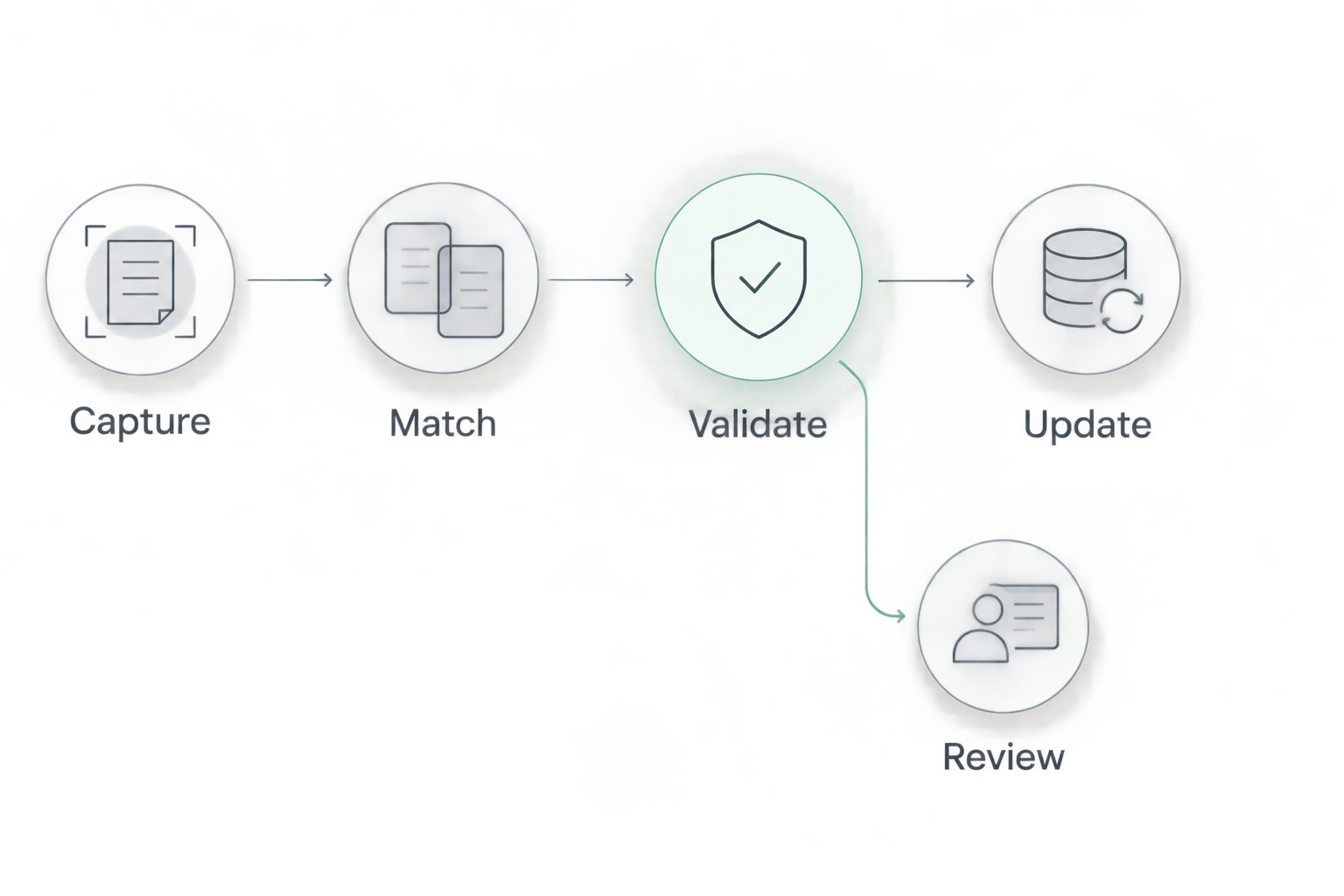
Directional movement requires supporting evidence, such as an ordered sequence across defined read zones. Validate the sequence against physical movements at the actual installation before using it to automate check-in or check-out.
Record updates and recovery
Write the change safely
- Record the decision. Store the source observation, matched asset, proposed change, and validation outcome in a durable processing record.
- Protect against duplicates. Use an idempotency key to recognize the same logical event on retry. Prefer a reliable source event identifier; otherwise define a deterministic key from stable event attributes without collapsing distinct observations.
- Apply a conditional update. Where supported, use the asset record's version or last-accepted event information to prevent concurrent updates from overwriting newer state. If the destination lacks this support, serialize updates per asset in the integration.
- Verify and recover. Confirm the destination accepted the update before marking processing complete. Retry temporary failures, quarantine permanent failures, and retain the audit trail linking the observation to the result.
Expected result: A repeated delivery does not repeat the business transition, and a failed update remains recoverable.
Do not mark an event complete just because the integration sent a request. A network timeout can leave the outcome uncertain; reconcile the destination record before issuing a non-idempotent action again.
Maintain separate processing and business outcomes. An event can be processed successfully while correctly producing no change because the asset is already recorded in that zone.
Choose the update policy
The right policy depends on what the reader proves and what happens when a record is wrong. Use this comparison to keep the first workflow narrow.
| Update policy | Best for | Advantage | Limitation |
|---|---|---|---|
| Last-seen update | Finding equipment within defined zones | Records a useful observation without asserting custody | Does not prove a transfer or exact position |
| Confirmed movement | Controlled transfers between tested zones | Connects validated movement to location changes | Requires reliable transition evidence and physical testing |
| Review-first update | Ambiguous zones or consequential custody changes | Keeps uncertain changes out of operational records | Adds a human review step |
Start with last-seen updates unless your installation can substantiate movement. Escalate to confirmed movement only after the test results support it.
For manufacturing equipment, RFID location and OT asset monitoring software address different questions: where an asset was detected versus its operational condition. Keep those signals separate so a location read never clears a maintenance restriction or implies that equipment is safe to operate.
Second workflow: trigger work after a confirmed move
Once location updates work reliably, use a confirmed location transition to initiate an adjacent workflow. For example, arrival in an inspection zone can create an inspection task without declaring that the asset passed inspection.
- Trigger on the accepted transition. Listen to the validated asset-change event, not the raw reader stream.
- Check for existing work. Search for an open task associated with that asset and transition before creating another.
- Assign responsibility. Route the task to the team responsible for the destination zone, using an approved assignment rule.
- Preserve the status boundary. Keep the asset's maintenance or readiness status unchanged until the responsible process confirms the outcome.
Expected result: The confirmed move starts the required work once, while the inspection outcome remains under the inspection process's control.
This variant adds operational value but also adds failure points. Track task creation separately from location updates so a downstream task failure does not erase a valid movement record.
Acceptance tests before rollout
Use the following as a proposed 2026 acceptance plan, not as evidence of expected read accuracy. Record the physical action, observed events, processing decision, and final asset state for each test.
- Repeated reads: Scan a stationary tagged asset 10 times. Confirm that observations remain traceable without creating repeated movement actions.
- Unknown tag: Present 1 unregistered tag. Confirm that it enters review without creating an asset or changing an existing record.
- Late delivery: Deliver 2 valid observations in reverse order. Confirm that the older observation does not overwrite the newer accepted state.
- Destination outage: Interrupt the destination connection, then restore it. Confirm that retained events resume processing without duplicate actions.
- Neighboring zone: Place a tagged asset outside the intended read area. Confirm that unintended detections cannot authorize a location transition.
Repeat the physical tests with representative assets and placements. Metal surfaces, liquids, antenna placement, and tag orientation affect RFID read behavior; software filtering does not replace a correctly designed read zone.
Troubleshooting
The asset keeps switching locations
Inspect overlapping read zones and conflicting reader mappings. Stop automatic transitions for the affected zone, correct the physical coverage or validation rule, and replay retained observations only after checking their order.
One scan creates several updates
Check whether repeated reader observations receive different event identifiers. Protect against delivery retries with idempotency, then separately group repeated observations so a stationary asset does not generate repeated transitions.
Some tags never match an asset
Compare the raw tag value with the stored mapping. Check encoding, letter case, whitespace, and inactive mappings; apply only transformations documented for your identifier scheme.
An older scan replaces a newer location
Inspect source timestamps, clock synchronization, and concurrent writes. Enforce timestamp or version checks at the update boundary rather than relying on the order messages reach the integration.
Scans arrive, but records stay unchanged
Inspect the event's processing outcome before changing reader settings. Separate validation rejection, permission failure, destination rejection, and retry backlog so the team fixes the actual failure.
Customize your workflow
Expand the 2026 rollout by adding approved zones and asset classes, not by weakening validation. Give each zone an owner, documented transition rules, and a way to suspend automated writes without losing observations.
Measure accepted updates, rejected events, unresolved tags, and failed writes. Review exception age as well: an exception queue without an accountable owner becomes another manual backlog.
Keep retention rules explicit. Preserve enough event and decision history to investigate disputed movements while limiting access to assignment data that identifies employees.
FAQ
How does RFID asset tracking automation update an asset record?
RFID asset tracking automation matches a reader event to an asset, validates the observation, and sends an authorized update to the asset system. The workflow should retain the source event and update outcome for investigation and recovery.
Can every RFID scan automatically change an asset's location?
Not every RFID scan should change the recorded location. Repeated reads, overlapping zones, and ambiguous movement require filtering or review before the workflow changes operational state.
Do I need a custom integration for RFID asset tracking?
You need an integration path that supports your reader events, asset identifiers, and update rules. An existing connector can satisfy that requirement if it also supports the validation, recovery, and access controls your workflow needs.
Can an RFID scan automatically check equipment out to an employee?
An RFID scan alone does not establish employee custody. Automatic checkout requires an approved identity-and-transfer process that associates the employee with the confirmed asset handover.
What happens when the asset system is offline?
A workflow with durable event storage retains observations and retries updates when the destination recovers. Duplicate protection and event-order checks prevent recovery processing from repeating actions or restoring outdated locations.
One last thing
Test the no-change outcome as carefully as the successful update. A stationary asset, an unknown tag, and an older observation should all produce an explainable result without an unauthorized record change.
Related guides
- ERP development for construction companies
- Custom software development for logistics companies
- How long supply chain software implementation takes
Schedule a consultation with Hexagon IT Solutions to define your RFID event rules, asset mappings, and rollout acceptance criteria.


