





Instead of manually exporting Salesforce opportunities and rebuilding your sales pipeline, use a Salesforce CRM integration workflow that captures opportunity changes, updates matching destination records, and recovers missed events. This 2026 guide covers the setup, field mapping, testing, and recovery rules needed to keep your pipeline current without creating duplicate deals.
- Use Salesforce Change Data Capture for an event-driven Salesforce CRM integration workflow, not repeated spreadsheet exports.
- Match destination deals by Salesforce Opportunity ID, not deal name or email address.
- Treat pipeline sync as recoverable delivery: save checkpoints, prevent duplicate writes, and reconcile records.
- Define and measure your freshness target; real-time sales pipeline sync does not mean guaranteed instant delivery.
Why this matters
A pipeline that trails Salesforce creates an operational problem: sales managers review stages, amounts, and close dates that no longer match the source. Automating the export alone does not solve this if the receiving system duplicates records or silently rejects updates.
Salesforce Change Data Capture is the best fit for teams that need an event-driven opportunity pipeline feed. Its benefit is a change notification rather than a repeated full export; its limitation is that your integration still needs authentication, durable processing, and recovery logic.
For your 2026 implementation, separate the transport decision from the data rules. The API integration platforms guide is a starting point for evaluating the integration layer; this workflow explains what that layer must accomplish.
Before you start
- Accounts and access: Have a Salesforce administrator, an authorized integration identity with API and required data access, and credentials for the destination system. Confirm that your Salesforce organization supports the APIs and event features you intend to use.
- Data contract: Agree on which opportunities belong in the destination, which fields Salesforce owns, and how stages, owners, currencies, and deleted records should behave. Obtain a test environment before changing production records.
- The gotcha: Change Data Capture is not an initial database export. Update notifications do not necessarily contain every field your destination needs, so plan a starting backfill and an authenticated Salesforce record lookup.
Do not begin with bidirectional editing. Establish a working Salesforce-to-destination flow first, then add write-back only where the business needs it.
Salesforce event configuration
Enable the opportunity change feed
- Open Salesforce Setup and enter Change Data Capture in Quick Find. Select Change Data Capture.
- Under Available Entities, select Opportunity and move it to Selected Entities. Click Save.
- Configure your integration to subscribe to the Opportunity change-event channel,
/data/OpportunityChangeEvent, through a supported Salesforce event client, such as a Pub/Sub API client. - Authenticate with the intended integration identity. Confirm that the identity can subscribe and read the opportunity fields required by the workflow.
- Change a test opportunity's stage. Inspect the received notification and confirm that its change header identifies the affected opportunity.
Expected result: A saved opportunity change produces an event that the integration receives. Receiving the event proves capture works; it does not yet prove that the destination pipeline is correct.
Use the same identity for permission testing that production will use. An administrator's successful test does not establish that a restricted integration identity can retrieve the same fields.
Set a measurable freshness target
Choose an acceptance target before you describe the workflow as real-time. For example, set a 60-second target from a committed Salesforce change to a confirmed destination update; this is a proposed test threshold, not a Salesforce delivery guarantee.
Record both timestamps. Also track the age of the oldest unprocessed event, because a connected subscriber can still fall behind while destination writes fail.
For a 2026 rollout, place the target in the handover documentation alongside the alert owner. A freshness target without a person responsible for breaches is not an operating rule.
Pipeline mapping and record identity
Establish the destination contract
- Create or select a destination field that stores the Salesforce Opportunity ID. Make that identifier unique wherever the destination supports uniqueness enforcement.
- Map Salesforce fields to destination fields explicitly. Start with
Id,Name,StageName,Amount,CloseDate,OwnerId, andAccountId, then add only fields the pipeline requires. - Define a stage translation table. Decide what happens when Salesforce contains a stage the destination does not recognize: reject and alert, rather than silently selecting a default stage.
- Resolve owner and account identifiers through lookup mappings. Do not write a Salesforce user ID into a destination field that expects its own user identifier.
- Define filtering rules, such as which business unit or opportunity record type enters the pipeline. Specify how to remove a deal when an update moves it outside those rules.
Expected result: Every included opportunity has a stable destination identity, an explicit field map, and a defined treatment for unsupported values.
For example, if Salesforce controls deal stage, the destination must not overwrite that stage during a later synchronization. Put field ownership in the contract rather than relying on which system happens to write last.
Choose the update pattern
These are implementation options, not interchangeable promises of speed. Select the approach that matches the destination's role and the available access.
| Pattern | Best for | Advantage | Limitation |
|---|---|---|---|
| Change Data Capture | Operational pipeline updates | Reacts to opportunity changes without repeated full scans | Requires a subscriber, checkpoints, and recovery |
| Scheduled API polling | Periodic reporting refreshes | Uses a scheduled retrieval process | Freshness depends on the schedule and query design |
| Bidirectional synchronization | Controlled editing in both systems | Supports updates from either workspace | Adds conflict rules and feedback-loop prevention |
Use Change Data Capture for the primary feed and a scheduled reconciliation for verification. Reconciliation checks correctness; it should not hide a broken event subscription.
Destination processing and initial backfill
Build a repeat-safe update path
- Read the event's
ChangeEventHeader, including its change type and affected record IDs. Process every relevant record ID rather than assuming each notification represents exactly one record. - Route create, update, and undelete events to a Salesforce record lookup. Retrieve the current fields required by the destination contract instead of treating an update event as a complete opportunity record.
- Upsert the destination deal using the stored Salesforce Opportunity ID. An upsert updates an existing match or creates a new record when no match exists.
- Handle delete events separately. Apply the agreed archive or removal policy without attempting to retrieve an opportunity that has been deleted.
- Confirm the destination write before advancing the durable replay checkpoint. If processing fails, retain the event for retry and leave the checkpoint at the last successfully processed position.
Expected result: Reprocessing an event updates the same destination deal instead of creating another deal. A failed write remains recoverable rather than disappearing behind an advanced checkpoint.
Serialize processing for each Opportunity ID so concurrent workers do not overwrite a newer update with an older request. Re-fetching the current Salesforce record helps, but it does not remove the need to control concurrent writes.
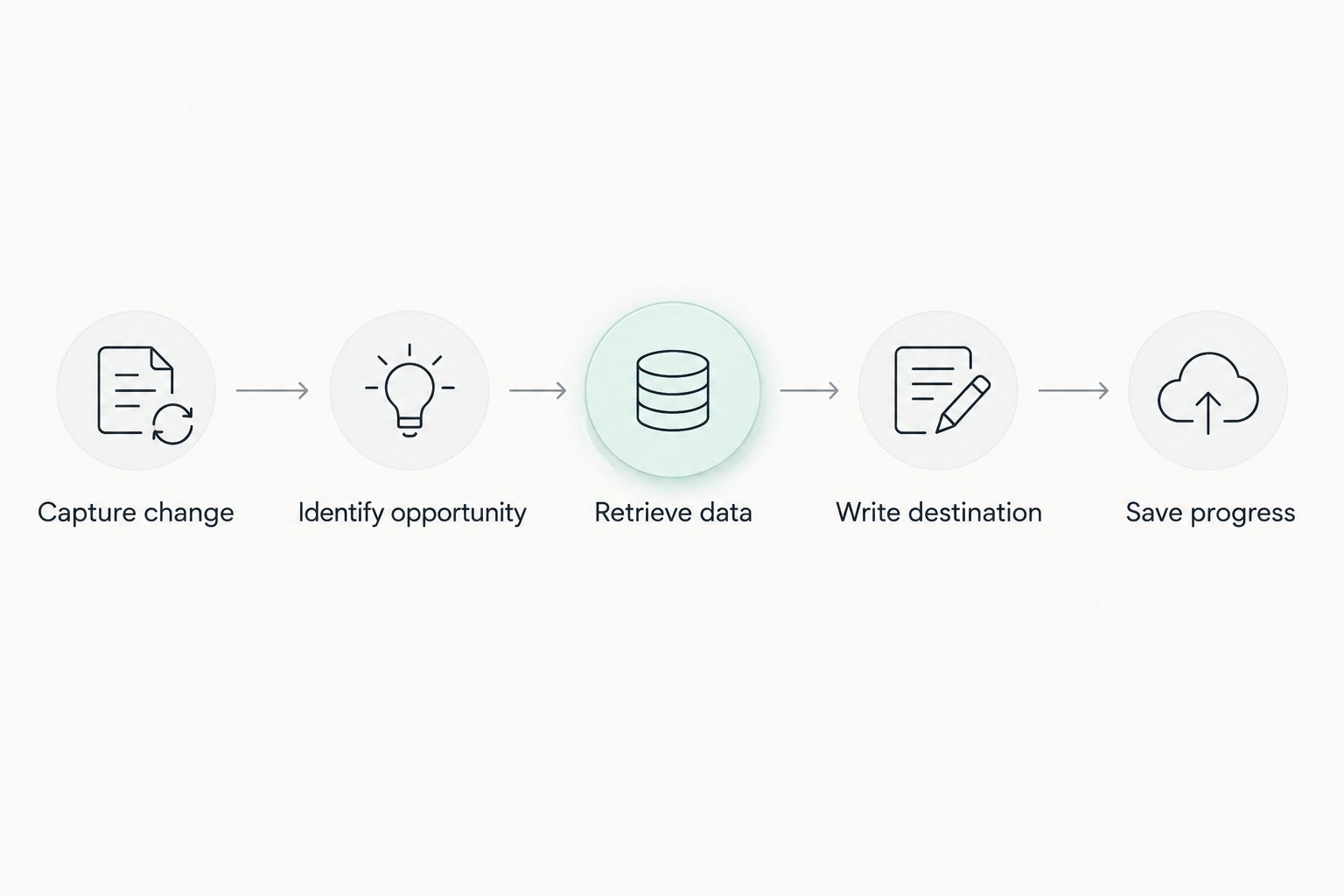
The core path is deliberately small: capture the change, identify the opportunity, retrieve current data, write the destination, and save progress. Keep business notifications outside this path until data delivery works reliably.
Load existing opportunities without losing new changes
Start the event subscription and durably buffer incoming changes before exporting the initial opportunity set. Then load the initial records and process the buffered changes through the same repeat-safe update path.
Do not run an uncontrolled bulk load alongside live destination writes. An older exported record can otherwise overwrite a newer event-driven update.
For the first 2026 launch, define a release gate: the initial load is complete, buffered changes have drained, and a source-to-destination reconciliation passes. Only then should sales leaders use the destination as their operational pipeline view.
Recovery controls and acceptance testing
Configure recovery before release
- Persist replay checkpoints outside application memory. A process restart must not erase the subscription's recovery position.
- Reconnect using the saved replay position when it remains valid. Treat replay IDs as opaque values, not sequential counters or timestamps.
- Build a reconciliation job that compares included Salesforce opportunities with destination records. Check identities and mapped values, not just total record counts.
- Route persistent failures to a review queue with the affected Opportunity ID, error, and retry history. Never place access tokens or unnecessary customer information in logs.
- Alert on subscription failures, rejected writes, and processing delay. Set an example 5-minute alert threshold for the oldest pending event if that threshold fits your operating needs.
Expected result: A restart resumes processing, rejected records remain visible, and reconciliation exposes missed or incorrect updates.
Salesforce's Pub/Sub API documentation specifies a 72-hour event retention window. That window limits event replay; it is not a substitute for a recovery export when the saved position is no longer available.
Test failures, not just successful updates
Before release, test a new opportunity, stage change, amount change, owner change, deletion, and restoration. Also test a record that moves outside the inclusion filter.
Repeat an event and verify that the destination still contains one matching deal. Disconnect the worker, change Salesforce records, restart the worker, and confirm that recovery reaches the correct final state.
Finally, force a destination rejection and an authentication failure. The test passes only when the failure is visible, the affected work remains recoverable, and the integration catches up after the problem is fixed.
Update a follow-up task whenever the stage changes
A useful adjacent workflow creates or updates a follow-up task when an opportunity enters a designated stage. This supports the sales handoff without turning every field edit into another notification.
- Inspect whether
StageNameappears among the changed fields for an update event. Treat create events separately if newly created opportunities should also qualify. - Retrieve the current opportunity and confirm that its stage still matches the task rule. A queued event can describe a transition that has already been superseded.
- Create or update the task using a repeat-safe business key, such as Opportunity ID plus task purpose. Replayed events must not generate duplicate follow-ups.
- Assign the task through the owner mapping and record the result separately from pipeline synchronization.
Expected result: A qualifying stage change produces the intended task without blocking the underlying deal update if task creation fails.
The trade-off is extra state. If the rule requires a new task every time a deal re-enters a stage, store transition history rather than using one permanent task key.
Troubleshooting
No opportunity events arrive
Confirm that Opportunity remains under Selected Entities, the subscriber uses the correct channel, and the integration identity has the required access. Make a new test change after the subscription connects; a subscription alone does not backfill existing opportunities.
Deals appear twice
Check the upsert key and uniqueness rule. Deal names change and are not reliable identifiers; use the Salesforce Opportunity ID and resolve existing duplicates before replaying failed work.
Destination fields become blank
Inspect whether the integration mapped absent event fields as empty values. Retrieve the current Salesforce record for updates, and distinguish an intentionally cleared field from a field omitted from the notification.
Records fail after an owner or stage change
Inspect lookup mappings and destination validation errors. Add the missing owner or stage mapping, then retry the rejected record; do not substitute an unrelated value just to clear the queue.
Recovery cannot use the saved replay position
Check whether the retained event window has expired or the replay position is invalid. Reconcile or reload the affected source records, establish a valid subscription position, and resume the repeat-safe processing path.
Customize your workflow
Expand scope only after opportunity synchronization passes its acceptance tests. Account details, contact relationships, and downstream forecasts each introduce different ownership and permission questions.
Hexagon IT Solutions is a consultation option for teams planning a custom Salesforce CRM integration workflow. Custom integration lets you define business-specific mappings, but it also leaves your team responsible for testing, maintenance, and operational ownership.
For your 2026 backlog, prioritize the missing business action rather than the next available object. If sales managers need reliable stage handoffs, complete task assignment and exception handling before adding unrelated data feeds.
FAQ
What is a Salesforce CRM integration workflow?
A Salesforce CRM integration workflow moves defined CRM changes into another system using agreed triggers, mappings, and record identifiers. A dependable workflow also handles duplicate delivery, rejected writes, and recovery after interruptions.
Does Salesforce Change Data Capture provide instant pipeline updates?
Salesforce Change Data Capture supports event-driven updates, not a guarantee of instant destination delivery. Measure the full path from the Salesforce change to the confirmed destination write against your chosen freshness target.
Should I use events or scheduled polling for pipeline sync?
Use events for an operational pipeline that needs change-driven updates; use scheduled polling when periodic refreshes meet the requirement. Both approaches need stable identifiers, error handling, and reconciliation.
How do I stop duplicate deals during Salesforce synchronization?
Upsert destination deals using the Salesforce Opportunity ID and enforce uniqueness where supported. Make retries repeat-safe so processing the same opportunity again updates its existing destination record.
Can the destination send pipeline changes back to Salesforce?
Yes, but bidirectional synchronization needs explicit field ownership, conflict handling, and feedback-loop prevention. Establish the one-way workflow first, then add write-back only for fields that users genuinely need to edit in the destination.
One last thing
Matching record counts do not prove that a pipeline is correct. Two systems can contain the same number of deals while disagreeing on stage, amount, owner, or which deals belong there.
Compare identities and business-critical values during reconciliation. That check separates a connected integration from a pipeline your sales team can trust.
Related guides
- Business intelligence tools for enterprises
- CRM software for small businesses
- CRM development for insurance agencies
Schedule a consultation with Hexagon IT Solutions to define your Salesforce pipeline sync, ownership rules, and acceptance tests.
Plan your Salesforce integration
Discuss pipeline mappings, recovery rules, and the acceptance tests your team needs.


