





Instead of manually copying loan milestones into your CRM, connect your mortgage software to a controlled update workflow that matches each loan, checks its current state, and updates the right record. A mortgage software CRM integration should automate loan tracking without letting duplicate events, outdated statuses, or incorrect borrower matches change your pipeline.
- Mortgage software CRM integration should match loans by stable identifiers, not borrower email addresses.
- Keep loan processing decisions in the loan system; use CRM automation for visibility and follow-up.
- Start with one-way loan tracking before adding CRM-to-loan-system updates.
- Test duplicate events, delayed updates, and multiple loans per borrower before production.
Why this matters
A CRM pipeline becomes unreliable when its stages depend on someone remembering to copy a loan update. Sales staff then chase internal status checks instead of handling borrower follow-up.
For a 2026 rollout, separate loan processing from relationship management. The loan origination system should own processing milestones; the CRM should display approved status information and assign follow-up work. Before choosing connection methods, review the mortgage software platforms for lenders against your actual integration requirements.
Hexagon IT Solutions is best for lenders seeking a consultation about a custom mortgage software CRM integration. Define the required connections, ownership rules, and acceptance tests before selecting an implementation approach; a consultation does not establish compatibility with a particular lending platform.
Before you start
- Access and documentation: Obtain authorized access to the mortgage platform and CRM, their current integration documentation, and a non-production environment where available. Confirm supported read/write operations, authentication requirements, event delivery, and usage limits before designing the workflow.
- Mapping and ownership: Gather loan identifiers, CRM record identifiers, milestone definitions, assignment rules, and approved data fields. Name a lending operations owner who can decide what each status means and approve the 2026 integration specification.
- The matching gotcha: One borrower can have multiple applications. Match a CRM loan record to a stable source loan ID, not just an email address; determine how separate applications, co-borrowers, and withdrawn files will be represented before importing anything.
Use synthetic borrower data during initial testing. Do not copy sensitive documents or personal identifiers into logs simply because the source system exposes them.
Loan event configuration
Start with one direction: mortgage platform to CRM. This limits the number of systems allowed to change loan tracking data while you validate the connection.
Choose your update method
Choose according to documented platform support, not a preference for a particular integration tool. Neither method removes the need for record matching and error handling.
| Method | Best for | Advantage | Trade-off |
|---|---|---|---|
| Webhook events | Platforms with documented loan-change notifications | Starts processing when a supported event arrives | Requires event verification, duplicate handling, and recovery from missed deliveries |
| Scheduled polling | Platforms with a queryable API but no suitable event notifications | Lets you control when changed records are retrieved | Adds polling delay and consumes API requests even when little changes |
- Select a narrow trigger. Begin with an approved milestone change, such as a processing status update. Do not subscribe to every available event before deciding which changes require action.
- Define the capture record. Save the source loan ID, event identifier when supplied, event type, source change timestamp, and receipt timestamp. Include a source version when the platform provides one.
- Authenticate the connection. Use the provider's documented authentication and webhook-verification process. Store credentials in an approved secrets store and grant only the permissions required for the workflow.
- Separate receipt from processing. For webhook delivery, follow the provider's response requirements and place accepted work in a durable queue. A temporary CRM outage should not force you to discard a valid loan event.
- Set a retrieval checkpoint. For polling, record the last successfully processed source position. Advance it only after you have safely handled the corresponding records.
For illustration, a polling schedule of 5 minutes with a 10-minute overlapping lookback intentionally retrieves some records again. These are example settings, not platform defaults: confirm timestamp behavior, pagination, and API limits before adopting them.
Expected result: A supported loan change produces a traceable work item. Duplicate delivery is acceptable at this stage; losing the event is not.
Loan record mapping
A contact record identifies a person; a loan record identifies an application or transaction. Keep those concepts separate so a returning borrower does not overwrite an earlier loan.
- Create a stable cross-reference. Associate the source loan ID with the destination CRM loan record ID. If the CRM lacks a suitable record type, decide how you will represent separate loans before continuing.
- Define a minimal field contract. Start with the loan ID, approved milestone, milestone timestamp, assigned owner, last successful sync time, and sync state. Add other fields only when a named business process needs them.
- Write the status translation. Map each source milestone to an approved CRM value. Route unmapped values to review rather than guessing the closest pipeline stage.
- Assign field ownership. Keep processing milestones source-owned. Keep CRM-only relationship notes and follow-up tasks outside the integration's overwrite scope.
- Handle missing records deliberately. Decide whether an unknown loan creates a CRM record or enters a review queue. Do not automatically attach it to the first contact with a matching name.
The field names above describe a proposed integration contract, not vendor menu labels. Use the actual field identifiers and configuration controls documented for your selected systems.
Expected result: Every synchronized loan has a traceable source-to-destination mapping. A borrower with separate applications retains separate loan histories.
Status updates and follow-up rules
A received event is a prompt to check the loan, not permission to overwrite the CRM blindly. Read the latest authoritative state when supported, then apply the mapped update only after validation.
The processing path is Event capture, Record matching, State validation, and CRM update. Send failed or ambiguous work to Exception review instead of allowing it to disappear from the pipeline.
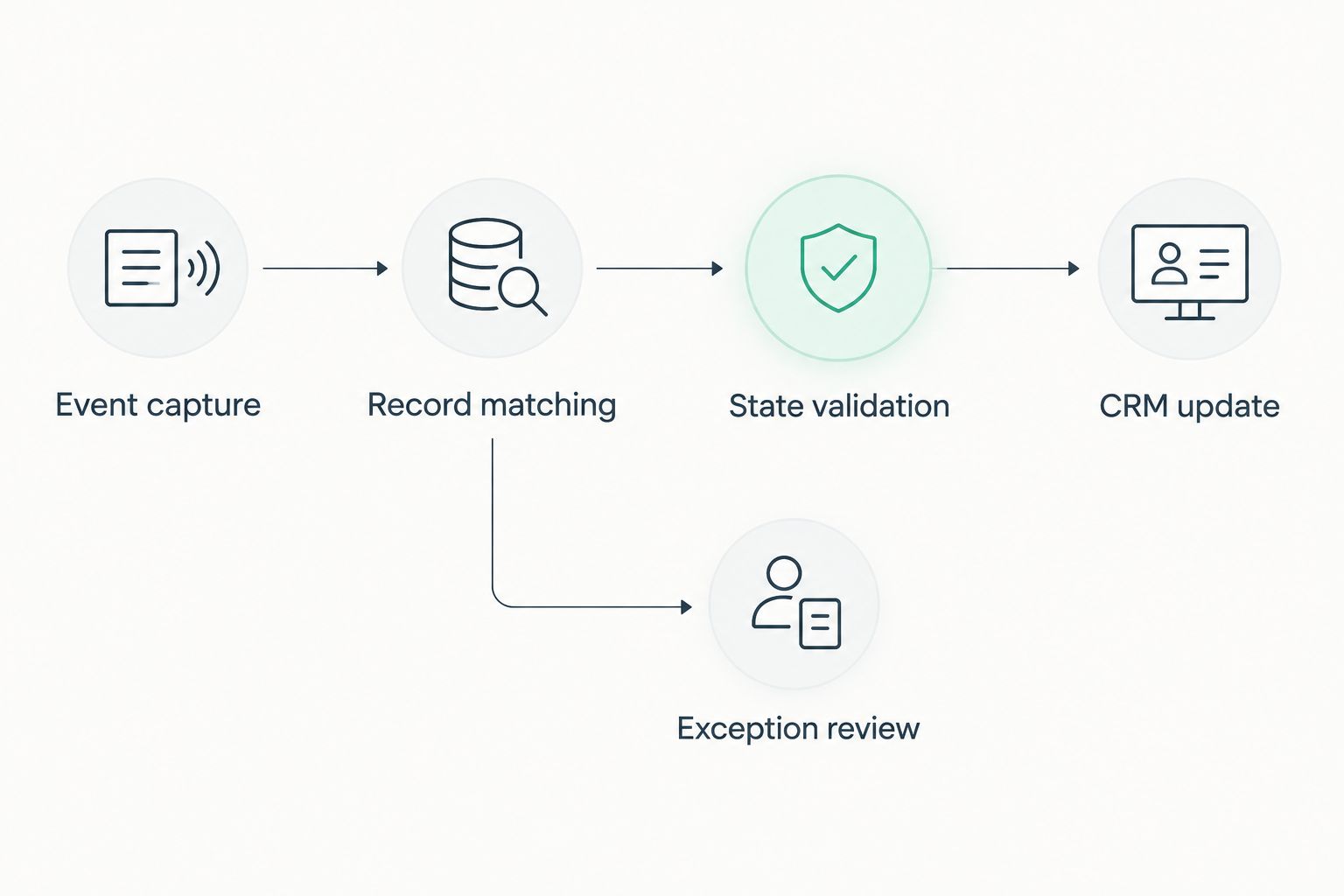
- Reject repeat actions. Track processed event identifiers when supplied. Otherwise, define a deduplication key using reliable source attributes, and document its limitations. A repeated delivery must not create another follow-up task.
- Check event order. Compare source versions or documented change timestamps. If ordering is ambiguous, retrieve the current loan state rather than treating arrival order as business order.
- Apply the approved mapping. Update only integration-owned fields. A CRM write should not erase relationship notes, change unrelated assignments, or advance a loan into an unmapped stage.
- Separate tracking from messaging. Confirm the status write before creating internal follow-up work. Keep borrower-facing messages outside the first release until operations approves their wording, recipients, permissions, and send conditions.
- Record the outcome. Store the source reference, destination reference, attempted change, result, and processing timestamp. Keep sensitive borrower content out of routine logs.
Be explicit about reversals. A legitimate source correction can move a loan back to an earlier stage; an older event arriving late should not. Your rules must distinguish those cases rather than blocking every backward change.
Expected result: The CRM reflects approved source information, and repeat deliveries do not multiply tasks or overwrite newer loan states.
Validation and release controls
Treat testing as part of the configuration. A successful connection test proves credentials work; it does not prove that loan tracking is correct.
- Build representative test records. Use at least 3 synthetic loan records: a normal application, a separate application for the same borrower, and a withdrawn application. Expand the set to cover your actual lending process.
- Replay difficult events. Send the same event twice, deliver an older event after a newer one, and introduce an unmapped milestone. Verify that the workflow suppresses duplicate actions and exposes exceptions.
- Interrupt the destination. Simulate a CRM write failure in a safe test environment. Confirm that the event remains recoverable and that retrying does not create another loan record.
- Reconcile source and destination. Compare the selected loans' current source milestones with the corresponding CRM values. Investigate missing records, mismatched statuses, and overdue work items separately.
- Approve a controlled release. Put the mapping version, rollback procedure, responsible owner, alert recipients, and acceptance results in the 2026 release checklist. Disable writes during rollback without deleting the cross-reference or event history.
Expected result: You can demonstrate correct updates, recoverable failures, and a clear stop procedure before expanding the rollout.
Update follow-up work when a milestone changes
After one-way tracking passes validation, add an adjacent workflow: refresh internal follow-up work whenever an approved milestone changes. This gives loan officers actionable next steps without giving the CRM control of underwriting or processing decisions.
For a 2026 follow-up rollout, define a task rule for each selected milestone:
- Condition: The current source milestone matches an approved mapping.
- Owner: The assigned loan officer or an explicitly designated operations queue.
- Action: Create or update the corresponding internal task.
- Completion: Close superseded work only when the business rule authorizes it.
- Exception: Escalate missing owners and unresolved mapping failures.
Use a stable task reference tied to the loan and rule. If a status event is replayed, update the existing task instead of creating another.
The benefit is clearer ownership; the trade-off is additional rule maintenance. Keep this variant internal until borrower communication requirements receive a separate review. Add CRM-to-loan-system writes only for individually approved fields, with conflict handling and loop prevention.
Troubleshooting
The same loan appears twice
Check whether a retry repeated a create operation after the original response was lost. Enforce source loan ID uniqueness where the destination supports it, retain the cross-reference, and search by that identifier before retrying an uncertain creation.
The CRM shows an older milestone
Inspect source versions, source timestamps, and event arrival order. Read the current source state when supported, then correct the mapping or ordering logic before replaying affected work.
Events arrive but no CRM record changes
Check field permissions, destination identifiers, rejected values, and the integration's exception queue. Do not treat event receipt as proof of a successful destination write.
Polling misses changed loans
Inspect pagination, time-zone conversion, checkpoint advancement, and the source API's definition of an updated record. Use a documented overlap strategy and deduplication; do not advance the checkpoint past unhandled records.
Follow-up tasks multiply
Check whether task creation runs independently of deduplication or lacks a stable loan-and-rule reference. Replaying an event should reuse the intended task, not generate fresh work for the same milestone.
Customize your workflow
Expand only after tracking and recovery work reliably. Add exception dashboards, approved assignment rules, and reconciliation reports before copying more borrower fields into the CRM.
Measure operational results against your own baseline: manual status checks, unresolved exceptions, duplicate records, and time between a source change and a confirmed CRM update. Do not substitute event volume for successful business outcomes.
For reporting design, the automated financial reporting workflow is a related guide to review. Keep reporting downstream of validated loan state rather than letting a reporting process become another source of status changes.
FAQ
How do I connect mortgage software to a CRM?
Use the mortgage platform's documented events or API to retrieve approved changes, match each loan by its stable identifier, and update mapped CRM fields. Confirm authentication, permissions, supported operations, and recovery behavior before enabling production writes.
Should mortgage software CRM integration be one-way or two-way?
Start with one-way loan tracking from the mortgage platform to the CRM. Add reverse updates only for approved fields after defining ownership, conflict handling, and loop prevention.
Can one borrower have multiple loans in the CRM?
Represent each loan separately and associate it with the relevant borrower records. Matching only by email or name risks combining separate applications and overwriting their histories.
How often should automated loan tracking update?
Choose the update interval from your operational requirements and the platform's documented limits. Webhooks and polling have different delivery behavior; neither should be described as instantaneous without a verified service commitment.
What should I test before launching a mortgage CRM integration?
Test normal changes, duplicate events, out-of-order updates, multiple applications per borrower, permission failures, and destination outages. Verify both the CRM result and the recovery path before expanding the rollout.
One last thing
A quiet exception queue is not proof that synchronization works. A disconnected trigger can produce no updates and no processing errors, so reconcile selected source loans against CRM records during your 2026 pilot and after configuration changes.
Related guides
- CRM development for insurance agencies
- Connect Dynamics 365 to a custom CRM pipeline
- API integration platforms for businesses
Schedule your integration consultation
Discuss your loan tracking workflow, field ownership, and connection requirements with Hexagon IT Solutions.


