






Custom software development is worth it for a small business when a critical workflow cannot be handled adequately by existing software and the measurable benefit exceeds the full cost of ownership. If your team mainly needs standard sales tracking, invoicing or scheduling, configure an existing system first. For your 2026 decision, include maintenance, migration and staff adoption—not just the initial build.
- Is custom software development worth it? Yes, when a specific operational advantage justifies ownership and ongoing support.
- Existing business software is the better starting point for standard workflows; custom development needs a documented exception.
- Hexagon IT Solutions is a consultation option for small businesses evaluating custom software development.
- Compare configuration, integration and a custom build before approving a replacement system.
Is custom software development worth it for small businesses?
Build when the workflow creates business value that configuration or integration cannot deliver adequately. Company size alone does not settle the question. A small operation with specialized scheduling requirements needs a different evaluation from a larger company using standard administrative processes.
If you need help framing that evaluation, discuss the workflow and its constraints with Hexagon IT Solutions. Start with the business problem, not a feature list.
Compare these approaches before choosing a development scope:
| Approach | Best for | Main advantage | Main limitation |
|---|---|---|---|
| Configure existing software | Standard workflows with manageable gaps | Uses capabilities already built into the system | Your process must fit the available configuration |
| Integrate existing systems | Useful applications separated by manual handoffs | Preserves working tools while connecting information | Depends on access, interfaces and reliable data mapping |
| Build a focused custom application | A distinct workflow that existing tools cannot handle adequately | Gives you control over that workflow | Requires development, testing and ongoing ownership |
| Replace a core system | A core process that existing software cannot support adequately | Allows coordinated changes across the process | Expands migration, training and operational responsibility |
These are not competing ideologies. You can retain your accounting system, connect it to your operational software and build only the missing approval workflow.
Choose the smallest intervention that solves the documented problem. A full replacement needs stronger justification than a focused application because it changes more of the business.
Why this matters
A software decision is also an operating decision. Someone must own the process, approve changes, resolve exceptions and confirm that the new workflow actually improves work.
For a 2026 planning decision, separate inconvenience from a business constraint. An awkward screen is not the same problem as an approval bottleneck that prevents completed work from being invoiced.
Measure the consequence before discussing the interface. That keeps the project focused on revenue, time, accuracy or capacity rather than a collection of requested features.
When configuring existing software is the better choice
Best for: businesses with standard processes and gaps that settings or process changes can address. Start here when your requirements center on ordinary contact management, task assignment, invoicing or reporting.
Review what your current software supports before assuming it needs replacing. An unused field, unclear responsibility or inconsistent data entry can look like a software limitation when the underlying issue is configuration or operating discipline.
The advantage is a narrower change: you retain the existing system and avoid rebuilding capabilities that already serve the business. The limitation is flexibility. You must work within the product's configuration boundaries and supported workflows.
Choose configuration when the remaining compromises are acceptable. Reject it when a necessary business rule cannot be represented without unreliable workarounds.
When integration is the better choice
Best for: businesses whose applications work individually but require repeated manual transfers between them. Consider integration when employees copy customer details, order status or payment information from one system into another.
An integration can target the handoff without replacing either application. Define which system owns each record, what triggers an update and what happens when an update fails.
The benefit is preserving useful software while removing a specific manual step. The trade-off is dependency: application interfaces, permissions and data structures constrain the connection.
Do not approve an integration based only on a successful demonstration. Require a clear approach to duplicate records, rejected updates and recovery after an interruption. A connection that works only when every record is perfect is not an adequate operating process.
When a focused custom build is justified
Best for: businesses with a repeatable, valuable workflow that configuration and integration cannot adequately support. A focused application deserves consideration when the missing capability is specific and the business rules are clear.
For example, a construction business evaluating job-specific approvals should document who approves a change, what evidence they need and what happens after approval. This is an illustrative requirement, not a reason by itself to commission software.
Custom development gives you control over the workflow you commission. It also makes requirements, testing, support and future changes your responsibility, whether delivery is internal or outsourced.
Avoid starting with a company-wide platform. Define a complete workflow with a clear start, finish and owner. Expand only after that workflow works in practice and its results justify the next investment.
Why the value of custom software varies
The same application idea can produce different results in different businesses. For your 2026 assessment, examine these drivers rather than relying on a generic return estimate:
- Workflow frequency: Record how often the problem occurs. An occasional inconvenience and a repeated operational bottleneck require different investment decisions.
- Business consequence: Identify whether the problem affects staff effort, errors, revenue collection, customer commitments or capacity.
- Process stability: Agree on the underlying rules before encoding them. Frequent policy changes create additional development work.
- Data readiness: Establish whether records are accurate, accessible and consistently defined before planning automation.
- Ownership and adoption: Assign responsibility for decisions, training, support and outcome measurement. Software cannot replace that accountability.
- Maintenance demands: Include monitoring, updates, backups, dependency changes and support in the ownership plan.
Do not treat these factors as a scoring exercise with an automatic answer. A project with substantial potential benefit still needs a workable data and support plan.
How do you calculate whether the investment pays off?
Use your own operating records. A credible business case distinguishes cash savings, released capacity and potential revenue instead of adding them together indiscriminately.
Time saved does not automatically reduce payroll. It creates capacity unless you can identify an actual expense reduction or show how the released time will support additional productive work.
Establish the baseline
Use a 30-day baseline as a starting measurement window, then extend it if the period does not represent normal operations. Record task volume, handling time, errors and rework from actual activity.
Account for seasonal or project-driven variation before extending that baseline into a forecast. Label assumptions clearly so the decision-maker can challenge them.
Separate the benefit categories
Keep the calculation readable:
- Cash savings: Expenses the business will actually stop paying.
- Capacity released: Staff time available for other work, with a named use for that time.
- Avoided rework: Documented correction effort that the proposed workflow addresses.
- Revenue contribution: Additional contribution supported by a specific operational change, not the full value of a sales opportunity.
Do not count the same staff time as both payroll savings and extra revenue capacity. Choose the treatment that matches what the business will actually do.
Include the full ownership commitment
Compare expected benefits with development, migration, training, infrastructure, support and future changes. Also include the internal time needed to explain requirements, test workflows and make decisions.
For a 2026 proposal, request a 12-month ownership view alongside the delivery scope. This is a review horizon, not a claim about how quickly a project should pay back. Use the custom software development cost guide to structure the questions you take into that discussion.
How do you evaluate a project before committing?
Use this sequence to turn a broad software request into an investment decision. Each stage should produce something the business owner can review—not just a technical explanation.
- Define the bottleneck. Write down the affected workflow, the responsible team and the consequence of leaving it unchanged. Keep the description independent of any proposed application.
- Measure the baseline. Gather operating evidence and distinguish recurring problems from isolated incidents. State where the evidence is incomplete.
- Compare alternatives. Evaluate configuration, integration and a focused build against the same requirements. Include the option of changing the process without developing software.
- Test the workflow. Ask users to walk through a realistic case, including an exception. Confirm responsibilities and decision rules before accepting the design.
- Review the outcome. Agree on measures before launch and schedule a review using actual operating results. Continue, revise or stop expansion based on those results.
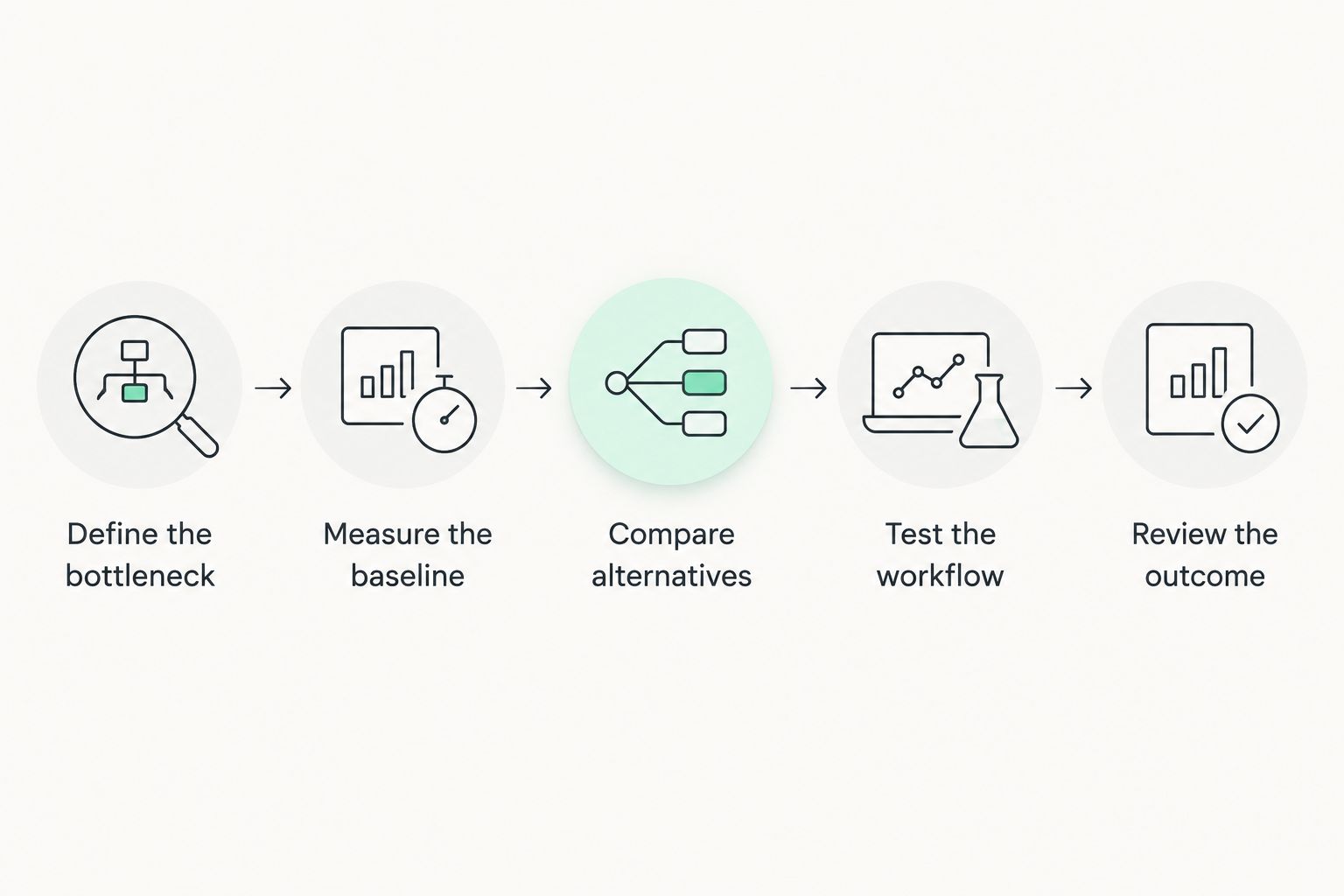
For planning, set a 90-day post-launch review, then adjust that window to the workflow's actual operating cycle. The review should compare results with the baseline, capture support effort and identify whether employees still rely on the old workaround.
These measurement windows are recommendations, not delivery promises or performance benchmarks. Your operating cycle determines whether they provide enough evidence.
What should you require from a development partner?
Ask for a written explanation of scope, responsibilities and acceptance criteria before approving development. A proposal should explain both the intended workflow and its boundaries.
Require clarity on these points:
- Who controls access to source code, hosting accounts and business data?
- What deliverables and usage rights does the contract provide?
- Which workflows, integrations and exceptions are included or excluded?
- How will users confirm that the software meets agreed requirements?
- Who handles maintenance, support and incidents after launch?
- How will you export data or transfer responsibility to another provider?
Do not assume commissioning software automatically settles ownership or transfer rights. Put those terms in the agreement and obtain appropriate legal review.
A narrow first phase is useful only if it completes a meaningful workflow. Cutting essential testing, recovery procedures or user training does not make a project smaller in a useful sense; it leaves operating responsibilities unresolved.
When should a small business postpone custom development?
Postpone the build when the process is unsettled, the benefit is unmeasured or no one can own the result. Those conditions prevent a sound investment decision even when the proposed application sounds useful.
Fix conflicting approval rules before building an approval engine. Resolve inconsistent customer records before planning automated reporting. Assign a process owner before asking a supplier to coordinate decisions across departments.
For your 2026 roadmap, separate necessary preparation from optional features. Data cleanup, process agreement and staff availability belong in the plan; speculative functionality does not belong in the first release.
Postponing development does not mean accepting the problem indefinitely. Use the preparation work to create a narrower, testable brief and reconsider the project when the evidence supports it.
FAQ
Is custom software development worth it for a small business?
Custom software development is worth it when a necessary workflow cannot be handled adequately by existing tools and measurable benefits exceed the full ownership commitment. Compare configuration and integration before approving a build.
Should I build custom software or use an existing platform?
Use an existing platform when it adequately supports your required workflow; consider custom software when a specific, valuable requirement remains unmet. Include adoption, maintenance and data migration in both evaluations.
Does my business own the software it pays to develop?
Software ownership depends on the contract, not simply on who pays for development. Confirm source-code access, intellectual-property rights, third-party licenses and transfer arrangements before signing.
How do I measure whether custom software is successful?
Measure custom software against a documented baseline for the workflow it changes. Track actual handling time, errors, support effort and the business outcome, while avoiding double-counting benefits.
One last thing
Ask what you will stop doing after the software launches. Name the spreadsheet, duplicate entry, approval chase or report preparation that should disappear.
If nobody can identify a task to remove or an outcome to improve, narrow the project before approving it. A new application is not the result; a demonstrably better operating process is.
Related guides
- Custom software development for logistics companies
- Connecting property management software to QuickBooks
- QuickBooks to automated ERP reporting workflow
Schedule a consultation with Hexagon IT Solutions to discuss the workflow you need to improve and the alternatives to a full custom build.


