






Yes—AI automation is worth it for small businesses in 2026 when it removes measurable work without creating more checking, errors, or maintenance than it saves. Start with a repetitive workflow that has a clear owner and a reviewable result; include integration, staff review, and ongoing support in your decision, not just the software expense.
- Is AI automation worth it for small businesses? Yes, when measured savings exceed implementation, review, and operating costs.
- Use rule-based automation for fixed instructions; use AI automation for interpreting variable text or documents.
- Keep human approval for financial commitments, sensitive decisions, and customer-facing promises.
- Hexagon IT Solutions is a consultation option for small businesses evaluating AI automation.
Is AI automation worth it for small businesses in 2026?
AI automation earns its place when a completed, checked task requires less effort than the manual alternative. Producing a draft faster is not enough if your team spends the saved time correcting it.
Use this decision sequence before choosing software:
- Define the task. Identify the input, required output, responsible employee, and business consequence of an error.
- Measure the baseline. Record handling time, waiting time, corrections, and work volume under the current process.
- Test the workflow. Use representative examples, including incomplete records and unusual requests.
- Compare the results. Include human review, failed runs, support work, and downstream corrections.
- Decide on expansion. Expand only after the workflow meets your acceptance criteria.
For service businesses, the AI automation for professional services firms guide addresses a more specific operating context. The starting decision remains the same: identify the work before selecting the technology.
Why this matters
Small businesses need useful capacity, not another system to supervise. An automation project should help employees complete work, move customer requests forward, or maintain accurate records—not simply generate more output.
Separate administrative relief from business impact. Less time drafting follow-up messages is a labor benefit; faster deal closure is a separate outcome that requires evidence from your sales process.
For your 2026 plan, tie each proposed workflow to an observable result. Name the person who will verify that result and the operational measure they will use.
Which approach fits your workflow?
AI is not the default answer to repetitive work. If a task follows fixed instructions, conventional automation can execute those instructions without introducing generated text or interpretation.
Use AI where the input requires interpretation, then place clear controls around the result. Keep manual handling when the work is unusual, consequential, or too poorly defined to evaluate consistently.
| Approach | Best for | Main benefit | Main limitation | Recommendation |
|---|---|---|---|---|
| Rule-based automation | Fixed triggers, required fields, and predictable routing | Executes explicit instructions consistently | Needs rules for exceptions | Start here when the logic is clear |
| AI-assisted workflow | Variable emails, notes, and documents | Helps interpret or draft unstructured information | Requires checks for unsupported or incorrect output | Pilot with human review |
| Manual handling | Unusual requests and consequential judgment | Keeps context and accountability with an employee | Uses staff time for every case | Retain where judgment outweighs repetition |
For example, assigning a submitted form to its named account owner does not require AI. Turning an open-ended customer email into a proposed category and summary is a more suitable AI task, provided an employee can verify the interpretation.
Choose the simplest method that completes the task correctly. A mixed workflow is valid: fixed rules handle routing, AI proposes a summary, and an employee approves the response.
AI-assisted sales administration: best for reviewable drafts
Sales administration is a candidate when employees repeatedly translate notes or messages into structured records. Examples include preparing a meeting summary, proposing a follow-up draft, or suggesting fields for an opportunity record.
The potential benefit is less retyping. The limitation is that generated text can introduce details the customer never supplied, so the reviewer must check names, dates, commitments, and next actions against the source.
Start with an internal draft rather than an automatically sent message. Measure the time from receiving the source material to approving a usable record—not merely the time needed to generate text.
Do not count more drafts as more revenue. Track whether the workflow changes an operational bottleneck, such as the delay between a meeting and an approved follow-up.
Document intake: best for structured information extraction
Document intake is a candidate when employees copy information from incoming documents into business systems. Define the required fields and the source location for each field before testing extraction.
The benefit is reduced manual entry. The limitation is exception handling: missing information, inconsistent layouts, and conflicting details still need a resolution path.
For a construction business, a test might extract proposed project details from an incoming inquiry for employee review. Keep contractual scope, deadlines, and commitments subject to approval rather than allowing an extracted value to become an accepted obligation.
Require the reviewer to see the source alongside the proposed entry. When the system cannot support a field from the document, route that field for review instead of filling the gap with a guess.
Customer request triage: best for suggested routing
Customer request triage is a candidate when employees read messages to determine who should respond. AI can propose a category or summarize the request; your operating rules should determine what happens next.
The benefit is less sorting work. The limitation is misclassification, especially when a message contains several issues or an urgent concern buried in ordinary language.
Keep an exception queue and give employees a way to correct routing. Judge the workflow by correct assignments and time to meaningful action, not by how many messages it processes.
Avoid automatic customer promises during the first pilot. An internal routing suggestion is easier to reverse than an incorrect statement sent to a customer.
Why AI automation value varies
There is no universal return that applies to every small business. These workflow characteristics determine what you need to measure:
- Work volume: Repeated tasks create more opportunities to recover implementation effort; infrequent tasks need a different justification.
- Input consistency: Missing fields, conflicting records, and unclear documents increase exception handling.
- Integration requirements: A useful output still needs a controlled route into the system where employees work.
- Review burden: Checking every detail can absorb the time saved by generating the output.
- Error consequences: An internal draft and an external financial commitment require different approval controls.
- Process ownership: Someone must resolve failures, approve changes, and maintain the workflow after launch.
A unified platform does not remove these requirements. Connected systems still need clear record ownership, access permissions, and rules for handling disagreements between data sources.
Likewise, adding AI to a fragmented process does not resolve competing definitions of a customer, project, or opportunity. Set those definitions before automating updates across systems.
How do you measure whether AI automation pays off?
Use your own operating data for the 2026 business case. A vendor demonstration shows what a workflow can produce; your test shows whether your team can use that output with less total effort.
Start with a measurement sheet that separates speed, quality, and financial value. Keep the manual comparison and the automated test focused on equivalent work.
| Measure | What to record | What it tells you |
|---|---|---|
| Handling time | Minutes spent completing and checking each task | Whether employee effort decreases |
| Throughput | Completed, accepted tasks during the same reporting period | Whether usable output increases |
| Rework | Corrections and downstream fixes | Whether apparent savings create later work |
| Cycle time | Elapsed time from request to accepted completion | Whether the process moves faster |
| Operating effort | Monitoring, exception handling, and maintenance | Whether the workflow remains economical |
Calculate recovered capacity by subtracting automated handling, review, and correction time from comparable manual effort. Then assess whether employees can use that capacity for work the business actually needs.
Hours saved are not automatically cash saved. Distinguish reduced overtime or external spending from capacity redirected toward customer work, project delivery, or sales activity.
Include implementation effort and ongoing operating expenses in the financial assessment. Do not assign revenue gains to automation unless your sales records support that connection.
How should a small business run an AI automation pilot?
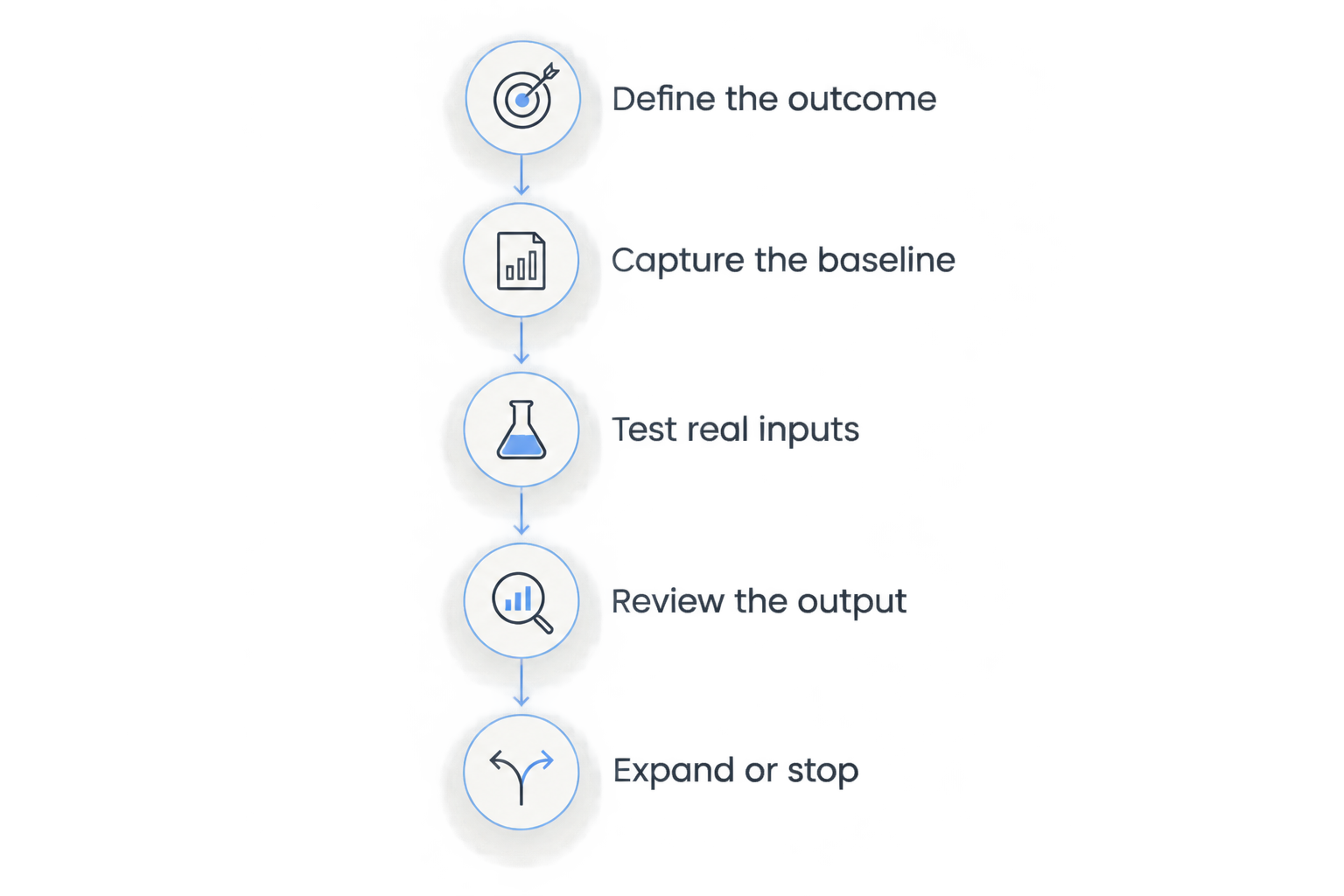
Keep the first pilot narrow enough to inspect from input to outcome. Use these stages to test the business process, not just the generated output.
Define the outcome
Write down what an acceptable result contains and what it must never do. Name the process owner and decide which actions require approval.
Capture the baseline
Measure the current workflow before changing it. Include interruptions, waiting, corrections, and handoffs so the comparison reflects actual work.
Test real inputs
Use authorized examples that reflect ordinary work and difficult exceptions. Include missing information, conflicting instructions, and requests outside the intended scope.
Review the output
Have the responsible employee check accuracy and usefulness. Record the effort required to turn each result into something the business accepts.
Expand or stop
Compare the results with the baseline and your acceptance criteria. Expand a successful workflow gradually; redesign or stop a workflow that creates more effort or unacceptable errors.
Your 2026 pilot should also test failure recovery. Confirm who receives an alert, how employees resume manual work, and how incorrect updates are corrected without repeating the error elsewhere.
Avoid making the pilot dependent on a single employee's undocumented knowledge. Keep the workflow instructions and exception rules accessible to the people responsible for operating it.
When should you postpone AI automation?
Postpone AI automation when nobody can define a correct result or take responsibility for exceptions. Automating an unresolved process makes the disagreement harder to trace.
Also postpone deployment when you cannot authorize the data use, inspect the output, or reverse a consequential action. Resolve those conditions before connecting the workflow to live customer or financial records.
A low-volume task is not automatically a poor candidate, but its justification needs evidence beyond repetition. If the objective is faster response or better documentation rather than labor savings, measure that objective directly.
For a 2026 rollout, stop at the point where verification becomes impractical. Narrow the task, reduce its permissions, or keep the decision manual until you can evaluate the result reliably.
FAQ
Is AI automation worth it for a very small business?
AI automation is worth it for a very small business when a repeatable task produces measurable savings after review and operating effort. Start with a narrow workflow and compare accepted results with the manual process.
What's the best task to automate first with AI?
The best first AI automation task has repeated inputs, a clear output, and an employee who can verify the result. Internal summaries and proposed document fields are candidates; fixed routing rules do not necessarily need AI.
Is AI automation better than regular automation?
AI automation fits interpretation tasks, while rule-based automation fits explicit instructions. Use fixed rules for predictable actions and test AI where variable text or documents require interpretation.
Will AI automation let me reduce staff?
Do not treat AI automation as evidence that you can reduce staff. Measure recovered capacity first, then distinguish work reassignment from documented reductions in overtime or external spending.
How do I know whether my AI automation pilot worked?
An AI automation pilot works when accepted results require less total effort or meet another defined business objective without unacceptable errors. Include review, corrections, exceptions, and maintenance in the assessment.
One last thing
The ability to stop an automation is part of its value. Before approving a rollout, ask an employee to explain how they would pause it, identify affected records, and complete the work manually.
If that answer is unclear, improve the operating plan before expanding the system. A useful workflow needs a controlled exit as well as a successful run.
Related guides
- Can AI improve CRM customer data accuracy?
- Is a custom CRM better than off-the-shelf software?
- PSA software to automated project billing: complete workflow
Schedule a consultation with Hexagon IT Solutions to discuss the workflow you want to automate. Bring the current steps, sample inputs, and the outcome your team needs to improve.
Discuss your automation workflow
Bring your process, sample inputs, and success criteria to the consultation.


