






A custom CRM is better than off-the-shelf software when your revenue-critical workflows cannot fit a packaged platform without persistent workarounds; otherwise, start with a configurable product. Building gives you control over scope and behavior, but also makes you responsible for maintenance, security, testing and future changes.
- Is custom CRM better than off the shelf software? Only when workflow fit justifies building and maintaining it.
- Off-the-shelf CRM is best for teams whose sales processes fit the platform’s configuration options.
- Custom CRM is best for business-critical workflows that packaged configuration cannot support.
- Compare implementation, integration, maintenance and exit requirements—not just the feature list.
Is a custom CRM better than off-the-shelf software?
Choose custom CRM for a documented capability gap, not a preference for owning software. Choose off-the-shelf software when it supports your sales process, permissions, integrations and reporting without forcing staff into parallel spreadsheets.
For an initial packaged-software shortlist, use the guide to CRM software for small businesses. Then test candidates against actual work rather than accepting a polished demonstration as proof of fit.
| Approach | Best for | Main advantage | Main drawback | Evidence to request |
|---|---|---|---|---|
| Off-the-shelf CRM | Teams with processes that fit available configuration | Existing application functionality and vendor-managed product releases | You operate within the platform’s capabilities and contractual terms | A working demonstration of your required workflows |
| Custom CRM | Teams with essential workflows that packaged products cannot support | Control over application behavior and development priorities | You need an accountable owner for ongoing development and operation | A working prototype, maintenance plan and ownership terms |
| Packaged CRM with custom integrations | Teams whose sales process fits a product but whose systems need connecting | Keeps the packaged application while addressing specific handoffs | Integrations introduce dependencies and support responsibilities | An integration test covering failures, retries and reconciliation |
These approaches are not maturity levels. A larger business does not automatically need custom software, and a smaller business can have a genuinely unusual workflow. The deciding question is whether the gap affects a business outcome and whether configuration can close it.
Why this matters in 2026
A CRM decision changes how people capture commitments, transfer responsibility and report revenue. A poor fit can leave the application holding records while employees manage the actual work elsewhere. Replacing software without fixing that mismatch preserves the underlying problem.
For your 2026 evaluation, separate essential requirements from inherited habits. An approval step required by your commercial terms is different from a spreadsheet layout someone prefers. Build around the former; challenge the latter before paying to recreate it.
Off-the-shelf CRM: best for repeatable sales processes
Start with off-the-shelf CRM when configuration can support the work that matters. Examine account relationships, opportunity stages, required fields, permissions and reporting before assuming you need development.
Ask the vendor to demonstrate your process using representative records. A professional services team, for example, can test whether an opportunity moves through proposal review, approval and delivery handoff without duplicate entry. This is an evaluation scenario, not a claim that every packaged CRM supports those steps.
Advantages to look for
- Existing functionality: Confirm that the application already performs the required tasks instead of relying on promised development.
- Defined administration: Check whether your operations team can manage fields, permissions and routine workflow changes.
- Product maintenance: Establish which updates, infrastructure tasks and security responsibilities the vendor handles.
Limits to accept or reject
You do not control the vendor’s product roadmap. Extensions also depend on the platform’s interfaces, permissions and contract terms. Treat those boundaries as decision criteria rather than problems you will somehow solve after purchase.
Recommendation: Select packaged CRM when its demonstrated configuration meets your essential requirements and its operating terms are acceptable. Reject it when a critical workflow depends on an unsupported workaround.
Custom CRM: best for essential workflow gaps
Build a custom CRM when a specific business requirement cannot be met acceptably through packaged configuration or integration. The requirement should explain what users must accomplish, why it matters and how you will verify success.
Consider a construction business evaluating how to connect an account, multiple project opportunities and internal bid approvals. A custom build is justified only if shortlisted products fail the required relationship or approval model—not simply because the business operates in construction.
Advantages to evaluate
- Workflow control: You can specify application behavior around an agreed process.
- Development priorities: Your organization can decide which changes enter the development backlog.
- Data structure: You can design relationships around the information the business actually needs, subject to technical and contractual constraints.
Responsibilities to budget for
Custom software needs testing, access management, monitoring, dependency updates and support. Someone must decide what gets fixed first and who can approve a release. Source-code ownership alone does not establish any of those operating arrangements.
In a 2026 development agreement, define ownership, deployment access, documentation, support responsibilities and handover requirements. Do not assume these come with the word custom.
Recommendation: Choose custom development only after validating the critical gap and assigning a long-term system owner. Without both, you have a project proposal rather than an operating plan.
Packaged CRM with integrations: best for isolated gaps
Keep the packaged CRM when the sales workflow fits and the unresolved problem is a specific handoff. A connection to finance, estimating or service delivery can address that gap without replacing the customer-facing application.
For example, evaluate whether an accepted proposal needs to create a downstream record and return a status update. Define the required information, which system owns it and what happens when the transfer fails. Do not assume an integration is feasible until you check the available interfaces and access terms.
The benefit is narrower development scope. The drawback is shared responsibility: a failure can sit in the CRM, the connection or the receiving application. Name an owner for troubleshooting across those boundaries.
Recommendation: Choose integration when the missing capability belongs between systems rather than inside the CRM. Reject this approach when it merely hides a fundamental mismatch in the core sales workflow.
Why the right CRM choice varies
The decision depends on requirements and operating capacity, not whether custom sounds more advanced. Use these factors to explain why one approach fits your business:
- Workflow fit: Distinguish mandatory steps from preferences that the team can change.
- Data relationships: Check how accounts, contacts, opportunities and other required records connect.
- Integration requirements: Identify information that must move between systems and how failures will be resolved.
- Change ownership: Decide who approves process changes, tests releases and manages competing requests.
- Security responsibilities: Establish who controls access, reviews permissions, handles incidents and maintains the application.
- Exit requirements: Verify how you will retrieve usable records, attachments and relationship information when changing providers.
Document the consequence of each gap. A missing field label and a missing approval control do not deserve the same response. Prioritize the gaps that prevent work, obscure accountability or require repeated manual reconciliation.
How to make the build-or-buy decision in 2026
Use a staged evaluation with evidence at each decision point. Do not authorize a full custom build before testing whether configuration can meet the essential requirements.
1. Map workflows
Select 3 workflows that directly affect selling or delivery. For each, record the trigger, responsible person, required information and completion condition. Include exceptions, such as a rejected proposal or an opportunity reopened after approval.
Keep the map focused on work rather than screens. You need to know who makes a decision and what information they need before deciding where a button belongs.
2. Test configuration
Ask shortlisted providers to perform those workflows with representative, non-sensitive data. Watch for manual re-entry, permission conflicts and steps completed outside the application. Require a demonstration rather than a verbal assurance that a feature is configurable.
Record each result as supported, unsupported or requiring further verification. Do not let an untested promise become an accepted requirement.
3. Classify gaps
Separate configuration gaps, integration gaps and application-behavior gaps. Then distinguish requirements from preferences. A custom interface is not justified merely because users dislike a different arrangement of familiar fields.
For every essential gap, write a pass-or-fail acceptance test. This becomes the basis for evaluating either a packaged extension or a custom prototype.
4. Assign ownership
Name 1 accountable business owner for CRM decisions. That person needs authority to resolve conflicting requirements and approve process changes. Technical delivery can involve several parties, but responsibility for the business outcome must remain clear.
Agree who handles user support, data corrections, access changes and release approval. Put those responsibilities in writing before implementation starts.
5. Verify exit
Request 2 sample exports: one covering records and their relationships, and another covering attachments and relevant history. Check what each export actually includes. A file containing contact names does not prove you can reconstruct the sales pipeline elsewhere.
For custom software, also verify access to the source code, deployment instructions and documentation under the agreement. Test the handover process instead of treating a contractual clause as sufficient evidence.
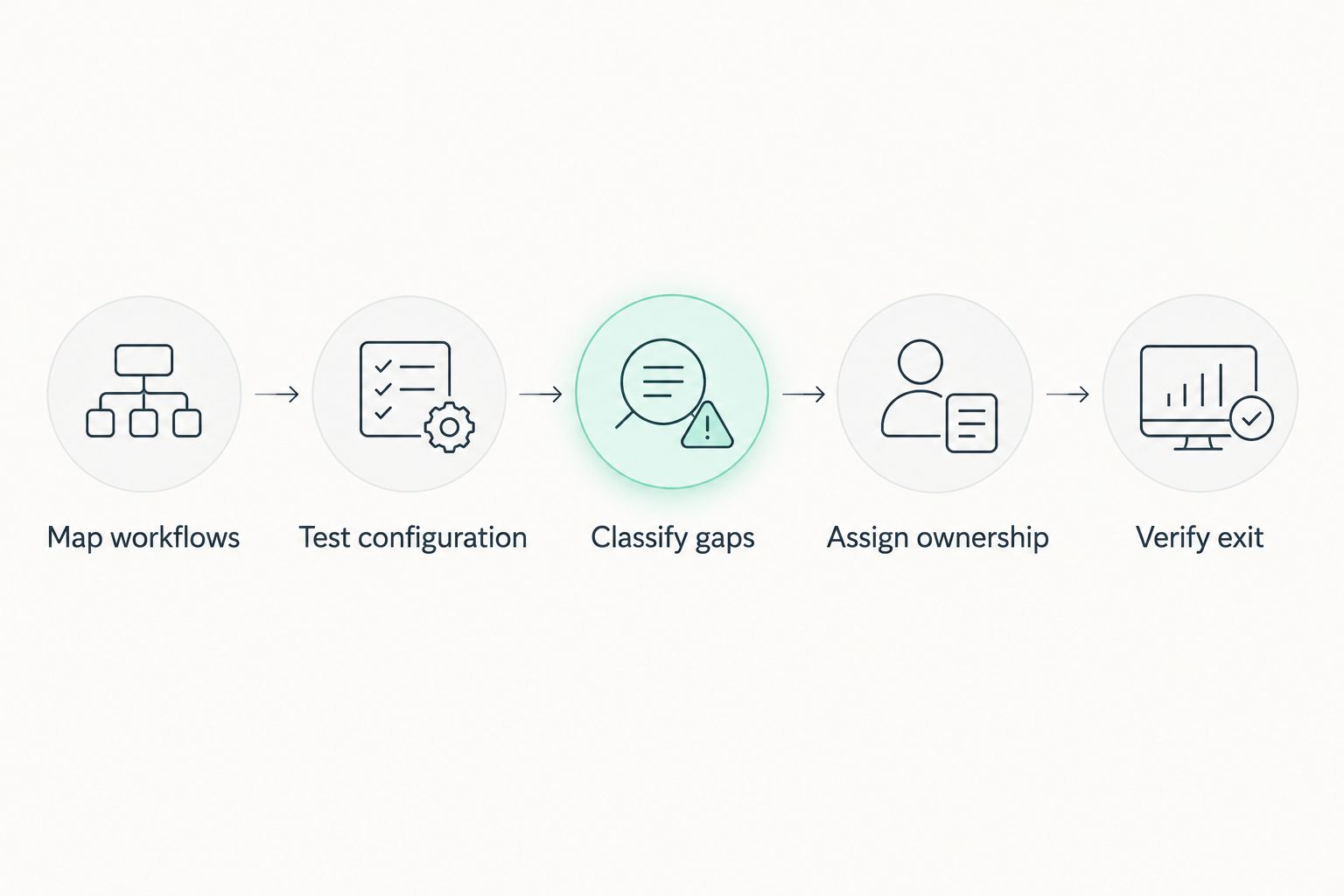
The output of this evaluation should be a decision record, not a longer wish list. State which approach passed, which essential gaps remain and who owns the next action. That gives leadership a basis for approval without relying on feature-count comparisons.
Does a custom CRM always save money?
A custom CRM does not automatically save money. Compare development, implementation, migration, integrations, training, support and ongoing changes against the equivalent packaged-software obligations.
Use the same evaluation period and scope for each proposal. Include internal administration and manual work that would remain after launch. Treat claimed savings as unproven until you connect them to observed work and realistic operating responsibilities.
Can you customize an off-the-shelf CRM instead?
Configure an off-the-shelf CRM first when its data model and workflow controls support your requirements. Then assess extensions or integrations for the remaining gaps.
Keep a record of what depends on standard configuration and what depends on custom code. That distinction helps you assess testing, support and upgrade responsibilities without assuming all customization carries the same obligations.
Will a custom CRM make your sales team more productive?
A custom CRM improves productivity only if the delivered workflow removes a verified obstacle and users adopt it. A different interface does not fix unclear ownership, inconsistent stages or incomplete records by itself.
Before implementation, document the work you want to change: duplicate entry, approval chasing or manual reporting, for example. After rollout, compare the same activity under equivalent conditions rather than attributing every change in sales results to the software.
FAQ
What’s the best CRM approach for a small business in 2026?
Start with off-the-shelf CRM when its configuration supports your essential sales workflows. Choose custom development only for a verified gap that matters enough to justify ongoing development and support.
Do I own the source code when I commission a custom CRM?
Source-code ownership depends on your contract. Define ownership, licensing, repository access, deployment access and handover obligations before development begins.
Is an off-the-shelf CRM secure enough for my business?
Evaluate the specific product, configuration and contractual responsibilities rather than assuming packaged software is secure enough. Review access controls, data handling, recovery arrangements and incident responsibilities against your requirements.
What should I ask a custom CRM developer before signing?
Ask for acceptance tests, ownership terms, support responsibilities and a documented handover plan. Also establish who approves changes and how the application will be maintained after launch.
One last thing
Your existing spreadsheet can be a requirements document—or a collection of habits nobody has challenged. Ask the people using it which decisions it supports before commissioning software to reproduce it. The goal is to preserve necessary work, not every existing step.
For teams evaluating custom CRM development in 2026, a consultation with Hexagon IT Solutions should start with evidence of workflow gaps, not a feature wish list. Bring your process maps, failed configuration tests and ownership questions.
Related guides
- How long does CRM implementation take?
- How much does CRM development cost?
- Is custom software development worth it for small businesses?
Schedule a CRM consultation
Discuss workflow fit, configuration gaps and ownership responsibilities with Hexagon IT Solutions.


