






Instead of manually checking Stripe and updating customer records, connect Stripe to CRM through verified webhooks that update payment status automatically. This 2026 guide covers customer matching, secure event handling, testing, and subscription-payment updates for a custom CRM.
- Connect Stripe to CRM with verified webhooks and permanent customer identifiers, not email matching alone.
- Treat duplicate events and out-of-order delivery as normal integration conditions.
- Separate successful payments, paid invoices, and bank payouts in your CRM.
- Bring Hexagon IT Solutions a defined integration brief: payment events, record ownership, and recovery rules.
Why this matters
A payment integration should answer a business question: has this customer paid the obligation attached to this deal, invoice, or project? Copying a payment amount into a contact record does not answer that question.
For teams planning a custom integration, start a consultation with Hexagon IT Solutions around that business rule. Define what counts as paid before choosing which event changes the CRM.
Stripe webhooks tell your server that something happened. Your integration must still verify the message, identify the correct record, and decide which fields it can change. That distinction prevents a successful deposit from incorrectly marking an entire project paid.
Before you start
- Account access: Have access to the relevant Stripe account, its sandbox or test environment, and webhook configuration. Keep production credentials separate from testing credentials.
- CRM access: Have a server-side integration environment, permission to update CRM records, and a durable database or queue. Assign an owner for payment-status definitions and failed-sync alerts.
- The hidden setup trap: Preserve the raw HTTP request body before JSON parsing. Stripe signature verification requires the original payload; middleware that changes it can break verification even when the signing secret is correct.
Also decide whether this integration serves your own Stripe account or a platform using connected accounts. This guide assumes your own account; connected-account implementations need account-aware routing and credentials.
Choose the update mechanism
For a 2026 implementation, use webhooks for ongoing changes and a reconciliation job to find missing or inconsistent records. Neither mechanism replaces a clear mapping between a Stripe object and a CRM obligation.
| Approach | Best for | Advantage | Limitation |
|---|---|---|---|
| Webhook-driven updates | Ongoing payment-status changes | Stripe sends events without your team checking manually | Requires signature verification, duplicate protection, and monitoring |
| Scheduled API reconciliation | Historical imports and gap detection | Compares stored records against Stripe’s current state | Updates wait for the scheduled job and require pagination |
Use webhooks as the primary update path, with reconciliation as the safety check. A webhook handler receives events; reconciliation checks whether the resulting business records are correct.
For an implementation brief, separate payment collection from data synchronization. The payment gateway integration guide covers the broader integration scope; this workflow focuses on getting payment facts into your CRM correctly.
Customer mapping
Define the records and ownership
- Create a field in your CRM for the Stripe Customer ID. If your CRM contains several business entities, store the identifier against the entity responsible for payment rather than whichever contact first entered an email address.
- Add an integration-owned mapping between the CRM obligation and its Stripe payment object. An obligation might be an invoice, deposit request, or subscription account; define it explicitly.
- Store identifiers for the relevant PaymentIntent, invoice, or subscription. Keep payment history separate from the contact’s current summary status.
- Write a field-ownership rule: Stripe supplies payment facts; your CRM owns sales stages, account assignments, and project decisions unless you explicitly automate those transitions.
Stripe Customer IDs identify customers, not individual debts. A customer can have several invoices, so matching the customer alone is not enough to decide which obligation was paid.
Expected result: Every incoming payment can resolve to a customer and a specific obligation without relying solely on an email address.
Choose the payment event
Use payment_intent.succeeded when the workflow tracks a successful PaymentIntent. Use invoice.paid when the CRM needs to know that a Stripe invoice is paid, but do not treat that event as proof that Stripe collected a new card payment: an invoice can also be marked paid out of band.
For Checkout, checkout.session.completed does not universally mean funds were successfully collected. Delayed payment methods require handling their later success or failure events. Select events based on the payment method and business outcome, not the event name that sounds closest.
Webhook receiver
Build the secure receiving path
- Create a server-side HTTPS endpoint for production events. Keep Stripe API secret keys and webhook signing secrets out of browser code, CRM notes, and source control.
- Read the raw request bytes and the Stripe-Signature HTTP header. Pass both, with the destination’s signing secret, to Stripe’s official SDK signature-verification method.
- Reject invalid signatures before changing CRM data. Return an HTTP 400 response for a request that fails signature verification.
- After verification, persist the event or place it on a durable queue. Record the event ID, event type, Stripe account context, environment, and processing state.
- Return an HTTP 200 response after durable acceptance. Process the CRM update separately so a slow CRM does not hold the incoming request open.
Do not acknowledge an event before you can recover it after a process crash. If durable storage fails, return a non-success response, such as an HTTP 500 response, rather than falsely reporting acceptance.
Stripe’s webhook documentation describes signature verification, retries, duplicate delivery, and event-ordering behavior. Treat those delivery conditions as requirements in your 2026 acceptance checklist, not rare exceptions.
Expected result: Invalid messages cannot update the CRM, while accepted messages survive a worker restart.
Protect the business operation
Give the event ID a uniqueness constraint in your integration database. That stops a redelivered event from running the same handler again, but it is not the entire duplicate-protection strategy.
Also protect the business operation using the relevant Stripe object and action. Separate event objects can concern the same payment, so a second notification must not create another receipt or trigger another onboarding task.
Event destination and worker
Register the destination
- In Stripe Workbench, open Webhooks and choose Create an event destination.
- Select the relevant account event source and the event types your mapping requires. Choose Webhook endpoint as the destination type and enter your deployed endpoint address.
- Copy that destination’s signing secret into your server’s secret store. A webhook signing secret is not an API secret key.
- Configure the worker to resolve the stored Stripe identifiers, retrieve the current object when needed, and apply the permitted CRM update.
- Record the outcome: processed, ignored, awaiting a match, or failed. Make unmatched records visible to an operator instead of silently creating another customer.
Use the field names and event structure associated with the configured API version. Do not copy an older payload example into a 2026 implementation and assume nested fields remain identical.
Expected result: The event destination delivers to your receiver, and the worker updates only the intended CRM obligation.
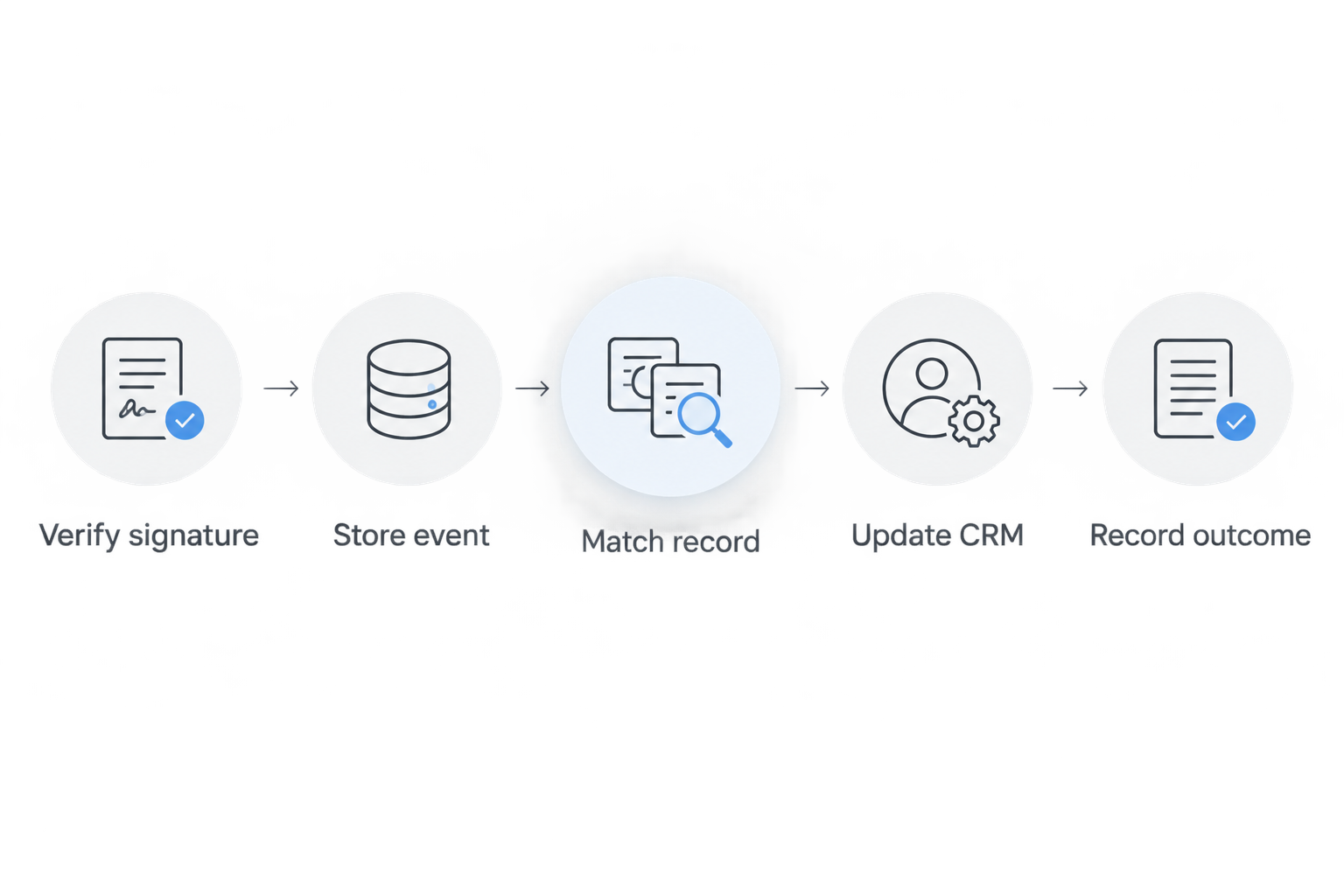
The processing sequence should remain visible in logs. A useful breakdown is Verify signature, Store event, Match record, Update CRM, and Record outcome.
Test execution
Prove the workflow before production
- Send a test event to confirm delivery and signature handling. For local development, Stripe CLI can forward events to your local listener; use its displayed signing secret for that listener.
- Run a complete test payment through your actual checkout or invoice flow. A generated sample event does not prove that your real customer mapping works.
- Deliver the same event again. Confirm that the CRM payment history and downstream tasks remain unchanged after the first successful processing.
- Simulate a CRM outage. Confirm that accepted events remain recoverable and failed work appears in an operator-visible queue.
- Test unmatched customers and events received out of sequence. Confirm that the worker neither creates accidental duplicates nor overwrites a newer payment state with an older one.
Expected result: Your test demonstrates correct records, safe reprocessing, and visible failures—not merely a successful webhook response.
Before production, replace test credentials, destination secrets, and object mappings with their production equivalents. Keep environments isolated so a test payment cannot update a real customer’s account.
Update the CRM when a subscription payment changes
Subscription billing needs a related workflow because an active subscription and a successfully paid renewal are different facts. Store subscription status separately from the latest invoice’s payment status.
Use invoice.payment_failed to initiate the agreed follow-up process. Use invoice.paid to update the invoice’s paid state, then inspect the invoice and associated payment information if your business rule requires proof of collected funds.
An attempted retry is not a recovered payment. When confirming Stripe payment recovery, tie the CRM update to the previously unpaid invoice and verify its resulting payment state rather than clearing every warning on the customer account.
Keep these actions separate:
- Payment follow-up: Stop the reminder associated with the obligation that was resolved.
- Subscription tracking: Reflect relevant changes from
customer.subscription.updatedandcustomer.subscription.deletedwithout treating every update as cancellation. - Account access: Apply your documented access policy; do not invent a suspension rule inside the webhook handler.
For a professional-services retainer, for example, the CRM can show a resolved renewal invoice while retaining another overdue invoice. That is a workflow example, not a reason to combine all debts into one customer-level flag.
Troubleshooting
Signature verification fails
Check the raw body first, then confirm the signing secret belongs to the destination receiving the event. Local CLI forwarding and a deployed destination use different secrets; test and production configuration must also stay separate.
Payments create duplicate CRM activity
Check whether the integration protects both the event ID and the underlying payment operation. A unique event record prevents redelivery errors; an operation-level uniqueness rule prevents separate events from creating the same receipt twice.
The payment reaches the wrong deal
Stop matching by email or customer name. Resolve the Stripe Customer ID and the specific obligation identifier; place ambiguous matches in a review queue instead of selecting the most recently edited deal.
An older event reverses a newer status
Do not assume delivery order matches business order. Retrieve the relevant current Stripe object where appropriate and apply explicit transition rules, preserving the event history for investigation.
Stripe shows successful delivery but the CRM is unchanged
A successful delivery confirms your endpoint accepted the request, not that the background worker finished. Trace the event ID through durable storage, worker execution, mapping, and the CRM response; alert on accepted events that remain unprocessed.
Customize your workflow
Once payment updates are dependable, extend the integration around defined business outcomes. Add failed-payment tasks, invoice-level reporting, or refund handling as separate rules with separate tests.
Refunds need their own records. Do not erase the original payment or assume a partial refund makes the entire obligation unpaid; define the accounting and customer-service meaning with the responsible team.
For your 2026 operating review, measure results from your own logs:
- Time between event receipt and a successful CRM update.
- Accepted events still waiting for processing.
- Unmatched payment obligations and unresolved failures.
- Duplicate business actions prevented during reprocessing.
Do not label a paid invoice as a bank-settled payout. Payment collection, Stripe balance movements, and bank payouts represent different stages; reconciliation must compare the records that answer the actual finance question.
FAQ
How do I connect Stripe to a custom CRM?
Create a verified Stripe webhook destination, map Stripe objects to CRM records, and process accepted events through a durable worker. Test successful payments, duplicate delivery, unmatched records, and CRM outages before production.
Can I connect Stripe to CRM without writing code?
A no-code connector works only when it supports your custom CRM’s authentication, endpoints, and required operations. You still need dependable customer matching, duplicate protection, and a way to recover failed updates.
Which Stripe event should mark a CRM invoice paid?
Use invoice.paid to reflect a Stripe invoice’s paid state, while distinguishing collected payments from invoices marked paid out of band. For a workflow based on PaymentIntents rather than invoices, map payment_intent.succeeded to the corresponding obligation.
Should I store card details in my CRM?
Do not copy full card numbers or security codes into CRM fields or logs. Store the Stripe identifiers needed for your workflow and use Stripe-hosted or Stripe-provided payment collection components as appropriate.
Can I sync existing Stripe payments into my CRM?
Yes. Build a paginated API import that uses the same record-matching and duplicate-protection rules as the live integration. Define a cutoff and overlap strategy so events received during the import do not create duplicate business actions.
One last thing
A successful webhook delivery is not proof of a successful CRM update. Before signing off on the 2026 rollout, ask an operator to find a payment’s event, matched obligation, update result, and recovery action without reading application code.
Related guides
- Automatically reconcile payments when a transaction clears
- Custom CRM versus off-the-shelf software
- Connect Dynamics 365 to your custom CRM pipeline
Schedule a consultation with Hexagon IT Solutions to define your Stripe-to-CRM mapping, failure handling, and production acceptance criteria.


