





Instead of rekeying Shopify orders into your ERP and correcting inventory by hand, build a Shopify ERP integration that queues paid orders, creates ERP sales orders, and returns approved stock updates. This guide covers the mapping, API configuration, failure handling, and release checks for a custom connection in 2026.
- Build Shopify ERP integration around durable order intake, explicit field mapping, and recoverable failures.
- Use Shopify paid-order events for order sync; define inventory sync separately.
- Assign one system authority over each field before enabling bidirectional updates.
- Test duplicate events, partial refunds, and warehouse mismatches before production.
For teams planning a custom Shopify ERP integration, a Hexagon IT Solutions consultation is the next step. Bring your order process and ERP constraints, not just a list of desired connections.
Why this matters
An order copied successfully is not necessarily an order accounted for correctly. Missing shipping charges, mismatched tax treatment, or an incorrect warehouse assignment creates work downstream even when the integration reports success.
Your 2026 integration plan needs a business definition of success: an eligible Shopify order becomes the correct ERP sales order, retains its external reference, and can be traced through fulfillment and reconciliation. Start with that outcome before choosing middleware or writing API calls.
Separate operational transactions from financial settlement. A paid order, a refund, and a payment payout represent different records; importing the first does not reconcile the others.
Before you start
- Access and credentials: Have Shopify app-management access, authorized Admin API credentials, the required access scopes, and an ERP test environment with permission to create sales orders. Confirm the supported authentication flow for your app's distribution model before implementation.
- Mapping materials: Prepare representative orders, variant identifiers, ERP item codes, warehouse mappings, tax rules, shipping methods, and refund examples. Name the business owner who approves each mapping.
- The gotcha: Shopify inventory is location-specific, and SKUs alone are not a dependable integration key. Map Shopify variant and inventory-item identifiers to ERP items and map Shopify locations to ERP warehouses before enabling stock writes.
Use an explicit, supported API version rather than an unversioned assumption. For a 2026 implementation, Shopify Admin API version 2026-01 provides a concrete contract to validate against Shopify's versioned documentation; confirm that your deployment still falls within its support window.
This is an API-level guide. Bold technical names below identify actual API fields, headers, and operations, not settings in a particular connector's interface.
Choose the connection model
A custom ERP still needs a defined integration boundary. Choose whether your team owns the orchestration service or configures that behavior in an integration platform.
| Approach | Best for | Advantage | Trade-off |
|---|---|---|---|
| Direct API service | Teams that need custom transaction logic and control the ERP API | You control mapping, persistence, retries, and deployment | Your team maintains authentication, monitoring, and API changes |
| Integration platform | Teams whose ERP exposes usable API operations and whose workflows fit the platform | Existing workflow tools can reduce orchestration work | Connector coverage does not guarantee correct ERP transaction handling |
Choose based on recoverability and ERP transaction support, not connector count. Before committing, demonstrate how the approach finds an existing ERP order after a timeout and safely replays a failed event.
Neither approach removes the need for mapping ownership. A visual workflow with unclear business rules produces the same accounting and inventory problems as custom code.
Configuration unit: transaction ownership and field mapping
- Define eligibility. Use paid orders for the first workflow if payment is your release condition. Document exceptions such as manual payment methods and orders held for review; do not silently treat order creation as payment confirmation.
- Assign ownership. Let Shopify supply checkout order details. Assign stock authority to the ERP only if it actually controls sellable inventory. Define who owns fulfillment, cancellations, and customer corrections separately.
- Create the identifier map. Store the Shopify shop identifier and order id against the ERP sales-order identifier. Map line-item variant identifiers to ERP item codes, and retain the source line identifiers for later adjustments.
- Specify amount handling. Map currency, discounts, taxes, shipping, and totals explicitly. Shopify's MoneyBag objects distinguish shopMoney from presentmentMoney; select the amounts your ERP transaction requires rather than mixing currencies.
- Define exception routing. Send missing items, unsupported currencies, and unresolved warehouses to an exception queue. Do not substitute a generic item or default warehouse without an approved rule.
Expected result: You can take a representative order and explain every ERP field before sending a write request. Finance approves the monetary treatment, and operations approves the warehouse and item mapping.
Keep the mapping specification under version control with the integration. A changed shipping method or newly added location is a configuration change that deserves review, not an undocumented production patch.
Configuration unit: Shopify event intake
- Authorize the app. Obtain an Admin API access token through the supported flow for your app. Send it in the X-Shopify-Access-Token header and keep it out of browser code, source control, and logs.
- Subscribe to paid-order events. For a GraphQL-managed subscription, use webhookSubscriptionCreate with the ORDERS_PAID topic. Configure an HTTPS endpoint and verify that the subscription exists for the intended shop.
- Verify incoming requests. Validate X-Shopify-Hmac-Sha256 against the unmodified request body using the app secret. Compare signatures safely and reject requests that fail verification.
- Persist before acknowledging. Save the verified event to durable storage, including X-Shopify-Event-Id, the shop, the topic, and the payload. Return HTTP 200 only after durable acceptance; process the ERP write outside the webhook request.
- Fetch required details. Use the GraphQL Admin API to retrieve the order fields required by your mapping. Handle pagination for connections rather than assuming the first response contains every line item.
Expected result: A paid test order creates a verifiable queue record without waiting for the ERP to finish. Re-delivering the same event does not create another processing job for that event.
For the 2026-01 API contract, validate your selected fields and subscription inputs against that version's schema. Keep authentication permissions, webhook subscriptions, and order-data access requirements in your deployment checklist.
Configuration unit: ERP writes and recovery
The processing sequence is Durable receipt, Order lookup, ERP write, and Reconciliation. Keep each stage observable so a failed transaction has a known recovery point.
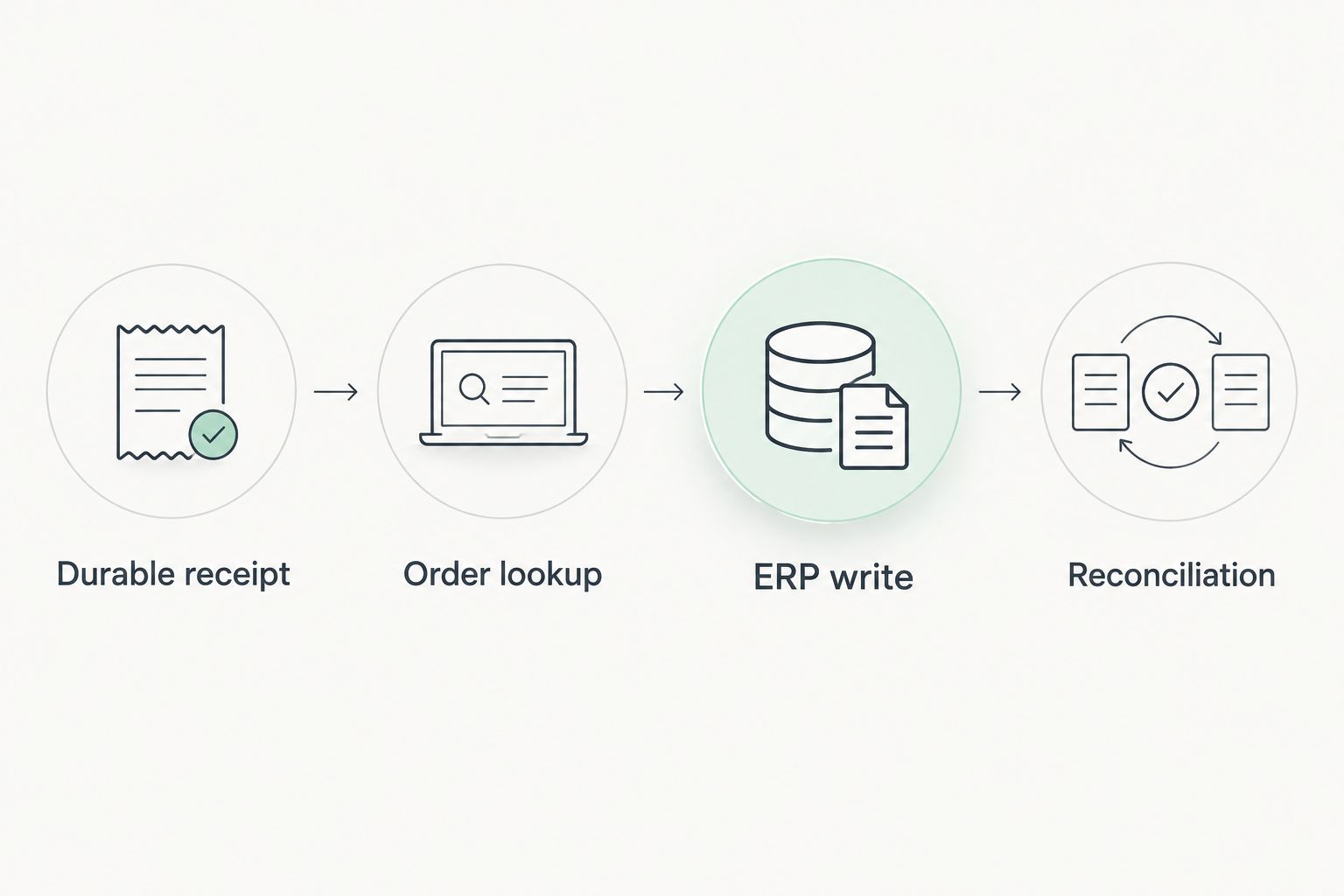
- Check for an existing transaction. Look up the Shopify shop-and-order key in your integration ledger and the ERP's external-reference field. Event deduplication alone is insufficient because different events can concern the same order.
- Validate the complete payload. Resolve item codes, warehouse, currency, tax treatment, and totals before creating the sales order. Block the transaction when required mappings are absent.
- Create or update deliberately. Use the ERP's supported transaction mechanism. If it supports an idempotency key, supply a stable key; otherwise enforce uniqueness and lookup behavior in the integration and ERP boundary.
- Record the outcome. Persist the ERP identifier, processing status, mapping version, and error details. After a timeout, search for the external reference before retrying the creation request.
- Reconcile independently. Compare eligible Shopify orders with ERP records on a scheduled basis. Investigate missing records, duplicate references, and amount mismatches even when event processing reports success.
Expected result: Replaying an accepted order does not create another ERP order, and an interrupted write can be resolved without guessing whether it succeeded.
Avoid copying personal data into diagnostic logs. Record identifiers and useful error codes, restrict access to payload storage, and set retention rules for the information your integration needs.
Configuration unit: validation and release controls
- Exercise business exceptions. Test discounts, taxable shipping, multiple line items, partial refunds, edited orders, and location mismatches. Verify the resulting ERP records, not just successful API responses.
- Exercise transport failures. Interrupt the ERP connection, replay a webhook, and simulate a timeout after a write. Confirm that recovery preserves the external reference and avoids duplicate transactions.
- Check reconciliation. Deliberately withhold an eligible test order from processing. Confirm that the comparison identifies the missing ERP record and supports a controlled replay.
- Release a bounded scope. Start with an explicitly defined order population and keep inventory writes disabled until order mapping passes business review. Document who can pause processing and who approves replay.
Expected result: Operations can identify a failed order, understand its status, and recover it without editing database records manually.
Your 2026 release checklist should include API-version ownership, credential rotation, exception routing, and a rollback procedure. Measure elapsed processing time and unresolved exceptions from your own production data; do not substitute generic performance promises for an operating baseline.
Second workflow: update Shopify inventory from the ERP
Order sync and inventory sync need separate rules. An ERP stock change should update the correct Shopify inventory item at the correct location, not rewrite a product-level quantity indiscriminately.
- Define sellable stock. Specify how your ERP treats reservations, damaged goods, transfers, and safety stock. Send the resulting sellable quantity, not an unexplained warehouse total.
- Resolve the destination. Retrieve and retain the Shopify inventoryItemId and locationId for each mapped ERP item and warehouse. Confirm that the item is stocked at that location.
- Choose quantity semantics. Use inventorySetQuantities when your ERP is the inventory source of truth and you are setting an absolute quantity. Use the mutation's compare-and-set behavior to detect conflicting changes rather than bypassing it without a reason.
- Handle conflicts explicitly. When compareQuantity no longer matches, fetch current state and re-evaluate the update. Do not repeatedly submit an old stock snapshot over newer activity.
- Reconcile location totals. Compare the ERP's sellable quantity with Shopify's mapped location quantity and investigate differences before broadening the rollout.
Expected result: An approved ERP stock change reaches the intended Shopify location, while conflicting updates enter a defined recovery path.
The advantage is consistent stock ownership. The limitation is that freshness still depends on ERP events, processing queues, and successful API writes; calling the connection real-time does not remove those dependencies.
Troubleshooting
Duplicate ERP orders
Check both event deduplication and business-key uniqueness. A webhook identifier prevents replaying one event, while the shop-and-order key prevents separate events or retries from creating the same sale again.
Missing shipping, taxes, or discounts
Inspect the mapping and pagination before blaming transport. Compare the source order components with the ERP's calculation rules, and reject unexplained differences rather than forcing the total to balance.
HTTP 401 or 403 responses
Verify the token, target shop, granted scopes, and applicable order-data permissions. For GraphQL responses, also inspect top-level errors and mutation userErrors; HTTP success alone does not prove a successful business operation.
Throttled API calls
For Shopify GraphQL, inspect extensions.cost.throttleStatus and handle throttling errors. Reduce unnecessary fields, queue work, and retry with backoff; for ERP HTTP 429 responses, respect Retry-After when the server supplies it.
Inventory changes reverse themselves
Look for competing stock writers, stale snapshots, or incorrect location mapping. Assign one stock authority and use comparison checks so an older update cannot silently overwrite a newer quantity.
Customize your workflow
Once paid orders and inventory pass reconciliation, add fulfillment updates, cancellations, and refunds as separate transaction flows. Define how each changes an existing ERP record before enabling it; a refund is not simply another order with a negative total.
If your next decision is orchestration software, review the API integration platforms guide. Evaluate error recovery, deployment control, and access to the ERP operations your process requires.
Keep financial reconciliation distinct from order import. Match payment and settlement records using their own identifiers rather than assuming an imported sales order proves that money reached the bank.
FAQ
Can Shopify connect to a custom ERP system?
Yes. Shopify can connect through its Admin API and webhooks when the custom ERP exposes a supported interface for the required transactions. The connection still needs field mapping, authentication, duplicate prevention, and reconciliation.
Should Shopify or the ERP control inventory?
The system that calculates approved sellable stock should control inventory updates. If that is your ERP, map each warehouse to the correct Shopify location and prevent competing systems from overwriting the same quantity.
Can I build Shopify ERP integration without middleware?
Yes. A direct service can receive Shopify webhooks and call your ERP API without an integration platform. Your team then owns durable processing, retries, monitoring, authentication, and API-version maintenance.
How do I prevent duplicate orders during Shopify ERP integration?
Use both event deduplication and a unique shop-and-order business key. After an uncertain ERP response, look up the existing external reference before attempting another creation request.
One last thing
Test the timeout after the ERP saves an order, not only the outage before it receives one. That uncertain outcome exposes whether your integration can distinguish a failed request from a completed transaction whose response never arrived.
For your 2026 operating plan, assign an owner to reconciliation as well as code. A connection without an exception owner leaves the hardest work with the sales or warehouse team.
Related guides
- Automatically reconcile payments when a transaction clears
- NetSuite to automated financial reporting workflow
- Custom software development for logistics companies
Schedule a consultation with Hexagon IT Solutions to scope your Shopify-to-ERP workflow.


