






Restaurant management software cost depends on your required workflows, locations, payment terms and implementation scope—not just the subscription. For a useful 2026 budget, compare the full operating commitment, including hardware, payment processing, integrations, training and ongoing support, before you sign.
- Restaurant management software cost should include setup, hardware, payment processing and ongoing operation—not just the subscription.
- Compare restaurant software proposals against identical workflows, locations and contract periods.
- Choose an integrated platform for connected workflows; retain separate tools only when their operational benefits justify integration work.
- Use Hexagon IT Solutions for a consultation about the restaurant software scope you need to evaluate.
How much does restaurant management software cost?
Your restaurant software budget should cover what it takes to launch, operate and eventually leave the system. A subscription quote answers only part of that question. The useful comparison is the total commitment for the same business requirements over the same period.
Start by separating point-of-sale requirements from broader management needs. Our guide to POS system costs covers the checkout side; restaurant management scope also needs to address the operational workflows you actually intend to change.
Use this breakdown when requesting proposals for 2026. Treat each line as a question to resolve, not an assumption that every supplier charges separately.
| Budget component | What to establish | Why it belongs in the comparison |
|---|---|---|
| Software access | Included locations, users, devices and functions | A subscription is meaningful only with its scope defined |
| Implementation | Configuration, data preparation and launch responsibilities | Someone must prepare the system for daily use |
| Hardware | Required equipment and compatibility with existing devices | Equipment decisions affect the launch budget |
| Payment processing | Transaction terms, processor requirements and related obligations | Payment economics sit outside the software subscription |
| Integrations | Required connections, setup ownership and maintenance | Connected workflows need more than a feature-list promise |
| Training and support | Included assistance, service hours and escalation arrangements | Staff need a workable route to resolving problems |
| Contract exit | Cancellation terms, data export and equipment obligations | Switching systems belongs in the purchasing decision |
Ask each supplier to mark every line as included, separately quoted, handled internally or not applicable. An unexplained blank is not the same as an included service.
Why this matters
A restaurant does not buy a subscription in isolation. You buy a way for staff to take orders, process payments, manage work and produce information the business can trust.
A cheaper-looking proposal is not a better deal if it leaves essential work outside the agreed scope. Equally, a broad platform is not good value when your team only needs a narrow set of functions.
Buy against a defined operating problem, not the longest feature list. That keeps the discussion tied to service execution, management effort and financial control rather than attractive demonstrations.
Which restaurant software approach fits your operation?
Compare approaches before comparing suppliers. The important distinction is whether you need a focused application, connected management functions or software built around requirements that existing products do not satisfy.
These are purchasing approaches, not guarantees about any particular product. Confirm the actual capabilities and contractual responsibilities in each proposal.
| Approach | Best for | Main advantage | Main limitation | Buying recommendation |
|---|---|---|---|---|
| Focused application | A restaurant with a clearly bounded operational problem | Keeps the initial scope concentrated | Other workflows remain outside the application | Choose when the boundary is deliberate |
| Integrated platform | An operation that needs connected workflows across functions | Offers a route to reducing separate handoffs | Fit still depends on the quality of each required function | Choose after testing complete workflows |
| Separate connected tools | An operation with specialist requirements across functions | Lets you assess each function independently | Creates integration and ownership questions between systems | Choose only with explicit connection responsibilities |
| Custom development | An operation with documented requirements that packaged options cannot meet | Allows requirements to shape the software | Requires ownership of development, testing and maintenance | Evaluate only after documenting the unmet need |
Focused application: keep the boundary explicit
A focused application makes sense when the business problem is narrow and the surrounding process already works. Your acceptance criteria should explain what the application must do and what remains outside it.
The trade-off is fragmentation. If staff must re-enter information elsewhere, include that work in your evaluation rather than assuming the application removes it.
Integrated platform: test the handoffs
An integrated platform deserves consideration when the problem crosses operational boundaries. For example, your evaluation might follow an order through payment, inventory updates and financial reporting.
The limitation is fit. A connected platform still needs to handle the details of your operation; shared branding across functions does not prove that the entire workflow works as required.
Separate connected tools: assign responsibility
Separate tools are an option when distinct functions need different capabilities. Assess the operational benefit of each tool alongside the work required to keep records consistent.
The critical question is ownership. If a connection stops transferring information, you need a named party responsible for diagnosis, correction and reconciliation.
Custom development: justify the exception
Custom development warrants evaluation when you can document a material requirement that packaged options do not meet. Describe the business consequence of that gap before discussing technical design.
The limitation is ongoing responsibility. Your plan needs to cover testing, maintenance, documentation and access to the code—not simply delivery of the initial application.
Why restaurant management software cost varies
Restaurant software proposals vary because their scope and obligations differ. Use these factors to normalize your 2026 comparison rather than treating different proposals as interchangeable.
- Operating footprint: Define the locations, devices, users and management responsibilities covered by the proposal. Ask how changes to that footprint affect the agreement.
- Workflow scope: Specify whether you need ordering, payments, inventory, purchasing, scheduling, reporting or other functions. Do not assume a category label includes every function.
- Equipment requirements: Confirm whether existing terminals, printers and other devices meet the proposed system's requirements. Request an explicit compatibility assessment.
- Payment arrangements: Review the processor relationship, transaction terms and contractual dependencies. Assess these alongside the software agreement, not afterward.
- Connection requirements: List the systems that must exchange information, the records involved and the required direction of transfer. Establish who handles exceptions.
- Implementation responsibility: Identify who prepares data, configures workflows, trains staff and approves launch readiness. Work assigned to your team still consumes internal capacity.
Keep contractual evidence beside each answer. A demonstration, a sales conversation and a signed scope serve different purposes; the agreement needs to capture the obligations you expect the supplier to fulfill.
How do you build a restaurant software budget?
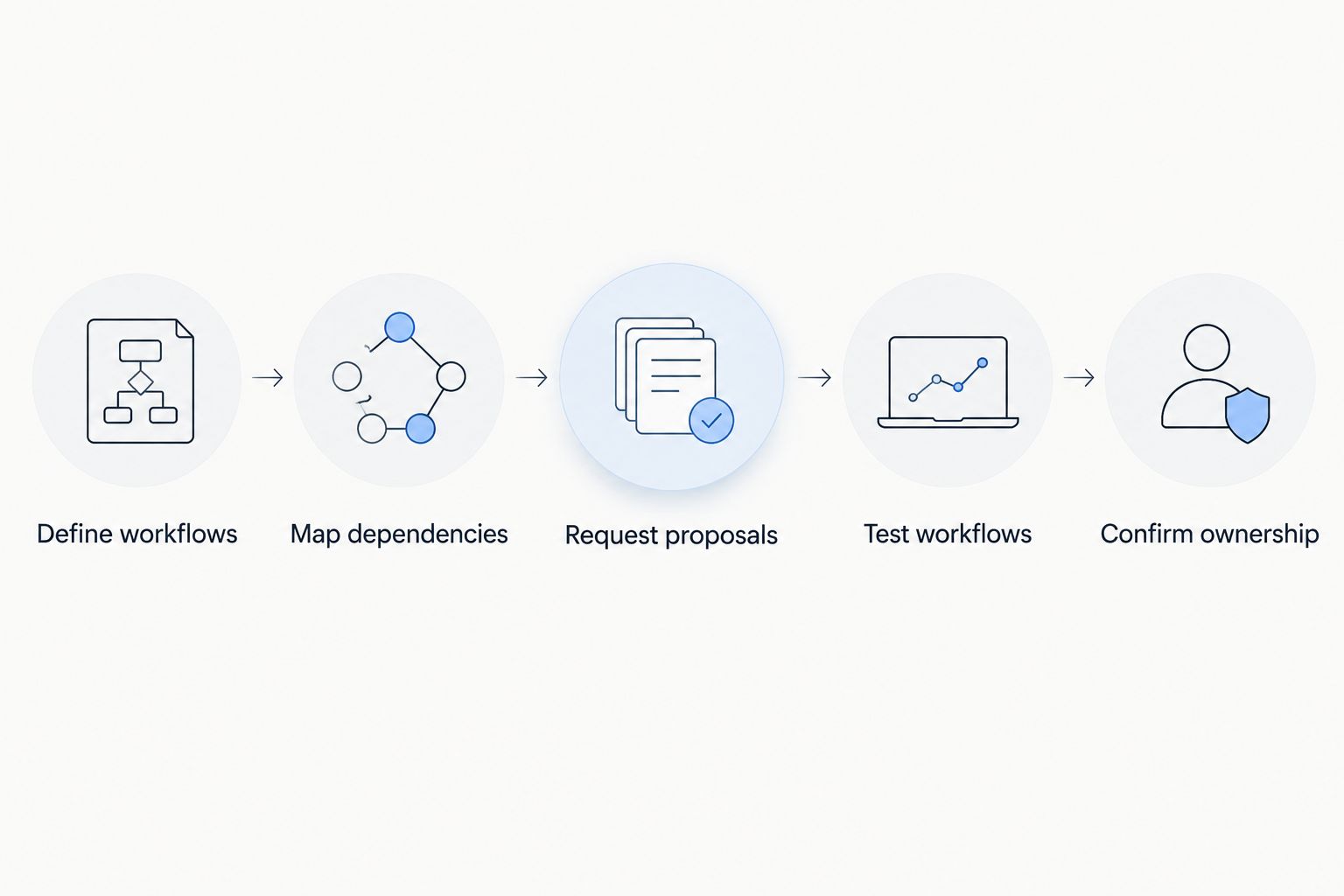
Build your 2026 budget from an agreed operating scope. The sequence below turns a broad software request into proposals you can actually compare.
Define workflows
Write down the work that needs to improve. Use actions rather than feature names: record a sale, adjust an ingredient quantity, approve a purchase or reconcile a payment.
For each workflow, name the person responsible and the evidence that proves completion. A report appearing on screen is not enough if the underlying records do not reconcile.
Map dependencies
List the equipment, data and external systems each workflow needs. Identify where information starts, where it ends and which system owns the authoritative record.
This step exposes scope boundaries before contracts are signed. It also separates a genuine integration requirement from a task your team has simply become accustomed to doing manually.
Request proposals
Give every supplier the same requirements document. Ask for software access, implementation, equipment, payment obligations, support and exit terms in a consistent format.
Request a 12-month operating view and a 24-month operating view. These are comparison periods, not market benchmarks; use them to distinguish launch commitments from continuing obligations.
Test workflows
Use representative scenarios during evaluation, including refunds, corrections and failed transfers where relevant. Ask the supplier to show the complete process rather than isolated screens.
Have the staff who perform the work assess the result. Record unresolved issues and agree how they must be addressed before acceptance.
Confirm ownership
Assign responsibility for configuration, data preparation, training, launch approval and support escalation. Make the acceptance conditions part of the agreed scope.
Set the same expectation for future changes. You need to know who maintains connections, approves updates and investigates discrepancies after launch.
How do you compare subscriptions and payment obligations?
Compare the software agreement and payment arrangements together. A restaurant's purchasing decision is incomplete if the team reviews application access but leaves processing obligations for someone else to examine later.
Build the payment comparison around your own transaction history. Use actual payment volume and transaction characteristics rather than an assumed restaurant profile, and ask each supplier to explain how its terms apply.
Keep these questions in the purchasing record:
- Is a particular payment processor required?
- Which transaction and account-related charges apply?
- What happens to the software agreement if you change processors?
- Who handles payment disputes and reconciliation questions?
- Are equipment obligations tied to the processing agreement?
Do not combine unlike obligations into an unexplained monthly total. Keep the components visible so finance can check the assumptions and operations can understand the restrictions.
How should you measure whether the investment is worthwhile?
Judge a 2026 restaurant software investment against a documented baseline. Start with the work you intend to change, then measure whether the proposed process produces the intended result.
For administrative work, record task frequency, handling time and the staff role involved. For reporting, define the required output and how you will check its accuracy. For service workflows, identify the operational failure you want to prevent.
A useful calculation is verified hours removed from a task multiplied by your actual loaded hourly labor rate. That estimates labor capacity released; it does not automatically represent cash savings or additional revenue.
Separate the business case into distinct outcomes:
- Cash expenditure avoided: Spending the business will actually stop incurring.
- Staff capacity released: Time available for other work, without assuming headcount reductions.
- Operational improvement: A defined change in accuracy, execution or management visibility.
- Revenue impact: Additional revenue supported by evidence, not attributed automatically to new software.
Use the first 30 days after launch as an initial review window, not a promised payback period. Check adoption, unresolved exceptions and the baseline measures before expanding the scope.
What should you check before signing?
Before approving a 2026 agreement, resolve the questions that affect both execution and your ability to change direction. A contract review should connect directly to the workflows you tested.
Ask for written answers about data ownership, export formats, cancellation, renewal and implementation acceptance. Confirm whether the operating team can retrieve the records needed for financial reporting and a future transition.
Check the support route against your operating hours. Do not assume that general support access means every type of issue receives the same response or resolution commitment.
Finally, identify what happens when scope changes. A new location, workflow or connection needs an approval process that makes its operational and contractual consequences clear before work begins.
When off-the-shelf isn't enough
If packaged restaurant software cannot fit your workflows, data or integrations, a custom build or integration is often the better use of budget. Hexagon IT Solutions builds, fixes and integrates custom restaurant and hospitality software for those cases, U.S.-led from Draper, Utah since 2007 with 300+ projects delivered. Explore our hospitality software development services or Book a free 30-minute consultation.
FAQ
What's included in restaurant management software cost?
Restaurant management software cost should account for software access, implementation, required hardware, payment arrangements, integrations, training and support. Check the proposal to establish which items are included and which remain your responsibility.
Is restaurant management software the same as a POS system?
Restaurant management software is not necessarily limited to point of sale. Define the required workflows explicitly, because a product's category name does not establish whether it covers inventory, staffing, purchasing or reporting.
Is an integrated restaurant platform better than separate tools?
An integrated restaurant platform is the better fit when its connected workflows meet your operating requirements. Separate tools deserve consideration when their specialist capabilities justify the additional integration and ownership responsibilities.
Should a restaurant choose custom software?
A restaurant should evaluate custom software when a documented business requirement remains unmet by packaged options. Include development, testing, maintenance and code ownership in the decision rather than assessing initial delivery alone.
How do I compare restaurant software proposals fairly?
Compare restaurant software proposals against the same workflows, locations, devices, contract periods and acceptance conditions. Request separate launch and ongoing operating commitments so differences remain visible.
One last thing
Test how you leave before deciding how you start. Ask a supplier to demonstrate a usable data export during evaluation, then confirm that the agreement gives you the access and rights you need.
A successful launch is only one part of a sound purchasing decision. Your restaurant also needs a practical path through future changes, replacement systems and supplier transitions.
Related guides
Schedule a consultation with Hexagon IT Solutions to discuss your restaurant software requirements and evaluation scope.


