






IT help desk automation has no single fixed cost: your budget depends on the workflows you automate, the systems you connect and the controls you require. For a useful 2026 estimate, separate implementation from recurring software, usage and maintenance charges; a subscription quote alone does not cover the full investment.
- How much does IT help desk automation cost? Budget for implementation, recurring charges, integration and ongoing ownership.
- Existing-platform automation suits standard workflows; custom development needs a clear business case and maintenance owner.
- Compare completed requests and human effort, not chatbot conversations or tickets closed automatically.
- For your 2026 budget, require written assumptions about usage, exceptions, approvals and support.
How much does IT help desk automation cost in 2026?
Budget for the complete operating workflow, not just the automation license. A useful estimate identifies what happens from the employee's first request through resolution, escalation and reporting.
Ask suppliers to separate the following categories. When a proposal bundles them together, request the assumptions behind the total before comparing it with another quote.
| Budget category | What the estimate should cover | What to clarify |
|---|---|---|
| Software and usage | Platform access, automation entitlements and consumption | What triggers a charge and what happens when usage grows? |
| Implementation | Workflow design, configuration, testing and rollout | Which request types and acceptance tests are included? |
| Integration | Connections to identity, ticketing and business systems | Who handles authentication, failures and interface changes? |
| Knowledge preparation | Reviewing instructions and preparing approved answers | Who maintains content after launch? |
| Security and controls | Permissions, approvals, logging and exception handling | Which actions require human authorization? |
| Ongoing ownership | Monitoring, fixes, workflow changes and support | What is included after acceptance? |
If your scope depends on connecting applications, the guide to API integration costs covers a related budget component. Keep that work visible rather than burying it inside a general setup allowance.
Why this matters
An automation project changes how work gets done, not just how employees submit tickets. A workflow that sends an answer has a different scope from one that verifies identity, requests approval, changes access and records the result.
That distinction matters when you compare proposals. The narrower quote is not an equivalent alternative if your team still performs the work behind the scenes.
For your 2026 business case, define the outcome before requesting prices. Use a statement such as: resolve an approved request, record what happened and send exceptions to a named support queue.
Which implementation approach fits your help desk?
Compare approaches against your existing systems and operating requirements. Choose the least complex approach that can complete the required workflow with appropriate controls.
| Approach | Best for | Main advantage | Main limitation |
|---|---|---|---|
| Existing-platform automation | Standard requests already handled in your help desk | Keeps workflow administration within the current platform | Depends on that platform's available functions and entitlements |
| Integration-led automation | Requests that require actions across existing applications | Connects the request to downstream work | Requires ownership of connections, credentials and failures |
| Custom development | Requirements that existing configurations cannot meet | Lets you define the workflow and operating rules | Requires responsibility for testing, maintenance and future changes |
Existing-platform automation
Best for: repeatable requests that fit your current help desk's documented capabilities. Start by checking what your existing agreement includes and which actions the platform actually supports.
The advantage is continuity: your administrators work within an environment they already manage. The limitation is scope; a configured workflow is not a substitute for a missing integration or an unsupported approval process.
Ask for a demonstration using your request fields and escalation rules. A generic demonstration does not establish that the proposed configuration meets your requirements.
Integration-led automation
Best for: workflows that must update several existing systems. Examples to assess include creating an approved account, updating an asset record or sending a request to another operational team.
The advantage is connecting the ticket to the action that resolves it. The drawback is dependency management: expired credentials, changed interfaces and partial failures all need an owner and a recovery procedure.
Custom development
Best for: requirements with a documented gap that configuration cannot close. Specify that gap before commissioning a build, including the business rule, required evidence and expected exception behavior.
Custom development gives you control over the requested behavior, but it also creates software you must maintain. Include documentation, code ownership, deployment access and handover requirements in the agreement rather than treating them as closing tasks.
Why IT help desk automation costs vary
The largest differences between proposals often sit in the definition of the work. Use these factors to make your 2026 scope explicit:
- Workflow depth: Distinguish answering a question, routing a request and executing a change. Each requires different acceptance tests.
- System connections: List every application the workflow reads from or writes to, including who provides access.
- Knowledge readiness: Identify which instructions are approved, which conflict and who can authorize changes.
- Security requirements: Specify identity checks, permission boundaries, approval rules and records of completed actions.
- Exception handling: Define what happens when information is missing, an action fails or a request falls outside policy.
- Operating ownership: Assign responsibility for monitoring, content updates, incident response and workflow revisions.
Do not use employee count as your only sizing input. Request volume, request complexity and the actions performed are separate scope questions that suppliers should address explicitly.
How do you build a budget you can defend?
Use a staged estimate so finance, IT and operations evaluate the same project. The purpose is not a detailed technical specification; it is a shared boundary around what the investment buys.
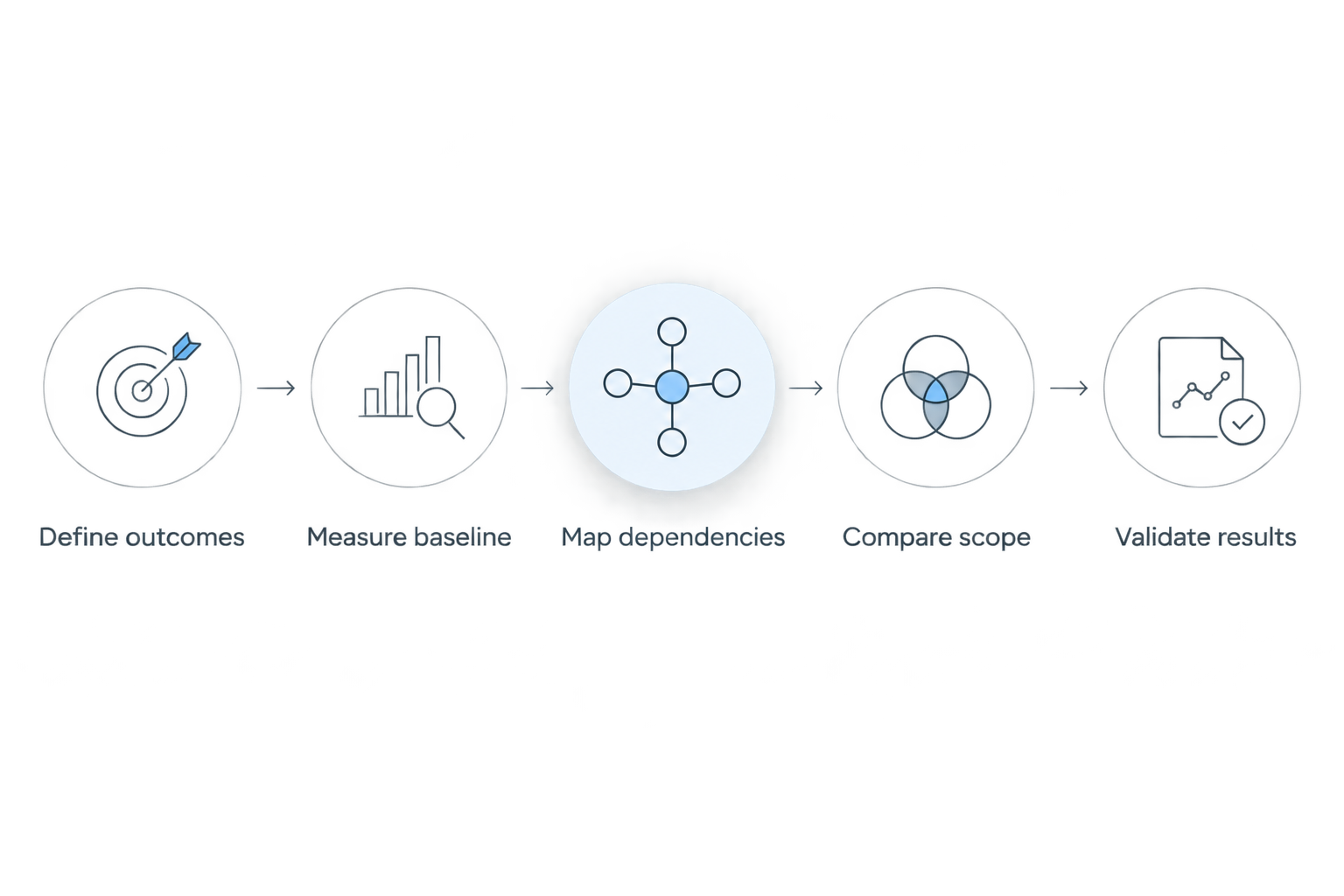
1. Define outcomes
Select a bounded workflow with an identifiable owner and a clear completion state. Write down the information it requires, the action it performs and the conditions that send it to a person.
Avoid a starting brief such as “automate IT support.” A testable brief names the request and states what counts as successful resolution.
2. Measure baseline
Use a 30-day measurement window as a planning starting point, then extend it if that period does not represent your workload. Record eligible requests, hands-on processing time, repeat contacts and reopened tickets.
Measure active work separately from elapsed time. A ticket waiting for approval does not represent continuous labor, and removing that wait is different from removing manual effort.
3. Map dependencies
Document the systems, permissions, approved content and human decisions the workflow requires. Give each dependency an owner before asking for a firm implementation commitment.
Include failure paths in this map. If the downstream application rejects an action, your workflow needs to preserve the request and tell a person what remains unfinished.
4. Compare scope
Send each supplier the same workflow description and acceptance criteria. Require a written breakdown of setup work, recurring charges, exclusions and ongoing responsibilities.
For your 2026 comparison, ask each supplier to explain how charges behave when request volume changes. Also ask which changes trigger additional implementation work rather than ordinary administration.
5. Validate results
Test completed outcomes before expanding the rollout. Include successful requests, incomplete requests, rejected approvals and system failures in the acceptance process.
A successful demonstration is not the same as an accepted operating workflow. Require evidence that the request reaches the correct final state and that a support owner can identify and recover failed actions.
How do you calculate the business case?
Separate labor capacity from cash savings. If automation frees time but your staffing and external spending remain unchanged, record the result as capacity returned to the team, not a reduction in expenditure.
Use these calculations with your own measured inputs:
- Net hours returned per month: manual processing hours avoided minus automation review, maintenance and exception-handling hours.
- Capacity value: net hours returned multiplied by your approved loaded hourly labor cost.
- Net operating benefit: capacity value plus separately evidenced benefits, minus recurring operating costs.
- Payback period: implementation investment divided by positive net monthly benefit.
Convert minutes to hours by dividing by 60 minutes per hour. Keep the measurement period consistent across the calculation; monthly request volumes and annual operating charges cannot be compared directly.
Build a 12-month operating view alongside the implementation budget. Include internal administration and content ownership even when those tasks do not generate a supplier invoice.
Do not count the same benefit twice. Reduced ticket handling and time returned to the support team describe the same benefit when they come from the same removed activity.
What should a supplier quote include?
A useful quote makes the project testable. It also explains what your team must provide and what happens when the scope changes.
Request these items before approval:
- Workflow boundary: Included request types, channels, actions and exclusions.
- Charging basis: The events or quantities that determine recurring charges.
- Acceptance evidence: Tests and records that demonstrate successful completion.
- Security responsibilities: Who approves access and maintains credentials.
- Failure ownership: Who responds when an automated action stops working.
- Handover materials: Documentation, administrator access and operating instructions.
- Change process: How both parties approve additions or revised requirements.
- Exit provisions: How you retrieve relevant records and transfer operational responsibility.
For consulting-led work, evaluate the discovery deliverable before the build proposal. It should leave you with a usable scope, dependencies and acceptance criteria rather than only a presentation.
Hexagon IT Solutions is a consultation option for founders and IT buyers evaluating help desk automation scope. Apply the same requirements to that consultation: confirm relevant delivery experience and support terms rather than assuming them.
Should you automate answers or actions first?
Start with the workflow whose result you can verify and whose risks you can control. An answer-only workflow needs approved content and a clear escalation route; an action-taking workflow also needs permission checks and confirmation that the change succeeded.
Do not treat every automated reply as a resolved request. Check whether the employee achieved the intended outcome and whether support had to repeat the work afterward.
Can you reduce scope without weakening the result?
Reduce the number of request types before removing essential controls. A narrower rollout can retain identity checks, approvals, logging and a reliable human handoff.
Defer unrelated departments, additional channels and optional reporting until the initial workflow meets its acceptance criteria. Keep those deferred items visible so they do not reappear as unplanned requirements during delivery.
When should you expand the rollout?
Expand after the initial workflow produces verified outcomes under normal and exception conditions. Review reopened requests, manual intervention, processing time and ongoing administration together.
For a 2026 rollout decision, compare those results with the original baseline and agreed business case. More automated activity is not sufficient evidence of better service.
FAQ
Does an IT help desk automation subscription cover implementation?
Do not assume a subscription covers implementation. Require the quote to identify workflow design, configuration, integration, testing and training separately, even when the supplier bundles them commercially.
Is custom help desk automation better than configuring existing software?
Custom help desk automation is justified when documented requirements exceed the existing platform's capabilities. Configuration is the better starting point when it can deliver the required outcome and controls without additional software ownership.
What hidden work should I include in a help desk automation budget?
Include knowledge maintenance, access administration, exception handling, monitoring and workflow updates. Assign an internal owner to each task so the operating budget reflects work that remains after launch.
How can I tell whether help desk automation is worth the investment?
Compare verified time returned and other evidenced benefits with implementation and operating costs. Separate capacity gains from cash savings, and subtract the effort required to review and maintain the automation.
One last thing
Put the failure path in the acceptance test. Ask what happens when approval is denied, an application is unavailable or an action completes but the confirmation fails.
That exercise exposes the difference between a convincing demonstration and a workflow your support team can operate. Require a named owner, a visible status and a recovery procedure before sign-off.
Related guides
- How long does a system integration project take?
- Is automation worth it for small businesses?
- How much does custom software development cost?
Schedule a consultation with Hexagon IT Solutions to discuss your help desk automation scope, dependencies and acceptance criteria.


