






CRM development cost in 2026 depends on the workflows, integrations, data migration and operating responsibilities included in your project—not simply the number of screens. A development estimate is not the full ownership budget: you also need to account for hosting, third-party services, maintenance and the internal work required to launch. Define the first release before comparing estimates; otherwise, you are comparing different projects.
- CRM development cost starts with scope: define workflows, data migration and integrations before requesting estimates.
- Configure an existing CRM when it meets your essential workflows; consider custom development for requirements it cannot support.
- Compare implementation and ongoing ownership separately, including maintenance, hosting and internal administration.
- Approve the first release against written acceptance checks, not a feature list alone.
How much does CRM development cost in 2026?
Your CRM development budget should cover the work required to deliver an accepted, usable system and keep it operating. Request a scope-based estimate with explicit assumptions, exclusions and responsibility for ongoing support.
Use that same written brief when discussing your project with Hexagon IT Solutions or another development provider. Consistent requirements make proposals comparable; a shared project title does not.
| Budget component | What the estimate should cover | What to clarify before approval |
|---|---|---|
| Discovery and design | Workflow mapping, requirements and interface decisions | Which decisions and documents you receive |
| Application development | Agreed records, permissions, screens and business rules | What belongs in the first release |
| Integrations | Data exchange with your other systems | Direction, frequency and failure handling |
| Data migration | Mapping, cleanup, import and validation | Who fixes incomplete or conflicting records |
| Testing and launch | Functional checks, user acceptance and deployment | What constitutes acceptance |
| Ongoing ownership | Hosting, monitoring, maintenance and administration | Who owns each responsibility after launch |
Treat this as a budgeting checklist, not a requirement to commission every item separately. An existing platform can cover part of the work, while a custom application requires explicit decisions about what your team will build and maintain.
Why this matters
A CRM project needs to improve a business process, not just replace its interface. Before approving development, identify the problem you expect the system to solve: missed follow-ups, duplicate entry, unclear ownership or a broken handoff between sales and operations.
For a 2026 investment decision, connect each requested capability to an observable result. A lead-assignment rule should support clearer accountability; a finance connection should reduce a defined reconciliation task. Neither justifies itself because it appears on a feature checklist.
The broader custom software development cost guide provides a related planning topic. Keep your CRM brief focused on the customer-facing workflows you actually need to change.
Configure an existing CRM: best for established workflows
Start with configuration when an existing CRM supports your essential process without forcing critical work outside the system. This approach means adapting available records, fields, permissions and automation rather than commissioning an entire application.
The advantage is a smaller custom-development responsibility. The limitation is dependence on the platform's supported behavior, integration methods and commercial terms.
Ask the implementation provider to demonstrate your actual workflow before you commit. A standard sales demonstration does not establish whether the platform supports your approval rules, account structure or handoff requirements.
Extend an existing CRM: best for targeted gaps
Consider an extension when the existing CRM works overall but a specific workflow or connection remains unresolved. Keep the working system and define the gap precisely enough to test independently.
The advantage is a focused scope: you address the missing capability without replacing every functioning process. The trade-off is shared responsibility across the CRM, the extension and any connected service.
Your brief should identify where each business rule lives. If both systems can update the same customer record, define which system takes precedence and how conflicting changes are resolved.
Build a custom CRM: best for requirements configuration cannot meet
Consider a custom CRM when documented business requirements cannot be met acceptably through configuration or a targeted extension. Use concrete workflow examples to justify that decision, rather than a general preference for flexibility.
The advantage is control over the application you commission, subject to your agreement and technical design. The drawback is the responsibility to fund and manage its development, operation and future changes.
Before choosing this route, establish who will own the code, documentation, infrastructure accounts and deployment process. Your access to those assets should be a contractual decision, not an assumption.
| Approach | Best for | Main advantage | Main limitation |
|---|---|---|---|
| Configure an existing CRM | Workflows supported by an existing platform | Less custom application work | Platform constraints remain |
| Extend an existing CRM | A working CRM with clearly defined gaps | Preserves functioning processes | Adds integration and support boundaries |
| Build a custom CRM | Essential requirements existing options cannot meet | Direct control over commissioned functionality | Requires ongoing application ownership |
Why CRM development cost varies
For your 2026 scope review, organize the estimate around the work each requirement creates. These are scoping questions—not market benchmarks or claims about a particular provider's rates.
- Workflow depth: Document approvals, exceptions, reassignment and handoffs, not just the normal sales path. Each required behavior needs implementation and testing.
- Integration behavior: Specify what moves between systems, which system owns the record and what happens when a transfer fails.
- Data condition: Separate importing records from correcting duplicates, missing fields and inconsistent formats. Assign responsibility for cleanup.
- Access rules: Define which roles can view, edit, export or delete information. Include restrictions that apply to individual records.
- Interface requirements: State whether users need browser access, mobile-specific behavior or offline operation. Do not leave these expectations implicit.
- Operating responsibilities: Identify who handles monitoring, backups, updates, incident response and routine administration after launch.
A short request can hide a large amount of work. For example, an instruction to connect finance and sales leaves record ownership, update rules and exception handling undecided. Resolve those questions before treating the integration as an agreed deliverable.
How do you get a usable CRM development estimate?
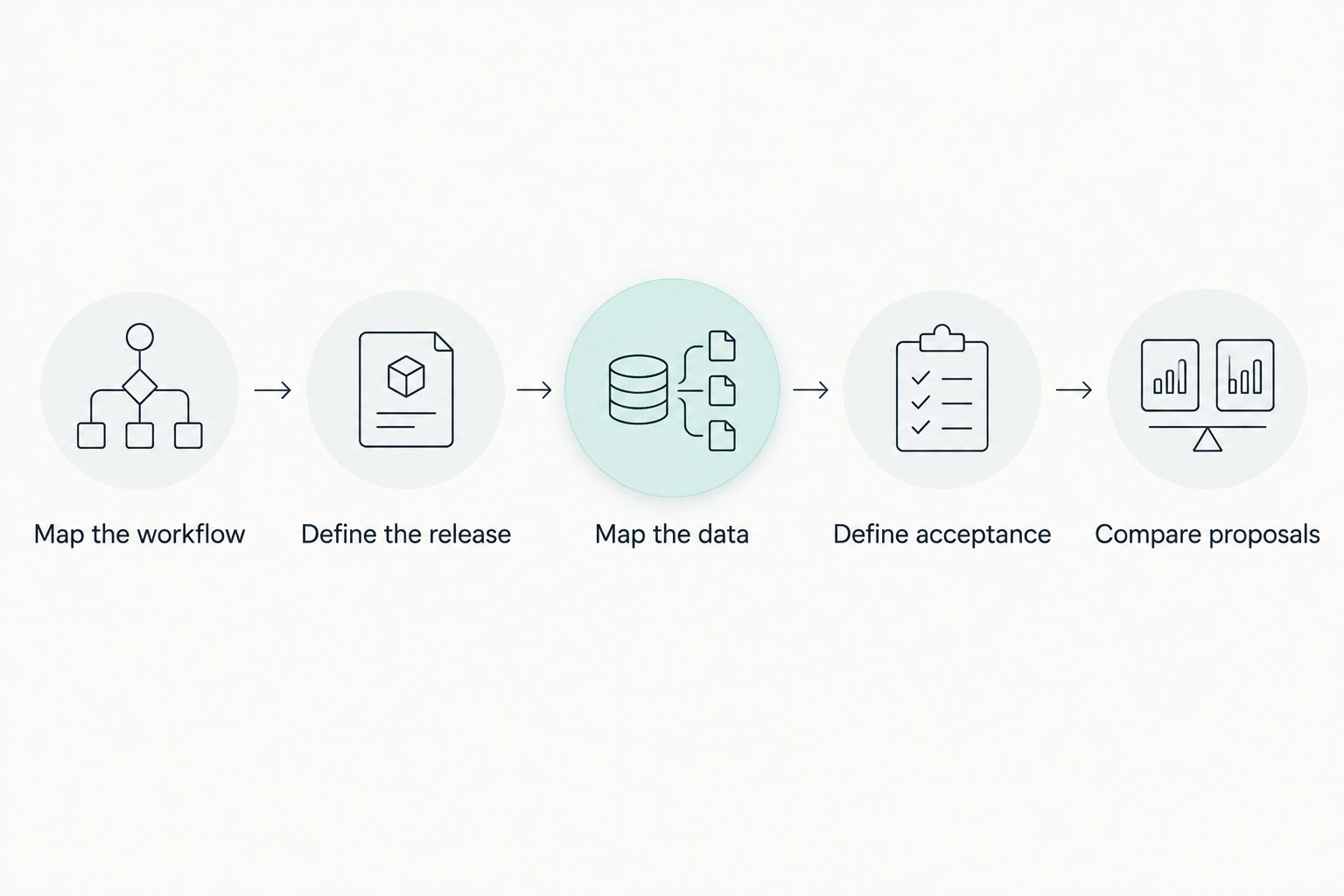
Follow this sequence before asking providers to commit to delivery. The goal is a brief that lets both your team and the provider recognize the same finished result.
1. Map the workflow
Choose 1 priority workflow for the initial scope discussion. Describe its trigger, owner, required information, decisions and completion point.
For a construction business, that could be the handoff from an accepted opportunity to project setup. For a professional services firm, it could be the handoff from a signed engagement to delivery. These are planning examples, not prescribed product features.
2. Define the release
Separate launch requirements from later improvements. A capability belongs in the first release when the agreed workflow cannot operate acceptably without it.
Keep a separate deferred list so useful ideas do not become accidental commitments. Record why each item is included or deferred; that decision becomes valuable when stakeholders request changes.
3. Map the data
List the records the workflow needs and where they currently live. Identify the source of truth for customers, contacts, opportunities and any related operational records.
Then document what happens when information is missing or conflicts. Assign cleanup decisions to someone with business authority rather than leaving developers to infer the correct answer.
4. Define acceptance
Write at least 3 acceptance checks for the priority workflow: a successful path, an invalid-data case and a permission check. Expand that set wherever additional business rules require proof.
A useful check names the starting condition, the action and the expected result. An instruction to make the CRM easy to use is not an acceptance criterion; a defined task that a named user role must complete is testable.
5. Compare proposals
Compare 2 proposals against the same brief before selecting a delivery approach. This is a purchasing discipline, not a claim that every project needs the same procurement process.
Ask each provider to identify assumptions, exclusions, dependencies and unresolved decisions. A proposal that includes migration validation is not directly comparable with one that includes only an import script.
What should a CRM development proposal include?
A usable 2026 proposal should let you distinguish committed work from assumptions. Request clear deliverables, acceptance conditions and an agreed process for changing scope.
Check these items before signing:
- Deliverables: Name the workflows, interfaces, integrations and migration tasks included.
- Dependencies: Identify access, decisions, data and third-party approvals your team must supply.
- Acceptance: State who reviews completed work and how unresolved defects are handled.
- Ownership: Specify rights to code, documentation, accounts and deployment assets.
- Support: Define the boundary between defect correction, maintenance and new development.
- Change control: Explain how a requested change affects the agreed scope and delivery plan.
Also name the business owner responsible for decisions. A development provider can implement an approval process, but your company must decide who has approval authority and what exceptions are acceptable.
How do you budget for CRM ownership after launch?
Budget for recurring operation separately from implementation. Hosting, third-party services, monitoring, maintenance and internal administration are different responsibilities; grouping them under support can conceal important exclusions.
Ask what happens when a connected system changes its interface, a backup must be restored or an employee needs different access. Your operating plan should name the responsible party for each task.
Evaluate the business result separately from delivery completion. Record the baseline for a relevant measure—such as time spent re-entering customer information—before rollout, then measure the same task afterward. Do not treat a projected improvement as an achieved result.
Can you reduce CRM scope without weakening the result?
Reduce the number of workflows before removing essential controls from the selected workflow. A narrower release can still produce a complete business outcome; an unfinished handoff leaves users responsible for closing the gaps manually.
Review every requested dashboard, field and automation against a decision or task. If nobody can explain who uses it and what action it supports, defer it until the requirement becomes clear.
For your 2026 plan, keep integration failures visible. If an automated handoff stops, a named owner needs a way to recognize the failure and resolve it. Automation does not remove the need for accountability.
FAQ
How much does CRM development cost in 2026?
CRM development cost in 2026 depends on the agreed workflows, integrations, migration and operating responsibilities. Request a scope-based estimate that separates implementation from ongoing ownership and states its assumptions and exclusions.
Is building a custom CRM better than configuring an existing CRM?
Custom development is appropriate when essential, documented requirements cannot be met acceptably through configuration or a targeted extension. Configuration is the better starting point when an existing platform supports the required workflow, because it avoids commissioning functionality already available.
What should I include in a CRM development brief?
Include the priority workflow, user roles, required records, integration behavior, migration responsibilities and acceptance checks. Separate first-release requirements from deferred improvements so providers estimate the same project.
Does a CRM development estimate include maintenance?
Maintenance is included only when the proposal explicitly includes it. Confirm responsibilities for updates, monitoring, backups, integration failures and new functionality rather than assuming they fall under a general support commitment.
How can I reduce the scope of a custom CRM project?
Reduce scope by launching a complete priority workflow before adding unrelated workflows and reports. Retain the permissions, data validation and failure handling needed for that workflow to operate correctly.
One last thing
Ask the provider to walk through a failed handoff, not just a successful demonstration. What happens when a customer record is incomplete, a connected system rejects an update or the assigned employee leaves?
Those answers make the operating responsibilities concrete. Approve the workflow only when you understand both its successful path and who handles its exceptions.
Related guides
- CRM development for insurance agencies
- Is custom software development worth it for small businesses?
- Connecting Dynamics 365 to a custom CRM pipeline
Schedule a consultation with Hexagon IT Solutions to discuss your CRM requirements, first-release scope and development approach.


