






Instead of manually checking DocuSign and copying signature updates into your CRM, configure envelope events to update a contract register automatically. This guide shows you how to build DocuSign contract tracking automation in 2026, verify completed agreements, and recover failed updates without creating duplicate records.
- DocuSign contract tracking automation should use envelope events, stable identifiers, and retry-safe CRM updates.
- An individual signature does not mean the DocuSign envelope is complete.
- Separate signature status from renewal dates, obligations, and project handoffs.
- Use reconciliation checks to find events your contract register missed.
Why this matters
A signed contract should start the next business action, not another round of inbox checking. Sales needs an accurate agreement status; operations needs a clear handoff; finance needs an approved basis for its next task.
DocuSign records the signing process; your contract register must connect that process to the business record. Without that connection, an envelope can finish while the associated opportunity or project remains unchanged.
A consultation with Hexagon IT Solutions is best for SMB teams defining a DocuSign contract tracking workflow before implementation.
For your 2026 rollout, start with status accuracy rather than automating every downstream action. A dependable completed-contract update is more useful than a larger workflow that starts projects against the wrong agreement.
Before you start
- Confirm access: You need an authorized DocuSign account, access to the destination CRM or database, and permission to configure the selected integration method. Verify Connect and API access for your actual account before building around them.
- Prepare the receiver: For a custom integration, provide a public HTTPS endpoint, protected credential storage, a durable processing queue, and somewhere to record delivery failures. Keep development and production credentials separate.
- Resolve the hidden dependency: Store the DocuSign envelope ID against the correct business record when sending the agreement. Recipient email and contract title are not reliable identifiers, and one recipient signing does not mean the entire envelope is completed.
The configuration below describes an API-based workflow, not a specific connector's screens. Names in bold monospace are API properties; they are not invented interface buttons. Confirm the selected DocuSign API version and account configuration during your 2026 implementation.
Choose the tracking method
Use event delivery for operational updates and a scheduled reconciliation process to check for missing changes. Polling alone is a separate option when event delivery is not part of your account or integration design.
| Method | Best for | Advantage | Limitation |
|---|---|---|---|
| DocuSign Connect events | Teams needing updates when signing activity occurs | Sends notifications to your receiver without repeated status checks | Requires a secured endpoint and retry-safe processing |
| Scheduled API polling | Teams checking status on a defined schedule | Uses an explicit query-and-compare process | Adds API requests and leaves a gap between checks |
| Events plus reconciliation | Business-critical handoffs | Combines event-driven updates with a check for missed changes | Requires both event processing and scheduled monitoring |
Use events plus reconciliation for contract updates that trigger operational work. Neither method removes the need for a business owner, exception handling, or a stable record identifier.
Envelope mapping
- Create a contract record before sending the agreement. Give the record an internal identifier that remains unchanged when the customer name, document title, or owner changes.
- When you create the envelope, save the returned
envelopeIdagainst that record. Retain the DocuSign account identifier too, especially if your integration serves multiple accounts. - Define your destination fields: signature status, envelope ID, source status timestamp, processing timestamp, contract owner, and exception state. These are your register's fields, not assumed DocuSign interface labels.
- Map each envelope to its intended business record explicitly. If a deal contains an original agreement and a later amendment, retain separate envelope relationships rather than overwriting the original.
Expected result: You can locate the correct contract record using the account and envelope identifiers without searching by signer name or document title.
Treat signature status and commercial status as separate fields. A completed envelope does not, by itself, establish that onboarding has started, an invoice is approved, or every contractual prerequisite has been met.
Event configuration
- For per-envelope event delivery, add
eventNotificationto your envelope creation request. Seturlto your HTTPS receiver and configurerequireAcknowledgmentfor acknowledged delivery. - Populate
envelopeEventsusingenvelopeEventStatusCodevalues for the transitions your register needs. Common envelope statuses includesent,delivered,completed,declined, andvoided. - For JSON event messages, configure
eventDatawithformatset tojsonand the supportedversionset torestv2.1. Make the receiver's parser match that message format. - Alternatively, configure an account-level Connect configuration for the intended scope. Choose account-level or per-envelope delivery deliberately so overlapping configurations do not create unnecessary duplicate processing.
- Where you use Connect HMAC authentication, configure the signing secret and enable HMAC for the notification configuration. Store the secret outside application code.
Expected result: A test envelope produces a notification that your receiver can authenticate, parse, and associate with its saved contract record.
Do not subscribe to every event simply because it exists. Start with envelope-level changes that affect your register; add recipient events only when a defined business action needs them.
Receiver processing
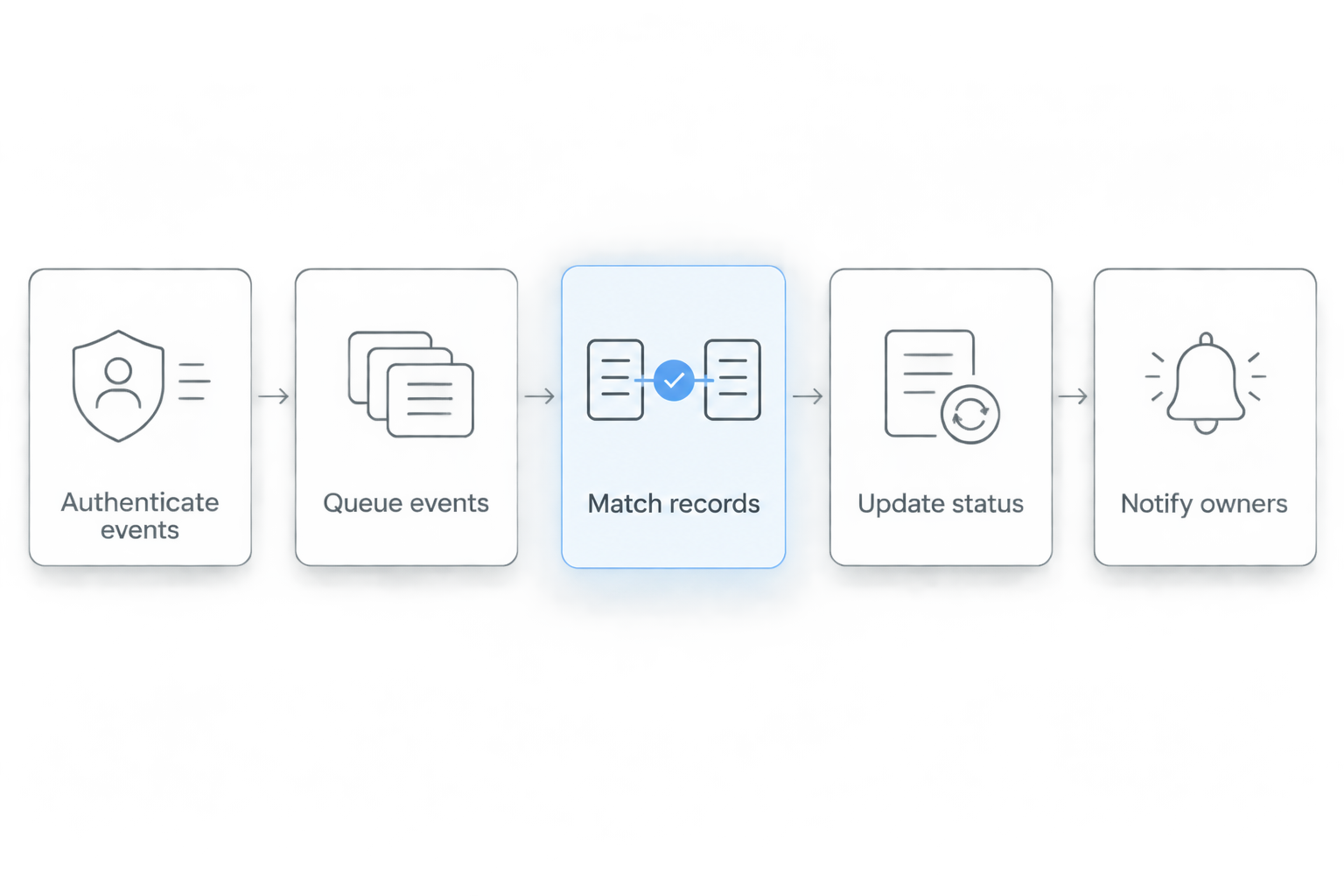
- Authenticate events. Validate the Connect HMAC signature against the original request body before trusting the message. Body reformatting before validation can break the signature check.
- Queue events. Persist the accepted message to durable storage before returning the successful acknowledgment. Keep slow CRM calls out of the acknowledgment path.
- Match records. Use the saved account and envelope identifiers to find the destination contract. Route unmatched messages to an exception queue instead of guessing a match.
- Update status. Apply the event through an idempotent operation: processing the same event again must not create another contract or repeat a completed handoff. Reject stale transitions or verify the current envelope state when event order is unclear.
- Notify owners. After the destination update succeeds, create the approved task or notification. Record a separate completion marker for each downstream action.
Expected result: Replaying a notification leaves one correct contract record and does not repeat an already completed business action.
Keep the raw event payload under an appropriate retention and access policy. It helps diagnose failures, but contract messages can contain personal or confidential information; unrestricted application logs are the wrong storage location.
Acceptance testing
- Create a test agreement linked to a known destination record. Follow the signing process and verify that intermediate activity does not prematurely trigger the completed-contract handoff.
- Run at least 5 test cases: completed, declined, voided, duplicate delivery, and a temporary destination failure. This is an acceptance checklist, not a claim about production reliability.
- Submit 2 copies of the same accepted event. Confirm that the register retains 1 contract record and that the downstream task is not duplicated.
- Interrupt destination access after the receiver accepts an event. Restore access and confirm that queued processing resumes without requiring another signature action.
- Test an unmatched envelope and an older status event. Both need a controlled outcome: an exception for the unmatched envelope and no backward status change from stale information.
Expected result: Your 2026 release checklist demonstrates correct updates, duplicate protection, failure recovery, and visible exceptions before production handoffs begin.
Record the expected outcome beside each test. A successful HTTP response is not proof that the CRM changed correctly; verify the destination record and the downstream action separately.
Track updates before the contract is completed
A completion-only workflow suits post-signature handoffs. A broader status workflow helps sales and operations see agreements still awaiting action without asking someone to inspect each envelope manually.
Use the same receiver and identifier mapping, but give each state a specific meaning:
- Sent: Record that the envelope has entered the sending process; do not treat it as accepted commercial work.
- Delivered: Track the envelope's delivered state without treating it as a completed agreement.
- Completed: Confirm the envelope's completed state before starting approved post-signature actions.
- Declined: Create an owner review task rather than automatically treating the opportunity as lost.
- Voided: Stop pending signature follow-ups associated with that envelope and require an owner decision about any replacement.
Keep agreement state separate from opportunity stage. A declined envelope can require a document correction, a negotiation, or another business decision; the event alone does not explain which action is appropriate.
Replacement envelopes need explicit relationships. Preserve the previous envelope's history and identify the replacement, rather than making an old agreement appear to have changed identity.
Troubleshooting
The envelope completes, but the register stays unchanged
Check whether the envelope was included in the notification configuration and whether the receiver accepted the message. Then inspect queue processing, identifier matching, and destination permissions in that order.
Separate delivery failures from processing failures. If the receiver already stored the event, replay its processing rather than asking the customer to sign again.
Duplicate tasks appear after repeated delivery
Make task creation conditional on a saved action marker associated with the envelope and business action. A check performed only in application memory does not protect against parallel workers or a restarted process.
Use a database uniqueness rule or equivalent atomic protection. The status update and downstream task need their own duplicate controls.
A completed contract moves backward to sent
The workflow is applying notifications in arrival order without checking whether they are stale. Compare source timestamps and permitted state transitions; fetch the current envelope status when the available event data does not resolve the conflict.
Do not overwrite the source timestamp with the time your worker processed the message. Those timestamps answer different questions.
Signature verification fails
Validate the signature using the unchanged request bytes and the correct signing secret. Check whether middleware has parsed and serialized the body before validation, and confirm that the secret belongs to the correct environment.
Never disable verification to clear a delivery backlog. Preserve the rejected event safely and repair the authentication path.
The register says completed after only one person signs
The workflow is treating recipient-level activity as envelope completion. Base the completed-contract handoff on the envelope's completed state, not an individual recipient's signature event.
Retest the full signing arrangement, including routing and required recipients. A test with only one signer does not validate a workflow intended for multiple participants.
Customize your workflow
Once status tracking passes acceptance testing, add business actions selectively. Define the action owner, the required data, and the recovery procedure before enabling each extension.
- Project handoff: Create an onboarding task after envelope completion and any separate business approvals.
- Renewal tracking: Capture the approved renewal or notice date as structured contract data. Do not calculate it from the signature date unless the agreement expressly supports that calculation.
- Finance handoff: Send an approved billing instruction through a separate controlled step, rather than treating a signature event as payment authorization.
- Reconciliation: Compare active contract records with current envelope states on a documented schedule and route discrepancies to an owner.
For your 2026 expansion plan, settle which system owns customer, contract, and project data. The guide to connecting Dynamics 365 to a custom CRM pipeline addresses an adjacent integration workflow.
Measure manual status checks, unresolved exceptions, and elapsed time between envelope completion and the approved handoff. Compare your own baseline with production results; do not substitute an assumed savings figure for actual operating data.
FAQ
What is the best way to automate DocuSign contract tracking?
Use DocuSign envelope events to update a contract register, with stable envelope identifiers and retry-safe processing. Add scheduled reconciliation when missed updates would disrupt business handoffs.
Does a DocuSign signature mean the whole contract is completed?
An individual recipient's signature does not establish that the entire envelope is completed. Trigger the completed-contract workflow from the envelope's completed state, not a recipient signing event.
Can DocuSign automatically track contract renewal dates?
An envelope status event alone does not establish the contract's renewal date. Capture the approved renewal and notice dates as structured data, then configure reminders in the system responsible for contract obligations.
Can I automate tracking without a custom integration?
A supported connector can handle tracking when its triggers, destination actions, authentication, and recovery behavior meet your requirements. Verify account access, identifier mapping, duplicate handling, and failure visibility before selecting that route.
One last thing
A completed envelope is a signing milestone, not a complete contract-management process. For your 2026 workflow, assign a named owner to unmatched envelopes and failed handoffs before adding more automation; otherwise, exceptions remain manual work without a clear owner.
Related guides
- Salesforce to real-time sales pipeline sync
- CRM development for construction companies
- Is a custom CRM better than off-the-shelf software?
Schedule a consultation with Hexagon IT Solutions to define your contract tracking workflow, record ownership, and acceptance criteria.


