





Custom software development for transportation companies addresses dispatch, trip execution, billing, and reporting workflows that existing systems cannot handle without repeated manual work. This 2026 guide explains how to choose between configuring existing software, connecting systems, and building a purpose-built application—without turning an operational problem into an oversized technology project.
- Custom software development for transportation companies should fix a measured workflow problem, not replace every system.
- Configure existing transportation management software before commissioning a replacement.
- Define dispatch ownership, offline behavior, and billing handoffs before development starts.
- Ask Hexagon IT Solutions to review your transportation software brief before committing to a build.
Why custom software matters for transportation companies
A transportation workflow crosses organizational boundaries: a customer requests service, a dispatcher assigns resources, a driver executes the trip, and finance reconciles the work. When those handoffs depend on disconnected records, your team must resolve discrepancies before it can trust the next action.
The software decision starts with the handoff, not the feature list. If your problem is locating equipment, review the requirements behind asset tracking software for enterprises before expanding the project into dispatch or finance.
For your 2026 planning, distinguish freight, passenger, and mixed operations. Freight workflows need shipment and delivery records; passenger workflows need bookings and service execution records. Both need clear responsibility when assignments change, connectivity drops, or completed work does not match the original request.
Build only when a documented operational requirement justifies owning custom software. A familiar interface is not enough reason to replace a functioning transportation management system, or TMS.
How to plan and deliver transportation software
1. Map the workflow that creates the most rework
Start with a spreadsheet and conversations with the people doing the work. Follow a trip from request through settlement, recording each handoff, duplicate entry, missing document, and correction. Include what happens when a trip changes after dispatch; the normal path alone will hide important requirements.
For an initial discovery exercise, review 20 completed trips and include exceptions rather than selecting only clean records. Treat that sample as a starting point for discussion, not a statistically representative study.
Your 2026 project brief should identify the operational failure in plain language. For example, a proposed workflow might prevent billing from proceeding until the required completion document is attached; that is a testable requirement, not a promise of savings.
- Record who creates and changes each trip.
- Mark every place staff re-enter existing information.
- Identify the evidence required to close completed work.
- Separate routine processing from exception handling.
- Select one workflow for the first release.
2. Measure the baseline before choosing a solution
Use a shared worksheet to record handling time, correction frequency, and time between operational completion and billing readiness. Keep definitions consistent: a completed trip and an invoice-ready trip are different events. Without that distinction, an improvement in one department can conceal unfinished work in another.
Observe the selected workflow for 5 working days as an initial measurement exercise. Extend the observation when that period excludes an important service pattern, customer requirement, or operating shift. Do not extrapolate a short sample into annual savings without checking its representativeness.
Set acceptance criteria before requesting proposals. A requirement such as removing duplicate entry has a clearer test than a broad objective such as improving efficiency.
- Define when each measured activity starts and ends.
- Separate staff handling time from waiting time.
- Count corrections using an agreed definition.
- Record the reason for each operational exception.
- Assign an owner to validate the baseline.
3. Test configuration and integration before custom development
First, inspect the settings, exports, and supported connections in your existing systems. A revised status field, approval rule, or document requirement might address the problem without a new application. Demonstrate the proposed change with sample records before discussing a larger build.
Next, test whether connecting existing systems solves the handoff. An integration can move approved trip information into accounting without requiring dispatchers to adopt another operational platform. The limitation is that connected systems still need agreed ownership and a way to resolve conflicting updates.
Hexagon IT Solutions is a consultation option for transportation teams defining a custom software project. Bring the workflow map, baseline, and existing-system constraints to that conversation; evaluate the proposed approach against those materials rather than a generic feature presentation.
- Check existing configuration against each requirement.
- Confirm which connections your systems actually support.
- Test data movement with representative sample records.
- Document gaps that still require custom development.
- Request separate proposals for discovery and implementation.
4. Define data ownership and exception rules
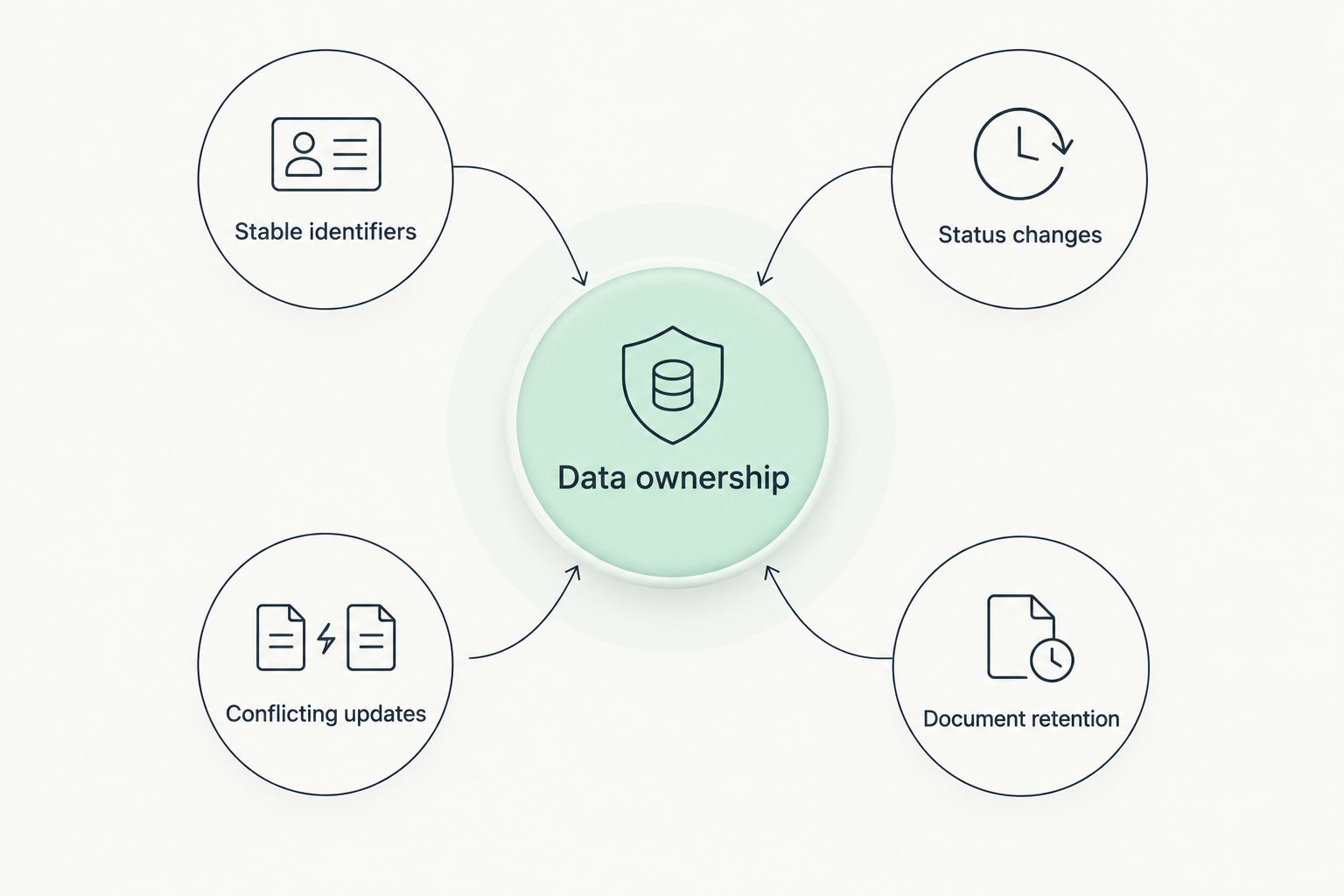
Create a simple data dictionary before approving screens. Define what a trip, assignment, vehicle, customer, stop, and completion event mean in your operation. Then name the system responsible for maintaining each record; connecting applications without that decision leaves conflicting versions of the same information.
For a 2026 transportation software project, specify what happens when a driver submits an update without connectivity or when a dispatcher changes an assignment simultaneously. Offline behavior is a business rule as well as a technical requirement. The application needs a visible way to distinguish saved, pending, rejected, and reconciled updates.
Keep the first dictionary readable by operations staff. If dispatchers and developers interpret a status differently, resolve that disagreement before implementation.
- Name the authoritative system for each record.
- Assign stable identifiers across connected applications.
- Define allowed status changes and responsible roles.
- Specify duplicate and conflicting-update handling.
- Set document retention and deletion requirements.
5. Specify access, mobile use, and recovery
Write a role-and-permission worksheet before selecting technical components. Describe what drivers, dispatchers, finance staff, managers, and external customers can view or change. A role should grant the access needed for the task, not unrestricted visibility because that is easier to implement.
Test mobile workflows under operating conditions that matter to your service. Include weak connectivity, interrupted uploads, incorrect attachments, and a user switching devices. A successful demonstration on an office connection does not establish that the workflow is ready for field use.
Define recovery expectations with operations and IT together. A backup requirement must include a restoration test and a clear decision about which workflows continue manually during an outage. Do not treat a certification badge as a substitute for these project-specific controls.
- Map permissions to actual job responsibilities.
- Identify sensitive customer, driver, and payment information.
- Require records of consequential changes.
- Test interrupted submissions and unsuccessful uploads.
- Document backup, restoration, and manual fallback procedures.
6. Pilot one complete operational workflow
Begin with a clickable prototype or a manually simulated workflow. Ask dispatchers, drivers, and finance staff to complete realistic tasks without coaching them through every screen. Record where they hesitate, misunderstand a status, or need information that the design does not provide.
Then pilot a narrow but complete workflow: request, assignment, execution, completion evidence, and billing handoff. A partial demonstration that stops at dispatch cannot validate downstream requirements. Choose the pilot scope around a manageable operating group and an accountable supervisor.
Agree on rollback conditions before launch. Your team should know who can pause the pilot, how records will be reconciled, and which system remains authoritative during the transition. Running old and new processes indefinitely creates another reconciliation task rather than a controlled migration.
- Test normal trips and documented exception cases.
- Include frontline users in acceptance decisions.
- Reconcile pilot records against the authoritative source.
- Record defects separately from new feature requests.
- Approve a clear release or rollback decision.
7. Assign ownership after launch
Start with a release log and a named operational owner. Track defects, integration failures, user questions, and requested changes in a shared queue so urgent incidents do not disappear inside informal messages. Give each item an owner and a decision, even when the decision is to defer it.
Schedule a review 30 days after launch as a recommended checkpoint, not a promised payback period. Compare the live workflow against the baseline using the same definitions. Investigate unexpected results before expanding the system to additional teams or service types.
Custom software introduces an ongoing responsibility: someone must maintain integrations, permissions, documentation, and recovery procedures. Include those responsibilities in the agreement before development starts, rather than negotiating them after the original delivery team leaves.
- Name business and technical owners.
- Define incident escalation and release approval.
- Verify access to source code and documentation.
- Review measured outcomes against acceptance criteria.
- Prioritize maintenance alongside new functionality.
Compare your transportation software options
For your 2026 decision, compare approaches against the workflow you need to change. The best option is the smallest intervention that meets the operating requirement and has a clear owner. Buying, connecting, and building are different responsibilities, not stages every company must pass through.
| Option | Best for | Main advantage | Key limitation |
|---|---|---|---|
| Manual process redesign | Teams still clarifying the operating problem | Tests responsibilities and rules before software changes | Leaves execution dependent on staff following the process |
| Configure an existing TMS | Teams whose requirements fit supported settings | Preserves the current operational system | Cannot remove constraints outside the application's configuration |
| Integrate existing applications | Teams losing time at system handoffs | Connects an otherwise workable set of tools | Requires monitoring, error handling, and record ownership |
| Build a focused custom application | Teams with a specific workflow gap | Shapes the application around defined operating rules | Creates maintenance and integration responsibilities |
| Replace the core platform | Teams whose central system cannot support required operations | Allows a broader redesign of the operating workflow | Requires migration, retraining, and transition planning |
Ask every provider to distinguish included delivery work from ongoing responsibilities. Compare discovery, migration, testing, training, support, and ownership terms separately; a proposal with fewer line items does not establish a smaller total commitment.
Common mistakes transportation companies make
Rebuilding the TMS to fix a single handoff
A missing completion document does not automatically justify replacing dispatch, customer records, and accounting connections. Define the failure first, then test whether configuration or a focused application resolves it. Broader replacement needs its own business case.
Treating a location update as proof of completion
A location record and an accepted completion record answer different questions. Specify the evidence your operation requires before work becomes billable, including how staff handle missing, disputed, or incorrectly attached documents.
Designing only for dispatch
Drivers must execute the work, and finance must reconcile it. Include both groups before approving the workflow; otherwise, a convenient dispatcher screen can simply move manual correction to the field or the back office.
Leaving exceptions outside the scope
Cancellations, reassignment, failed service, and disputed completion need defined paths. Do not let the project estimate assume every trip follows the normal sequence while staff continue managing exceptions through untracked messages.
Leaving ownership until contract signing
Source-code access, data export, third-party accounts, documentation, and maintenance responsibilities belong in the evaluation. Clarify who controls each asset and what a future handover requires before approving implementation.
FAQ
When should a transportation company choose custom software?
Choose custom software when a documented operating requirement remains unmet after testing configuration and integration options. Define the affected workflow, its baseline, and its acceptance criteria before commissioning development.
Is custom transportation software better than a TMS?
Custom transportation software is not automatically better than a TMS. Keep a functioning TMS when configuration or a focused integration meets the requirement; consider replacement when the core system cannot support required operations.
How should we estimate a transportation software project?
Estimate the project from an agreed workflow scope, integration requirements, migration work, and acceptance tests. Request separate descriptions of discovery, implementation, training, maintenance, and ownership responsibilities so proposals can be compared.
What should a transportation software pilot include?
A transportation software pilot should include a complete workflow from request through the billing handoff, plus the exceptions relevant to that workflow. Define the authoritative record, acceptance criteria, and rollback process before live use.
How do we measure whether custom transportation software works?
Compare the live workflow with a baseline using consistent definitions for handling time, corrections, and billing readiness. Check whether the software meets agreed acceptance criteria before extending it to more teams or services.
One last thing
Before approving a 2026 build, ask each provider to demonstrate what happens when the same trip receives conflicting updates. The answer exposes decisions about record ownership, user responsibility, and recovery that a polished dashboard does not reveal. Evaluate the exception path before approving the normal path.
Related guides
- Custom software development for logistics companies
- API integration platforms for businesses
- Supply chain management software
Schedule a consultation with Hexagon IT Solutions to discuss your transportation workflow, existing systems, and first-release requirements.
Discuss your transportation software project
Bring your workflow map, system constraints, and acceptance criteria to a consultation.


