






Logistics companies’ custom software development is the creation of software around shipment, warehouse, or dispatch workflows to reduce manual work and improve operational control. If your team rekeys orders, chases shipment updates, or reconciles disconnected systems, this 2026 guide explains what to build, what to keep, and how to release changes without disrupting operations.
- Custom software development for logistics companies fits workflows that standard transport management systems cannot adequately support.
- Keep working systems; build around the operational gaps rather than replacing everything.
- Define shipment ownership, integration failures, and exception handling before choosing technology.
- Consider Hexagon IT Solutions for a development consultation after documenting the workflow and acceptance criteria.
Why custom software matters for logistics companies
A shipment does not follow a single application boundary. Booking, dispatch, warehouse handling, carrier updates, delivery evidence, and invoicing involve different people and records. Your software plan must connect those handoffs without losing responsibility for the next action.
Start by comparing your process with established supply chain management software options. Custom development belongs where a documented operational requirement remains unmet—not wherever an existing screen feels inconvenient.
For a 2026 investment decision, distinguish missing functionality from inconsistent execution. If staff use different shipment identifiers or disagree about delivery status, a new application will inherit those disagreements unless you resolve them first.
Build around a measurable operating constraint, not a general ambition to modernize. The strongest project brief names the affected workflow, its owner, the current failure, and the result that makes development worthwhile.
How to plan and deliver logistics software
1. Map the workflow before selecting technology
Start manually with a shared document and a sample of completed shipments. Trace each shipment from order receipt to invoice approval, including the phone calls, spreadsheets, and messages that sit outside your core systems.
As a practical starting exercise, review 30 completed shipments. This is a suggested discovery sample, not a statistical benchmark. Include successful deliveries, failed attempts, missing documents, and disputed charges so your requirements reflect exceptions as well as routine work.
For your 2026 requirements brief, describe each problem as an observable event. Replace “poor visibility” with “customer service cannot identify who owns a delayed shipment.” That wording gives developers something testable and gives operations a clear owner.
Separate rules from habits. A customer contract requirement is different from a spreadsheet column that nobody remembers creating.
- Record the trigger, owner, inputs, and completion condition for each handoff.
- Identify where staff enter the same information again.
- Capture decisions that require approval or judgment.
- List documents needed before billing can proceed.
- Mark which exceptions stop work and which permit continuation.
2. Set the baseline and choose one outcome
Measure the current process in a spreadsheet before commissioning a dashboard. Use records your team can inspect: timestamps, correction logs, unresolved exceptions, and invoice holds. Define the start and end of each measure so everyone calculates it consistently.
Choose 1 workflow for the first release. Dispatch reassignment, proof-of-delivery collection, or shipment exception handling can each form a bounded project; combining all of them creates dependencies that need separate evaluation.
Use a 2-week observation window as an initial planning exercise, extending it when the sample excludes important operating conditions. These are suggested planning boundaries, not promised delivery times or performance targets.
Tie the proposed change to business value without inventing savings. Calculate staff time from observed handling effort and approved labor assumptions; treat faster billing as a cash-timing improvement unless finance confirms another effect.
- Define the primary measure and its calculation.
- Record the baseline source and observation dates.
- Name the operational owner responsible for improvement.
- Set acceptance thresholds using your actual baseline.
- Include an error or service-quality measure alongside speed.
3. Choose what to configure, connect, or build
Start with the systems you already operate. Check whether configuration, an export, a supported integration, or a revised process solves the problem before commissioning another application. A custom interface is not automatically better than a well-configured existing workflow.
Hexagon IT Solutions is a consultation option for logistics teams evaluating custom software development. Use a development consultation to test a defined scope against your system constraints, rather than asking for an entire platform before discovery.
Ask any development partner to explain what remains in your transport management system, warehouse management system, and accounting system. The proposal should identify where new code is necessary and where existing capabilities remain authoritative.
A connected application can preserve familiar tools, but it also adds interfaces to maintain. A full replacement removes some boundaries while expanding migration and operational responsibility. Neither choice wins without a workflow-level comparison.
- Document requirements your current software cannot meet.
- Separate mandatory rules from preferred interface changes.
- Compare configuration, integration, and custom development.
- Request assumptions, exclusions, and acceptance criteria.
- Confirm ownership of source code, deployment access, and documentation.
4. Define data ownership and failure behavior
Start with a spreadsheet listing each important data field, its owner, and every system that reads or changes it. Shipment identifiers, customer references, delivery status, locations, and invoice references need explicit ownership.
For a 2026 integration design, require the team to explain what happens when systems disagree. A carrier update arriving late should not silently overwrite a newer event, and a retried request should not create another shipment.
Define idempotency in plain language: repeating the same request must not repeat the business action. Also define how staff recognize and recover a failed transfer; hidden failures leave operations working from incomplete information.
Keep financial authority clear. A shipment application can request billing or display invoice status without becoming the authoritative accounting record. Choose those boundaries deliberately rather than letting each integration decide them independently.
- Assign an authoritative system to each shared field.
- Specify identifiers, timestamps, time zones, and measurement units.
- Define duplicate handling and out-of-order event rules.
- Document retries, alerts, and manual recovery actions.
- Limit access according to operational responsibility.
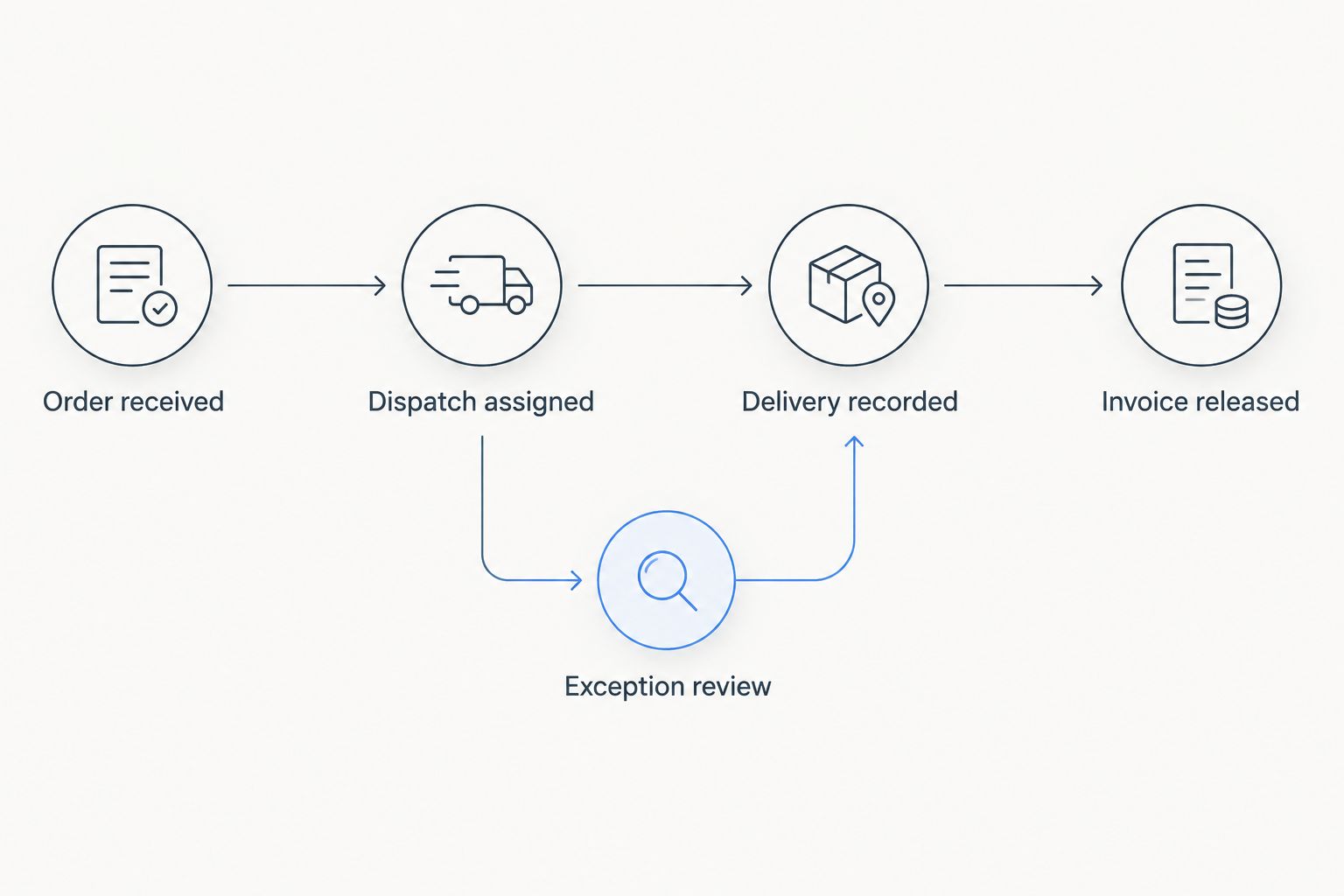
The integration model should show both the normal event path and the recovery path. Use these labels when reviewing the design: Order received, Dispatch assigned, Delivery recorded, Invoice released, and Exception review.
5. Pilot the workflow under real operating conditions
Test the process manually with supervisors before releasing automation. Walk through representative records and ask the people responsible for each handoff to explain what they would do next. Resolve unclear ownership before testing software behavior.
Then pilot the smallest complete workflow with a defined operating group. A dispatch-to-delivery process is not complete if the pilot excludes failed deliveries, corrections, or the documentation needed by finance.
Use actual operating constraints when testing mobile work. Check interrupted connectivity, resumed uploads, device permissions, and whether a driver can complete the task without unsafe interaction. Do not assume a successful office demonstration proves field readiness.
Keep a fallback that staff understand. The release plan must explain how to continue operations, reconcile records created during an interruption, and return to normal processing without losing accountability.
- Write acceptance tests using real, appropriately protected examples.
- Include cancellation, reassignment, duplicate events, and missing evidence.
- Test access permissions for each operating role.
- Rehearse outage recovery and record reconciliation.
- Obtain approval from operations, finance, and the system owner.
6. Assign ownership before expanding the release
Start with a simple issue register and a named process owner. Record what failed, the operational consequence, the workaround, and who can approve the fix. A reporting tool helps only when someone owns the response.
Before expanding a 2026 release, compare the pilot with the baseline using the same definitions. Separate improvements caused by software from changes in shipment mix, staffing, or operating procedures; otherwise, you cannot judge the result fairly.
Review ongoing responsibilities as carefully as the initial build. Integrations, access permissions, dependencies, backups, and recovery procedures need owners after launch. Custom software creates control over the workflow and responsibility for keeping that workflow usable.
Expand only after the current group can operate without constant developer intervention. New branches, customers, or shipment types introduce rules that the pilot might not cover.
- Assign business ownership and technical maintenance responsibility.
- Review errors, workarounds, and unresolved exceptions.
- Verify backups through an actual restoration exercise.
- Document support escalation and release approval.
- Require operational evidence before expanding scope.
Compare the development options
Choose an approach by the gap it closes, not by the number of features in a demonstration. For your 2026 decision, compare implementation responsibility, workflow fit, and the systems each option leaves in place.
| Option | Best for | Main advantage | Key limitation |
|---|---|---|---|
| Configure an existing logistics platform | Standard workflows already supported by your system | Keeps the workflow within an established application | Configuration remains bounded by the platform’s capabilities |
| Add integrations and a focused custom application | A specific handoff that crosses working systems | Preserves core systems while addressing the missing workflow | Requires clear interface ownership and failure recovery |
| Build a custom operational platform | Essential business rules that existing options cannot support | Lets you define workflow behavior and data boundaries | Makes your business responsible for development, maintenance, and adoption |
Prefer the smallest change that meets the operational requirement. Configuration wins when the capability already exists. A focused custom application fits a bounded gap. A broader build needs evidence that narrower approaches cannot support essential operations.
Evaluate maintainability alongside functionality. Ask who can change the workflow, how a release is tested, and what happens if the original development team is unavailable. Those answers matter after the demonstration ends.
Common mistakes logistics companies make
Replacing the core system to fix one handoff
A missing delivery-document workflow does not automatically justify replacing dispatch, rating, and billing. Define the missing capability first, then test whether an extension can supply it without introducing another conflicting record.
Treating shipment status as a universal definition
“Delivered” can describe a carrier event, customer receipt, or an approved document. Define which event changes the operational status and which evidence releases downstream work. Otherwise, customer service and finance can act on different meanings of the same label.
Designing only for completed deliveries
Routine shipments do not expose every requirement. Include partial deliveries, rejected loads, reassignment, missing signatures, and corrections in discovery and acceptance testing. Assign an owner to each exception rather than placing everything in an unowned queue.
Automating estimates before fixing the source data
An arrival estimate needs agreed inputs and a way to evaluate errors. Start by making shipment events, location references, and timestamps dependable; add predictive functions only when you can judge their output against actual outcomes.
FAQ
When should a logistics company choose custom software development?
Choose custom development when an essential, documented workflow cannot be adequately supported through existing software, configuration, or integration. Define the business consequence and acceptance criteria before approving a build.
Should we replace our transport management system or connect it to a custom application?
Keep the transport management system when it supports your core operations and the unmet requirement is a bounded workflow. Evaluate replacement when essential requirements remain unsupported after checking configuration and integration options.
What should go into a logistics software development brief?
Include the workflow, business owner, baseline measures, system boundaries, data ownership, exceptions, and acceptance tests. Also specify source-code ownership, deployment access, maintenance responsibilities, and recovery requirements.
Can logistics software work when drivers lose connectivity?
Disconnected operation must be explicitly designed and tested. Specify which tasks remain usable offline, how records synchronize afterward, and how conflicting updates or repeated uploads are resolved.
How do we know whether the software improved operations?
Compare the released workflow with a documented baseline using unchanged measurement definitions. Check handling effort, exceptions, and service quality together, and account for changes in shipment mix or staffing before attributing results to software.
One last thing
Make a correction walkthrough part of the final demonstration. Ask an operator to fix a shipment after dispatch and show how the change reaches delivery records and billing without hiding the original event. This reveals whether the design supports real operations or only a clean demonstration.
Related guides
- Asset tracking software for enterprises
- API integration platforms for businesses
- Business intelligence tools for enterprises
Schedule a consultation with Hexagon IT Solutions to review your highest-friction logistics workflow, integration boundaries, and first-release acceptance criteria.


