





Insurance agency CRM development is the design of customer relationship management workflows around prospects, policies, producers and renewals to improve follow-up and retention. If your team reconciles spreadsheets, inboxes and an agency management system before contacting a customer, this 2026 guide explains what to fix, what to build and how to choose the right approach.
- CRM development for insurance agencies should connect sales activity with policy context without replacing every existing system.
- Define ownership of customer, policy and renewal records before choosing CRM integrations or sales automation.
- Consider a Hexagon IT Solutions consultation when your insurance agency needs to scope custom CRM development.
- Compare configuration, integration and custom development against the same insurance workflows before committing.
Why CRM development matters for insurance agencies
Insurance relationships extend beyond a sales opportunity. A household or business can have multiple policies, different renewal dates and several people involved in purchasing or servicing coverage. A contact record alone does not describe that relationship.
Your CRM needs to show who should act, what the action concerns and which system holds the authoritative information. Otherwise, a producer can see an open opportunity without seeing a pending service issue that changes the conversation.
For your 2026 CRM plan, start with the handoffs that interrupt revenue or service—not a feature checklist. Compare your requirements with the approaches in this small-business CRM software guide, then test those approaches against actual insurance records.
The business case should identify the operational problem precisely: missed renewal preparation, duplicate entry, unassigned inquiries or incomplete submission packages. Treat each as a workflow to measure, not proof that you need a replacement platform.
How to plan CRM development for insurance agencies
1. Map the handoffs before selecting software
Start with a shared document and your existing task lists. Follow a prospect from inquiry through qualification, submission, quoting, binding and renewal preparation, including the points where responsibility changes.
Review 10 recent submissions as an initial discovery sample, not a statistically representative benchmark. Ask producers and account managers to explain what actually happened, including work completed outside the official process. Document the delay or duplicate action before proposing automation.
Your map should distinguish selling activity from policy administration. A CRM can coordinate a renewal conversation without becoming the authority for policy transactions.
- Record the trigger, owner and completion condition for each handoff.
- Separate new business, cross-selling, renewals and service requests.
- Mark every place someone retypes customer or policy information.
- Identify the next action when a carrier response is delayed.
- Choose one workflow for the initial release.
2. Define the customer and policy data model
Use a spreadsheet to list the records your team needs and how those records relate. Separate an individual contact from a household or business account, and separate a policy from a sales opportunity.
This distinction prevents a common design error: treating every renewal as an unrelated new customer. Define how your agency will connect an existing relationship to a new term, changed coverage or additional policy without erasing its history.
Agree on authoritative fields before development starts. If the agency management system controls policy status, the CRM should not silently overwrite it because a producer updated an opportunity. A documented field owner is more useful than an impressive synchronization diagram.
- Define account, contact, policy, opportunity and activity records.
- Assign an authoritative system to each shared field.
- Establish matching rules for duplicate people and businesses.
- Preserve relationships between current and prior policy terms.
- Document required fields and acceptable blank values.
3. Choose configuration, integration or custom development
Write your requirements in plain language before requesting proposals. Describe what a user must accomplish, the information required and the exception the workflow must handle. Avoid specifying a feature simply because a platform advertises it.
Configuration fits requirements that an existing CRM can support through settings and standard extensions. Integration fits a workflow split across systems. Custom development fits requirements that remain unmet after those options have been tested; it also creates ongoing maintenance responsibilities.
Hexagon IT Solutions is a consultation option for scoping custom CRM development. Bring documented workflows to that discussion so the proposed scope addresses specific handoffs rather than an undefined request for an insurance platform.
- Test your initial workflow in an existing CRM before approving a build.
- Ask vendors to demonstrate exceptions, not only the ideal path.
- Identify which requirements need code and which need configuration.
- Require ownership terms for custom code and documentation.
- Name the team responsible for maintenance after launch.
4. Design integrations around record ownership
Start manually: list what moves between your CRM, agency management system, email and other approved systems. For each exchange, record its direction, trigger and expected result. Confirm actual interface access with each provider before making it a project dependency.
Do not approve a two-way integration until you define conflict handling. If two people change the same field in different systems, the integration needs an explicit rule—not whichever update arrives last by accident.
For a 2026 integration specification, include failure handling alongside the successful path. A failed update needs an owner, a visible status and a recovery process. A connection that fails quietly leaves staff working from inconsistent information.
- Define field ownership before synchronization.
- Specify update direction and triggers for each record type.
- Set rules for duplicates, deleted records and conflicting changes.
- Design an exception queue with named responsibility.
- Test retries without creating duplicate tasks or records.
5. Build automation with human checkpoints
Create task templates manually before automating them. A renewal reminder is useful only when the underlying date is correct, someone owns the relationship and the task has a clear completion condition.
Use the same discipline for AI-assisted work. A summary or drafted message should help an employee review information, not become an unquestioned statement about coverage. Keep decisions that require professional judgment within the agency's review process.
Build the workflow in this order: Record check, Task assignment, Human review, Exception handling. Each stage needs a visible result so staff can distinguish completed work from an automation that merely ran.
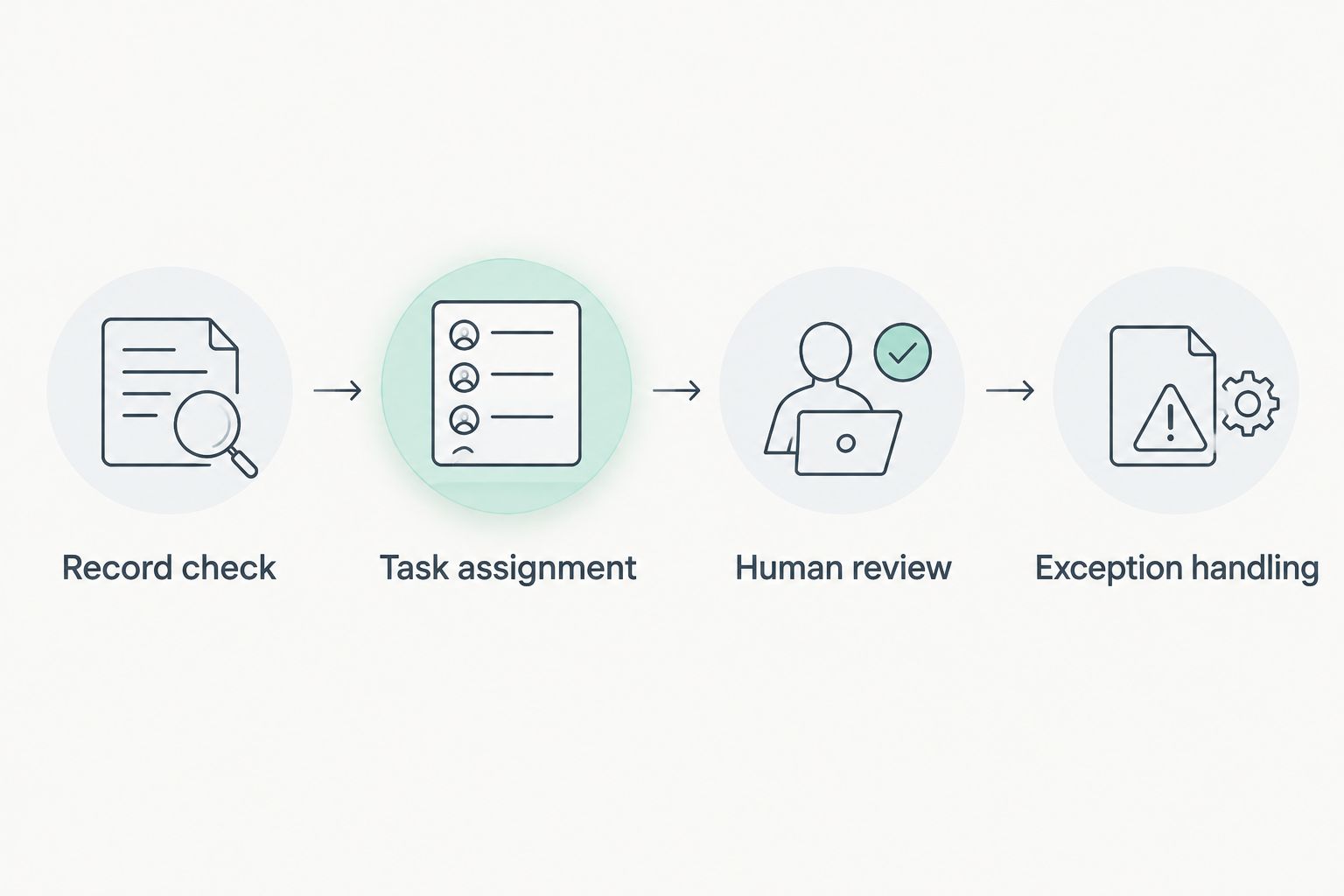
A workflow that generates activity without resolving exceptions adds another queue to manage. Test who handles the work when the expected information is missing.
- Validate policy dates before creating renewal tasks.
- Assign work by a documented account or producer ownership rule.
- Require review of generated customer-facing messages.
- Stop reminders when the underlying workflow is completed.
- Route incomplete records to a named exception owner.
6. Set access, security and retention requirements
Begin with a role worksheet rather than a list of security features. Define what producers, account managers, supervisors, administrators and external collaborators need to read, change or export.
Insurance records can contain sensitive personal and business information. Document which data belongs in the CRM, which should remain elsewhere and which should not be copied at all. Have qualified legal and security reviewers determine the obligations that apply to your agency, jurisdictions and insurance lines.
Security functionality does not itself establish compliance. Your operating procedures, access decisions, contracts and use of the system also require review. Make these requirements part of acceptance testing rather than a post-launch cleanup task.
- Apply role-based access and test restricted actions.
- Require multifactor authentication where the chosen systems support it.
- Record meaningful changes and administrative actions in audit logs.
- Define retention and deletion rules with qualified reviewers.
- Test backup restoration and employee access removal.
7. Pilot the workflow and measure the result
Use your current reports and a simple spreadsheet to establish a baseline. Define each metric before collecting it: what starts the clock, what stops it and which records qualify.
For your 2026 pilot, compare the same workflow before and after the change. Keep the scope narrow enough to identify whether a problem comes from data quality, integration behavior, user training or workflow design. Avoid presenting a short pilot as proof of long-term retention improvement.
Track quote turnaround in business days, follow-up delay in hours and duplicate-entry effort in minutes per submission. These are measurement units, not promised results. Record adoption alongside outcomes so you can distinguish an unused feature from an ineffective process.
- Establish a baseline from completed work before launch.
- Pilot with users who perform the selected workflow.
- Test permissions, integration failures and duplicate records.
- Collect exceptions and assign each a resolution owner.
- Expand only after the workflow passes agreed acceptance tests.
Compare your insurance CRM development options
Choose the smallest intervention that solves the documented workflow. A unified platform reduces fragmentation only when the underlying records and responsibilities are clear; moving disconnected processes into one interface does not resolve those disagreements.
Use this table to structure your 2026 shortlist. Every option needs a demonstration using your own representative scenarios, including a renewal, a duplicate customer and a failed update.
| Option | Best for | Main advantage | Key limitation |
|---|---|---|---|
| Configure an existing CRM | Agencies whose workflows fit available configuration | Keeps the initial scope focused on settings and adoption | Unusual policy relationships can require workarounds or extensions |
| Extend the agency management system | Agencies focused on policy-centered service workflows | Keeps work close to existing policy records | Suitability depends on the system's sales workflow and extension capabilities |
| Integrate CRM and agency management | Agencies needing sales coordination alongside policy administration | Preserves distinct system responsibilities | Requires explicit synchronization, conflict and failure handling |
| Build a custom CRM layer | Agencies with documented requirements that configuration cannot meet | Supports a deliberately designed workflow and data model | Creates responsibility for maintenance, testing and future changes |
Choose custom development for unmet requirements, not for the label “custom.” If configuration passes the same acceptance tests, a new application needs a separate business justification.
Common mistakes insurance agencies make
Treating the CRM as the policy authority by default
An opportunity stage and a policy status describe different events. Decide which system controls each before linking them; otherwise, a sales update can create misleading service information.
Automating renewal outreach before validating dates
A workflow can execute correctly against an incorrect expiration date. Validate the source field and define what happens when a policy changes, cancels or renews outside the expected sequence.
Buying integrations without testing exceptions
A successful demonstration does not establish how a connection handles duplicate insureds, missing identifiers or rejected updates. Require those scenarios in acceptance testing, with visible ownership of unresolved items.
Migrating every historical record without a purpose
Old duplicates and incomplete records can carry confusion into the new system. Define what staff need for active work, what requires retention and what belongs in a separate archive before migration.
Measuring logins instead of completed work
Login counts show access, not whether a producer followed up or an account manager completed a handoff. Measure workflow completion and exception resolution alongside adoption.
FAQ
What should CRM development for insurance agencies include?
CRM development for insurance agencies should include defined customer and policy relationships, task ownership, integration rules, access controls and measurable acceptance tests. Start with one documented workflow, such as new-business follow-up or renewal preparation, before expanding scope.
Should an insurance CRM replace an agency management system?
An insurance CRM should not replace an agency management system unless the replacement scope explicitly covers the agency's required policy administration workflows. Define the authoritative system for each record and field before deciding whether to replace, extend or integrate.
Is custom CRM development better than configuring an existing platform?
Custom CRM development is the better choice only when documented requirements remain unmet by a suitable existing platform. Configuration still deserves evaluation because a custom application adds maintenance, testing and change-management responsibilities.
How should an insurance agency measure CRM results in 2026?
An insurance agency should measure CRM results in 2026 against a defined pre-launch baseline for the same workflow. Track follow-up delay, quote turnaround, duplicate-entry effort and exception resolution, then separate observed results from longer-term outcomes the pilot has not established.
One last thing
Your most revealing demonstration is not a clean new lead. Ask the proposed system to handle an existing customer with multiple policies, a changed contact and an unresolved service request while a renewal task is open.
That scenario tests relationships, ownership and exceptions together. Put it in your acceptance criteria before you approve the project.
Related guides
- API integration platforms for businesses
- Business intelligence tools for enterprises
- AI development services for financial services firms
Schedule a consultation with Hexagon IT Solutions to scope your insurance CRM workflow, integration boundaries and acceptance criteria.


