






Yes—AI can improve CRM data accuracy in 2026 by identifying likely duplicates, extracting information from customer communications, and flagging conflicting records. If your sales team keeps correcting contacts or questioning account ownership, use AI to propose evidence-backed corrections rather than fill gaps with guesses. Human approval still matters for uncertain matches, sensitive fields, and changes that affect customer relationships.
- Can AI improve CRM data accuracy? Yes—when corrections use reliable sources and uncertain changes receive human review.
- Use validation rules for predictable errors and AI for ambiguous matches or unstructured customer information.
- Measure incorrect changes alongside accepted corrections; cleaner-looking records are not proof of accuracy.
- Keep source evidence, change history, and rollback controls before allowing automated updates.
Can AI improve CRM customer data accuracy?
AI improves CRM data accuracy when it helps establish what is true—not merely what looks plausible. It can compare records with inconsistent naming, extract details from emails, and identify information that needs verification. A model-generated answer alone does not establish that a customer detail is correct.
Choose the method that matches the error. These approaches complement each other; replacing every validation rule with AI adds uncertainty where none is needed.
| Approach | Best for | Main benefit | Main limitation |
|---|---|---|---|
| Validation rules | Required fields and consistent formats | Rejects predictable entry errors | Cannot establish whether a correctly formatted value is true |
| AI-assisted matching | Duplicate candidates with naming variations | Finds relationships that exact matching misses | Can confuse separate people or businesses |
| AI-assisted extraction | Details in emails, forms, and notes | Reduces manual transcription | Can misread context or select outdated information |
| Human review | Ambiguous or consequential changes | Applies business context before approval | Requires staff time and clear ownership |
Build these controls into your CRM implementation, rather than treating cleanup as a separate finishing task. Record identity, field ownership, and approval rules determine whether automation preserves the right information.
Why this matters
A wrong contact email affects outreach. A duplicate account can split sales activity across records, while an incorrect account relationship can send an opportunity to the wrong owner. These are operational problems, not cosmetic database defects.
For a 2026 CRM improvement plan, connect each proposed correction to a business decision. Ask whether the change helps your team contact the right person, assign work correctly, or trust a report. That keeps the project focused on useful accuracy rather than a higher percentage of populated fields.
Completeness and accuracy are different. An empty job-title field is incomplete; a confidently invented job title is inaccurate. Leave an unsupported field blank rather than convert uncertainty into false customer information.
Duplicate detection: find candidates before merging records
AI-assisted matching is useful when the same organization appears under abbreviations, spelling variations, or inconsistent address formats. It can assess several signals together instead of relying on an exact name match.
That does not make every similar record a duplicate. A parent company, subsidiary, branch, and project account can share names or domains while representing different business relationships.
For construction teams, distinguish the contractor, project site, and billing entity before approving a merge. For professional services firms, distinguish an individual contact from the client organization and any separate engagement records.
- Best for: Finding possible duplicates that simple matching rules miss.
- Benefit: Gives reviewers a focused set of records to inspect.
- Limitation: A false merge can combine unrelated activities, ownership, and reporting history.
- Recommendation: Present the matching evidence and conflicting fields before merging.
Keep the original record identifiers and a reversible merge history. Deleting the evidence behind a merge makes later investigation harder, even when the surviving record looks clean.
Information extraction: capture facts without inventing them
AI can extract candidate details from customer emails, submitted forms, and meeting notes. The useful output is a proposed value tied to its source—not a completed field with no explanation.
Consider a customer email announcing a new role. The extraction workflow should show the proposed title, the source message, and when that message was received. It should also distinguish the sender's role from another person's role mentioned in the same conversation.
Treat customer statements as evidence with context. A signature can contain an old title, a forwarded message can describe someone else, and a meeting note can record a plan rather than a completed change.
- Best for: Reducing repeated transcription from customer communications.
- Benefit: Moves relevant information into the review workflow without requiring staff to retype it.
- Limitation: Context errors can produce a valid-looking but incorrect field value.
- Recommendation: Require source visibility and restrict extraction to explicitly stated information.
Do not ask a model to infer missing purchasing authority, revenue, or customer intent and store the answer as verified fact. Predictions belong in clearly labeled predictive fields, separate from confirmed customer information.
Field standardization: use rules before AI
Consistent formatting helps your team search, filter, and match records. Standardization can normalize capitalization, approved country names, and telephone formatting, but it does not prove the underlying information is correct.
Use deterministic rules when the accepted format is clear. AI adds value when an entry needs contextual interpretation, such as mapping inconsistent free-text descriptions into an approved category.
Preserve the original input alongside any normalized value when the distinction matters. Changing an organization name for display should not silently replace its legal name or billing identity.
- Best for: Making inconsistent entries usable in search and reporting.
- Benefit: Creates consistent categories and formats across records.
- Limitation: Over-standardization can erase meaningful differences.
- Recommendation: Publish approved field definitions before automating normalization.
A clean format is a useful control, not an accuracy certificate. An email address can pass a format check and still belong to the wrong person.
Why AI-driven CRM accuracy varies
The same model can produce different operational results depending on the information and controls surrounding it. Evaluate these factors before expanding automation:
- Source reliability: Customer-confirmed details and unverified imported lists should not receive the same authority.
- Record structure: Clear relationships between contacts, accounts, branches, and projects reduce ambiguous matches.
- Field meaning: A billing address, service address, and headquarters address answer different questions.
- Integration behavior: A connected system can overwrite an approved correction if field ownership is undefined.
- Review ownership: Unassigned suggestions do not become verified corrections merely because they sit in a queue.
- Decision thresholds: A reversible formatting change needs different approval rules from an account merge.
Fix the source of repeated errors before increasing cleanup automation. If an import or integration keeps restoring an old value, another correction cycle only hides the underlying issue.
How do you introduce AI data cleanup safely?
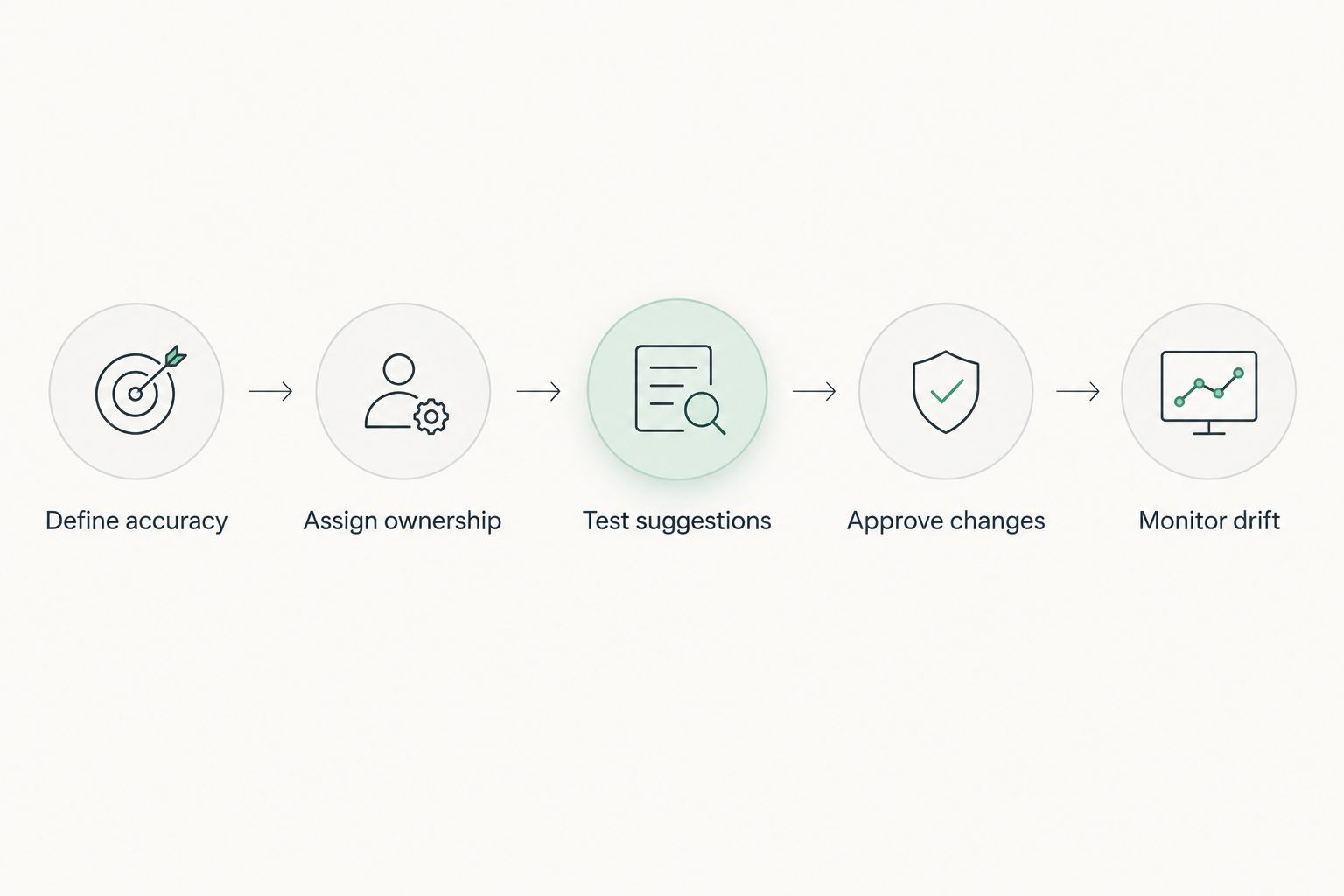
Use a controlled sequence for your 2026 rollout. Start with a defined error type and expand only after reviewers understand the results.
1. Define accuracy
Choose the field or relationship you want to improve. Write down what counts as correct, which evidence supports it, and what should remain unresolved.
For example, duplicate detection needs a definition of the same account. Without that definition, reviewers can disagree even when they inspect identical evidence.
2. Assign ownership
Name the system and person responsible for each field. Decide which source wins when customer communications, sales notes, and billing records disagree.
Ownership should follow the field's business purpose. A salesperson's preferred contact address does not automatically replace the address used for invoicing.
3. Test suggestions
Run the workflow without allowing it to overwrite live records. Review proposed changes against their original sources and include difficult cases, not just obvious examples.
Look specifically for false matches, outdated details, and confusion between people mentioned in the same document. Record why reviewers reject suggestions so the team can adjust the workflow.
4. Approve changes
Route uncertain or consequential changes to a named reviewer. Show the existing value, proposed value, supporting evidence, and affected relationships together.
Do not approve account merges from a name similarity score alone. Inspect the identifiers and business relationships that distinguish the records.
5. Monitor drift
After enabling approved automation, inspect accepted changes and reversals. Check whether new imports, changed forms, or connected systems introduce a different error pattern.
Keep a way to stop writes without stopping ordinary CRM use. A useful rollout includes a practical rollback path, not just a successful demonstration.
How do you measure whether accuracy actually improved?
For a 2026 evaluation, compare proposed corrections with independently checked records. Measure the workflow's errors as carefully as its accepted changes; approval volume alone does not show that the database became more accurate.
Use a consistent review method before and after rollout. Otherwise, a stricter review process can make results look worse even when the underlying records improved.
| Measure | What it tells you | What to watch |
|---|---|---|
| Confirmed correction rate | How often reviewed suggestions are correct | Approval without checking the source |
| False merge rate | How often distinct records are combined | Hidden damage to account relationships |
| Missed duplicate rate | How often reviewed duplicates remain undetected | Testing only the candidates AI already found |
| Source traceability | Whether changed values retain supporting evidence | Updates without a recoverable source |
| Reviewer effort | Work required to verify and approve changes | Automation that shifts rather than removes work |
| Error recurrence | Whether corrected problems return | Imports or integrations restoring bad values |
Tie the results to the affected workflow. Contact-data work should include delivery failures or routing errors where those outcomes are measurable. Account-matching work should examine ownership conflicts and incorrect relationship assignments.
Do not promise a revenue lift from cleaner data without measuring the connection. Better records support better execution, but sales performance also depends on demand, offers, follow-up, and other factors.
Can AI verify customer information without a trusted source?
AI cannot establish that a customer detail is true merely by generating a plausible answer. Verification requires evidence appropriate to the field, such as a customer confirmation or an authoritative business record.
If sources disagree, preserve the disagreement for review. Choosing the newest value automatically is unsafe when the newest source describes a different address, person, or business entity.
Should AI automatically update every CRM field?
AI should not automatically update every CRM field. Allow automatic changes only where evidence requirements, business impact, and reversal controls justify them.
Start with low-impact, reversible transformations. Keep stronger approval controls around account relationships, ownership, consent records, and other fields that change how your business treats a customer.
Does a unified CRM eliminate data accuracy problems?
A unified CRM does not eliminate data accuracy problems. It gives teams a shared place to manage records, but inaccurate imports and unclear field ownership can still create errors.
Use consolidation to establish common definitions and reduce conflicting copies. Do not assume that moving information into a single platform verifies it.
FAQ
Can AI improve CRM data accuracy without replacing our CRM?
Yes, AI-assisted validation and review can work alongside an existing CRM when its integration capabilities and permissions support the workflow. Evaluate data access, approval controls, and change history before enabling updates.
What's the best place to start with AI-assisted CRM cleanup?
Start with a clearly defined error that reviewers can verify against reliable evidence. Duplicate candidates or inconsistent field formats are useful starting points when their business rules are explicit.
Is AI better than validation rules for customer data?
AI is better suited to ambiguous matching and unstructured information; validation rules are better suited to predictable requirements. Use both, with human review for uncertain or consequential changes.
Can AI fill in missing customer information accurately?
AI can extract missing information when a reliable source explicitly contains it. Unsupported guesses should remain separate from verified customer fields rather than being written as facts.
How do we protect customer information during AI data cleanup?
Limit access to the information required for the task and review how the chosen service processes and retains it. Apply permissions, audit logging, and approval controls before connecting customer records.
One last thing
Before approving a 2026 CRM accuracy project, ask the team to demonstrate a rejected correction—not just a successful one. A useful system should show why it left an uncertain record unchanged and who can resolve it.
The ability to refuse an unsupported update is part of data quality. Build that behavior into your acceptance criteria alongside matching, extraction, and reporting.
Related guides
- How much does CRM development cost?
- How much does API integration cost?
- Connecting Dynamics 365 to a custom CRM pipeline
Schedule a consultation with Hexagon IT Solutions to discuss your CRM data accuracy requirements, source systems, and approval controls.
Plan your CRM data accuracy workflow
Discuss the records, source systems, and approval controls your CRM workflow needs.


