






Yes—AI can handle business intelligence tasks such as querying approved data, drafting report summaries, flagging anomalies, and supporting forecasts. If your team spends more time assembling reports than acting on them, these are practical automation candidates. The limit is accountability: AI output still needs reliable metric definitions, enforced access controls, and human review before consequential decisions.
- Can AI handle business intelligence tasks? Yes: use approved data, validated calculations, and accountable human review.
- Enterprise business intelligence needs traceable answers, not just fluent explanations.
- Keep financial approvals and consequential decisions outside autonomous reporting workflows.
- Choose business intelligence tools by data access, calculation accuracy, and review requirements—not conversational polish.
Why this matters
A reporting bottleneck is not always an analysis problem. Your sales, finance, and operations teams might spend their time reconciling definitions, finding the right spreadsheet, or explaining why dashboards disagree. Adding a conversational interface does not resolve those problems.
For a 2026 business intelligence project, separate faster access to information from better decisions. Start with the questions people repeatedly ask, then identify the systems and definitions needed to answer them. If you are evaluating the reporting layer, use these business intelligence tools for enterprises as a starting point for your requirements—not a substitute for testing your own data.
Automate the work around the decision before automating the decision itself. That distinction gives you a useful scope without handing business authority to an unverified answer.
Can AI handle enterprise business intelligence tasks?
Yes, but the appropriate level of automation depends on the task. Producing a draft explanation of a verified sales report is different from deciding whether a customer should receive credit. Both use data; only the latter directly authorizes a consequential action.
The following table compares task types, not specific products. Capabilities depend on the implementation, connected systems, and controls you configure.
| BI task | Best for | Practical benefit | Limitation and required control |
|---|---|---|---|
| Natural-language queries | Repeated questions about approved metrics | Reduces the need to write routine queries manually | Validate joins, filters, date ranges, and permissions |
| Report summaries | Drafting commentary on verified results | Reduces repetitive explanation work | Check every numerical statement against the underlying report |
| Anomaly detection | Prioritizing unusual changes for investigation | Directs attention toward exceptions | An unusual result is not proof of an error or its cause |
| Forecasting | Planning where relevant historical data exists | Supports estimates and scenario comparisons | Test against unseen periods and simpler forecasting methods |
| Data-quality triage | Finding records that need review | Helps prioritize cleanup | Suggested corrections need validation before changing source records |
| Decision support | Comparing documented scenarios | Organizes evidence and trade-offs | Keep approval authority with a named business owner |
AI is useful for enterprise BI when you can inspect how an answer was produced and reproduce its underlying calculation. Fluent language alone does not establish accuracy.
Querying business data in plain English
A sales leader can ask which opportunities have no recent activity rather than building a report manually. A connected system can translate that request into a query, execute it through an approved data layer, and summarize the result.
The difficult part is the business definition. Does recent activity mean a logged call, an email, a meeting, or any record update? Specify that meaning before approving the query, and expose the selected filters alongside the answer.
Summarizing reports and highlighting exceptions
AI can turn verified tables into draft commentary: which region declined, which project moved outside its budget, or which customer segment contributed to a change. This is a sensible starting point because a reviewer can compare the narrative with the source report.
Do not let the summary invent an explanation. A decline in sales and a change in staffing can occur together without establishing that staffing caused the decline. Require the system to distinguish an observed change from a hypothesis worth investigating.
Supporting forecasts without promising certainty
Forecasting belongs in a separate evaluation from conversational reporting. A language model writing a convincing forecast narrative is not evidence that the underlying forecast is accurate.
Use an appropriate forecasting method, document its inputs, and test it on historical periods excluded from training. Present uncertainty and assumptions with the forecast so your operations team can plan around more than a single projected outcome.
Why AI business intelligence results vary
The quality of an enterprise BI answer depends on more than the selected model. These factors determine whether the output is useful enough for your workflow:
- Data quality: Missing transactions, duplicate accounts, and inconsistent dates undermine the underlying analysis. Fix recurring source problems rather than repeatedly rewriting prompts.
- Metric definitions: Booked revenue, invoiced revenue, and collected cash answer different questions. Give each metric an owner and an agreed calculation.
- Access controls: Apply permissions to the data and query execution layer. A prompt asking the assistant to protect confidential information is not an access-control system.
- Task complexity: A predefined sales summary requires less interpretation than an open-ended question about why margins changed. Increase review as the question requires more judgment.
- Traceability: Reviewers need the source, filters, reporting period, and calculation—not just a paragraph describing a result.
- Operational change: Updated schemas, new sales stages, and revised accounting rules can invalidate previously accepted answers. Retest affected workflows when definitions or systems change.
For a 2026 rollout, treat these as acceptance criteria. A demonstration using clean sample data does not establish that the workflow will handle your exceptions, permissions, and conflicting definitions.
How do you introduce AI into an enterprise BI workflow?
Use a controlled sequence rather than granting broad access and waiting to see what happens. The following five steps connect a reporting need to a measurable business result without assuming a particular software platform.
1. Define the decision
Choose a repeated question tied to an action, such as identifying overdue receivables for follow-up. Name the person who owns the response and describe what they need to decide.
Keep the first use case narrow. A defined weekly collections report is easier to validate than an unrestricted request to explain everything affecting cash flow.
2. Approve the data
Identify the source records, refresh requirements, and metric definitions. Resolve conflicting meanings before connecting the assistant, and record which source wins when systems disagree.
For a construction business, committed cost and paid cost should remain distinct. For professional services, booked work and recognized revenue need separate definitions. These are reporting design requirements, not problems a better-written prompt will reliably fix.
3. Constrain execution
Start with read-only access to approved views or datasets. Validate generated queries before execution, restrict exposed fields, and apply the requesting user's permissions.
Keep report generation separate from changes to operational systems. An assistant that explains overdue invoices does not also need permission to change payment terms or issue credits.
4. Test the answers
Build a reference set of questions with verified answers. Include empty results, missing records, ambiguous requests, restricted information, and questions the system should decline to answer.
Test the calculation and explanation separately. An answer can reproduce the right total while describing the wrong period, or provide a sensible narrative around an incorrect join. Both failures matter.
5. Measure the outcome
Measure the complete workflow, including review and correction. Track elapsed reporting time, reviewer effort, accepted answers, and errors that reach users.
Compare the result with the existing process before expanding scope. Faster drafting is not a business improvement if the finance team spends longer checking every sentence afterward.
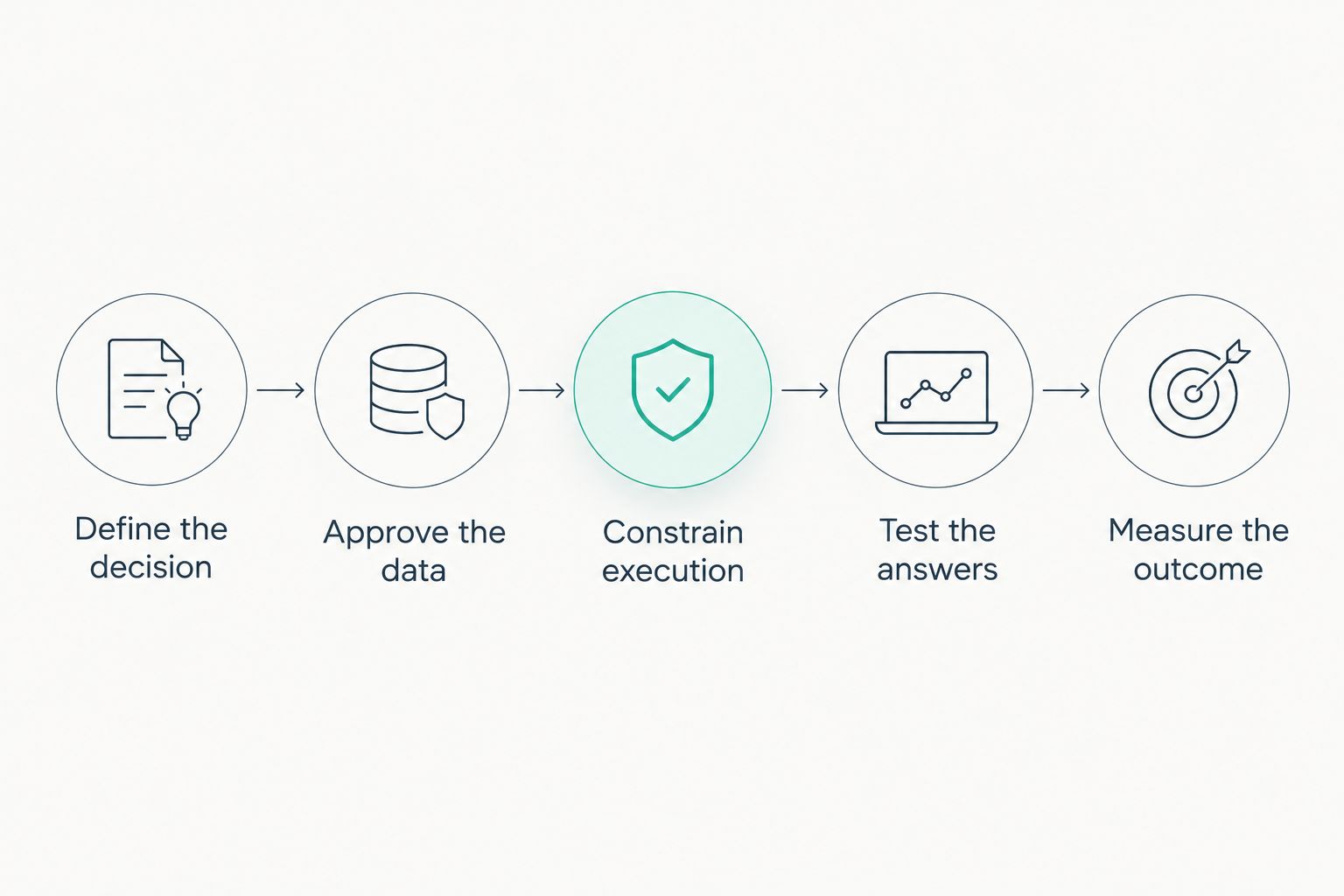
In 2026, use this sequence as a release gate, not just a project plan. Keep a workflow in review mode until its business owner accepts the results and its data owner accepts the access boundaries.
Can AI replace a business intelligence analyst?
AI can automate parts of a BI analyst's work, but task automation does not transfer responsibility for defining metrics, interpreting business context, or approving decisions. Analysts also resolve disagreements about what a number means—work that requires accountable business judgment.
For example, a sales report might show a falling win rate after the team changes how it records lost opportunities. The calculation can be correct while the comparison becomes misleading. An analyst needs to examine the definition change before presenting that movement as deteriorating performance.
Use analysts to set definitions, investigate exceptions, and evaluate whether an answer supports the intended decision. Use automation to reduce repeated preparation and drafting work around those responsibilities.
Is AI better than traditional BI dashboards?
AI is better suited to asking follow-up questions and drafting explanations; dashboards are better suited to consistent, repeatable views of approved metrics. Neither approach removes the need for governed data.
| Approach | Best for | Strength | Trade-off |
|---|---|---|---|
| Governed dashboard | Recurring operational reviews | Keeps definitions and presentation consistent | New questions can require report changes |
| Conversational analytics | Exploring approved data through questions | Supports flexible follow-up requests | Ambiguity requires clarification and query validation |
| Combined workflow | Teams needing consistency and exploration | Keeps approved metrics alongside flexible investigation | Requires clear ownership across both interfaces |
Keep the dashboard as the reference for recurring metrics, then add conversational analysis where follow-up questions create useful work. Do not replace a dependable reporting process simply to make the interface conversational.
For your 2026 evaluation, ask each approach the same business questions. Compare the answers, access restrictions, and reviewer effort—not just how quickly a demonstration produces text.
What should enterprise buyers require before launch?
Require evidence that the workflow handles your data and your business rules. A polished demonstration should lead to a test plan, not an automatic approval.
Ask the implementation team to demonstrate:
- Source visibility: Show the records, reporting period, and filters behind an answer.
- Permission enforcement: Demonstrate that restricted information stays inaccessible across queries, summaries, exports, and conversation history.
- Failure handling: Show what happens when a source is unavailable or a question has no supported answer.
- Change control: Explain how changes to prompts, models, schemas, and metric definitions trigger testing.
- Human approval: Identify which outputs require review and who can authorize any downstream action.
Evaluate the operating burden as well. Someone must maintain connections, investigate failed runs, update definitions, and manage access. Those responsibilities remain even when the report itself appears automatically.
A 2026 procurement decision should distinguish the initial build from ongoing operation. Define ownership before launch so an apparently successful pilot does not become an unsupported reporting dependency.
FAQ
Can AI handle business intelligence tasks without human review?
AI can execute predefined, validated reporting tasks without reviewing every run, but consequential decisions need accountable oversight. Set review requirements according to the task's risk and test the workflow before reducing manual checks.
Can I connect AI directly to my company database?
You can connect an AI application to a company database through a controlled integration, but unrestricted production access is not an appropriate starting point. Use approved datasets, read-only permissions, query validation, and logging.
How do I know whether an AI-generated BI answer is correct?
Check the answer against its source data, metric definition, reporting period, filters, and calculation. Test recurring questions against verified reference answers and require clarification when the request is ambiguous.
What's the best first AI business intelligence project?
A narrow, read-only reporting task with a verified source and a named reviewer is a practical first project. Choose a recurring question whose preparation time, review effort, and errors you can measure.
Will AI business intelligence work with messy data?
AI can help identify data-quality problems, but it does not make unreliable source records trustworthy. Resolve the problems affecting the selected metric before using its output for business decisions.
One last thing
Your most useful acceptance test is a question the system should not answer. Ask for a metric that does not exist, a restricted customer's details, or an explanation unsupported by the available records. A responsible workflow should decline, request clarification, or expose the limitation—not fill the gap with a plausible sentence.
Before your next demonstration, prepare those questions alongside your normal reporting requests. This tests the boundary between useful assistance and unsupported output.
Related guides
- QuickBooks to automated ERP reporting
- NetSuite to automated financial reporting
- AI development services for financial services firms
Start with a reporting bottleneck, not a broad automation brief. Schedule a consultation with Hexagon IT Solutions to discuss your enterprise business intelligence requirements, data boundaries, and acceptance criteria.


