






Yes—AI automation can reduce IT support ticket volume when it resolves repeatable requests before employees need an agent, rather than simply answering or routing messages. If your support queue keeps growing, distinguish fewer requests from faster handling: automated triage reduces agent effort, but it does not remove the underlying ticket.
- Can AI automation reduce IT support ticket volume? Yes, when employees resolve eligible issues without agent intervention.
- Self-service resolution, automated triage, and agent assistance deliver different results; measure each separately.
- For a 2026 rollout, prioritize approved knowledge, restricted actions, and a direct route to human support.
- Count repeat contacts and reopened issues before declaring ticket deflection successful.
Why this matters
A smaller queue means little if employees stop asking for help because the support channel frustrates them. Your business needs restored access, working applications, and fewer interruptions—not a dashboard that hides unresolved problems.
For a 2026 automation plan, separate the business case into work prevented, work completed automatically, and work made easier for agents. The guide to AI automation for professional services firms provides related context for teams evaluating automation beyond the service desk.
Reduce the need for a ticket, not the employee's ability to open one. Keep escalation visible and pass the conversation history to the receiving agent.
Can AI automation reduce IT support ticket volume?
Yes. AI automation can reduce incoming tickets through successful self-service and reduce human-handled tickets through approved automated workflows. These are different outcomes, and your reporting should distinguish them from faster classification or response drafting.
The following comparison separates the approaches by what they actually change. Treat the “best for” labels as selection criteria, not a promise that every request in a category belongs in automation.
| Approach | Best for | Effect on ticket volume | Benefit | Limitation |
|---|---|---|---|---|
| Knowledge self-service | Documented, repeatable questions | Can prevent ticket creation when the answer resolves the issue | Employees get instructions without waiting for an agent | An answer is not proof of resolution |
| Approved workflow automation | Requests with clear rules, identity checks, and permitted actions | Can reduce human-handled tickets; a service record can still exist | Completes work rather than only explaining it | Requires permissions, error handling, and maintained integrations |
| Automated triage | Requests needing classification and assignment | Does not inherently reduce ticket creation | Sends work to the appropriate queue | Incorrect classification creates rework |
| Agent assistance | Complex requests that still need a person | Does not inherently reduce ticket creation | Helps agents review context and prepare responses | Agents must verify suggested answers and actions |
Choose knowledge self-service for documented questions and approved workflows for bounded actions. Use triage and agent assistance when the objective is lower handling effort rather than fewer incoming requests.
Knowledge self-service
Knowledge self-service gives employees answers drawn from approved support material. Suitable starting points include locating setup instructions, understanding request procedures, and finding documented troubleshooting steps.
Require the system to identify the source behind its answer and respect access restrictions. An employee should not receive instructions or internal information that the employee could not otherwise access.
Keep the limitation explicit: a relevant answer does not establish that the employee's application works again. Ask whether the issue is resolved and offer escalation without making the employee repeat the original request.
Approved workflow automation
Workflow automation performs a permitted action after checking the required conditions. Examples to evaluate include starting an existing account-recovery process or submitting a standard access request through its established approval path.
The model can interpret the request, but your workflow should control authorization and execution. A natural-language instruction must not become permission to change an account, device, or business application.
Record the attempted action, its result, and any exception. When execution fails, transfer the request with that evidence instead of presenting a generic success message.
Automated triage and agent assistance
Triage classifies the issue and routes it; agent assistance helps a person investigate or respond. Both address support workload, but neither establishes ticket reduction by itself.
These approaches fit requests where incomplete information, judgment, or risk makes autonomous action inappropriate. Their benefit belongs in routing accuracy, handling effort, or service quality—not in a deflection metric.
Why ticket reduction varies
The right 2026 target depends on your own support queue. An overall reduction goal hides the fact that some request categories are suitable for self-service while others require investigation or approval.
- Request mix: Repeated questions and standardized requests offer different opportunities from unfamiliar failures and security incidents. Classify demand before selecting an automation approach.
- Knowledge quality: Approved instructions need an owner and a review process. Conflicting or obsolete articles give the system conflicting or obsolete material to use.
- Execution access: An assistant that explains a process cannot necessarily complete it. Confirm which actions existing systems permit and which require approval.
- Employee adoption: A self-service route needs to be accessible within the support channels employees use. Preserve a clear human handoff when the route does not solve the problem.
- Measurement boundaries: Ticket creation, agent involvement, and issue resolution are separate events. Changing the definition midway makes before-and-after comparisons unreliable.
- Underlying reliability: A recurring application defect remains a defect even when an assistant explains a workaround. Assign recurring causes to an owner rather than treating every repeat contact as an automation opportunity.
How should you test IT support automation?
Run a bounded pilot against a defined request category. For a 2026 evaluation, use the following sequence to make the decision measurable without giving the system unrestricted authority.
1. Establish a baseline
Use 4 weeks of baseline data as an initial planning window, then extend the window if it misses a relevant operating cycle. This is a suggested pilot design, not an industry benchmark or a promised implementation timeline.
Group requests by the employee's problem, not just the queue that received them. Record incoming requests, agent involvement, repeat contacts, reopened issues, and available handling-time data.
Document changes in employee population, application releases, or outages. Those changes affect demand and belong beside the results rather than disappearing into an overall average.
2. Define eligible requests
Select a category with approved instructions, a clear completion condition, and an accountable owner. Write down both what the automation handles and what it must reject or escalate.
For example, an assistant can explain a documented recovery process without receiving authority to bypass identity checks. Treat privileged access, suspected compromise, and unclear ownership as escalation conditions rather than opportunities to improvise.
3. Constrain actions
Separate interpreting the request from approving and executing it. Use established identity checks, restricted service accounts, and explicit action rules rather than relying on the model to decide its own permissions.
Define what happens when an integration times out or returns an ambiguous result. Do not report completion until the connected system confirms the required outcome.
4. Confirm resolution
Ask whether the employee completed the task and capture the relevant workflow result where available. Silence alone is not a successful resolution signal.
Give employees a direct handoff that includes the original question, instructions already offered, and actions attempted. This prevents the automated channel from becoming an extra intake form before real support begins.
5. Review outcomes
Use 4 weeks of pilot operation as a starting review window, subject to the same operating-cycle check as the baseline. Review failures during the pilot rather than waiting until the comparison period ends.
For an initial measurement rule, check for related repeat contacts within 7 days of the automated interaction. Adjust that observation window to the request type; it is a proposed reporting rule, not a universal definition of success.
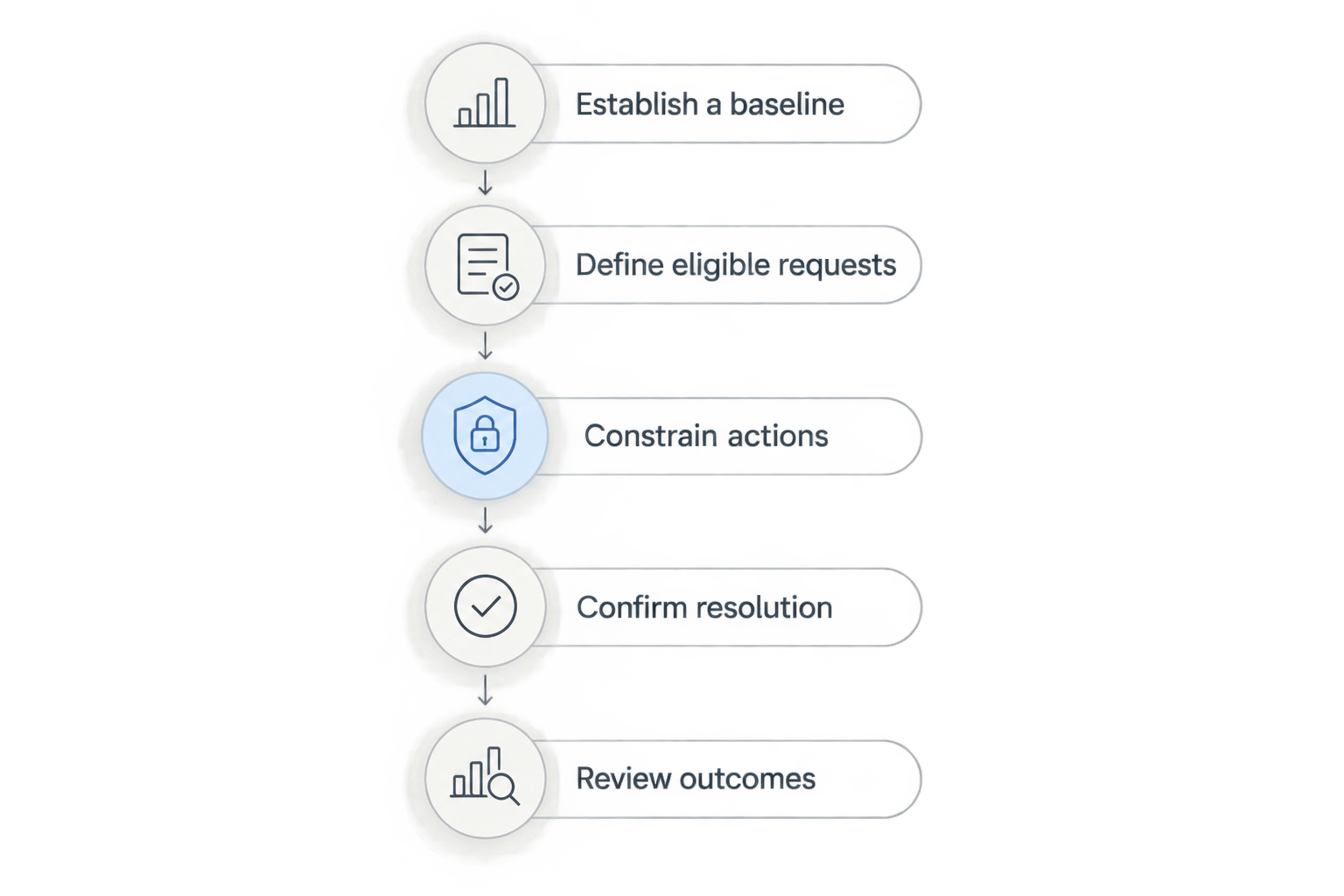
A pilot passes when eligible requests reach confirmed resolution with acceptable escalation, repeat-contact, and error results. Set those acceptance criteria before launch so the team cannot redefine success after seeing the numbers.
What should your support dashboard measure?
Your 2026 dashboard should distinguish demand reduction from effort reduction. Keep the original request category attached to each interaction so a change in ticket mix does not masquerade as better performance.
| Measure | What it tells you | What it does not prove |
|---|---|---|
| Incoming requests | How much demand enters the measured channels | Whether employees received help elsewhere or gave up |
| Confirmed self-service resolutions | Which eligible issues ended without agent involvement | Whether the same issue returned later |
| Human-handled requests | How much work still reaches agents | Whether remaining requests became harder |
| Repeat contacts and reopens | Whether apparent resolutions lasted | The root cause without further investigation |
| Agent handling time | How much active agent effort a request consumes | The employee's total waiting time |
| Failed or unauthorized actions | Where execution controls need attention | That unrecorded failures did not occur |
Report the denominator for every rate. Self-service resolution among eligible interactions is not the same measure as ticket reduction across the entire business.
For financial evaluation, compare verified agent effort avoided with operating, maintenance, integration, and review effort. Time released is capacity, not automatically cash saved. It becomes a financial outcome when you can connect it to reduced expenditure or productive work the team actually completes.
Do not combine ticket deflection and reduced handling time into the same savings calculation without checking for overlap. A request prevented from reaching an agent cannot also receive credit as an agent-handled request completed faster.
Where should humans stay in control?
Keep people responsible for exceptions that require business judgment, uncertain authorization, or investigation beyond an approved workflow. Automation should expose uncertainty through escalation, not conceal it behind a confident answer.
A suspected security incident needs the incident process, not an extended chatbot troubleshooting exchange. A request to change sensitive access needs the appropriate approval, even when the employee describes an urgent business need.
For an SMB, name the person who owns failed automation and the person who can disable an unsafe action. For a larger operation, define the corresponding operational roles and escalation path.
The same discipline applies when you buy implementation help. Hexagon IT Solutions is a consultation option for SMB and mid-market leaders evaluating IT support automation. Bring request categories, approval rules, and baseline measurements to the discussion; a general demonstration cannot establish the result for your queue.
Will AI automation eliminate the need for a help desk?
No—ticket automation does not eliminate incident investigation, exception handling, or ownership of the support service. Your help desk still needs people to resolve unfamiliar failures and maintain the workflows and knowledge that automation depends on.
Judge staffing decisions separately from the pilot. A decline in routine work does not establish that the remaining work requires the same skills or effort.
Should you automate every recurring support request?
No—recurrence alone does not make a request safe to automate. Prefer repeatable requests with documented instructions, verifiable identity, and a clear completion condition; keep sensitive or ambiguous actions behind the required human decision.
Some recurring requests deserve a permanent fix instead. If a broken configuration creates repeated tickets, correcting the configuration removes the cause rather than automating the workaround.
FAQ
Can AI automation reduce IT support ticket volume without closing unresolved tickets?
Yes—AI automation can reduce ticket volume through confirmed self-service resolution before an agent is needed. Keep escalation available and check repeat contacts rather than counting abandoned conversations as successful deflection.
What's the best IT support request to automate first?
Start with a repeatable request that has approved instructions, clear eligibility rules, and a verifiable completion condition. Choose a bounded category from your own queue rather than giving an assistant access to every support workflow.
How do I prove that support automation saved time?
Compare measured agent effort for equivalent request categories before and during the pilot, including review and exception work. Report released capacity separately from cash savings unless expenditure actually changes.
Is automated ticket routing the same as ticket deflection?
No—automated routing assigns an existing request, while ticket deflection prevents the need for agent involvement through successful resolution. Routing can improve the workflow without reducing the number of tickets created.
One last thing
A successful automation pilot can leave your ticket count unchanged. If you retain a service record for every automatically completed request, the count remains while human handling falls.
Write your success definition before choosing the tool. For a 2026 decision, confirmed resolution and verified effort are more useful than a lower number with an unclear definition.
Related guides
- Is AI automation worth it for small businesses?
- How long does a system integration project take?
- AI development services for B2B SaaS companies
Schedule a consultation with Hexagon IT Solutions to discuss your IT support automation requirements.


