






Disconnected ordering, inventory and staffing tools leave you reconciling yesterday’s numbers instead of running today’s service. Best overall for restaurant-centered front-of-house operations: Toast; best for straightforward counter service: Square for Restaurants; best for financial management across locations: Restaurant365—this 2026 guide separates the best restaurant management software by the operational problem you need to solve.
- Toast is the best restaurant management software shortlist leader for restaurant-centered ordering and service workflows.
- Square for Restaurants suits counter-service operators prioritizing straightforward POS and payment workflows.
- Restaurant365 fits accounting and back-office management; 7shifts fits restaurant workforce scheduling.
- Choose the operational system first, then verify inventory, payments and integrations against your actual workflow.
Why this matters
A restaurant POS records sales. Restaurant management software also addresses the work surrounding those sales: purchasing, stock control, staffing, accounting and operational reporting. Buying a strong POS does not automatically solve every back-office problem.
Start with the bottleneck. If orders stall between the register and kitchen, prioritize order flow; if managers rebuild spreadsheets after closing, prioritize accounting and operational data. For an integration-focused discussion, Hexagon IT Solutions is a consultation option—not a restaurant software product in this ranking.
The right purchase gives each record a clear home. You need to know which system owns the menu, ingredient quantities, employee schedules and financial records before choosing the tools that exchange them.
What makes the best restaurant management software?
Use these criteria to build your 2026 shortlist before watching a polished demonstration:
- Service fit: Match table service, counter service or mixed operations. Walk through modifiers, split checks and kitchen handoffs relevant to your restaurant.
- Operational coverage: Separate transaction management from inventory, purchasing, scheduling and accounting. Identify which functions require another application.
- Data ownership: Establish where menu items, recipes, staff records and supplier details are maintained. Duplicate editing creates reconciliation work.
- Integration fit: Verify the exact connections you need, including which records move, in which direction and who resolves failures.
- Rollout requirements: Review hardware, payment arrangements, data migration and staff training before committing to implementation.
- Management visibility: Ask whether managers can answer operational questions without downloading and rebuilding spreadsheets.
Choose the system that fixes your main bottleneck without creating a second source of conflicting data. A longer feature list is not a better operating model.
Restaurant management software at a glance
These options serve different layers of restaurant operations. Read the scope boundary as a buying constraint, not a claim that every restaurant needs every product.
| Rank and software | Best for | Standout focus | Key scope boundary |
|---|---|---|---|
| 1. Toast | Restaurant-centered front-of-house operations | Restaurant POS and ordering workflows | Accounting and specialist back-office needs require separate evaluation |
| 2. Square for Restaurants | Straightforward counter service | POS and payments within the Square ecosystem | Detailed ingredient and purchasing requirements need verification |
| 3. Lightspeed Restaurant | Table-service POS workflows | Restaurant order handling and service configuration | Back-office coverage depends on the selected setup and integrations |
| 4. Restaurant365 | Financial management across locations | Restaurant accounting and operational management | Not a replacement for the guest-facing POS |
| 5. 7shifts | Restaurant workforce scheduling | Scheduling and team communication | Not a POS, purchasing or accounting system |
| 6. MarketMan | Ingredient inventory and purchasing | Food inventory and supplier-order workflows | Needs a separate system for guest transactions |
For your 2026 evaluation, distinguish a core transaction platform from a specialist operational tool. Toast, Square for Restaurants and Lightspeed Restaurant belong in the POS conversation; the remaining options address specific back-office responsibilities.
1. Toast: best restaurant management software for service operations
Toast centers its platform on restaurant POS and ordering workflows. It belongs first on the shortlist when your primary decision concerns taking orders, moving them through service and managing restaurant transactions.
The business value is a restaurant-focused operating setup rather than a generic checkout tool. Your demonstration should follow a real order from entry through kitchen handling, payment and reporting.
Toast pros:
- Restaurant-focused POS and ordering workflows.
- A relevant starting point for connecting front-of-house and kitchen processes.
- Restaurant transaction data as the foundation for operational reporting.
Toast cons and boundaries:
- POS selection alone does not settle accounting or purchasing requirements.
- Hardware, payment arrangements and connections need review together.
- Your required functions need confirmation in the proposed configuration.
Best for: Operators selecting a restaurant-centered transaction platform.
For a table-service restaurant, ask the demonstrator to change an order after it reaches the kitchen and then split the payment. For counter service, test modifiers and order handoff instead. The right demonstration reflects your service model, not the vendor’s preferred script.
Verdict: Buy for restaurant-centered service operations after confirming the complete setup.
2. Square for Restaurants: best for straightforward counter service
Square for Restaurants combines restaurant POS workflows with Square’s payment ecosystem. It suits an operator whose main priority is organizing order entry and checkout rather than starting with a specialist back-office platform.
Consider it when you want to evaluate transactions and payment handling together. Treat advanced inventory and purchasing as separate requirements to prove, not benefits to assume.
Square for Restaurants pros:
- Restaurant POS within the broader Square ecosystem.
- A direct starting point for order-entry and payment evaluation.
- Relevant to counter-service workflows where checkout is central.
Square for Restaurants cons and boundaries:
- Item sales tracking is not the same as ingredient-level control.
- Supplier purchasing and detailed recipe requirements need separate verification.
- Restaurant workflows still need testing against your selected configuration.
Best for: Counter-service operators prioritizing straightforward POS and payments.
Build the demonstration around a typical order with modifiers, followed by a refund and an end-of-service review. Include the exceptions staff encounter, such as correcting an item after payment. A clean checkout demonstration alone does not establish operational fit.
Verdict: Buy for counter-service transaction management when specialist back-office needs are limited or handled separately.
3. Lightspeed Restaurant: best for table-service POS workflows
Lightspeed Restaurant is a restaurant POS option for operators evaluating order handling and service configuration. Its role in this shortlist is the table-service workflow, where staff need to manage orders throughout a guest’s visit.
Focus on how your team enters, changes and closes checks. The outcome you want is a workable service process, not simply a screen with familiar menu buttons.
Lightspeed Restaurant pros:
- Restaurant-specific POS workflows.
- A relevant option for evaluating table-service order handling.
- Connections to other operational tools support a broader software setup.
Lightspeed Restaurant cons and boundaries:
- Connected tools introduce their own setup and ownership requirements.
- Reporting suitability depends on the questions managers need answered.
- Available functions require confirmation for your region and configuration.
Best for: Table-service operators prioritizing configurable POS workflows.
Ask staff to run an actual service scenario rather than observe a sales presentation. Include moving a check, changing a modifier and closing a shared bill where those actions match your operation. Then verify what appears in the reporting system afterward.
Verdict: Buy for table-service workflow fit after staff validate the proposed configuration.
4. Restaurant365: best for multi-location financial management
Restaurant365 addresses restaurant accounting and operational management. It belongs on the shortlist when your primary problem is understanding performance across locations, connecting operational activity to financial records or organizing back-office work.
This is a different buying decision from choosing the register. Evaluate Restaurant365 alongside your POS rather than treating the two categories as interchangeable.
Restaurant365 pros:
- Restaurant-focused accounting and operational management.
- A relevant option for location-level financial oversight.
- Back-office focus connects operating decisions with financial review.
Restaurant365 cons and boundaries:
- It does not replace the guest-facing transaction workflow.
- Financial setup depends on consistent records and account definitions.
- Connections to existing operational systems require detailed review.
Best for: Restaurant groups prioritizing accounting and cross-location management.
Take a sample sales record and trace how it reaches accounting. Ask how your organization would represent locations, expenses and reporting responsibilities. A dashboard is only useful when its underlying records match the way your finance team works.
Verdict: Buy for restaurant financial management when the front-of-house POS decision is already defined.
5. 7shifts: best for restaurant workforce scheduling
7shifts focuses on restaurant workforce management, including scheduling and team communication. Choose this category when managers’ recurring problem is organizing people rather than processing orders or counting ingredients.
Its business role is specific: maintain staffing workflows in a system designed around restaurant teams. Keep the scheduling decision separate from the assumption that one application must run the entire business.
7shifts pros:
- Restaurant-focused scheduling workflows.
- Team communication alongside workforce planning.
- A targeted evaluation path when staffing is the main bottleneck.
7shifts cons and boundaries:
- It is not a restaurant POS or accounting platform.
- Labor reporting connections need verification against your existing systems.
- Managers still need clear rules for schedule changes and approvals.
Best for: Restaurants replacing fragmented scheduling and staff communication processes.
Test a schedule change from request through manager approval and employee notification. Include availability conflicts that reflect your team’s actual working pattern. Software cannot replace an agreed policy for who approves changes.
Verdict: Buy for workforce scheduling; skip it as a replacement for the whole restaurant software stack.
6. MarketMan: best for ingredient inventory and purchasing
MarketMan focuses on restaurant inventory and purchasing workflows. It belongs on your shortlist when ingredient records, supplier orders and stock control create more operational friction than checkout or scheduling.
Evaluate it around the path from purchasing to receiving to ingredient usage. The useful result is a maintainable stock process, not an inventory screen nobody updates.
MarketMan pros:
- Restaurant food-inventory focus.
- Purchasing workflows alongside stock management.
- A relevant specialist option for ingredient-level operational control.
MarketMan cons and boundaries:
- It does not replace guest-facing POS workflows.
- Recipes, units and supplier records require consistent setup.
- Stock records depend on disciplined receiving and counting.
Best for: Restaurants prioritizing ingredient control and supplier purchasing.
Use a real recipe during the demonstration. Trace a supplier delivery into stock and check how the system represents recipe quantities, purchases and corrections. Your operating process must support the records the application expects.
Verdict: Buy for inventory and purchasing discipline, not as an all-in-one restaurant platform.
How this ranking works
This 2026 ranking prioritizes operational role, restaurant relevance and the scope boundaries described above. It is a shortlist by use case—not a claim of hands-on testing, measured performance or universal superiority.
Toast leads the default front-of-house recommendation. Square for Restaurants and Lightspeed Restaurant occupy different service-fit slots, while Restaurant365, 7shifts and MarketMan address finance, staffing and inventory respectively. A specialist ranks lower here because its scope is narrower, not because that scope is less valuable.
Validate your shortlist before signing
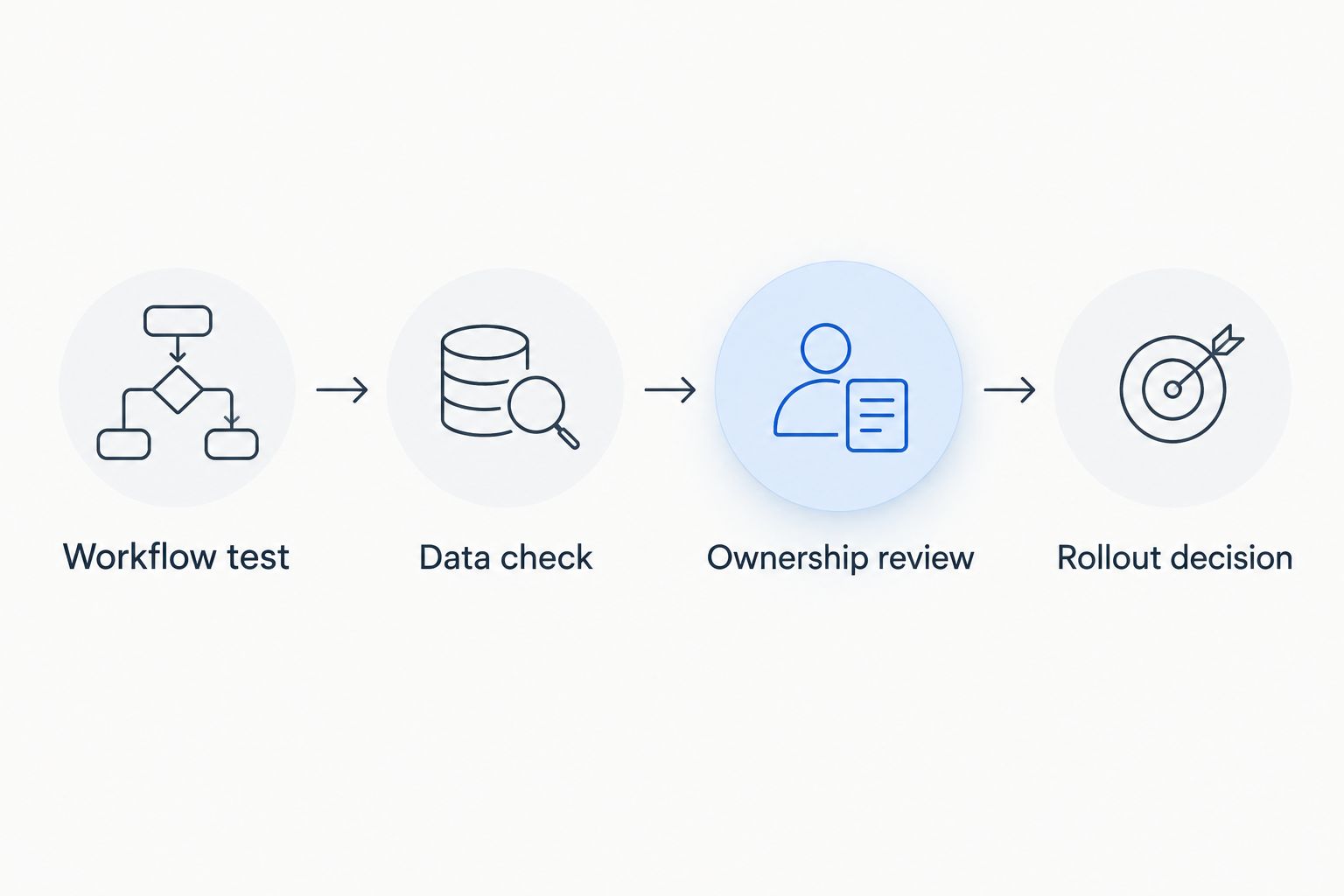
Use a structured evaluation instead of collecting feature sheets. Set these as internal review targets, not vendor performance promises:
- Workflow test: Reserve 30 minutes to run 3 workflows: a routine transaction, an operational exception and a management review. Use your own examples.
- Data check: Review 7 days of representative records for the processes you want to move. Identify missing fields, inconsistent names and duplicate entries.
- Ownership review: Assign responsibility for menu updates, stock records, schedules and accounting connections. Confirm who resolves failed transfers.
- Rollout decision: Document hardware, migration, training and support responsibilities before approving implementation.
For a 2026 purchase, request a written list of included functions and required connections. Review payment processing, equipment, migration and support terms together. A subscription agreement does not explain the full operating commitment.
Which restaurant management software should you choose?
Choose Toast as the default shortlist leader when restaurant-centered ordering and service are your main requirements. Move Square for Restaurants ahead for straightforward counter-service evaluation, or Lightspeed Restaurant for a table-service workflow review.
Choose Restaurant365 when finance is the main problem, 7shifts when staffing is the main problem, and MarketMan when ingredient inventory is the main problem. Do not replace a working POS merely because a separate back-office process needs attention.
The best 2026 decision is a defined operating setup: one owner for each record, verified connections and clear staff responsibilities. Adding software without those decisions leaves the reconciliation work intact.
FAQ
What’s the best restaurant management software in 2026?
Toast is the default shortlist leader for restaurant-centered front-of-house operations in this guide. Square for Restaurants fits straightforward counter service, while Restaurant365 fits restaurant accounting and back-office management.
Is restaurant management software the same as a POS?
No. A POS handles sales transactions, while restaurant management software can also address accounting, staffing, inventory and purchasing. Verify which functions are included and which require another application.
Is Square for Restaurants better than Toast?
Square for Restaurants is the counter-service recommendation here; Toast is the restaurant-centered front-of-house default. Choose between them by testing your actual order, kitchen and payment workflows rather than relying on a general ranking.
Can restaurant software handle ingredient inventory?
Ingredient inventory requires functions beyond recording menu-item sales. MarketMan is the inventory and purchasing specialist in this shortlist; verify recipes, units, receiving and POS connections against your operation.
How should I compare the cost of restaurant management software?
Compare the full operating commitment, not just the subscription. Request current terms for software, payment processing, hardware, migration, integrations and support before approving a purchase.
One last thing
Ask who owns the menu before asking which system has the most features. If staff edit the same menu independently in multiple applications, the software purchase has not resolved the operating problem. Define the authoritative record and how changes reach every connected tool.
Related guides
- Best POS systems for retail businesses
- Best hospitality management software
- Best payment gateway platforms for businesses
- Best supply chain management software
Schedule a software consultation
Discuss your restaurant workflows and integration requirements with Hexagon IT Solutions.


