





Your POS has to keep checkout, inventory and sales records aligned without creating more reconciliation work. For 2026, Square is the best default for straightforward store-first retail, Shopify POS wins for online-led selling, Lightspeed Retail fits catalog complexity, and Clover suits countertop checkout.
- Square leads this best pos systems for retail shortlist for straightforward, store-first selling.
- Shopify POS is the strongest fit when your online store already runs on Shopify.
- Lightspeed Retail deserves a closer look when inventory management drives the buying decision.
- Clover fits countertop checkout; confirm the provider, hardware and application setup before committing.
Why this matters
A checkout problem becomes an operating problem when a sale leaves the wrong stock balance, a return misses the accounting record, or staff cannot find an order. Choosing a POS means choosing how those records move through your business—not just choosing a payment terminal.
For your 2026 shortlist, separate the customer-facing transaction from the work that follows it. Payment acceptance, purchasing, inventory, accounting and customer records each need a clear owner. A feature list does not explain whether those handoffs work for your store.
A consultation with Hexagon IT Solutions is the next step for buyers who need to define software requirements before selecting a retail POS. Bring your workflows and existing systems, rather than starting with a preferred vendor.
What makes the best POS systems for retail?
Use these criteria to judge fit before comparing individual products:
- Sales-channel alignment: Your store and website should follow an agreed process for orders, stock updates and returns.
- Inventory control: Evaluate product variants, purchasing, stock counts and transfers against the way you actually sell.
- Checkout usability: Staff should complete normal sales and exceptions without switching between disconnected records.
- Integration coverage: Confirm how transaction, customer and inventory data reach accounting and other business systems.
- Operating control: Check permissions, data exports, payment arrangements and responsibility for support.
For a 2026 purchase, treat every integration as a workflow to verify. An application listing confirms that something exists; it does not prove that your required fields, timing and exception handling are supported.
Retail POS systems at a glance
These recommendations assign each system a distinct job. Choose the row that matches your operating model, then test the details before signing an agreement.
| POS system | Best for | Standout capability | Key fit check |
|---|---|---|---|
| Square | Store-first selling | Connected payments, checkout and retail inventory tools | Validate advanced purchasing and cross-system requirements |
| Shopify POS | Online-led selling | In-person selling connected to Shopify commerce | Confirm your commitment to the Shopify platform |
| Lightspeed Retail | Catalog complexity | Retail inventory and purchasing workflows | Match the product edition and setup to your operating needs |
| Clover | Countertop checkout | Connected POS hardware and an application marketplace | Review the provider, applications and hardware together |
No POS wins every dimension. A system that fits a simple shop can leave a complex catalog underserved; a feature-heavy system can ask a small team to maintain processes it does not need.
1. Square: best retail POS for store-first selling
Square combines payment acceptance with checkout, reporting and retail inventory tools. Its retail offering addresses the daily work of recording sales, maintaining product records and checking store performance.
Choose Square as your starting point when the physical store drives the business and your requirements are straightforward. The decision should center on how staff handle sales, returns and stock—not on whether the platform has the longest feature list.
Square pros:
- Payment acceptance and POS functions sit within the same ecosystem.
- Retail inventory tools support product tracking alongside sales.
- Sales reporting gives managers a record of store activity.
Square cons and fit checks:
- Advanced inventory and purchasing requirements need a detailed demonstration; basic checkout fit is not enough.
- Connected services and third-party integrations still require ownership, configuration and testing.
Ask staff to demonstrate a return, a discount and a product variant at checkout. Then follow each transaction into the inventory record and the accounting workflow you intend to use. A smooth sale is only part of the test.
Square's official retail documentation is the reference for supported inventory, reporting and hardware capabilities. Verify the exact configuration under consideration rather than applying a feature from another Square offering to your shortlist.
Best for: Retailers whose main requirement is a connected store-first checkout and inventory workflow.
Verdict: Buy Square for straightforward store-first retail after your checkout and reconciliation tests pass.
2. Shopify POS: best retail POS for online-led selling
Shopify POS connects in-person selling with the Shopify commerce platform. Its central value is the relationship between your online store and physical selling, rather than treating them as unrelated channels.
If your business already runs on Shopify, Shopify POS is the natural first candidate. You can evaluate how online and store activity work together inside that platform instead of beginning with a separate commerce architecture.
Shopify POS pros:
- In-person sales connect to the Shopify commerce environment.
- Product and inventory management support online and physical selling.
- Customer and order records sit within the broader Shopify business workflow.
Shopify POS cons and fit checks:
- The recommendation depends on choosing Shopify as your commerce platform, not just selecting a checkout application.
- Staff permissions, hardware and particular retail workflows require configuration-specific verification.
Test a product sold through both channels. Confirm what staff see when stock changes, how an order is located and which return process applies. Write down any manual work; do not let a polished checkout demonstration hide an unresolved handoff.
Shopify's official POS documentation explains the connection between its store administration and in-person selling. Use those materials to verify the workflow you need, including which capabilities apply to your proposed setup.
Best for: Online-led retailers using Shopify who want physical selling connected to their existing commerce operations.
Verdict: Buy Shopify POS when Shopify is your chosen commerce platform and the cross-channel tests pass.
3. Lightspeed Retail: best retail POS for catalog complexity
Lightspeed Retail provides retail POS, inventory and purchasing tools. Put it on your shortlist when managing the merchandise is as important as taking the payment.
The buying case starts with your catalog. Product variants, supplier records, purchasing and stock movement deserve more attention when your team spends substantial effort keeping those records accurate.
Lightspeed Retail pros:
- Inventory management is central to its retail offering.
- Purchasing tools connect merchandise administration with store operations.
- Retail reporting supports review of sales and inventory activity.
Lightspeed Retail cons and fit checks:
- Detailed inventory workflows require clean product data and consistent staff processes.
- Product editions and integrations need separate verification; the brand name alone does not identify your final configuration.
Bring representative product records into the demonstration. Include items with variants, supplier details and different purchasing requirements. Ask the demonstrator to receive merchandise, correct a stock count and show how those changes affect reporting.
Lightspeed's official Retail documentation is the source for edition-specific inventory and purchasing functionality. Check the proposed edition directly, especially when comparing demonstrations, application listings and implementation proposals.
Best for: Retailers whose selection depends on catalog management and purchasing workflows rather than checkout alone.
Verdict: Buy Lightspeed Retail when its inventory workflow resolves your documented operating requirements.
4. Clover: best retail POS for countertop checkout
Clover combines POS software with connected checkout hardware and an application marketplace. It belongs on the shortlist when the buying decision centers on the countertop setup and the applications supporting that setup.
Evaluate Clover as a complete arrangement: hardware, software, payment provider and added applications. That combination matters more than the terminal's appearance or an isolated feature demonstration.
Clover pros:
- Connected hardware supports a dedicated checkout setup.
- POS software handles the transaction workflow.
- The application marketplace offers ways to extend the system.
Clover cons and fit checks:
- Applications introduce separate configuration and support responsibilities that you need to document.
- The provider agreement and hardware arrangement form part of the purchase decision, not an administrative detail afterward.
Ask who owns each support issue. A payment problem, an application problem and a hardware problem should each have a named route to resolution. Confirm your data-export process before treating the setup as complete.
Use Clover's official product and application documentation alongside the actual provider agreement. Marketing material does not replace the terms governing the setup you will receive.
Best for: Retailers prioritizing a dedicated countertop checkout arrangement with selected supporting applications.
Verdict: Buy Clover after confirming the complete provider, hardware and application arrangement.
How we ranked these retail POS systems
This 2026 ranking prioritizes operating fit, not review scores or the number of features advertised. Square takes the default slot for straightforward store-first selling; Shopify POS takes the online-led slot; Lightspeed Retail takes inventory-led evaluation; Clover takes the countertop setup slot.
The criteria are sales-channel alignment, inventory control, checkout usability, integration coverage and operating control. Your own requirements can change the order. A retailer already committed to Shopify should evaluate Shopify POS before treating Square as the default.
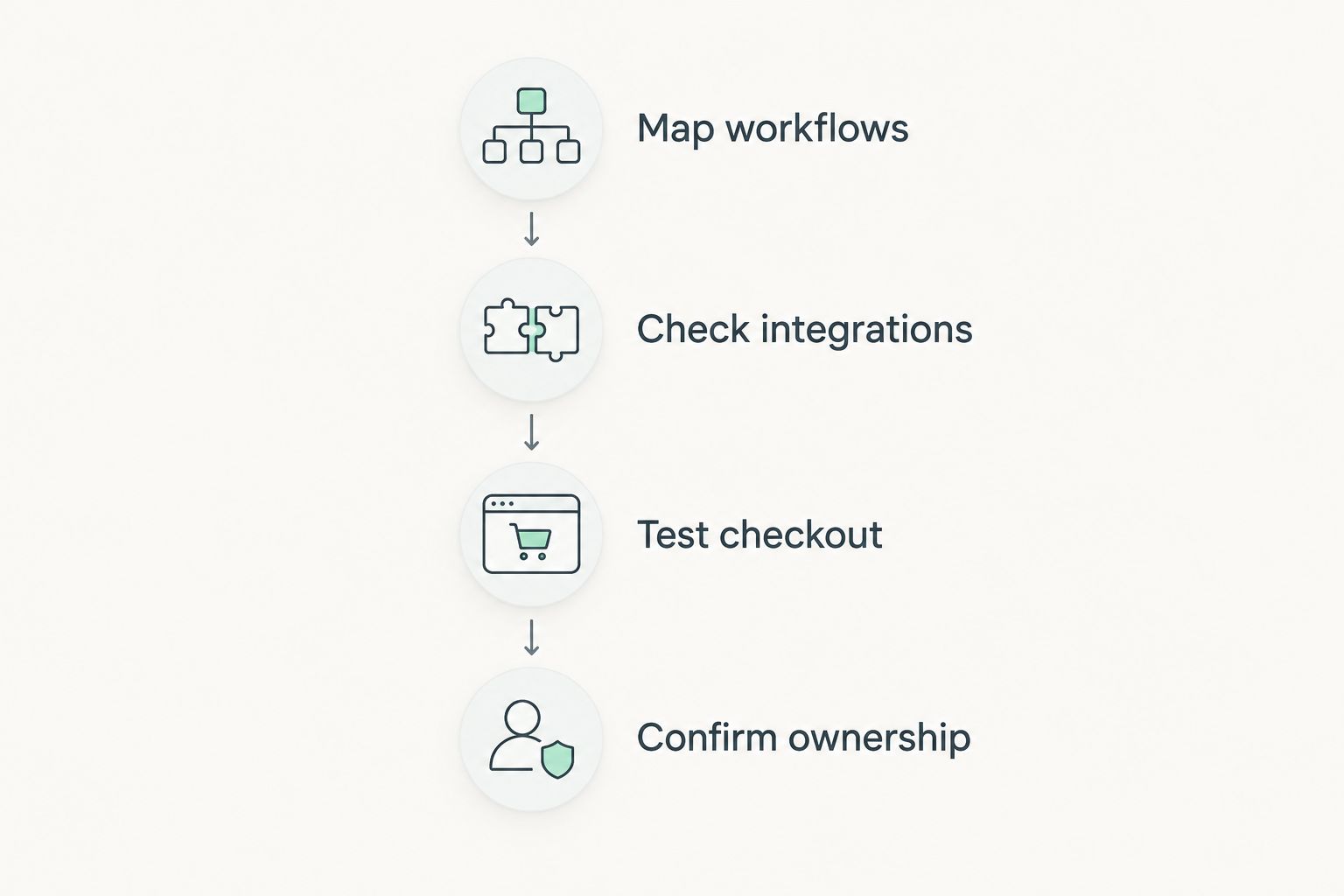
How to test your shortlist before buying
A useful demonstration follows your business from transaction to record. Give each candidate the same tasks so that you compare outcomes rather than presentation quality.
Map workflows
Write down how a sale, return, delivery and stock correction move through your business. Name the person responsible for each handoff and the system that holds the final record.
Review 30 days of operating records as a recommended starting sample. Use actual exceptions to shape the demonstration instead of assuming a normal sale represents the whole business.
Check integrations
List the accounting, ecommerce, customer-management and inventory connections you require. For each connection, record which data moves, when it moves and who resolves an error.
Separate an existing supported connection from custom development. Both need acceptance criteria, but they create different implementation responsibilities.
Test checkout
Use 10 products from your catalog as a manageable demonstration sample. Include representative variants and an item that regularly creates an exception.
Run 5 transactions as a minimum scripted test: a normal sale, a discount, a return, an exchange and a sale involving a product variant. These are recommended test quantities, not performance benchmarks.
Confirm ownership
Document who handles configuration, training, hardware support, integration errors and data exports. Ask your team to explain the process without the demonstrator's help.
Do not approve the purchase until every unresolved issue has an owner and an agreed next action. A written exception list is more useful than a verbal assurance that everything will work.
Which retail POS system should you choose?
Choose Square as the default for straightforward store-first retail. Start elsewhere when your business model clearly points to another slot: Shopify POS for a Shopify-led operation, Lightspeed Retail for inventory-led evaluation, or Clover for a countertop-focused setup.
For your 2026 decision, distinguish buying requirements from preferences. A required accounting handoff can eliminate a candidate; a preferred screen layout should not outweigh a failed return or inventory process.
Keep the shortlist short enough to test properly. A completed demonstration against your actual workflows tells you more than a long spreadsheet filled with unchecked feature claims.
FAQ
What's the best POS system for a small retail store?
Square is the default recommendation for a small retailer with straightforward, store-first selling requirements. Test returns, inventory updates and accounting handoffs before choosing your configuration.
Is Shopify POS better than Square for retail?
Shopify POS is the better starting point when your online business already runs on Shopify. Square is the default starting point for straightforward store-first retail; the better choice depends on your sales channels and workflows.
Which retail POS should I evaluate for complex inventory?
Lightspeed Retail belongs on the shortlist when catalog management and purchasing drive the decision. Demonstrate your own product variants, receiving process and stock corrections in the proposed edition.
What should I check before buying a retail POS in 2026?
Check checkout, inventory, integrations, provider terms and support ownership before buying a retail POS in 2026. Use representative products and scripted transactions, then follow the resulting records into your other business systems.
One last thing
The checkout demonstration is not finished when the receipt prints. Follow the transaction into inventory and accounting, then repeat the exercise with a return. Choose the system that passes that full workflow—not the one that gives the neatest presentation.
Related guides
- Best CRM software for small businesses
- Best digital transformation consulting firms
- Best enterprise development companies
Schedule a consultation with Hexagon IT Solutions to define your software requirements before selecting a retail POS.


