






Best overall: ChatGPT. Best for Microsoft-centered teams: Microsoft 365 Copilot. Best for source-led research: Perplexity. The best generative AI tools for business in 2026 solve a specific work problem; otherwise, your team gets another subscription and another place to copy information.
- ChatGPT leads the best generative AI tools for business for general drafting, analysis, and workflow exploration.
- Microsoft 365 Copilot and Google Gemini suit teams working inside their respective productivity ecosystems.
- Claude suits document-heavy drafting; Perplexity suits research that needs visible source references.
- GitHub Copilot supports software development; Adobe Firefly supports creative production.
- Choose business AI software by accepted work, review effort, and data controls—not impressive demonstrations.
Why this matters
A polished answer is not a completed business task. A proposal still needs accurate scope, a research brief needs checked sources, and generated code needs testing before anyone depends on it.
Your 2026 buying decision should start with the handoff: who supplies the information, who checks the output, and where the approved result goes. For a sales team, that might mean moving from meeting notes to a reviewed follow-up. For construction operations, it might mean turning approved project notes into a draft update without inventing commitments.
Hexagon IT Solutions is a consultation option for business buyers deciding how generative AI fits their workflows. Start with the business problem when approaching Hexagon IT Solutions, rather than asking for an unspecified technology deployment.
What makes the best generative AI tools for business
Use these criteria before comparing names. A tool that produces attractive prose but creates more checking work fails the business test.
- Workflow fit: Does the tool support the task your team actually performs, with the files and applications involved?
- Output quality: Does the result answer the request, preserve important details, and follow your approved terminology?
- Reviewability: Can a reviewer inspect sources, assumptions, edits, or code before accepting the result?
- Data control: Can you establish appropriate permissions and rules for the information employees submit?
- Operational fit: Can approved output reach the system where work happens without unnecessary copying?
- Evaluation clarity: Can you compare the result against the existing process using the same task and acceptance standard?
For a 2026 shortlist, check the exact edition and configuration under consideration. A familiar product name does not establish which controls or application connections your organization will receive.
Best business generative AI tools at a glance
This ranking separates use cases rather than treating every product as interchangeable. Choose the row that matches your bottleneck, then evaluate that tool against your own work.
| Rank | Tool | Best for | Standout capability | Evaluation requirement |
|---|---|---|---|---|
| 1 | ChatGPT | General business drafting and analysis | Conversational work across text, documents, and data | Check factual accuracy and task completion |
| 2 | Microsoft 365 Copilot | Microsoft-centered office workflows | Assistance within Microsoft productivity applications | Check permissions and application coverage |
| 3 | Claude | Document-heavy writing and synthesis | Working through supplied text and drafting responses | Confirm every material detail against source documents |
| 4 | Google Gemini | Google-centered productivity workflows | Generative assistance across Google's ecosystem | Check the edition and workspace configuration |
| 5 | Perplexity | Source-led business research | Answers accompanied by source references | Read the cited material, not just the summary |
| 6 | GitHub Copilot | Software development assistance | Code suggestions and coding assistance | Apply normal review, security, and testing standards |
| 7 | Adobe Firefly | Creative asset exploration | Generative image and creative workflows | Review rights, brand fit, and production suitability |
1. ChatGPT: best generative AI tool for general business work
ChatGPT is the default starting point when your team needs help across several text-based tasks. It supports conversational drafting, document work, and analysis, giving you a place to explore whether a repeatable task benefits from generative assistance.
Use a bounded brief. Supply approved facts, the intended audience, and the required output instead of asking it to write a business document from nothing.
ChatGPT pros:
- Supports varied business writing and analysis tasks.
- Lets users refine drafts through follow-up instructions.
- Helps turn supplied material into different working formats.
ChatGPT review requirements:
- Validate factual statements before using the output.
- Define a separate approval and handoff process.
Best for: Teams evaluating general-purpose assistance before committing to a narrower workflow tool.
Verdict: Buy for broad assistance after a successful task-based pilot. Do not treat a strong first draft as evidence that the entire workflow is solved.
2. Microsoft 365 Copilot: best for Microsoft-centered teams
Microsoft 365 Copilot fits organizations whose daily work already runs through Microsoft productivity applications. Its relevance comes from where employees work, not simply from its ability to generate text.
Evaluate it using a familiar business task: preparing a document, summarizing a meeting, or drafting a response from approved material. Confirm that the applications and configuration you need are included in the option being considered.
Microsoft 365 Copilot pros:
- Places assistance within familiar productivity workflows.
- Supports document, communication, and meeting-related work.
- Offers a focused evaluation path for Microsoft-centered organizations.
Microsoft 365 Copilot review requirements:
- Review access permissions before exposing organizational content.
- Confirm coverage for the specific applications involved.
Best for: Teams seeking assistance within Microsoft-centered office work.
Verdict: Buy when Microsoft workflow fit is the primary requirement. Evaluate permissions alongside output quality, not after rollout.
3. Claude: best for document-heavy drafting
Claude belongs on your shortlist when the task starts with substantial supplied text and ends with a clear explanation or draft. Examples include restructuring a proposal, synthesizing policy documents, and preparing an executive brief from approved material.
Ask Claude to separate source-backed statements from questions that need a human answer. That instruction gives the reviewer a clearer job than receiving a polished document with uncertain details mixed into the prose.
Claude pros:
- Supports drafting and revision from supplied documents.
- Handles conversational refinement of structure and tone.
- Provides a focused option for text-heavy evaluation tasks.
Claude review requirements:
- Compare summaries against the original documents.
- Have the responsible specialist approve consequential wording.
Best for: Professional services and operations teams producing document-based briefs and drafts.
Verdict: Buy for document-heavy assistance after testing source fidelity. Judge the accepted document, not how fluent the first response sounds.
4. Google Gemini: best for Google-centered teams
Google Gemini is the practical shortlist choice when your team works in Google's productivity ecosystem. Evaluate the relevant Workspace experience rather than assuming every Gemini interface provides the same business functionality.
A suitable test starts with an existing communication or document task. Check whether assistance helps employees complete that task where they already work and whether the result passes the usual approval standard.
Google Gemini pros:
- Supports generative assistance within Google's ecosystem.
- Provides a relevant evaluation route for Google-centered teams.
- Covers writing and information-oriented business tasks.
Google Gemini review requirements:
- Confirm the exact Workspace edition and configuration.
- Check generated content before external distribution.
Best for: Organizations standardizing office work around Google Workspace.
Verdict: Buy when Google workflow fit drives the decision. Compare the complete working experience, not an isolated response.
5. Perplexity: best for source-led business research
Perplexity suits research tasks where the reader needs references alongside an answer. Use it to assemble an initial brief, identify relevant sources, and frame follow-up questions before making a business decision.
A source reference is a starting point for verification, not proof that the accompanying sentence is correct. Open the underlying material and check whether it supports the precise claim you intend to use.
Perplexity pros:
- Presents source references alongside research answers.
- Supports follow-up questions during topic exploration.
- Helps organize the first pass of a research brief.
Perplexity review requirements:
- Check source authority, publication date, and relevance.
- Verify that each cited source supports the associated claim.
Best for: Founders, analysts, and marketing teams preparing source-led briefs.
Verdict: Buy for research assistance with a defined verification step. Keep the final decision with the person responsible for the evidence.
6. GitHub Copilot: best for software development assistance
GitHub Copilot supports developers with code suggestions and coding assistance. It belongs in a development workflow, where engineers can inspect the output and apply existing tests and review practices.
Evaluate it on work your team already understands. An unfamiliar generated solution is difficult to judge; a familiar task gives reviewers a clear basis for checking correctness, maintainability, and fit.
GitHub Copilot pros:
- Supports code drafting within development work.
- Assists with exploring implementation approaches.
- Gives engineering teams a task-specific evaluation path.
GitHub Copilot review requirements:
- Review generated code for correctness and security.
- Keep testing and accountable engineering approval in place.
Best for: Software teams with established review and testing processes.
Verdict: Buy as developer assistance, not autonomous delivery. Accepted, tested code is the outcome that matters.
7. Adobe Firefly: best for creative asset exploration
Adobe Firefly supports generative creative work, including image generation. It fits teams exploring visual concepts and draft assets before a designer decides what belongs in production.
Use an approved creative brief with clear subject matter and intended use. Review the result for visual errors, brand consistency, and applicable usage terms before publishing it.
Adobe Firefly pros:
- Supports visual concept exploration from text instructions.
- Gives creative teams another route for developing drafts.
- Fits image-oriented work rather than general business research.
Adobe Firefly review requirements:
- Check production suitability and visual accuracy.
- Review usage rights for the intended application.
Best for: Marketing and design teams exploring creative directions.
Verdict: Buy for creative exploration with designer approval. Keep final asset selection separate from image generation.
How we ranked
The 2026 order reflects use-case breadth and workflow fit, not a laboratory score. ChatGPT takes the general-purpose slot; the other recommendations serve distinct office, document, research, development, or creative requirements.
These are editorial recommendations based on the capabilities described above. No ranking establishes a measured productivity gain for your team. Your evaluation must connect each tool to an accepted business output and the effort required to produce it.
Turn a shortlist into a business decision
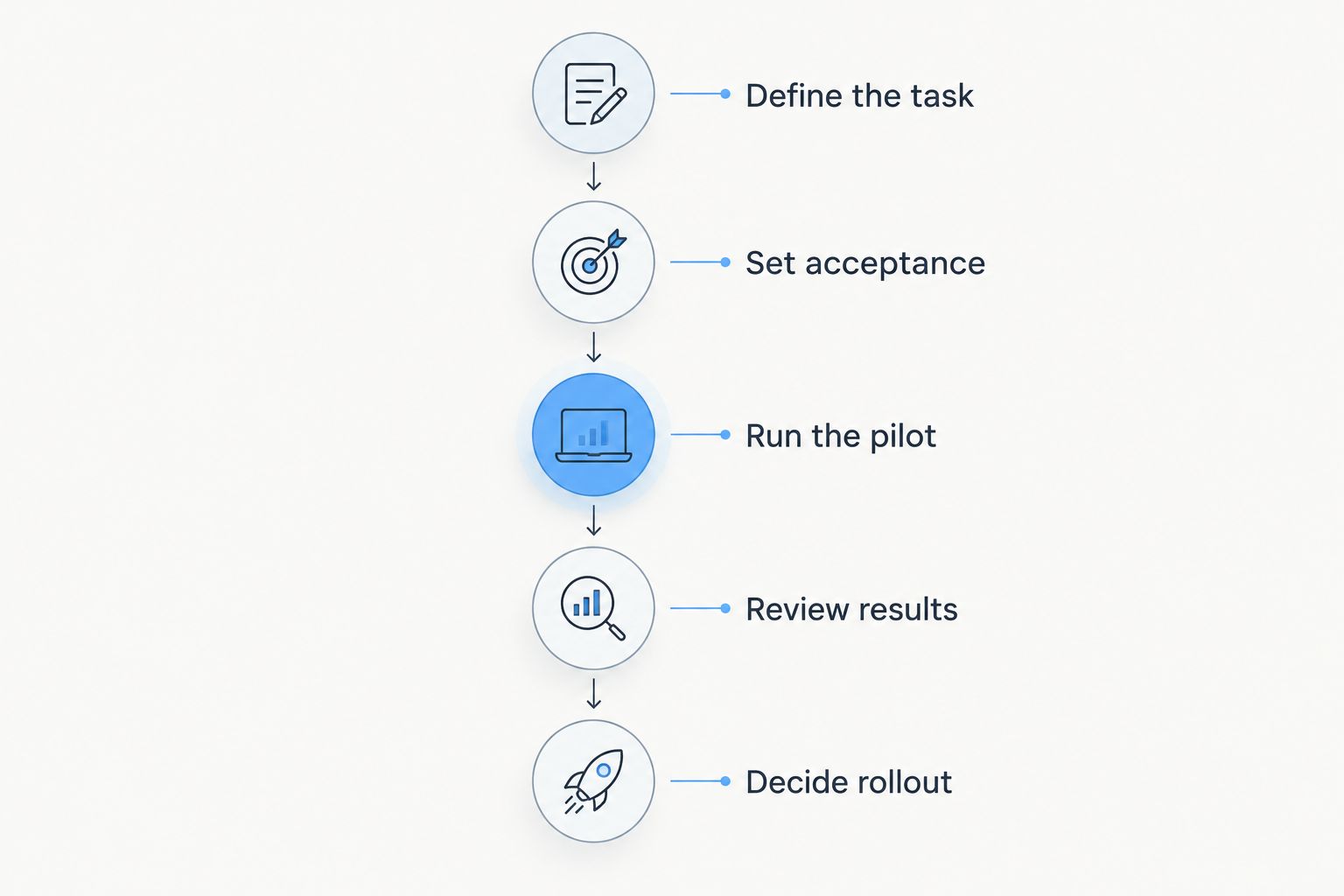
For your 2026 evaluation, start with 1 workflow, use 10 representative tasks, and assign 2 reviewers with clear responsibilities. These are recommended pilot settings, not performance benchmarks: choose a smaller scope when the work involves sensitive information or consequential decisions.
Define the task
Specify what goes in, what must come out, and who accepts the result. A sales follow-up, project update, or research brief needs a different acceptance standard.
Set acceptance
Write down what makes the output usable before generating anything. Include required facts, prohibited assumptions, formatting, and the approval owner.
Run the pilot
Use the same source material for the existing process and the assisted process. Record preparation, generation, checking, and correction effort rather than counting generation alone.
Review results
Have reviewers assess factual accuracy and practical usability. Track completed work, rejected output, and the reasons for revision without treating an attractive draft as a finished deliverable.
Decide rollout
Expand only after the accepted work justifies the review and setup effort. If the obstacle is connecting approved output to operational systems, evaluate implementation separately from the assistant; the guide to AI development companies for enterprises addresses that next buying decision.
Which generative AI tool should you choose?
Choose ChatGPT as the default general-purpose evaluation candidate in 2026. Choose Microsoft 365 Copilot or Google Gemini when your productivity environment is the deciding factor. Select Claude, Perplexity, GitHub Copilot, or Adobe Firefly when document work, research, development, or creative production defines the task.
Do not start by buying every category. Choose the recurring problem with a clear owner, available source material, and an observable completion standard. That produces a purchasing decision your operations team can defend.
FAQ
What's the best generative AI tool for a small business?
ChatGPT is the default general-purpose candidate for small businesses evaluating drafting, analysis, and document assistance. Microsoft 365 Copilot or Google Gemini deserves priority when the business needs assistance inside its existing productivity environment.
Is Microsoft 365 Copilot better than ChatGPT for business?
Microsoft 365 Copilot is the better evaluation candidate when assistance inside Microsoft productivity applications is the main requirement. ChatGPT suits a broader general-purpose evaluation across business tasks. Compare both using the same approved source material and acceptance standard.
Which generative AI tool is best for business research?
Perplexity is the recommendation here for source-led business research because it presents references alongside answers. Read the underlying sources and confirm that they support each important claim before making a decision.
Can generative AI tools use confidential company information?
Only submit confidential information after your organization approves the product, account configuration, and data-handling rules. Check permissions, contractual terms, and the sensitivity of the material before employees begin using it.
How should a business compare the cost of generative AI tools?
Compare the total effort required to produce accepted work, not just the subscription. Include setup, review, corrections, administration, and integration work, then check current commercial terms directly with the provider.
One last thing
Your most useful pilot artifact is the correction log. It shows where employees must repair facts, restore missing context, or move output into another system—and tells you whether the next investment should be a different assistant, a clearer process, or an integration.
Related guides
- Best CRM software for small businesses
- Best API integration platforms for businesses
- Best business intelligence tools for enterprises
Schedule a workflow consultation
Discuss your business workflow and evaluation requirements with Hexagon IT Solutions.


