






Your ecommerce platform becomes a business problem when routine changes need developer intervention or orders require manual cleanup. Among the best ecommerce software development platforms in 2026, Shopify is the default for a standard retail launch, WooCommerce suits WordPress-led stores, and BigCommerce suits teams that want hosted commerce with a separate storefront.
Need something these platforms can't do? See our ecommerce software development services .
- Shopify leads the best ecommerce software development platforms for standard retail stores that want managed hosting.
- WooCommerce fits WordPress-led ecommerce when your team can maintain hosting, plugins, and updates.
- BigCommerce fits hosted commerce with a separate storefront; Adobe Commerce fits complex account and catalog requirements.
- Choose commercetools for composable commerce only when you have engineering ownership for the surrounding systems.
Why this matters
Your platform determines more than how the store looks. It shapes who can publish changes, how orders reach fulfillment, and how much engineering work sits behind a promotion or new sales channel.
A familiar storefront does not prove that the operating model fits. Check the work behind it: product updates, account access, payment handling, inventory changes, and returns. Those workflows expose the difference between a good demonstration and a usable system.
Before choosing software, define the decisions your team needs to make without developers. If you need help turning those requirements into an implementation brief, discuss them with Hexagon IT Solutions. Keep platform selection separate from theme selection; an attractive design cannot fix an unsuitable order process.
What makes the best ecommerce development platform?
For a 2026 shortlist, use these criteria before comparing feature lists:
- Business fit: Match the platform to your selling model, including consumer checkout, business accounts, subscriptions, or negotiated purchasing.
- Ownership: Decide who handles hosting, security updates, extensions, and deployment. Managed hosting does not remove every operational responsibility.
- Integration fit: Confirm how products, customers, inventory, and orders move between commerce and the systems that own those records.
- Developer freedom: Identify where you need custom behavior. Separate a different-looking storefront from a genuinely different transaction process.
- Team usability: Make staff demonstrate catalog updates, order exceptions, and content changes without engineering assistance.
- Exit options: Inspect data export, extension dependencies, and custom code before committing. Document what a future migration would require.
Choose the least complex platform that supports your required workflows. Extra architectural freedom creates value only when your business needs it and your team can maintain it.
Ecommerce platforms at a glance for 2026
These recommendations assign each platform a distinct job. They are not a claim that one product wins every requirement.
| Platform | Best for | Standout approach | Key limitation |
|---|---|---|---|
| Shopify | Standard retail launches | Hosted commerce with storefront themes and developer interfaces | Custom requirements must fit platform boundaries |
| WooCommerce | WordPress-led stores | Commerce within a WordPress environment | Your team owns the hosting and extension maintenance plan |
| BigCommerce | Hosted commerce with a separate storefront | Hosted commerce services with headless storefront options | A separate storefront creates another system to maintain |
| Adobe Commerce | Complex accounts and catalogs | Extensive commerce customization | Implementation needs experienced technical ownership |
| commercetools | Engineering-led composable commerce | API-first commerce components | Your team must assemble the wider customer experience |
1. Shopify: best ecommerce platform for standard retail launches
Shopify provides a hosted commerce platform for managing products, orders, and online storefronts. You can work within its theme-based storefront approach or use its developer interfaces for custom experiences.
Its strongest fit is a business that wants commerce infrastructure managed by a provider rather than maintained as its own application stack. That lets your team focus the implementation on merchandising, customer journeys, and operational connections.
Shopify pros:
- Managed hosting removes server administration from the store team's workload.
- A theme-based storefront gives you a defined starting point for design and development.
- Apps and developer interfaces provide routes for extending the store.
- Store administration separates routine commerce work from custom development.
Shopify cons:
- Custom transaction behavior must work within the platform's supported extension points.
- App-dependent workflows still require dependency management and testing.
- A custom headless storefront adds engineering responsibilities beyond the hosted backend.
Best for: Retail businesses whose main challenge is launching and operating a conventional online store, not creating a new commerce architecture.
During evaluation, demonstrate an actual product update and an order exception. Then test the requirement most likely to need customization. Do not approve a platform because the storefront demonstration looks polished.
Verdict: Buy Shopify for standard retail workflows; hold if an essential transaction rule has not been demonstrated.
2. WooCommerce: best ecommerce platform for WordPress-led stores
WooCommerce adds ecommerce capabilities to WordPress. It suits businesses that want content publishing and commerce within the same underlying website environment.
The business case is strongest when WordPress already supports the company's publishing operation and the team wants to retain that setup. The trade-off is ownership: hosting, updates, extensions, backups, and recovery need a clear maintenance plan.
WooCommerce pros:
- WordPress content and store operations share the same website foundation.
- Open-source software allows code-level customization.
- Themes and extensions offer several routes to adapt the store.
- Your team can choose its hosting and development arrangements.
WooCommerce cons:
- Someone must own updates, compatibility checks, backups, and restoration.
- Custom code and extensions need testing together, not just individually.
- Operational quality depends on the hosting and maintenance setup you choose.
Best for: Content-led businesses with an established WordPress workflow and access to dependable technical support.
Ask the implementation team to show how an update reaches production and how a failed update gets reversed. A maintenance agreement should name the owner of that process. Leaving responsibility split between the host, developer, and marketing team creates avoidable confusion.
Verdict: Buy WooCommerce when WordPress is a deliberate operating choice; skip it if nobody owns ongoing maintenance.
3. BigCommerce: best ecommerce platform for a separate storefront
BigCommerce is a hosted ecommerce platform that supports both its storefront tools and headless implementations. In a headless setup, the customer-facing website is separate from the commerce backend.
That separation suits businesses with a specific reason to control presentation independently. Examples include retaining an established content frontend or building a shopping experience that does not fit a conventional theme.
BigCommerce pros:
- Hosted commerce reduces the infrastructure your team must operate directly.
- Headless options let the frontend and commerce backend evolve separately.
- Developer interfaces support connections to external business systems.
- You can evaluate a conventional storefront before committing to a separate frontend.
BigCommerce cons:
- A headless frontend needs its own deployment, monitoring, and maintenance.
- Previewing content and coordinating releases require an agreed process.
- Backend flexibility does not eliminate integration work with other systems.
Best for: Businesses that want hosted commerce but have a documented requirement for an independently developed storefront.
Do not adopt headless architecture simply because it appears in a proposal. Name the business task it improves, the team that maintains it, and the fallback when the frontend fails. If those answers are unclear, evaluate the conventional storefront approach first.
Verdict: Buy BigCommerce for a justified frontend separation; hold a headless build until ownership is explicit.
4. Adobe Commerce: best ecommerce platform for complex catalogs
Adobe Commerce supports configurable commerce implementations with substantial scope for customization. It belongs on the shortlist when account structures, catalog rules, or purchasing processes drive the platform decision.
The relevant question is not whether your business is large enough. It is whether the complexity of your sales operation warrants a platform and implementation team built to handle those requirements.
Adobe Commerce pros:
- Customization supports business-specific commerce processes.
- B2B capabilities address company accounts and purchasing workflows.
- Catalog configuration gives technical teams room to model detailed requirements.
- Extensions and integrations provide routes to connect commerce with operations.
Adobe Commerce cons:
- Development, deployment, and updates require experienced technical ownership.
- Extensive customization increases the code your team must understand and maintain.
- A broad feature set does not replace detailed workflow design.
Best for: Businesses with demanding account, catalog, or purchasing requirements and a team capable of managing the implementation.
Bring your hardest purchasing scenario to the demonstration. Include the account permissions, applicable catalog, approval process, and resulting order record. Confirm the relevant edition and implementation scope rather than assuming every demonstrated capability belongs in your proposed setup.
Verdict: Buy Adobe Commerce when demonstrated business complexity justifies it; skip it for a straightforward store without that need.
5. commercetools: best ecommerce platform for composable builds
commercetools provides API-first commerce capabilities for applications assembled from separate components. Your team connects the commerce services to the frontend and other systems that make up the buying experience.
This approach suits an engineering-led organization that wants to choose and develop those components independently. It is not a substitute for an implementation team or an operating model.
commercetools pros:
- API-first capabilities support custom customer experiences.
- Separate components allow deliberate choices about surrounding systems.
- Frontend development is not tied to a conventional storefront theme.
- Commerce services can participate in a wider application architecture.
commercetools cons:
- Your team must build or select the surrounding storefront and content tools.
- Multiple components need coordinated monitoring and failure handling.
- Routine business changes need a usable interface, not just developer access.
Best for: Organizations with sustained engineering ownership and a business reason to assemble their commerce stack.
Ask who owns the full purchase journey when a problem crosses component boundaries. A successful API response does not prove that the customer received confirmation or that fulfillment received the order. Test the complete workflow, including recovery from failed handoffs.
Verdict: Buy commercetools for an intentionally composable architecture; skip it when engineering ownership is temporary.
How to validate your shortlist
A 2026 platform decision should end with a demonstrated workflow, not a feature-count winner. Use this sequence to compare the finalists under the same conditions.
Map workflows
Write down 5 workflows to demonstrate: product publishing, checkout, order changes, fulfillment handoff, and returns. This is a recommended evaluation checklist, not a claim about how many workflows your business needs.
Assign ownership
Name the business and technical owner of each workflow. Specify who resolves failures, who approves changes, and who can publish to production. Shared responsibility still needs a single person accountable for resolution.
Test integrations
Choose 2 integrations for the initial demonstration: the system supplying inventory and the system receiving orders. Use your actual field definitions and exception rules. Confirm what happens when a message fails or arrives twice.
Rehearse recovery
Require a 30-day observation period after the pilot launch before expanding its scope. Treat that period as a planning recommendation, not a promised stabilization timeline. Record failures, manual interventions, and unresolved ownership gaps.
Approve expansion
Approve the next stage only after staff can operate the workflows and technical owners can diagnose failures. Define the acceptance evidence before development begins; otherwise, a visually finished store becomes the default definition of completion.
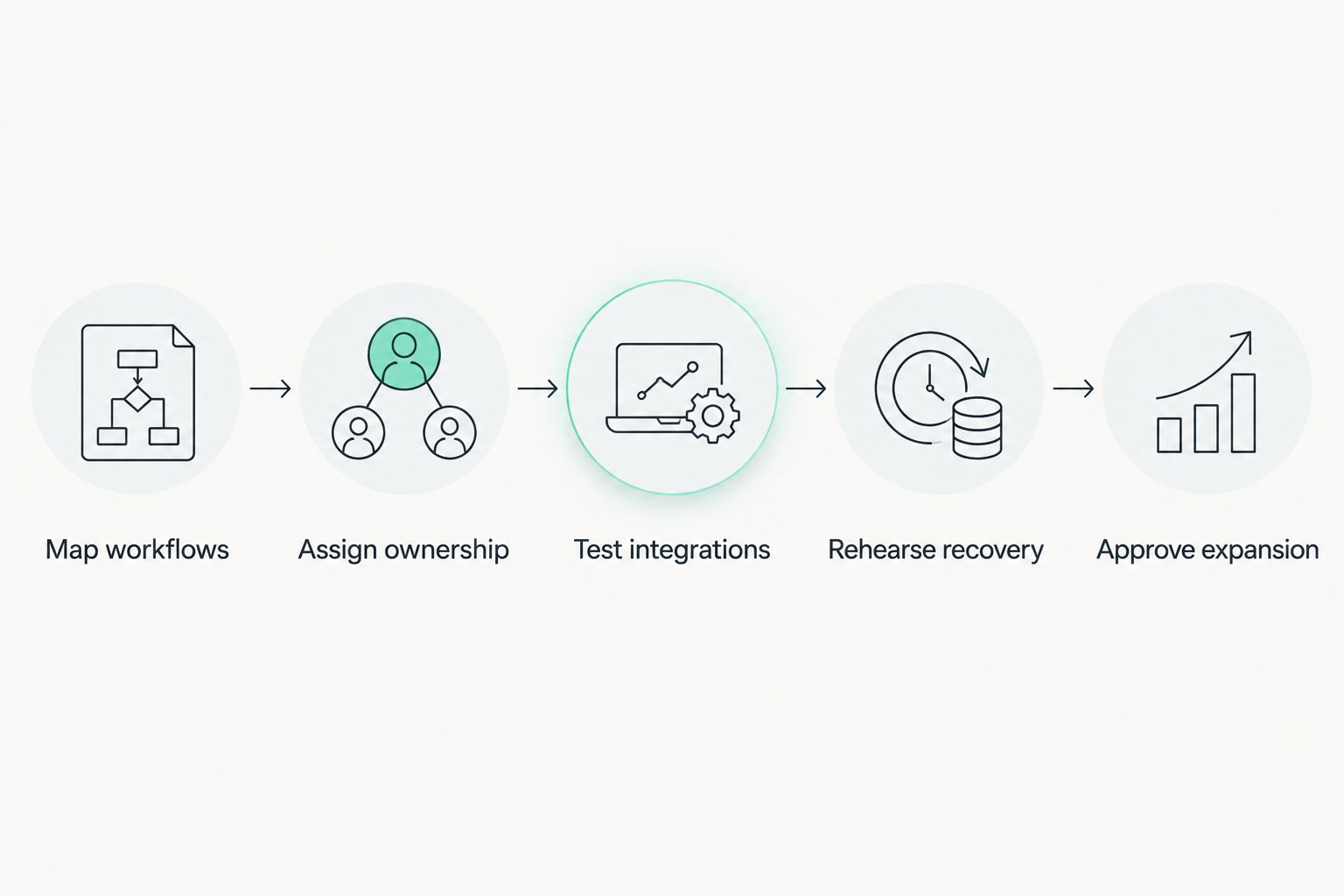
The same demonstration brief should go to every finalist. Different sales presentations are not a fair comparison. Keep the required workflows fixed and record where each platform needs configuration, an extension, or custom development.
How the platforms are ranked
The 2026 ranking prioritizes operational ownership, business fit, integration requirements, and development complexity. It does not represent hands-on benchmark testing or a measured performance contest.
Shopify takes the default position because this guide starts with a standard retail launch. The other platforms win distinct use cases: existing WordPress operations, frontend separation, complex purchasing requirements, or composable development. Change the use case and the preferred choice changes with it.
Which ecommerce platform should you choose?
Shopify is the best default ecommerce development platform for a standard retail store that wants managed hosting. Start there unless a required workflow gives you a concrete reason to choose another architecture.
For your 2026 decision, shortlist the default plus the platform that matches your strongest constraint. Avoid comparing every option indefinitely. Ask both finalists to demonstrate the same business process, then choose the one your team can operate and maintain.
FAQ
What's the best ecommerce software development platform for a small business?
Shopify is the default for a small business with standard retail workflows that wants managed hosting. WooCommerce is a better fit when WordPress is central to the business and someone owns ongoing maintenance.
Is WooCommerce better than Shopify for custom development?
WooCommerce fits teams that want code-level control within WordPress, while Shopify fits teams that prefer a hosted commerce foundation. Choose based on the required workflow and maintenance ownership, not customization alone.
Do I need a headless ecommerce platform?
You need headless commerce only when separating the storefront from the commerce backend solves a defined business requirement. It also creates frontend deployment, monitoring, and maintenance responsibilities.
What should I test before choosing an ecommerce platform?
Test product publishing, checkout, order changes, fulfillment handoff, and returns using your own business rules. Include failed integrations and recovery so the demonstration covers operations, not just the customer-facing store.
One last thing
Test a failed handoff before celebrating a successful checkout. Place a test order while an integration is unavailable, restore the connection, and inspect the resulting records. This exercise shows whether your team can recover without losing an order or creating a duplicate.
Related guides
- Best payment gateway platforms for businesses
- Best API integration platforms for businesses
- Best POS systems for retail businesses
- Best business intelligence tools for enterprises
Schedule a consultation with Hexagon IT Solutions to discuss your ecommerce platform requirements.
Discuss your ecommerce platform requirements
Bring your required workflows, integration dependencies, and maintenance responsibilities.


