






Your engine choice needs to match the game you can actually ship, not the most impressive demo. Best overall: Unity for mixed 2D and 3D development; best for advanced 3D rendering: Unreal Engine; best for source-code control: Godot; best for focused 2D workflows: GameMaker; best for browser games: Phaser; best for visual novels: Ren’Py.
- Among the best 3d 2d game development engines, Unity is the default for teams building across both formats.
- Unreal Engine fits advanced 3D production; Godot fits teams that need an MIT-licensed engine with accessible source code.
- GameMaker suits dedicated 2D projects, Phaser suits browser games, and Ren’Py suits dialogue-driven visual novels.
- Choose your game engine through a playable prototype, a target-device build, and a documented release path.
Why this matters
A game engine shapes how your team builds scenes, handles input, imports assets and creates release builds. Changing that foundation means revisiting code, content workflows and testing. Choose around the work your game requires.
For a founder evaluating a game project in 2026, the useful question is not which engine has the longest feature list. It is which engine lets your team deliver the intended experience without building unnecessary infrastructure.
If you need help framing that technical decision, Hexagon IT Solutions is a starting point for a consultation. Keep the engine shortlist separate from the delivery brief: target devices, gameplay scope, team skills and acceptance criteria belong in the brief before implementation starts.
What makes the best game development engine?
Use these criteria before reviewing the shortlist. Each criterion connects a technical choice to delivery work your team must own.
- Gameplay fit: A dialogue-heavy story needs different tools from a physics-driven 3D game. Choose around your core interaction.
- Target platform: Confirm the release path for desktop, mobile, browser or console before committing. An editor preview is not a release build.
- Team skills: Match the engine’s programming model to the people building and maintaining the game. Include designers and artists in that assessment.
- Content workflow: Check how scenes, animation, audio and assets move from source files into the game. Repeated manual steps become production work.
- Control and dependencies: Review the engine license, extension requirements and access to source code. Separate engine capabilities from third-party additions.
- Testing and maintenance: Confirm that you can diagnose problems on the target device and reproduce builds. The team must support the game after launch.
The best engine is the one that supports your core gameplay and release target with the fewest unnecessary systems. A broad engine is useful when you need breadth; a specialized engine is useful when your scope is narrow.
Best 3D and 2D game engines at a glance
| Rank | Engine | Best for | Standout capability | Planning consideration |
|---|---|---|---|---|
| 1 | Unity | Teams building both 2D and 3D games | C# scripting with dedicated 2D and 3D workflows | Package choices and project structure need active management |
| 2 | Unreal Engine | Advanced 3D rendering and visual scripting | Blueprint scripting alongside C++ | Its broad production toolset requires focused onboarding |
| 3 | Godot | Teams that want engine source-code control | MIT-licensed source with dedicated 2D and 3D systems | Console delivery requires separate platform planning |
| 4 | GameMaker | Dedicated 2D game production | A 2D-focused editor with GML scripting | It is not the default choice for advanced 3D production |
| 5 | Phaser | Games delivered through a browser | JavaScript framework for 2D browser games | It is a coding framework rather than a complete visual editor |
| 6 | Ren’Py | Visual novels and branching dialogue | Script-driven dialogue, choices and story presentation | General-purpose action gameplay needs additional systems |
These are use-case rankings, not a claim that one engine wins every project. For a 2026 shortlist, compare the tools against the same playable scene and the same release requirements.
1. Unity: best engine for mixed 2D and 3D development
Unity is a general-purpose engine with C# scripting, scene editing and workflows for both 2D and 3D games. It gives a team one development environment for projects that need different visual formats. That makes it the default here for a team without a narrow genre requirement.
The business value is flexibility. You can evaluate gameplay, asset production and deployment within the same engine rather than selecting a specialized framework before the project’s direction is settled.
Unity pros:
- Supports both 2D and 3D game development.
- Uses C#, giving C# developers a familiar programming language.
- Provides visual editing for scenes and game objects.
- Supports an extensible workflow through packages and editor tools.
Unity considerations:
- Package selection and engine-version changes need deliberate management.
- A broad toolset does not replace a clear architecture or asset pipeline.
Best for: Teams building across 2D and 3D formats, particularly when C# is already a team skill.
Before choosing Unity, build your central interaction and export it to the intended device. Include saved state, input and a representative asset import in that exercise.
Verdict: Buy into Unity when you need breadth across 2D and 3D, rather than a genre-specific workflow.
2. Unreal Engine: best engine for advanced 3D production
Unreal Engine combines 3D scene production, rendering tools, Blueprint visual scripting and C++ development. Its toolset fits projects where visual presentation and detailed environments are central to the game. Blueprint also gives teams a visual way to express gameplay logic.
For a founder, the decision is whether that production scope serves the game. Advanced rendering does not remove the need for disciplined art direction, asset preparation and performance testing.
Unreal Engine pros:
- Provides an extensive 3D production environment.
- Supports visual gameplay scripting through Blueprint.
- Supports C++ for programming and engine-level work.
- Includes animation and cinematic workflows.
Unreal Engine considerations:
- The breadth of systems requires focused learning and ownership.
- High-detail assets still need testing against the target hardware.
Best for: Teams producing visually demanding 3D games with the skills to manage a full production pipeline.
Test a representative scene, not an empty level. Include the lighting, characters and interactions that define your intended experience.
Verdict: Buy into Unreal Engine when advanced 3D production is a core requirement.
3. Godot: best engine for source-code control
Godot is an MIT-licensed game engine with dedicated 2D and 3D systems. Its scene-and-node model organizes game elements into reusable structures, and GDScript provides an engine-focused scripting language. Engine source access gives technical teams a direct route to inspect implementation details.
Godot is best for teams that want an MIT-licensed engine with accessible source code. That is a specific ownership advantage, not a promise that every release target requires the same effort.
Godot pros:
- Provides engine source code under the MIT license.
- Supports dedicated 2D workflows alongside 3D development.
- Uses reusable scenes and nodes to structure game content.
- Supports editor extensions and engine customization.
Godot considerations:
- Console distribution requires separate arrangements and platform planning.
- Extensions and integrations need evaluation against the exact project requirements.
Best for: Technically capable teams that prioritize engine transparency and control over their development foundation.
For a Godot project in 2026, verify the intended export route before building substantial content. Source access helps with control; it does not remove platform approvals or integration work.
Verdict: Buy into Godot when source-code access and a dedicated 2D workflow matter to your team.
4. GameMaker: best engine for focused 2D game production
GameMaker centers its workflow on 2D games, with visual editing and GameMaker Language, commonly called GML. Its objects, rooms and event-based logic provide a focused structure for sprite-based gameplay. That scope suits teams that already know their game belongs in 2D.
The value is focus. You can organize production around the interactions, levels and assets your game needs rather than evaluating an extensive 3D pipeline.
GameMaker pros:
- Provides a development environment centered on 2D games.
- Uses objects and events to organize gameplay behavior.
- Includes room editing for building game spaces.
- Supports scripted logic through GML.
GameMaker considerations:
- GML introduces a language-specific learning requirement.
- Projects centered on advanced 3D need a different shortlist.
Best for: Teams building sprite-based action games, platformers or other deliberately 2D experiences.
Prototype movement, collision and level editing together. A movement test alone does not show whether your team can produce and maintain the full game.
Verdict: Buy into GameMaker when the project is firmly 2D and production focus matters more than 3D breadth.
5. Phaser: best framework for browser-first 2D games
Phaser is a JavaScript framework for 2D games running in web browsers. It provides game-focused systems such as scenes, input, animation and rendering within a web development workflow. Teams already comfortable with JavaScript can evaluate it without first adopting a desktop game editor.
Browser delivery is the defining use case. Phaser fits games embedded in a web experience, but your team still owns the surrounding deployment and application structure.
Phaser pros:
- Uses JavaScript within a browser-based development model.
- Provides systems for 2D scenes and gameplay.
- Fits existing web development tooling.
- Supports browser input and canvas-based game presentation.
Phaser considerations:
- It is a framework, not a complete visual game-production editor.
- Browser differences and mobile input require explicit testing.
Best for: Web development teams creating browser-first 2D games or interactive experiences.
Test the game inside its intended page, not just a standalone development window. Loading behavior, focus, touch input and surrounding page elements belong in that test.
Verdict: Buy into Phaser when browser delivery is the requirement and JavaScript is a team strength.
6. Ren’Py: best engine for visual novels
Ren’Py is built around visual novels and interactive storytelling. Its scripting model handles dialogue, character presentation and player choices, with Python available for additional logic. It gives narrative teams a foundation aligned with their main production task: telling a branching story.
That specialization keeps the engine decision close to the content. Writers, editors and developers need a repeatable way to review dialogue and choices, not an unrelated 3D production workflow.
Ren’Py pros:
- Provides a dialogue-centered scripting model.
- Supports branching choices and story presentation.
- Includes established visual-novel systems such as saving and loading.
Ren’Py considerations:
- Action-heavy mechanics require work beyond its core storytelling model.
- Complex narrative branches still need structured testing.
Best for: Teams producing visual novels or games whose main interaction is dialogue and choice.
Prototype a complete story branch, including a return to an earlier save. Review the writing workflow as carefully as the gameplay.
Verdict: Buy into Ren’Py when narrative choices define the experience.
How the engines are ranked
This ranking matches each engine to a distinct delivery requirement: mixed-format development, advanced 3D, source access, focused 2D, browser delivery or narrative production. It is not a benchmark of rendering speed or development time.
For a 2026 procurement review, use the publishers’ official documentation: the Unity Manual, Unreal Engine documentation, Godot documentation, GameMaker Manual, Phaser documentation and Ren’Py documentation. Confirm scripting support, export requirements and licensing there before approving the technical plan.
Which game development engine should you choose?
Choose Unity as the default if your team needs both 2D and 3D and has no stronger specialization. Choose the other engines when their named use case is central to the game, not because a demonstration looks impressive.
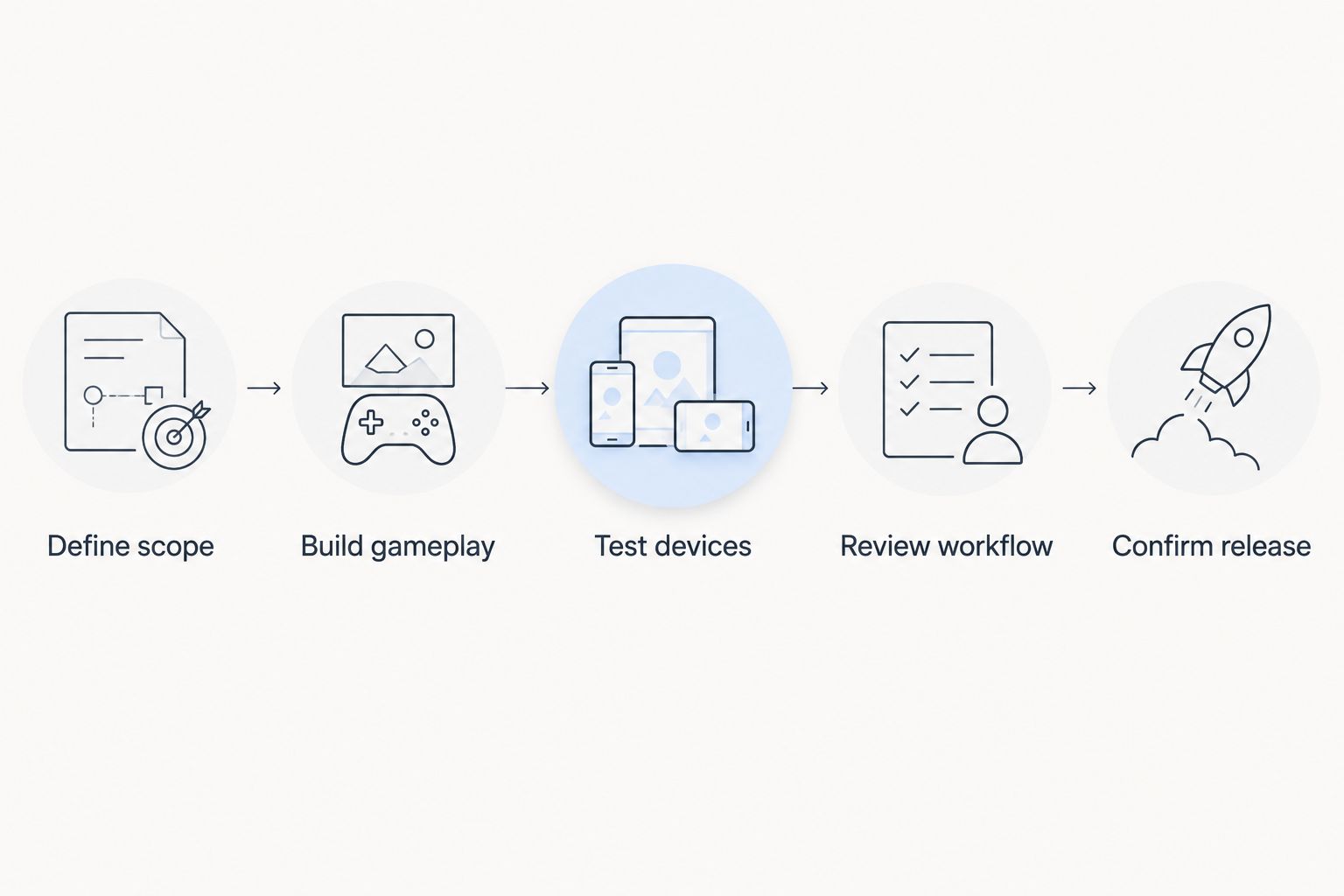
Turn that choice into a short, repeatable evaluation:
- Define scope. Write down the core interaction, target platforms and required release features. Separate launch requirements from later additions.
- Build gameplay. Create a playable version of the interaction that makes the game distinctive. Use representative assets where they affect the result.
- Test devices. Run an exported build on the intended hardware. Check input, loading and performance outside the editor.
- Review workflow. Ask a developer and a content contributor to make a change. Record the steps needed to produce another working build.
- Confirm release. Verify distribution requirements, dependencies and ownership of maintenance. Approve the engine only after those responsibilities are clear.
Set performance goals explicitly. If you choose a target of 60 frames per second, each frame has approximately 16.7 milliseconds; at 30 frames per second, it has approximately 33.3 milliseconds. Those are mathematical frame budgets, not performance claims about any engine.
Use the budget to guide testing in 2026. A working prototype must meet the intended experience on the intended hardware; a smooth editor preview does not answer that question.
FAQ
What’s the best engine for both 3D and 2D game development?
Unity is the default recommendation for teams that need both 3D and 2D development in one environment. Choose a specialized engine instead when browser delivery, advanced 3D production or visual-novel storytelling defines the project.
Should I choose Godot or Unity for a 2D game?
Choose Godot when MIT-licensed engine source access is a priority; choose Unity when its C# workflow and broader project requirements fit your team. Test the same gameplay interaction and export route before committing.
Is Unreal Engine the right choice for every 3D game?
No. Unreal Engine fits projects that need its advanced 3D production tools, but the engine choice should also match your team’s skills, target hardware and content workflow.
Which engine should a JavaScript team use for a browser game?
Phaser is the recommended option here for a JavaScript team building a browser-first 2D game. Test the game within the actual page and include mobile input and browser behavior in the release checklist.
What should I test before choosing a game engine in 2026?
Test a playable core interaction, an exported target-device build and a repeatable content-change workflow. Also confirm distribution requirements and who owns dependencies, build maintenance and post-launch support.
One last thing
Your most revealing engine test is a content change after the first working build. Replace an asset, adjust an interaction and produce another release build. That exercise exposes the workflow your team will repeat throughout production.
Keep the engine that makes the real game manageable, not the prototype that is easiest to applaud. Record the reasons for the decision so later feature requests do not quietly change the project’s technical assumptions.
Related guides
- Best mobile app development companies for startups
- Best API integration platforms for businesses
- Best digital transformation consulting firms
Schedule a technical consultation
Discuss your game’s scope, target platforms and delivery requirements with Hexagon IT Solutions.


