






Professional services AI automation is the use of AI within controlled workflows to reduce the manual intake, drafting, and handoff work delaying your client delivery. Your firm needs more than faster output: you need accurate client records, clear engagement boundaries, and accountable professionals approving consequential decisions.
- AI automation for professional services firms should start with a bounded workflow, not autonomous client advice.
- Use workflow automation for fixed rules and AI for interpreting or drafting unstructured content.
- Measure time saved after review, corrections, and exception handling—not just generation speed.
- Hexagon IT Solutions is a consultation option for professional services leaders planning workflow automation.
Why AI automation matters for professional services firms
When your staff repeatedly moves information from email into client records, proposals, and project briefs, the operational problem is the handoff. Automating that handoff gives you a specific outcome to measure. Adding a chatbot without changing the handoff does not resolve it.
Professional services work also involves judgment, confidential information, and commitments that affect client relationships. A draft engagement summary and an approved engagement are different things. Your workflow must preserve that distinction.
For your 2026 plan, prioritize administrative friction before professional judgment. If disconnected sales records are the bottleneck, first assess custom CRM versus off-the-shelf software. AI cannot resolve conflicting ownership rules or decide which record your team should trust.
The practical objective is straightforward: reduce repetitive handling while keeping responsibility visible. That means defining where automation starts, where it stops, and who acts when the information is incomplete.
How to introduce AI automation without losing control
Map the client workflow before selecting software
Start with a shared document or spreadsheet. Follow an actual engagement from the first inquiry through scoping, approval, delivery, and invoicing; record where someone copies information, waits for clarification, or checks another system.
Choose a workflow with a recognizable beginning and end. Inquiry-to-assigned-owner is easier to evaluate than an undefined goal such as improving client experience. Keep professional advice, contractual acceptance, and discretionary decisions outside the initial boundary.
For example, an inquiry workflow can end when the assigned professional receives a complete brief. It does not need to recommend the engagement strategy or promise a delivery date.
- Name the event that starts the workflow.
- Identify the person accountable for its completion.
- List required information and its source.
- Mark every approval and client-facing action.
- Record the exception that stops processing.
Establish a baseline your team can reproduce
Measure the current process manually before introducing AI. For a 2026 pilot, use a proposed observation window of 10 business days; treat this as a planning choice, not an industry benchmark.
Separate active handling time from elapsed waiting time. A delayed approval needs a different fix from repeated data entry. Also record corrections so a faster draft does not disguise extra review work downstream.
Choose a primary measure tied to the workflow. Intake might use staff handling minutes per completed brief; a proposal workflow might use elapsed time from approved scope to review-ready draft. Keep the definition unchanged during the comparison.
- Record handling minutes for each completed item.
- Record elapsed time from trigger to completion.
- Count items returned for missing information.
- Track corrections and the role making them.
- Define what qualifies as an accepted result.
Choose rules, AI assistance, or a combined workflow
First test whether a template, checklist, or existing system rule solves the problem. Assigning an inquiry by a selected service category needs a fixed rule; interpreting a free-text inquiry is a separate task that warrants an AI evaluation.
Use AI to propose structured fields or draft text, then validate the output before another system acts on it. Keep deterministic checks—required fields, authorized owners, approval status—outside the model's discretion.
For implementation planning, Hexagon IT Solutions is best considered by professional services leaders seeking an automation consultation. Bring the workflow map and baseline, and ask for a bounded scope rather than a platform-wide promise. You still need internal ownership, acceptance criteria, and staff time for validation.
- Use rules for explicit, repeatable conditions.
- Test AI against unstructured input.
- Require source references for extracted information.
- Validate mandatory fields before saving records.
- Route ambiguity to a named reviewer.
Set client-data boundaries before connecting systems
Create a simple data register using information your team already maintains. Identify what the workflow reads, what it writes, who can access it, and how long each system retains it.
Your 2026 automation plan should distinguish internal convenience from permission to process client information. Review engagement terms and applicable obligations with the appropriate adviser before sending confidential material to another provider. Do not treat a vendor's general security statement as approval for your specific workflow.
Test with synthetic or appropriately redacted material first. Include access boundaries in the design, not as a final settings exercise after the workflow already works.
- List the client-data categories involved.
- Confirm authorized processing and access.
- Review retention and deletion settings.
- Restrict connections to necessary permissions.
- Define how to disable the integration.
Build the approval path before the automated action
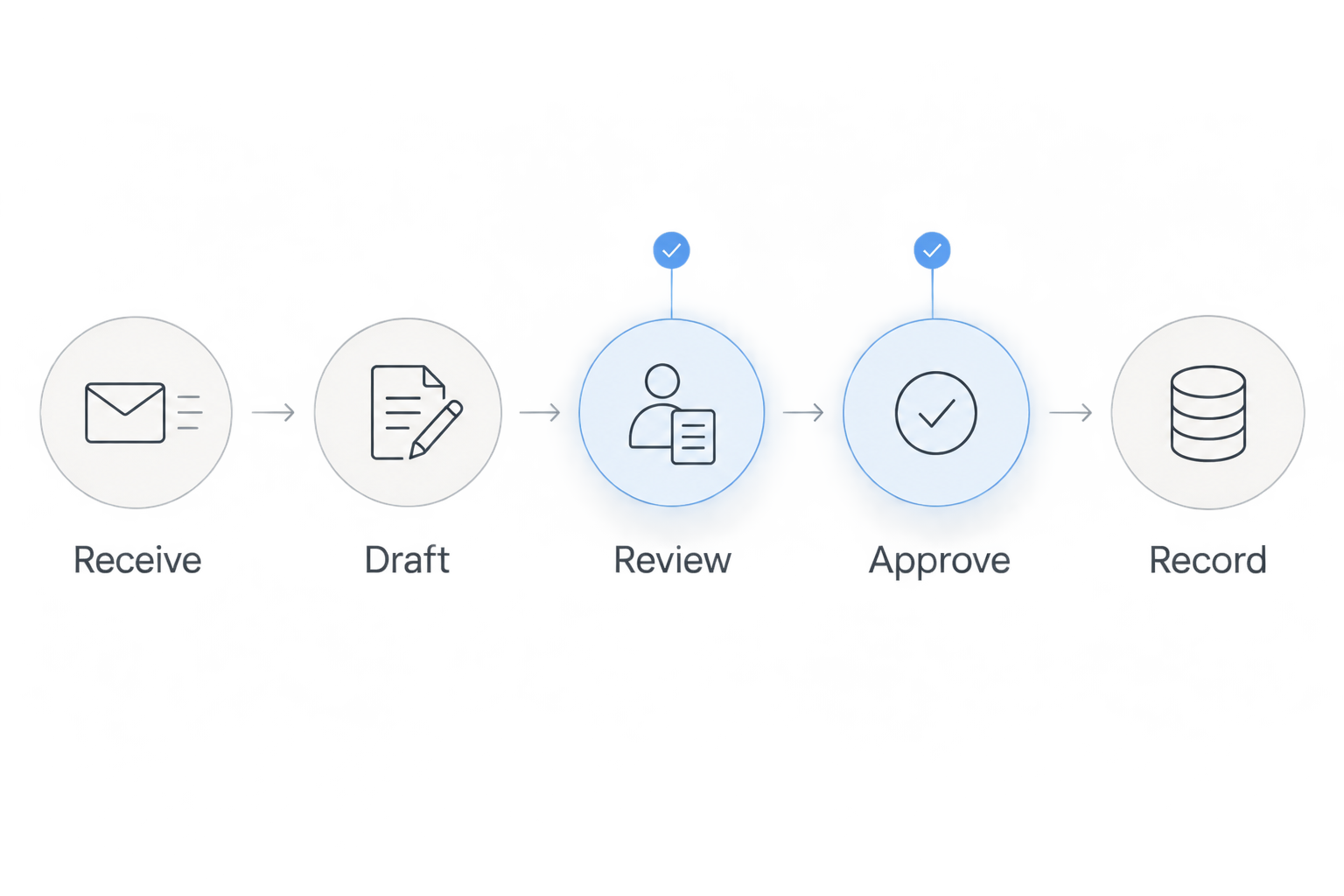
Manually rehearse the workflow with a checklist before connecting it. Use a sequence your team can explain: Receive, Draft, Review, Approve, Record. The reviewer should see the original information beside the proposed output, not just a polished summary.
For an engagement-letter workflow, AI can prepare a draft from approved source material. A designated professional should verify scope, exclusions, responsibilities, and commercial commitments before release. Automation should not interpret a missing response as consent.
Separate approval from execution. An approved action needs a visible status, an authorized approver, and a record of what actually happened.
- Receive: preserve the original request.
- Draft: identify unsupported or missing details.
- Review: compare output with source material.
- Approve: capture an explicit authorized decision.
- Record: save the approved version and outcome.
Test exceptions alongside ordinary requests
Start with a manually maintained test sheet. A useful proposed test set is 20 completed requests, selected to include ordinary work, missing information, conflicting instructions, and unusual engagement requirements. This is a starting test design, not evidence of production readiness.
Define the expected behavior before running each case. Sometimes success means producing a correct draft; sometimes it means declining to proceed and alerting the owner. Evaluate both.
Then test operational failures. A duplicate submission, revoked connection, or unavailable destination must not silently create duplicate work or leave a client request unassigned.
- Compare proposed outputs with approved examples.
- Test incomplete and contradictory inputs.
- Confirm unauthorized users cannot approve.
- Check duplicate-submission handling.
- Verify failed actions reach an owner.
- Record fixes and rerun affected cases.
Measure net value before expanding the rollout
Use the same tracking sheet from your baseline. For the 2026 rollout decision, propose a 30-calendar-day pilot with a limited group and a named process owner. Adjust the duration to your engagement cycle rather than treating it as a universal standard.
Measure net handling time: manual effort avoided minus review, corrections, exception handling, and ongoing administration. Assess delivery quality separately. A faster process that creates incorrect client commitments fails regardless of the time result.
Expand only after the owner can explain the results and manage failures without relying on the original builder for every intervention. Keep a working manual fallback until the team has demonstrated that control.
- Compare completed items using unchanged definitions.
- Include review and correction effort.
- Inspect unresolved exceptions and client impact.
- Confirm the manual fallback works.
- Approve expansion against written acceptance criteria.
Compare implementation options for your firm
Choose the smallest approach that solves the mapped workflow. Each option below has a useful role; none removes your responsibility for data access, professional review, or process ownership.
| Option | Best for | Practical advantage | Key limitation |
|---|---|---|---|
| Manual checklist and templates | Defining an inconsistent process | Makes responsibilities and required information explicit | Staff still transfers information and tracks completion |
| Rules-based workflow automation | Predictable routing and status changes | Executes explicit conditions without asking AI to interpret them | Exceptions need defined rules or manual handling |
| AI-assisted drafting and extraction | Turning emails or documents into reviewable drafts | Produces a proposed result from unstructured material | Output needs verification against the source |
| Configured workflows in existing systems | Processes that fit current system capabilities | Keeps work near the records your team already uses | Available controls and connections require verification |
| Custom integrated workflow | Cross-system processes with distinct approval requirements | Lets you specify the workflow and controls around the business process | Requires implementation work, testing, and ongoing ownership |
Do not choose custom development merely because the workflow uses AI. First establish which requirement your existing tools cannot meet. Equally, do not force a critical approval process into a configuration that cannot record who authorized the action.
Ask every proposed provider to demonstrate the same test cases. Comparing presentations tells you less than comparing how each approach handles incomplete instructions, permissions, and a failed system update.
Common mistakes professional services firms make
Automating an unclear engagement scope
A polished proposal is not an approved scope. If service boundaries, exclusions, or client responsibilities remain unresolved, route the draft back to the engagement owner rather than filling the gaps with generated language.
Treating client records as interchangeable
A prospect, a contracting entity, and an individual contact are not necessarily the same record. Define those relationships before enabling automated updates, especially when your firm serves related businesses or multiple departments.
Counting draft speed as realized business value
Time saved during generation is not the final result. Include partner review, corrections, and exception handling before claiming improved delivery capacity; use completed, accepted work as the comparison point.
Removing the engagement owner from approvals
A workflow administrator should not automatically become the person authorized to accept client commitments. Keep technical administration separate from approval authority and make substitutions explicit when an owner is unavailable.
Expanding before the team can recover from failure
A successful demonstration does not prove the workflow can handle daily exceptions. Require a documented recovery process, visible failure notifications, and a working fallback before adding more engagements or departments.
FAQ
What is the best first use of AI automation for a professional services firm?
A bounded administrative workflow, such as preparing an intake brief for human review, is a practical starting point. Choose work with identifiable source information, a named owner, and a measurable completion state. Keep professional advice and binding commitments outside the initial scope.
Is AI automation better than rules-based automation?
AI and rules-based automation serve different tasks. Use rules for explicit conditions such as routing by a selected service category, and evaluate AI for interpreting text or preparing drafts. A combined workflow should validate AI output before taking consequential action.
Can AI send proposals or engagement letters without approval?
Keep proposals and engagement letters behind authorized human approval when they contain client commitments. AI can prepare a draft, but the responsible professional should verify scope, exclusions, responsibilities, and terms before release. Record the approved version separately from earlier drafts.
How do you measure ROI from professional services automation?
Measure net effort saved after review, corrections, exception handling, and administration, then compare that benefit with implementation and operating costs. Track quality and client impact separately. Use the same workflow boundaries and measurement definitions before and after implementation.
Do professional services firms need custom software for AI automation?
No; first test whether templates, existing system features, or configured workflows meet the requirement. Consider custom implementation when verified integration, approval, or data-handling requirements remain unmet. Define those gaps before commissioning development.
One last thing
Test what the workflow refuses to do. Before expanding your 2026 program, submit an incomplete brief, a conflicting instruction, and an unauthorized approval attempt. A useful automation process stops visibly when it lacks the information or authority to continue.
That stopping behavior belongs in your acceptance criteria alongside speed and accuracy. It protects the boundary between preparing work and making a professional decision.
Related guides
Schedule a consultation with Hexagon IT Solutions to define a focused automation pilot, its approval boundaries, and its success measures.
Schedule an automation consultation
Define the workflow, approval boundaries, and success measures for your pilot.


