





Mobile app development for healthcare providers turns patient and staff workflows into mobile services that reduce administrative friction and support care delivery. If appointment requests, intake forms, and follow-up messages still require staff to reconcile separate systems, start with that operational problem—not a feature list.
- Mobile app development for healthcare providers should start with one workflow, an accountable owner, and a measurable outcome.
- Check existing patient portal capabilities before commissioning custom healthcare software.
- Hexagon IT Solutions is a consultation option for providers planning custom mobile app development.
- Define patient-data access, integration responsibilities, and clinical escalation before approving development.
Why mobile app development matters for healthcare providers
A healthcare app becomes useful when it completes a task without creating another queue for your staff. An appointment request that someone must copy into the scheduling system is a new interface, not a completed process.
Healthcare providers also face constraints that ordinary consumer apps do not: sensitive information, delegated access, clinical responsibility, and dependencies on electronic health records. Your 2026 plan needs to address those constraints before design approval.
The right starting point is the workflow with the clearest operational burden—not the longest feature backlog. Choose an outcome such as fewer incomplete intake forms or less staff time spent reconciling requests. Then establish how you will measure it.
If you are comparing delivery partners, use the mobile app development companies guide as a starting point for procurement questions. Healthcare-specific evidence still needs separate verification.
How to plan and deliver a healthcare mobile app
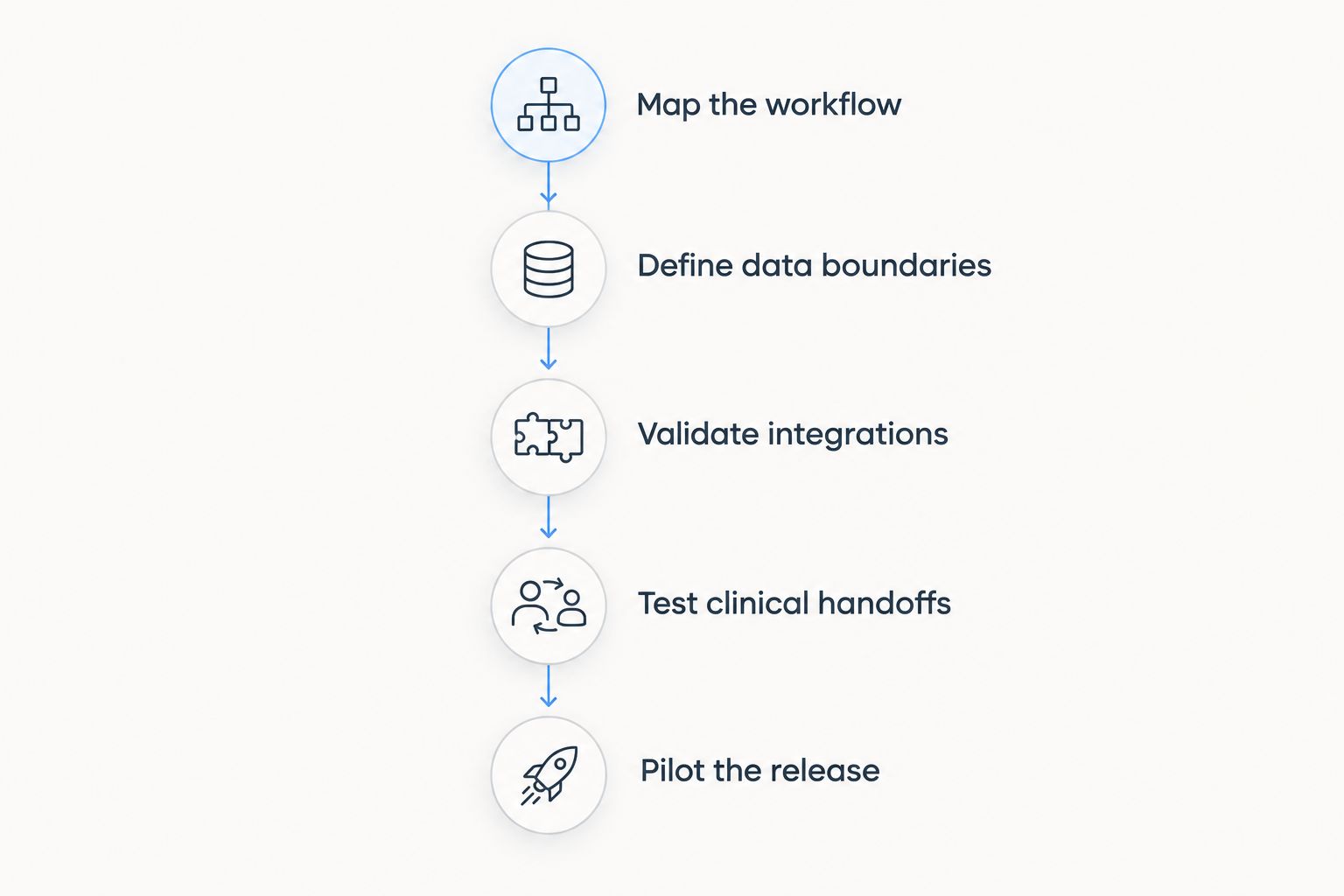
Map the workflow
Start manually: observe how a patient request moves from submission to resolution. Use a shared document and a simple process diagram before commissioning screens or selecting technology.
For example, trace an appointment request through identity checks, scheduling, confirmation, and exceptions. Identify who acts when the requested slot is unavailable. If nobody owns that exception today, an app will not fix the ownership gap.
For your initial scope, select 1 workflow with a named operational owner. Treat this as a planning constraint, not a claim that every healthcare app needs the same scope. Keep adjacent requests in a separate backlog until the first workflow works end to end.
- Record the trigger, responsible role, and completion condition.
- Document exception paths, including duplicate and incomplete requests.
- Separate patient actions from staff actions.
- Name the person authorized to approve workflow changes.
Define data boundaries
Create a data inventory before choosing an app platform. A spreadsheet is enough to list each field, its purpose, its source system, and who needs access.
For a US healthcare provider's 2026 project, review the applicable HIPAA requirements with privacy and security counsel. HHS Office for Civil Rights guidance covers the HIPAA Privacy, Security, and Breach Notification Rules for regulated entities. A vendor's security statement does not establish that your deployment meets its obligations.
Determine whether vendors that handle protected health information act as business associates and whether business associate agreements are required. Also review state privacy requirements and any additional rules relevant to your services.
- Remove fields that lack a documented business or care purpose.
- Define patient, caregiver, clinician, and administrator permissions.
- Document retention, deletion, and audit requirements.
- Identify vendors that receive or process sensitive information.
Choose the architecture
First, compare your documented workflow against capabilities already available in your patient portal or clinical systems. An existing capability that meets the need avoids building another application that your team must maintain.
If gaps remain, distinguish between a mobile-friendly web experience, a cross-platform application, and separate native applications. Choose based on required device functions, accessibility, integration constraints, and maintenance ownership—not a preference for a programming language.
Hexagon IT Solutions is a consultation option for providers scoping custom mobile app development. Bring the workflow map and data inventory to that discussion; evaluate the proposed approach against healthcare-specific requirements rather than assuming those requirements are covered.
- Test whether existing systems can complete the workflow.
- List required device functions and offline behavior.
- Assign responsibility for releases, support, and security updates.
- Require an explanation of alternatives before approving custom development.
Validate integrations
Verify integrations before treating the app design as final. Begin with the receiving system's documentation, an approved test environment, and a written list of supported operations.
An electronic health record connection is not a single capability. Reading appointment information, submitting a request, updating demographics, and attaching documents are separate operations with separate permissions and failure conditions. If FHIR is proposed, ask which resources and operations the receiving system actually supports.
Use synthetic test records to establish the complete path, including failure recovery. Your 2026 integration acceptance criteria should specify what happens when the receiving system rejects a request or becomes unavailable.
- Identify the authoritative system for each data element.
- Verify authentication, permissions, and supported operations.
- Test duplicate submissions and conflicting updates.
- Define retry rules, reconciliation, and staff-visible failure alerts.
Test clinical handoffs
Test the handoff, not just the screen. A successful submission message proves little if the request reaches the wrong queue or lacks the information staff need to act.
Run tabletop walkthroughs with clinical, administrative, accessibility, and privacy stakeholders before automating the process. Include caregiver access, lost devices, interrupted sessions, and patients who cannot complete the mobile journey.
If the app accepts symptom descriptions or care-related messages, make the monitoring and escalation process explicit. Do not imply continuous clinical monitoring unless your organization actually provides it. Keep diagnostic or treatment recommendations outside scope unless their clinical and regulatory requirements have been separately assessed.
- Assign ownership of each incoming request type.
- Verify emergency instructions and message-response expectations.
- Test caregiver authorization and access revocation.
- Preserve a workable non-app route for patients.
Pilot the release
Use a controlled pilot before a wider rollout. Start with staff walkthroughs and synthetic data, then admit real users only after the required security, privacy, and operational approvals.
A 30-day pilot is a proposed planning window, not a promised delivery timeline. Adjust it to cover the workflow's actual operating cycle and exception patterns. Define the entry criteria, support coverage, and stop conditions before enrollment.
Do not interpret downloads as evidence of operational success. A pilot succeeds when users complete the intended task and staff can manage the resulting work without unresolved safety or access problems.
- Select a patient group that reflects the intended workflow.
- Document eligibility, onboarding, and support arrangements.
- Set stop conditions for misrouted requests or access failures.
- Prepare rollback steps and a manual continuity process.
Measure operational results
Establish the baseline manually before building a reporting dashboard. Record how staff currently handle the selected workflow, using the same definitions you will apply after launch.
For the 2026 rollout, select 3 measures: completed tasks, staff handling time, and unresolved exceptions. These are suggested measurement categories, not industry benchmarks. Keep clinical safety and privacy incidents visible separately rather than hiding them inside an average performance score.
Compare equivalent workflows and operating periods. If staffing, eligibility rules, or appointment capacity changes during the pilot, record the change before attributing a result to the app.
- Define the numerator and denominator for completion measures.
- Separate patient waiting time from staff handling time.
- Review exceptions by cause and responsible team.
- Expand scope only after the initial workflow meets its acceptance criteria.
The delivery sequence should preserve this order: understand the work, constrain the data, verify the connection, test ownership, and then expose the process to patients.
Compare healthcare app delivery options
Choose the least complex option that completes the required workflow and meets your obligations. Custom development earns its place when documented requirements exceed what existing systems can support.
The options below are architectural choices, not endorsements of particular products. Each introduces a different maintenance and governance burden.
| Option | Best for | Main advantage | Key limitation |
|---|---|---|---|
| Existing patient portal configuration | Providers whose workflow fits current system capabilities | Keeps the workflow within an established system | Configuration and integration boundaries constrain changes |
| Mobile-friendly web application | Browser-based tasks without essential device-specific requirements | Avoids a separate app-store installation step | Device integration and background behavior depend on browser support |
| Low-code application | Bounded workflows that fit the platform's controls | Provides prebuilt components for supported use cases | Suitability depends on data handling, integration support, and contractual terms |
| Cross-platform custom application | Providers needing a shared application approach across mobile platforms | Shares portions of implementation across platforms | Platform-specific work and testing remain necessary |
| Separate native applications | Workflows requiring detailed platform-specific behavior | Supports direct use of each platform's capabilities | Requires maintaining separate platform implementations |
Before selecting an option, request evidence against the same acceptance criteria. A polished demonstration does not prove that the chosen architecture handles caregiver access, conflicting updates, or an integration outage.
For custom work, clarify ownership of source code, documentation, deployment credentials, and integration accounts. Require a handover process that lets your organization continue operating if the original delivery team changes. For configured platforms, ask how you export records and preserve required audit information when leaving.
Common mistakes healthcare providers make
Treating the app as a separate clinical record
A parallel record creates reconciliation work when staff cannot tell which system holds the current information. Specify the authoritative system for every data element and document how conflicting updates are resolved. Do not let screen design decide record ownership by accident.
Sending sensitive details through notifications
Patients can receive notifications while devices are locked, shared, or visible to other people. Keep notification content limited and direct users to authenticated access for sensitive details. Review analytics and crash-reporting data for the same exposure problem.
Designing only for the patient account holder
Healthcare workflows can involve parents, guardians, caregivers, and authorized representatives. Define delegated access explicitly rather than encouraging shared credentials. Test how permissions change when authority expires or the patient's circumstances change.
Launching messaging without queue ownership
A message feature creates an operational obligation. Define who monitors each queue, what happens outside operating hours, and how urgent concerns are redirected. Make those expectations visible before a patient submits a message.
Assuming launch ends the project
Mobile operating systems, dependencies, and connected systems change. Assign ongoing responsibility for updates, security review, accessibility checks, and integration testing. An app without a maintenance owner is an unfinished operating model.
FAQ
What's the best way to start mobile app development for healthcare providers?
Start with a documented workflow and a measurable operational problem. Check existing patient portal capabilities before approving a new app, then define data access, integration needs, and ownership of exceptions.
Should a healthcare provider build a native app or a web app?
Choose the approach that meets the workflow's device, accessibility, and integration requirements with the least maintenance burden. A browser-based workflow avoids an app installation step, while native development supports platform-specific behavior; validate the actual requirements before choosing.
Does choosing a healthcare app vendor make the app HIPAA compliant?
No, choosing a vendor does not establish HIPAA compliance for your deployment. Applicable obligations depend on your organization's role, data flows, agreements, safeguards, and operating practices; review them with qualified privacy and security advisers.
Can a mobile healthcare app connect to an electronic health record?
A mobile healthcare app can connect when the receiving system provides suitable interfaces, permissions, and contractual access. Verify each required operation in a test environment rather than assuming that an available API supports the complete workflow.
What should healthcare providers measure after launching an app?
Measure completed workflows, staff handling time, and unresolved exceptions against a baseline established before launch. Review safety, privacy, and access problems separately, and record operational changes that affect comparisons.
One last thing
Test the failure path before celebrating the successful journey. Ask a staff member to explain exactly what happens when a patient submits a request but the receiving system is unavailable.
If the answer depends on somebody noticing an inbox later, the workflow is not ready for wider release. Fix the handoff before adding another feature to your 2026 roadmap.
Related guides
- API integration platforms for businesses
- Digital transformation consulting firms
- Business intelligence tools for enterprises
Schedule a consultation with Hexagon IT Solutions to scope your healthcare app around workflow ownership, integration requirements, and measurable outcomes.
Plan your healthcare app
Discuss workflow scope, integration requirements, and the acceptance criteria for a controlled pilot.


