




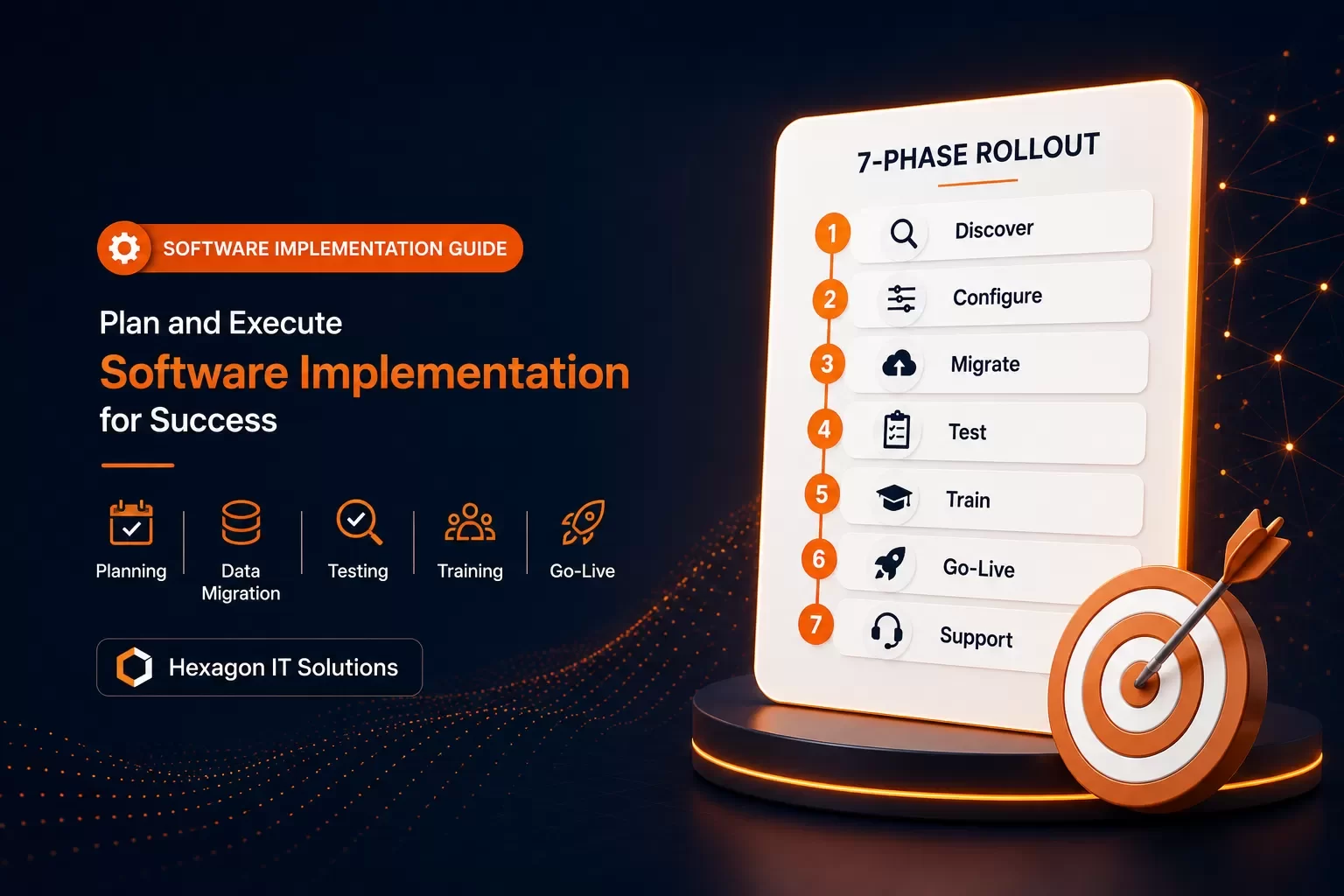
Revenue does not begin at contract signing. It begins when the software is live, adopted, and embedded into daily operations — which makes implementation discipline the difference between ROI and regret.
Over 60% of software implementation projects run over budget, mostly because of poor planning and underestimated scope[24]. Many teams approach implementation with a "how hard could it be?" mindset and are shocked at how much work it takes[25]. The reality? Revenue doesn't begin at contract signing. It begins when the software is implemented, used, and embedded into daily operations[26]. A successful implementation takes more than installing a program and hitting 'go'[27]. It demands a structured software implementation plan with clear milestones and structured implementation process steps. Ongoing support throughout each software implementation phase is also critical. We'll walk you through exactly how to plan and execute your implementation to maximize impact in this piece.
What is Software Implementation
Software Implementation Meaning
Software implementation is the structured process that integrates new software into your organization and makes it operational. This goes way beyond installing programs on computers. The process turns a purchased product into a fully functional system that delivers measurable business value. The core of this work fits new technology into existing IT infrastructure, processes and workflows. You can view this as a bridge between your business needs and the technology designed to address them. The work has several components: planning how the software fits into current workflows, system configuration to meet specific requirements, data migration from previous systems, tests to ensure everything functions correctly, user training on new tools, post-launch transition support, and success evaluation against original goals. The moment a delivery team inherits a deal, implementation starts. A signed contract only creates potential. Value shows up when the system is live, configured and used by people who know what they're doing.
Why Software Implementation Matters
Whether your investment turns into revenue or regret depends on how you handle implementation. Organizations that excel at digital transformation achieve earnings growth that is 1.8 times higher than digital laggards[1]. This competitive edge comes from capabilities that well-implemented software provides, from faster customer service to more insightful analytics. The main goal of most implementations is to make your business run more smoothly. New systems eliminate redundant tasks and automate repetitive processes. They give employees tools that make their jobs easier. Manual processes and outdated systems breed errors, while modern implementations have validation rules and automated checks that reduce mistakes. Well-implemented systems are designed to scale and adapt as your business evolves. They provide infrastructure that supports growth without complete overhauls every few years.
Software Implementation vs Software Development
Development creates the product. Implementation makes that product usable in a real context. Software development focuses on features and capabilities you build. Implementation focuses on how you apply those capabilities within your business operations to produce measurable outcomes. User engagement marks the biggest difference between the two. Development requires cooperation and continuous feedback gathering. Implementation has less direct interaction since the product already exists, but communication remains vital for adjustments. Development is concerned with software creation from scratch or modification of existing software. Implementation is concerned with applying software to your specific situation.
Pre-Implementation Planning: Setting Up for Success
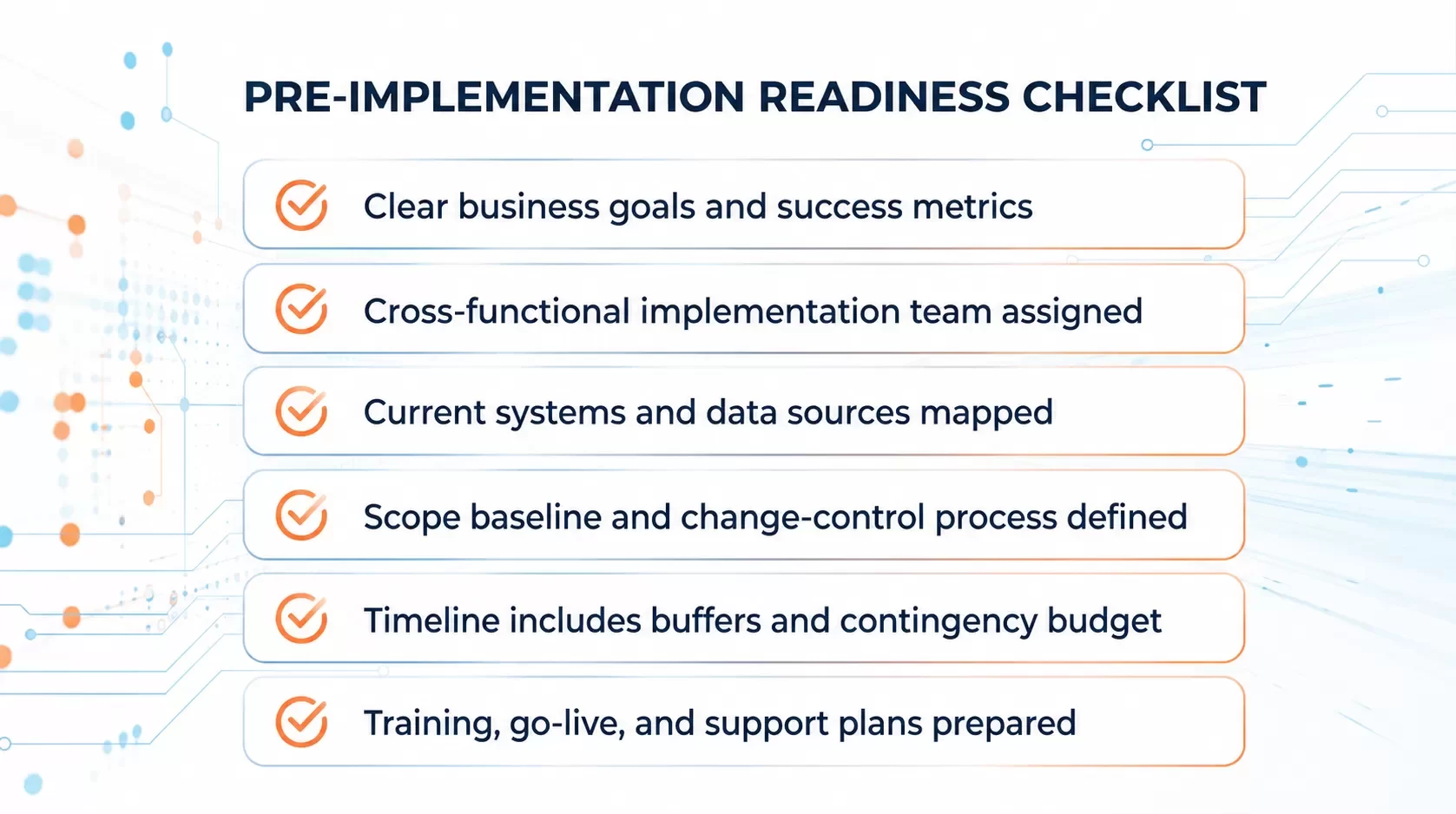
Proper groundwork separates successful implementations from those that stumble before you start execution. The planning phase determines whether your project delivers on its promises or becomes another statistic in the failure column.
Define Clear Goals and Success Metrics
Start by establishing what success looks like in measurable terms. Align each metric with specific business objectives. Skip any metric that doesn't measure progress toward a goal. Target an adoption rate of 75-80% within the first six months[28]. High adoption indicates users find the software useful and merge it into daily workflows. Set expectations for positive ROI within one to two years[28] and target customer satisfaction scores of 80% or higher[28]. Track efficiency gains by measuring reductions in manual processes, targeting 50-70% reduction within the first year[28].
Build a Cross-Functional Implementation Team
Four to six core team members drawn from different functional areas should work under a single team leader[29]. Representatives from program management, product management, engineering, design and quality assurance should be included. Each member brings complementary expertise and viewpoints that address potential blind spots. Roles and responsibilities need clear definition at the start to prevent confusion and overlapping duties. Assign your most skilled employees with both business and technical knowledge[30]. One to two projects per person is the optimum load to work[29].
Assess Organizational Readiness
Assess whether conditions are right before committing to full-scale implementation. Organizations that conduct a full readiness picture are up to 2.5 times more likely to achieve intended outcomes[31]. Get into financial resources, personnel availability, infrastructure capabilities and employee willingness to accept change. Understaffed and overworked teams on tight timelines are major risk factors[30].
Create a Detailed Software Implementation Plan
Project scope, specific goals and requirements including expectations and constraints need definition[6]. Break down deliverables, identify task dependencies and establish clear boundaries of what's in and out of scope. Milestones help track progress and spot barriers early[7].
Set Realistic Timelines and Budgets
Projects range from a few months to over a year depending on complexity[8]. Target 70-80% of projects completed on time and within budget[28]. Buffer time for unexpected delays and contingency funds for unforeseen expenses should be included[7].
Software Implementation Process Steps: From Planning to Go-Live
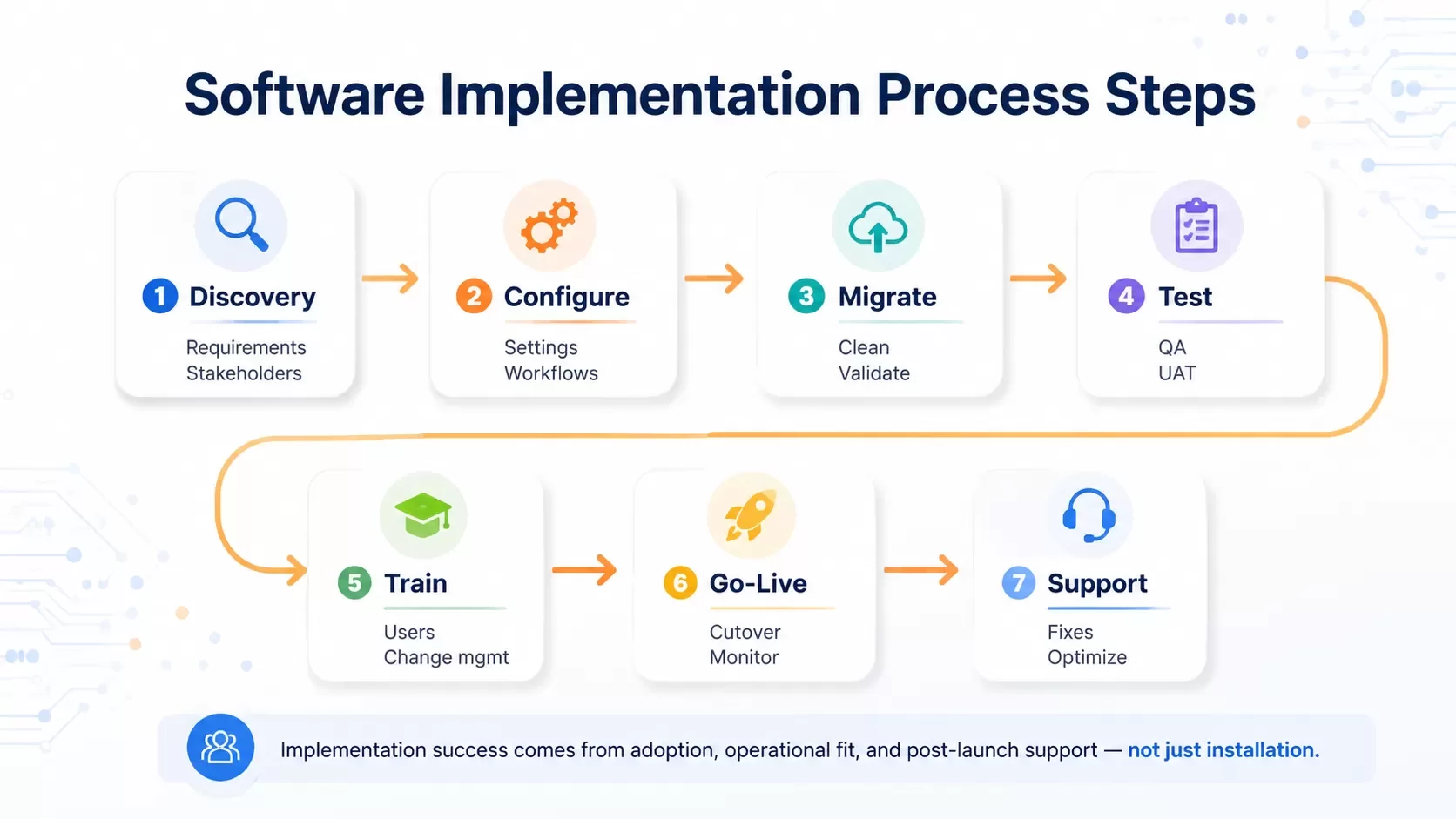
The implementation journey unfolds through seven distinct phases. Each builds on the work completed before it. These steps transform your software implementation plan from documentation into operational reality.
Step 1: Discovery and Requirements Gathering
Requirements gathering identifies what the system must do before design and development begin. The Project Management Institute found that inaccurate requirements gathering was a main cause of project failure in 37% of surveyed organizations[9]. NASA data shows that fixing a requirements error late can cost 29 to 1,500 times more than catching it during requirements work[9]. Participate with stakeholders from engineering, end users, regulators, and domain experts through interviews, workshops, observation, and prototyping to pull out needs, constraints, and assumptions[9].
Step 2: System Configuration and Customization
Configuration applies settings such as system property values or adds configuration data to enable functions without changing out-of-box functionality[10]. Customization changes how the application works, such as creating custom approval workflows or adding new state values[10]. Configuration means less effort and less risk. Tools within the application make changes in ways the system was designed to handle[11]. Customization means more effort and more risk since custom code tends to break during upgrades[11].
Step 3: Data Migration and Validation
Data migration validation ensures data has been transferred from source to destination systems with accuracy, completeness, and security[12]. Critical data can get lost, corrupted, or mismatched without proper validation. This leads to faulty analytics and broken applications[12]. Use a three-prong testing approach: count-based testing to verify record numbers match, functional testing with migrated content to ensure the target application works, and manual business verification where end-users randomly sample data[13].
Step 4: Testing and Quality Assurance
Quality assurance includes the entire software development process: requirements engineering, design, coding, code reviews, source code control, configuration management, testing, release management, and integration[14]. Testing is a most important component of QA, but it also focuses on preventing defects from appearing in the first place[15]. Complete all test cycles including system integration, performance, user acceptance, and other tests with exit criteria met and signed off by business stakeholders[16].
Step 5: User Training and Change Management
Studies show that poor user adoption can lead to a staggering 50% reduction in the ROI of your software investment[2]. Training is a must for all users to gain technical understanding of modules and tools. Not every user will employ the same features on a regular basis[17]. Super users require in-depth comprehension of the instance, while most users only need to acquaint themselves with select functions[17]. Communication from the onset of the project explaining the reason behind the implementation and specific ways the software will change tasks promotes acceptance[17].
Step 6: Deployment and Go-Live
Go-live is the point when your system becomes available for real-world users[18]. This high-stakes milestone requires preparation including readiness checks, change management communication, support, and sometimes additional training[18]. Execute your cutover plan step-by-step to switch from the old system to the new. Perform final health checks to verify all systems are operational. Monitor performance issues and user feedback closely. Communicate updates to keep stakeholders informed[18].
Step 7: Post-Launch Support and Monitoring
Post-launch support refers to ongoing maintenance and improvements made after official release[19]. Research shows that 75% of customers say they have recommended a company based on excellent customer service[19]. Activities include bug fixes to resolve software defects not discovered during testing, updates and patches to improve functionality and boost security, user support channels for reporting issues, and performance monitoring to ensure the software remains stable under real-world conditions[19]. A well-defined support phase combines a solid maintenance plan, documentation, and a post-implementation review to gather lessons learned and user feedback[3].
Avoiding Common Implementation Pitfalls
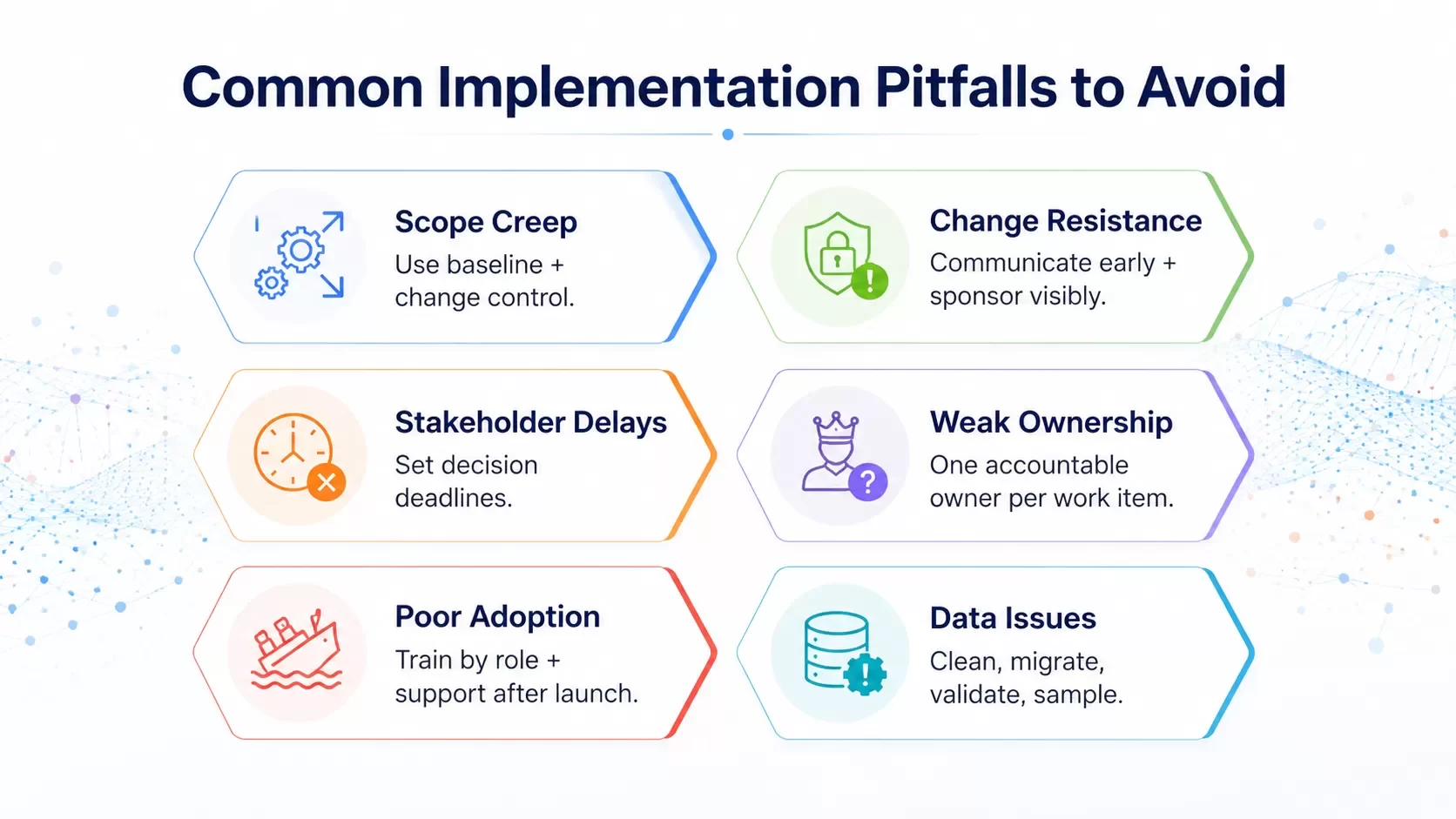
Even the best-planned implementations run into predictable obstacles. You can address these patterns before they derail your software implementation plan if you spot them early.
Managing Scope Creep
Scope creep affects 52% of all projects[20]. Requirements expand beyond the original agreement without matching adjustments to time, budget or resources[21]. Small and reasonable asks compound into schedule and cost overruns[21]. Establish a clear scope baseline and implement change control to make trade-offs visible[21]. Track changes in a register and review scope weekly to catch creep early[21].
Handling Resistance to Change
Resistance is a natural human reaction to change, not an obstacle to defeat[4]. People are involved and have concerns worth asking about when they resist[4]. Poor communication often results in people not understanding the reason behind change, which is the top cause of resistance[4]. Transparent communication increases trust and reduces uncertainty[4]. Leaders who champion the change and model desired behaviors provide active and visible sponsorship, which is the top contributor to success[4].
Preventing Customer and Stakeholder Delays
Client-side delays in providing feedback and sign-off at critical junctures cause most project delays[5]. Competing priorities derail stakeholder attention[5]. The overall project schedule must reflect delays in feedback, and the client must agree that milestones need to shift[5]. Set feedback deadlines that apply to everyone[22].
Ensuring Clear Ownership and Accountability
Single-threaded ownership means every work item has one named accountable owner[23]. Use the RACI matrix with one critical rule: every row must have one 'A' for accountable[23]. No one is responsible when you assign multiple accountable owners[23]. Clarity around who owns what makes precise commitment tracking and fast issue surfacing possible[23].
Conclusion
You now have a complete framework to execute your software implementation. Clear metrics through post-launch support—each phase builds the foundation for business value. Most importantly, note that implementation starts the moment you commit to the project, not when you flip the switch. Follow the steps outlined above, anticipate common pitfalls and focus on user adoption. Your software investment will deliver the ROI you planned for, not become another statistic.
FAQs
Start by defining clear project objectives and measurable success metrics. Build a cross-functional implementation team with 4-6 core members from different functional areas. Assess your organization's readiness by evaluating financial resources, personnel availability, and infrastructure capabilities. Create a detailed plan that outlines project scope, deliverables, task dependencies, and milestones. Finally, set realistic timelines with buffer periods and allocate contingency budgets for unexpected expenses.
Track adoption rates, aiming for 75-80% within the first six months. Monitor user engagement levels and gather regular feedback through satisfaction surveys, targeting scores of 80% or higher. Measure efficiency gains by tracking reductions in manual processes, with a goal of 50-70% reduction within the first year. Set expectations for positive ROI within one to two years, and aim to complete 70-80% of projects on time and within budget.
Software development focuses on building features and creating the product from scratch or modifying existing software. Implementation, on the other hand, focuses on applying those capabilities within your business operations to produce measurable outcomes. Development requires continuous collaboration and gathering requirements, while implementation involves integrating an existing product into your organization's workflows, infrastructure, and processes to make it operational and deliver business value.
The implementation process includes seven key phases: discovery and requirements gathering, system configuration and customization, data migration and validation, testing and quality assurance, user training and change management, deployment and go-live, and post-launch support and monitoring. Each phase builds on the previous one, transforming your implementation plan from documentation into operational reality.
Establish a clear scope baseline at the project's start and implement a formal change control process to make trade-offs visible. Track all changes in a register and review scope weekly to catch creep early. Ensure that any new requirements come with matching adjustments to time, budget, or resources. Remember that scope creep affects 52% of all projects, so vigilant monitoring and clear boundaries are essential to keep your implementation on track.
Need help implementing software without delays, scope creep, or adoption gaps?
Hexagon IT Solutions helps businesses plan, build, integrate, migrate, launch, and optimize software systems that create measurable operational value.
References
[1] https://www.rippling.com/blog/software-implementations
[2] https://www.alphabold.com/change-management-101-preparing-your-team-for-new-software/
[3] https://www.vivantio.com/blog/post-implementation-support-model/
[4] https://www.prosci.com/managing-change-resistance
[5] https://www.peterkang.com/8-ways-client-projects-get-delayed-and-how-to-avoid-them/
[6] https://www.projectmanager.com/blog/implementation-plan
[7] https://www.farreachinc.com/blog/realistic-expectations-custom-software
[11] https://mitratech.com/resource-hub/blog/configuration-vs-customization-whats-difference-matter/
[12] https://www.quinnox.com/blogs/data-migration-validation-best-practices/
[13] https://daelightsolutions.com/data-migration-validation-best-practices/
[14] https://en.wikipedia.org/wiki/Software_quality_assurance
[15] https://www.ranorex.com/blog/software-testing-vs-quality-assurance/
[17] https://datixinc.com/blog/change-management-the-key-to-erp-implementation-success/
[18] https://www.ocmsolution.com/go-live-checklist/
[19] https://www.topdevelopers.co/blog/post-launch-support-in-software-development/
[20] https://projectmanagementacademy.net/resources/blog/pmp-scope-creep/
[21] https://www.atlassian.com/work-management/project-management/scope-creep
[22] https://activecollab.com/blog/project-management/project-delays
[23] https://cleverbit.software/blog/how-to-ensure-software-team-accountability/
[25] https://4castplus.com/avoid-long-and-expensive-software-implementations-with-these-five-practises/
[26] https://www.rocketlane.com/blogs/software-implementation
[27] https://www.bwf.com/10-steps-to-mastering-software-implementation/
[28] https://www.ensightplus.com/how-to-measure-a-successful-implementation
[29] https://www.tcgen.com/articles/cross-functional-team/
[31] https://www.myshyft.com/blog/organizational-readiness-assessment/


