




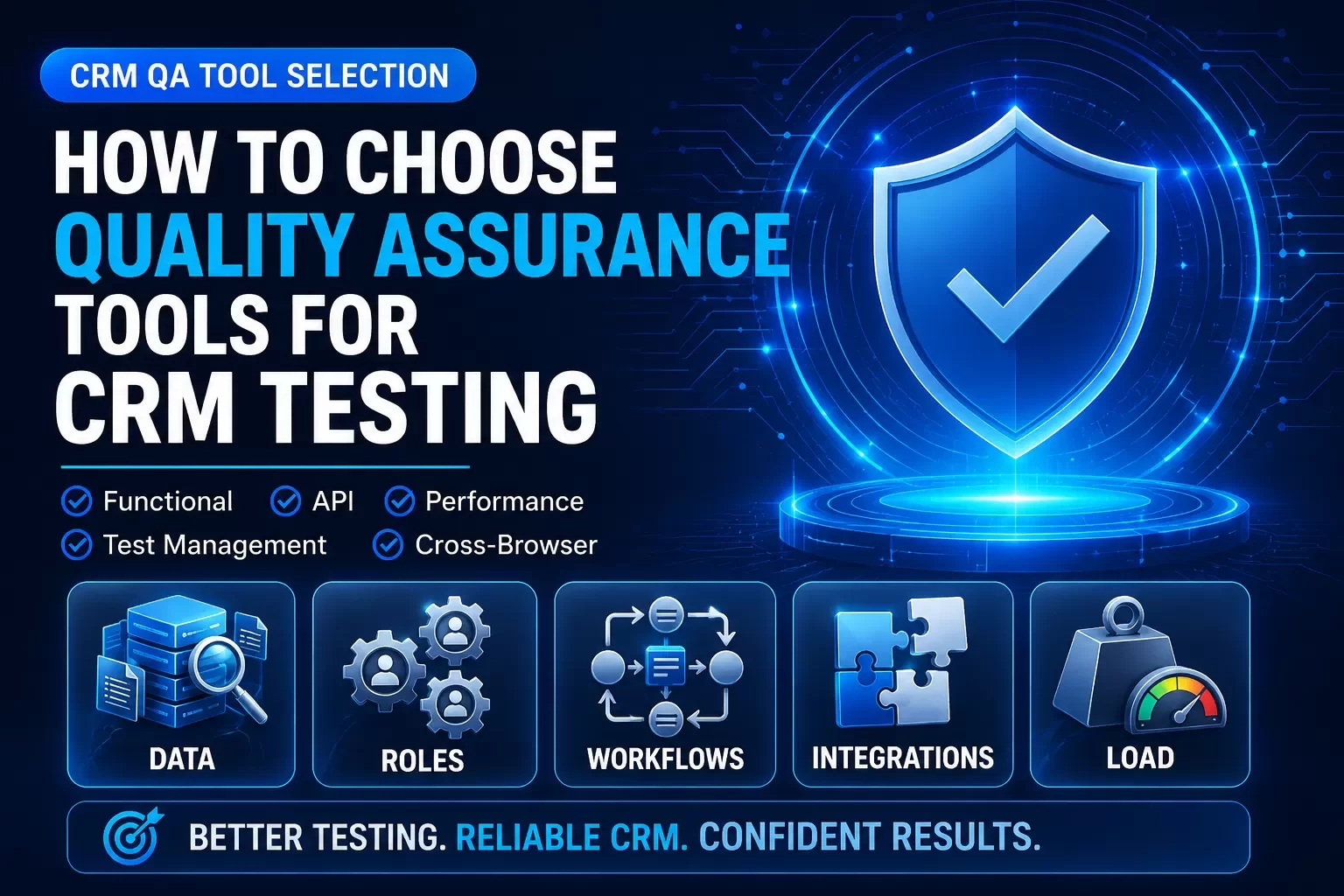
CRM testing is different because the system touches revenue, customer data, integrations, permissions, and daily sales workflows. Tool selection should start with risk, not feature lists.
You face dozens of options when you need to pick the right quality assurance tools for your CRM testing. The stakes are high. Companies that adopt DevOps and Agile methodologies need superior tools to manage testing in accelerated development timelines[29]. Yes, we're here to simplify that decision. This piece walks you through selecting qa automation tools tailored for CRM systems. We'll cover the key features and compare automated testing tools. You'll also get a step-by-step process to review software testing tools that match your team's needs and budget.
Understanding CRM Testing Requirements
CRM systems need a specialized testing approach that goes beyond standard software verification. The testing process verifies that the system functions fully and meets business objectives upon installation and when updated[30]. This verification becomes critical given that CRM platforms manage confidential customer data and affect revenue, customer satisfaction, and brand reputation.
What Makes CRM Testing Different
Several factors set CRM testing apart from conventional software testing. Modern CRM systems integrate with numerous enterprise applications like ERP, ecommerce platforms, marketing automation tools, and payment systems[2]. Testing end-to-end workflows across these interconnected systems presents complexity that standard testing approaches cannot address.
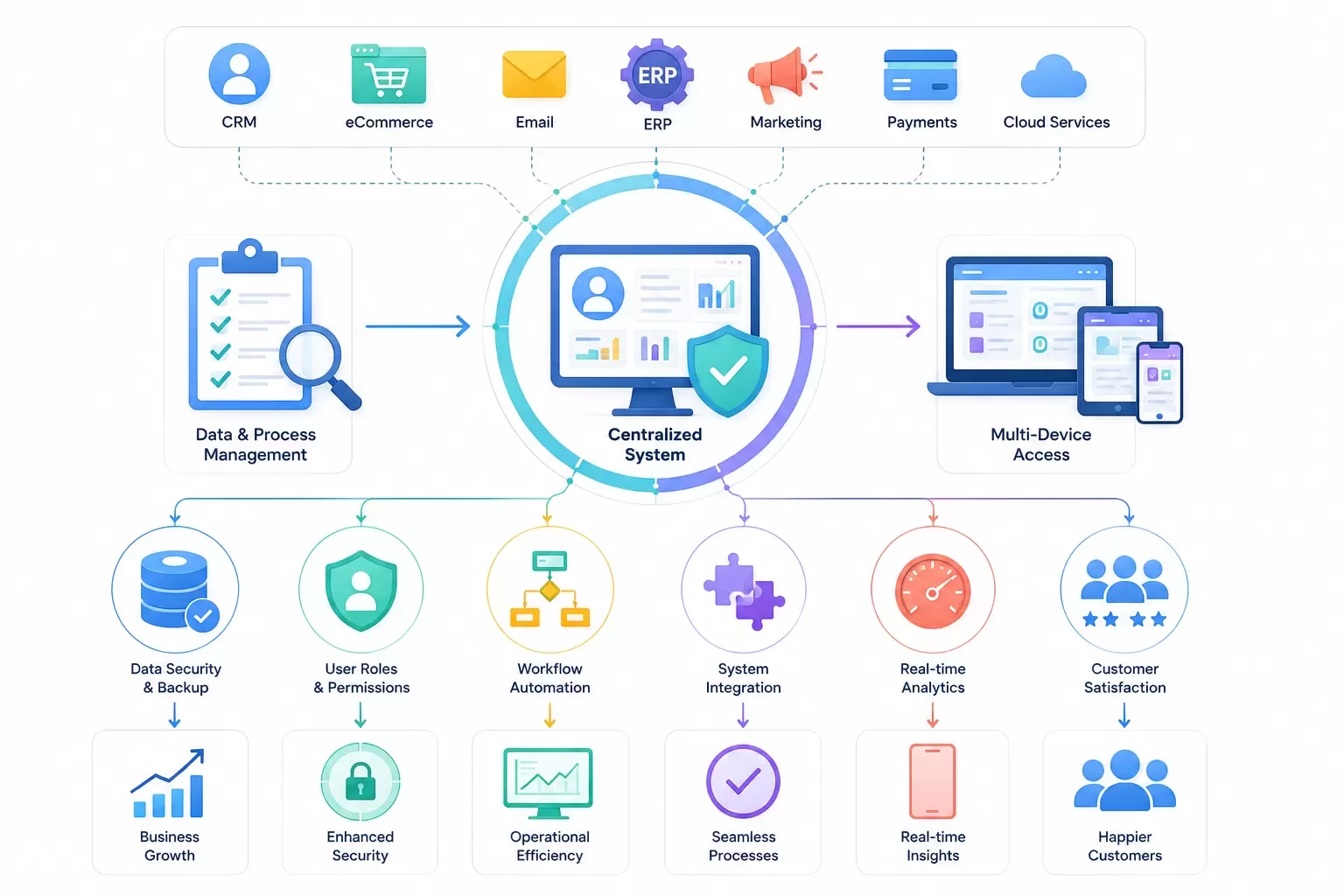
The customer point of view adds another layer of difficulty. We must verify the CRM from the outside in, through the customer lens, rather than via internal user stories alone[2]. This requires real-life customer data and scenarios that reflect actual usage patterns. Compliance requirements further distinguish CRM testing. These systems handle sensitive customer data, so security, data protection, and compliance features require verification[2]. Testing must verify adherence to regulatory standards like GDPR, PCI DSS, HIPAA, and GLBA[3]. Issues in this area can lead to audits and penalties that damage both finances and reputation. Scale represents another unique challenge. Performance testing with production-sized data becomes essential to ensuring acceptable response times under peak usage[2]. A dashboard might load in 2 seconds during normal conditions but require 20 seconds when 50 sales managers access it at month-end[4].
Key CRM Functionalities to Test
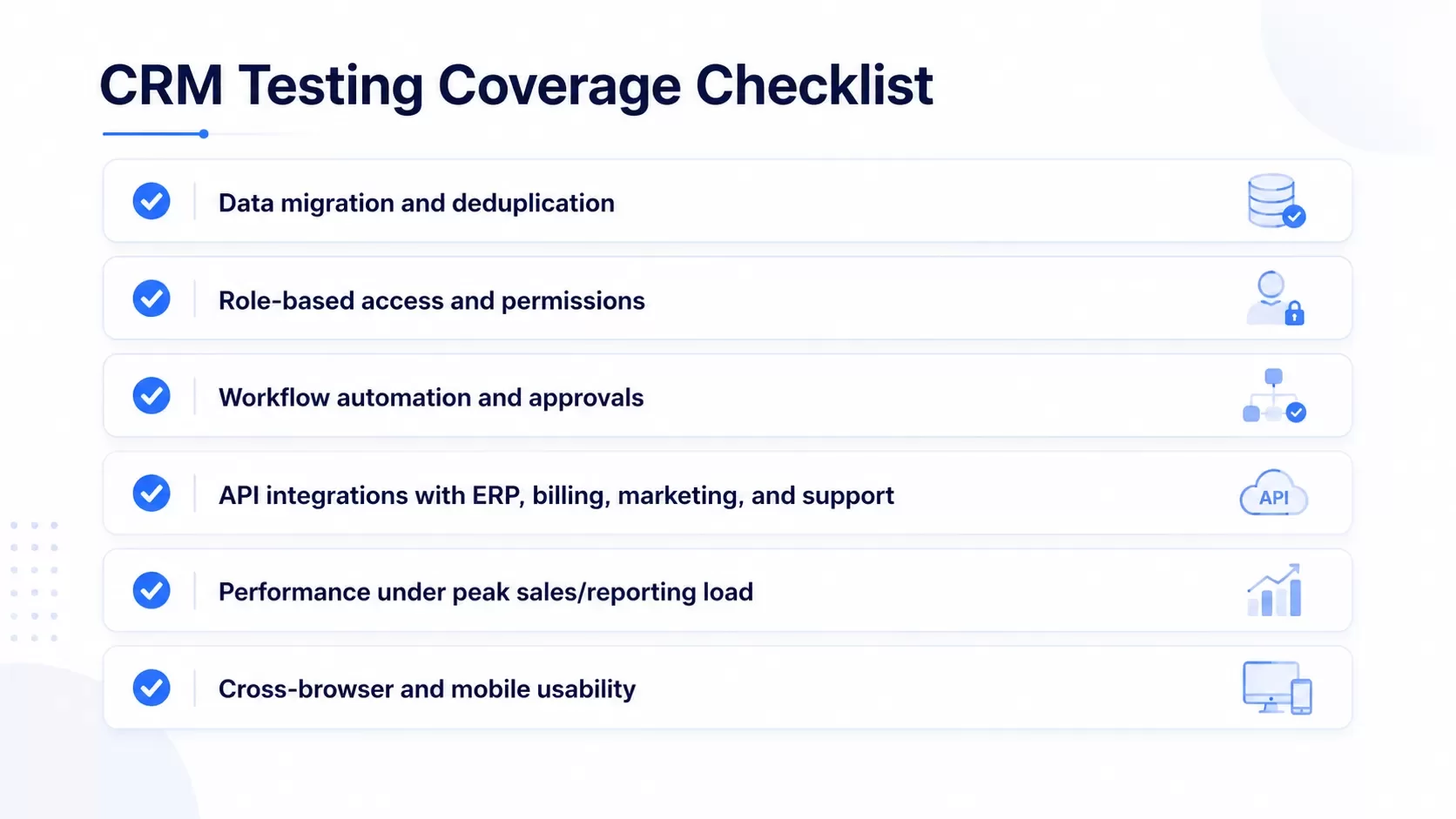
Data quality and migration form the foundation of CRM success[4]. We need to verify how data transforms during migration, how data mapping operates, and how field verification and deduplication processes function. The migration process requires verifying total record counts and sample record matches between source and target systems to confirm complete information transfer. Role-based access control testing is non-negotiable[4]. Each role should view authorized content only during verification tests. Sales representatives from different territories must not gain access to each other's opportunities, and support team members should not alter product price points. Verifying permission restrictions prevents data breaches and compliance problems. Workflow verifications must be complete because business procedures are embedded in CRM systems[4]. Testing requires evaluating every possible branch in conditional logic, approval chains, and automated actions. Integration testing verifies that customer data remains complete and intact during data transfer, with introduced changes visualized in all connected systems[3]. Performance testing checks CRM behavior under continuous and peak load conditions[3]. We measure the effects of multiple users working at the same time, which has loading speed, response time, and the maximum number of users the system can support. Usability testing verifies the easy-to-use arrangement of UI elements, content layout, and the number of usage steps[3]. Sales teams use CRM on laptops, smartphones, and tablets, so testing across every device and browser your employees use becomes mandatory[4].
Common CRM Testing Challenges
Test data availability poses an obstacle. A lack of test data affects the testing process and leads to inaccurate results[31]. Creating test data that represents production data helps overcome this challenge, as random test data often fails to expose real-life issues[2]. Integration issues can affect both performance and functionality[31]. Testing integration points ensures the software integrates naturally with other systems. Modern CRM interfaces undergo constant modifications, which makes traditional automation approaches ineffective[4]. Dynamic user interfaces require tools that do not base their object recognition on static element IDs. Limited time and resources affect the testing process and lead to incomplete testing[31]. Prioritizing critical areas of the software and ensuring they receive complete testing helps address this constraint. The complexity of custom workflows makes evaluation difficult because their design has intricate components[4]. Custom business logic testing matrices become too complex for manual testing when they have various conditions among required fields and conditional statements.
Types of Quality Assurance Tools for CRM Testing
Quality assurance tools for CRM testing fall into distinct categories. Each addresses specific validation layers within your system. Understanding these categories helps you build a complete testing toolkit rather than relying on a single solution that cannot handle every requirement.
Functional Testing Tools for CRM
Functional testing tools verify that every CRM feature operates according to business requirements. Selenium stands out as an open-source option that supports web application testing in different programming languages and integrates with various testing frameworks[31]. Organizations use it to confirm core functionalities like lead management, opportunity tracking, and reporting workflows. TestComplete offers a commercial alternative for teams testing desktop and mobile applications alongside web-based CRM systems[31]. It supports multiple programming languages and automates diverse testing scenarios. These tools help us identify functional gaps early. They prevent operational disruptions and user frustrations.
API Testing Tools
APIs serve as the backbone connecting CRM systems to ERP platforms, marketing automation tools, and payment gateways. SoapUI provides trusted API testing capabilities, supporting REST, SOAP, GraphQL, JMS, XML-RPC, MQTT, and other protocols[32]. The tool enables codeless test assertions and data-driven testing from Excel or databases. It generates reports in PDF, JUnit, XML, and CSV formats[32]. A survey by Smart Bear shows that 91% of API professionals consider API quality and testing critical to their success[33]. Postman has become popular for API design, testing, and collaboration. REST Assured serves developer-heavy teams comfortable with code-based frameworks[34]. Organizations implementing detailed API testing experience a 50% reduction in integration issues post-deployment[33]. Automated API testing can reduce testing time by up to 80% and enable faster releases[33].
Performance Testing Tools
Performance testing tools establish metrics for application throughput, latency, and resource consumption[35]. JMeter operates as an open-source solution for testing web application performance. It supports different protocols and simulates various load conditions[31]. BlazeMeter Continuous Testing Platform aids performance, functional, and API tests at scale. It supports JMeter, Selenium, Gatling, and more with smooth CI/CD integration[35]. LoadRunner Professional provides extensive protocol support covering over 50 technologies and application environments[35]. These tools simulate concurrent users and transactions. They pinpoint performance bottlenecks in the application stack. Stress tests verify that applications remain stable and reliable during extended periods and under peak load conditions[35].
Test Management Tools
Test management tools simplify the software quality assurance process. They enhance communication and expedite delivery times[36]. TestRail offers effective test case management with full reporting, analysis, and automation tool integration[36]. Zephyr provides dashboards for reporting and integrates with Jira and DevOps tools. It tracks tests in real-time fashion[36]. PractiTest delivers complete transparency in testing procedures with custom dashboards, requirement traceability, and API integrations[36]. qTest serves Agile and DevOps teams with automation framework integration and real-time collaboration. It provides high-level analytics[36]. These solutions handle complex business process testing while maintaining high stability after vendor upgrades.
Cross-Browser-and-Device-Testing-Tools
Cross-browser testing tools provide cloud-based infrastructure for validating web applications in a variety of browser environments[37]. BrowserStack operates on infrastructure validated for GDPR and SOC 2 Type 2 compliance. It offers real device access to reveal issues that virtual devices miss[37][38]. Sauce Labs Real Device Cloud enables testing on actual smartphones and tablets. It accesses real hardware sensors, multi-touch interfaces, and OS-level APIs[38]. Puppeteer gives teams with technical strength direct Chrome DevTools Protocol control for low-level browser access, network interception, and performance profiling[38]. Ranorex Studio serves Windows teams running legacy applications and provides integrated browser selection and UI inspection capabilities[38]. These tools address fundamental challenges where JavaScript engines behave differently in browsers and CSS rendering varies between Chrome, Safari, Firefox, and Edge[37].
Essential Features to Look for in CRM Testing Tools
Selecting quality assurance tools becomes straightforward once you understand which features matter most for CRM environments. The right software testing tools possess specific capabilities that address the unique challenges of testing interconnected systems, complex workflows and sensitive customer data.
Integration Capabilities with CRM Platforms
TestRail centralizes test case design, execution, reporting, traceability and defect management in an expandable platform that connects with tools like Jira, Azure DevOps, Selenium, CI/CD platforms and popular automation frameworks through integrations and the TestRail CLI[39]. This connectivity proves valuable when workflows span multiple systems. TestRail gives teams a centralized place to track coverage and identify gaps before they become production issues[39]. Test management is just the beginning. TestRail connects with CI/CD workflows through integrations, APIs and tools such as the TestRail CLI[39]. It integrates with tools like Jira, Azure DevOps, GitHub Issues, Bugzilla and other issue trackers[39]. This connectivity ensures automated test results that flow into your existing development pipeline without manual intervention.
Support for Multiple User Roles and Workflows
Workflows require more than one actor. An admin approves something, then a customer sees the change. A manager assigns work, then an employee completes it[40]. Quality assurance automation tools must handle multiple browser contexts or sessions, role-based credentials, switching accounts without test pollution, isolated cookies and storage, and parallel execution without user collisions[40]. Multi-user and multi-session capabilities confirm that test automation meets the demanding realities of real-world workflows[41]. Companies avoid costly post-release fixes and improve customer satisfaction by catching multi-user issues early in the development cycle[41]. Tools should define different user roles in a single runtime property file and allow multi-user, multi-Center tests to copy real-life scenarios where multiple users are required to operate through the complete workflow[41]. Data helpers help smooth communication between sessions by saving data in one session for use in another session[41]. This mechanism ensures data consistency, reduces coupling, makes realistic scenarios possible, provides flexibility through custom keys and offers expandability as tests grow more complex[41].
Data Management and Test Data Generation
Fresh, precise test data should be available for running functional and non-functional tests, whether executed manually or using a test automation tool[42]. Test data automation integrates test data into an organization's DevOps CI/CD pipelines and confirms that the test data is complete, precise and current[42]. The process should occur in three separate steps: connect to all your data sources to synchronize data extraction, integrate, mask, transform, subset and generate your test datasets, and provision the test data from your TDM tools to your testing environments on demand[42]. The data should be sourced from a centralized test data repository rather than the production source systems to minimize load on the sources when provisioning production-grade test data[42]. Virtual test data generation operates on a subset of recorded data and can mirror real-life datasets while masking sensitive information to confirm compliance with regulations such as PCI DSS and GDPR[43]. Generate on-demand, diverse and customizable virtual datasets to reduce dependencies on external data sources and enable testers to conduct tests without delays caused by data acquisition or preparation processes[43].
Reporting and Analytics Features
TestRail provides dashboards and reports for test coverage, execution progress, defect trends and milestone readiness[39]. AI-powered root cause analysis analyzes test logs, stack traces, screenshots and more, categorizes failures as product, automation or environment issue, and recommends both quick fixes and long-term solutions you can act on[10]. Flakiness detection flags unstable tests to confirm stable CI/CD pipelines and reliable feedback for developers[11]. Reporting should include step-level logs, screenshots or video when relevant, network or API request details, variable values used during the run, clear assertion messages and retry information that distinguishes product flakiness from test flakiness for complex workflows[40]. All data in reports should be consistent, correct, credible, drawn from reliable sources, validated before finding its way to the document and contain no false positives or negatives[12].
Step-by-Step Process to Choose QA Automation Tools
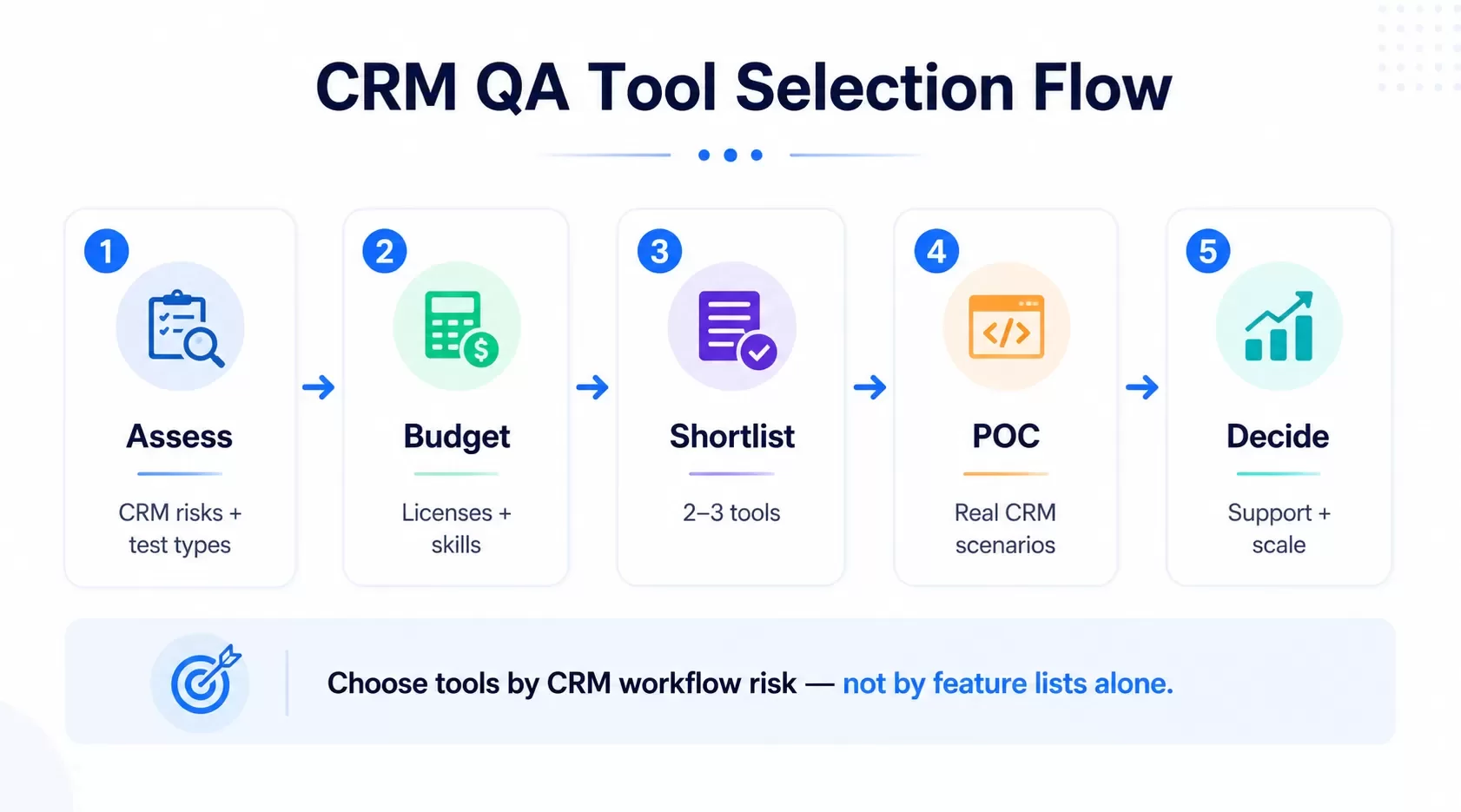
A systematic approach prevents expensive mistakes when you adopt quality assurance tools for your CRM environment. Tool-first thinking creates downstream risks and costs. Define your testing objectives before you review solutions to produce better outcomes[13].
Step 1: Assess Your CRM Testing Needs
Start by identifying what you want to accomplish with automation. We ask ourselves why automation is necessary, when the team will be ready to adopt it, who will build and maintain automation scripts, and what testing focus we have such as frontend, backend, or API[14]. Document your main goals first. Gartner's CRM buyers' market research shows that 40% of SMBs switch CRM tools to improve efficiency, while 31% cite feature limitations with their current system[5]. Define specific and measurable outcomes rather than focusing on features. We want to shorten the sales cycle, increase lead follow-up rates, or improve email campaign conversion rates[5]. Book your workflow audit to identify integration points that require full validation if your business processes span marketing, sales, and finance modules.
Step 2: Define Your Budget and Team Skills
Budget planning goes beyond license fees. Gartner reports that the average CRM budget is $87.00 per user per month, with the top five industries budgeting $73.00 to $117.00 per user monthly[5]. Hidden costs tied to implementation, support, and training often catch teams off guard[13]. Assess your team's technical capabilities with honesty. Teams with experienced automation engineers can handle complex tools with steep learning curves. Teams new to automation benefit from easier-to-learn options[15]. Think about whether your QA team possesses programming skills or requires no-code solutions[16].
Step 3: Research and Shortlist Software Testing Tools
Cast a wide net when you research qa automation tools. Compile options based on your documented requirements: supported platforms, preferred programming languages, required testing types, CI/CD integration needs, and reporting format expectations[7]. Narrow this list to 2-3 tools that best match your requirements[7]. Document why each shortlisted tool was selected and why others were excluded[7].
Step 4: Evaluate Tool Compatibility with Your CRM
Verify integration capabilities with your existing technology stack. Can the tool attach or create invoices, proposals, and sales quotes? What key programs need CRM integration? Does it offer document storage[17]? Check CI/CD compatibility, support for various application components, and available libraries for backend or database connections[15].
Step 5: Run Proof of Concept Tests
Proof of Concept testing confirms whether your proposed automation tool works under real-life conditions before you commit to full-scale implementation[18]. Select a minimum of 10 test cases ranging from moderate to high complexity[7]. Include critical happy-path user journeys, edge cases, negative scenarios, complex UI interactions, and API test cases[7]. Build a simple framework during POC execution that has page object patterns, BDD integration if required, CI/CD pipeline hooks, and reporting setup[7]. Document observations, limitations, workarounds, learning curve assessments, and maintenance effort estimates[18].
Step 6: Review Vendor Support and Documentation
Get into the provider's support documentation for frequent tasks and identify concerns or ambiguous statements about capabilities[5]. Review customer service options available after implementation. Check feedback from other clients through platforms like Gartner and Clutch[19].
Step 7: Make Your Final Decision
Compare POC results against your success criteria. Check if automation is possible, compare tools to find the best fit, and assess risk reduction potential[18]. Prepare a detailed analysis report covering scope, test cases chosen, framework features implemented, limitations found, and clear recommendations to adopt, refine, or reject[7].
Comparing Open-Source vs Commercial QA Tools
The debate between open-source and commercial software testing tools shapes budget discussions and long-term strategy. BrowserStack research shows that over 60% of QA teams use at least one open source tool in their testing stack[20]. This widespread adoption stems from tangible benefits, yet commercial alternatives continue gaining ground for specific reasons.
Benefits of Open-Source Testing Tools
Open-source frameworks like Selenium, Cypress, and Playwright offer flexible and scalable testing without licensing fees[21]. Teams gain full visibility into the code base and can modify it to fit exact needs[22]. Engineers write tests in familiar languages and integrate them easily into CI/CD pipelines[21]. Smaller teams often start with these frameworks combined with lightweight management layers[21]. Community strength drives rapid improvements. Problems arise and opportunities are someone already solved them[23]. Contributors worldwide maintain active forums and documentation. This collaborative environment promotes breakthroughs without vendor roadmaps dictating feature releases[23]. Teams comfortable with technical customization get complete ownership and transparency[23]. But freedom demands effort. Maintenance becomes your responsibility when something breaks[23]. Version dependencies change constantly and can cause pipeline failures[23]. RadView surveys show that 60% of teams report difficulty maintaining Selenium scripts due to limited coding expertise[20]. Hidden costs accumulate through training, customization, and troubleshooting time[8].
Advantages of Commercial Quality Assurance Tools
Commercial platforms deliver reliability through dedicated support teams and guaranteed response times[20]. Failures occur and professional assistance provides resolution rather than community forum searches[23]. These tools include unified ecosystems that combine execution, reporting, and analytics without piecing together multiple solutions[23]. Built for enterprise scale, commercial quality assurance automation tools handle thousands of tests across cloud environments without effort[23]. Visual workflows and natural-language test authoring allow non-technical team members to contribute[23]. This accessibility expands testing capacity beyond QA engineers alone. The trade-offs center on cost and flexibility. Subscription fees increase with team growth[23]. Vendors control product roadmaps and limit deep customization[23]. Switching becomes difficult once processes and data live inside proprietary systems[23].
Which Option Works Best for CRM Testing
The choice hinges on team capabilities and strategic priorities rather than cost alone. Open-source excels when deep technical expertise exists and customization requirements exceed commercial offerings[20]. Teams planning multi-year framework investments can realize substantial value[6]. CRM environments that need rapid deployment, compliance guarantees, and broad team participation benefit from commercial tools that reduce operational risk[23]. Mixed approaches work too. Many teams combine open-source automation frameworks with commercial test management platforms and take advantage of what each approach offers uniquely[9].
Best Practices for Implementing Quality Assurance Automation Tools
Implementation success depends less on the tool itself and more on how you deploy it. Strategic execution transforms quality assurance automation tools from expensive licenses into efficiency engines that reduce manual effort and accelerate delivery cycles.
Start with High-Priority Test Cases
Begin with test cases that are repetitive, high-risk, or time-consuming[24]. Automation should target functionality on the critical path and scenarios requiring extensive data setup[25]. Prioritize tests from critical to low priority and ensure the most important validations execute first[26]. Evaluate system stability before implementing automation for legacy CRM solutions and begin with high-impact, recurring cases[27].
Train Your Team on the Selected Tools
Customized workshops outlining how to maintain, expand, and run automated scripts guarantee your team operates autonomously and scales the solution[27]. Training investments pay dividends when team members understand not just button-clicking but automation principles such as behavior-driven development and data-driven testing[27].
Establish Clear Testing Workflows
Cross-functional collaboration between QA, development, and business operations ensures tests that reflect real-life processes[1]. Integrate automated tests into CI/CD pipelines for faster feedback loops and earlier defect detection[27]. Book your workflow audit to identify integration dependencies requiring validation coverage when processes span multiple departments.
Monitor and Optimize Tool Performance
Version control systems make shared work, change tracking, and easy reversion possible when issues arise[28]. Run automated tests on a schedule even when nothing appears broken[1]. Review skipped, failed, or outdated test cases to maintain relevance[1].
Conclusion
You now have a complete framework to select quality assurance tools that match your CRM testing requirements. The key lies in understanding your specific needs before evaluating tools, not the other way around. Assess your testing objectives, budget, and team capabilities first. Shortlist options and run proof of concept tests on them. Focus on tools that integrate naturally with your existing CRM platform and workflows. Success depends on how you implement the solution, whether you choose open-source or commercial. High-priority test cases should come first. Train your team and optimize performance as you go. Your CRM testing efficiency will improve by a lot when you follow this systematic approach.
FAQs
Start by assessing your specific CRM testing needs, including the functionalities you need to validate and integration points. Define your budget and evaluate your team's technical skills. Research and shortlist 2-3 tools that match your requirements, then run proof of concept tests with real test cases before making your final decision. Consider factors like integration capabilities, support for multiple user roles, and compatibility with your existing CRM platform.
Open-source tools like Selenium and Playwright offer flexibility and no licensing fees, making them ideal for teams with strong technical expertise. Commercial tools provide dedicated support, unified ecosystems, and visual workflows that allow non-technical team members to contribute. Open-source tools require more maintenance effort, while commercial options involve subscription costs but reduce operational risk. Many teams use a mixed approach, combining open-source automation frameworks with commercial test management platforms.
A complete CRM testing toolkit includes functional testing tools to verify features work correctly, API testing tools to validate integrations with other systems, performance testing tools to ensure the system handles peak loads, test management tools to organize and track testing activities, and cross-browser testing tools to validate functionality across different devices and browsers. Each tool type addresses specific validation layers within your CRM system.
Look for strong integration capabilities with your CRM platform and existing development tools, support for multiple user roles and complex workflows, robust data management and test data generation features, and comprehensive reporting and analytics capabilities. The tool should handle role-based access control testing, support CI/CD pipeline integration, and provide clear visibility into test coverage, execution progress, and defect trends.
Begin by automating high-priority, repetitive test cases that are time-consuming or prone to human error. Invest in proper training so your team can maintain and expand automation scripts independently. Establish clear testing workflows with cross-functional collaboration between QA, development, and business operations. Integrate automated tests into your CI/CD pipeline and regularly monitor and optimize tool performance by reviewing test results and updating outdated test cases.
References
[1] https://cyclelabs.io/blog/enterprise-workflow-testing-through-automation/
[2] https://www.softwaretestingmagazine.com/knowledge/crm-testing-full-form-resources-and-instructions/
[3] https://www.scnsoft.com/software-testing/crm
[4] https://qalified.com/blog/crm-testing-guide/
[5] https://www.uschamber.com/co/grow/customers/choosing-the-best-crm-software
[6] https://www.mabl.com/blog/open-source-qa-automation-limitations
[7] https://testgrid.io/blog/poc-in-testing/
[8] https://www.radview.com/blog/open-source-testing-tools-guide/
[9] https://www.getxray.app/blog/open-source-vs-commercial-tools-for-test-automation
[10] https://www.browserstack.com/test-reporting-and-analytics
[11] https://www.perfecto.io/solutions/analytics-rep
[12] https://testomat.io/blog/test-automation-reporting/
[13] https://solutionshub.epam.com/blog/post/software-testing-tools-and-how-to-improve-their-performance
[14] https://www.testrail.com/blog/qa-automation-tools/
[15] https://www.quora.com/How-do-you-select-the-right-test-automation-tool-for-your-project
[16] https://qalified.com/blog/proof-of-concept-in-automation-testing/
[18] https://www.browserstack.com/guide/proof-of-concept-for-test-automation
[19] https://qatestlab.com/6-tips-choosing-qa-vendor/
[20] https://aqua-cloud.io/open-source-vs-commercial/
[21] https://titanapps.io/blog/qa-testing-tools
[22] https://testomat.io/blog/best-open-source-testing-tools-list/
[23] https://www.accelq.com/blog/open-source-vs-commercial-test-automation/
[25] https://www.perfecto.io/blog/types-of-test-cases-to-automate
[26] https://testomat.io/features/test-case-priorities/
[27] https://www.a1qa.com/services/test-automation/
[28] https://www.testrail.com/blog/test-automation-strategy-guide/
[29] https://www.tricentis.com/learn/qa-testing-tools
[30] https://andersenlab.com/blueprint/what-is-crm-testing
[31] https://www.softwaretestingmagazine.com/knowledge/crm-testing-full-form-tools-and-guideline/
[33] https://www.alphabold.com/best-practices-for-api-testing-in-dynamics-365/
[34] https://testsigma.com/api-testing-tools
[35] https://www.gartner.com/reviews/market/performance-testing-tools-market
[36] https://borgerp.com/blog/best-test-management-tools-erp-crm-2026.html
[37] https://saucelabs.com/resources/blog/a-comprehensive-best-cross-browser-testing-tools-comparison
[38] https://www.ranorex.com/blog/cross-browser-testing-tools/
[39] https://www.testrail.com/blog/enterprise-software-testing/
[40] https://softwaretestingreviews.com/best-tools-for-testing-complex-user-flows/
[41] https://www.linkedin.com/pulse/power-multi-usermulti-session-testing-kim-filiatrault-tyszc
[42] https://www.k2view.com/what-is-test-data-management/
[43] https://www.parasoft.com/solutions/test-data-management/
Need help testing or modernizing your CRM?
Hexagon IT Solutions helps teams design, integrate, test, and automate CRM workflows so sales, marketing, support, and operations run on reliable systems.


