




CRM development succeeds when it starts with clear business outcomes, not just features. The best systems align goals, workflows, data, integrations, security, and user adoption from day one.
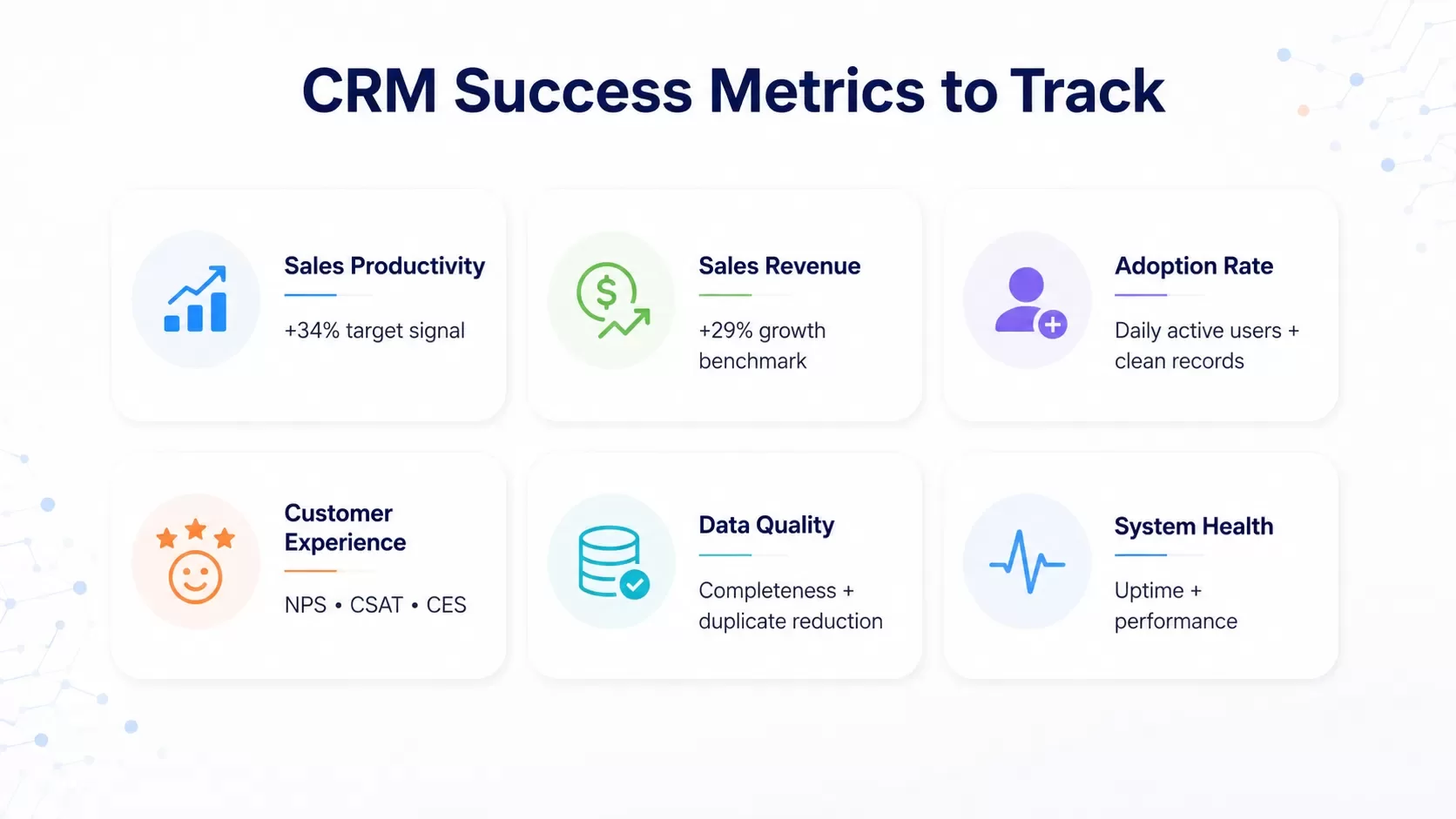
A Salesforce report shows that CRM system development delivers measurable results and boosts sales productivity by 34% while increasing sales revenue by 29%[15]. These statistics underscore why businesses prioritize CRM software development as a strategic investment. Building CRM system infrastructure requires planning, from defining business objectives to selecting the right technology stack. In this piece, we'll guide you through the key steps of how to build a CRM system from scratch. We'll cover CRM best practices for planning and architecture design, along with development methodologies and implementation strategies. These proven strategies will help you create a CRM solution that promotes customer satisfaction and business growth, whether you're launching a new system or optimizing an existing one.
Planning and Strategy: Defining CRM Objectives for 2026
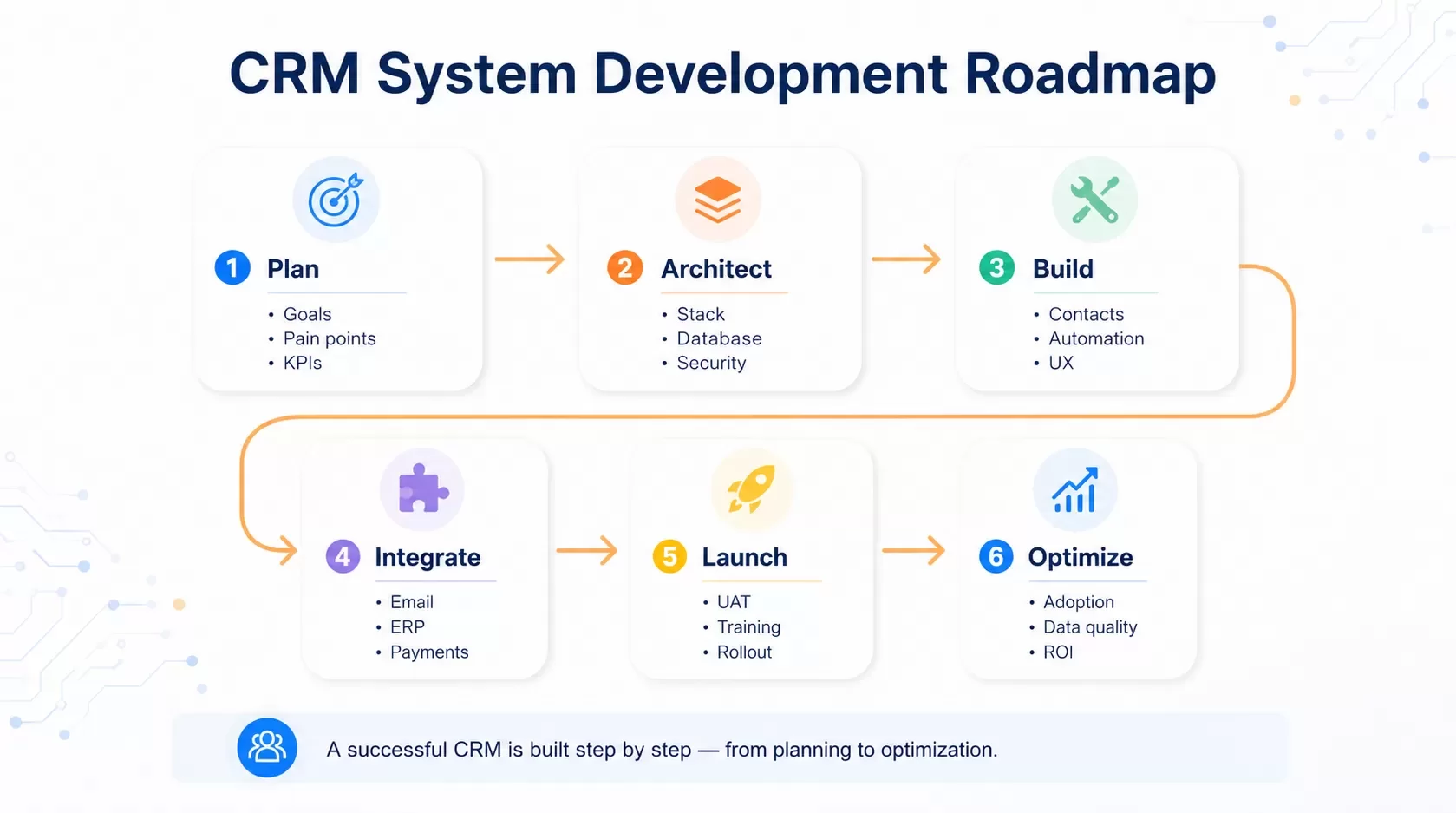
Research shows that successful CRM implementations remain below 30%, highlighting the critical need for proper planning[16]. Clear objectives at the start prevent costly rework and align your CRM system development with actual business needs.
Identify Business Goals and Customer Pain Points
Set specific, measurable goals using the SMART framework. A goal to "increase customer retention by 10% over the next six months" proves more applicable than vague aims to improve loyalty[2]. Common CRM objectives include driving sales growth, improving customer retention, and reducing customer acquisition costs. Customer pain points fall into four categories. Financial pain points relate to costs and ROI expectations. Productivity pain points involve inefficiencies that slow operations. Process pain points stem from outdated workflows and internal procedures. Support pain points reflect inadequate guidance or service experiences[3][4]. Find these challenges through stakeholder interviews and end-user feedback before selecting features.
Map Customer Journey and Touchpoints
Customer journey mapping reveals how prospects interact with your business through multiple channels. The average consumer now uses more than three channels to communicate with businesses[17]. Map each stage from awareness through post-purchase support and identify 5-7 key touchpoints as a starting point[18]. Document customer actions, emotions and pain points at each interaction. Link CRM data to specific journey phases and ensure visibility of priorities and feedback. This approach allows you to create tailored experiences and identify where customers drop out or engage most[19].
Define Success Metrics and KPIs
Establish clear performance indicators before implementation. Common metrics include Net Promoter Score (NPS), Customer Satisfaction Score (CSAT), and Customer Effort Score (CES)[7][20]. Track both readiness and performance, as CRM strategy evolves according to internal conditions and external environments[16]. Monitor sales efficiency improvements, data quality improvements, and collaboration gains. Set specific targets aligned with broader business objectives and ensure every effort contributes to growth.
Assess Current Systems and Integration Requirements
Review existing technology infrastructure and integration needs. Document upstream and downstream systems requiring connection: telephony, email, finance, ERP, marketing automation, and payment providers[21]. Capture sync method (real-time or batch), data direction, and volume requirements for each integration. Find data sources requiring migration, including contact databases, transaction records, and customer interactions. Catalog data format, ownership, quality level, and whether sources will be migrated, integrated, or retired[21]. This assessment prevents discovering data cleansing needs months into development.
Building CRM System Architecture: Technology Stack Selection
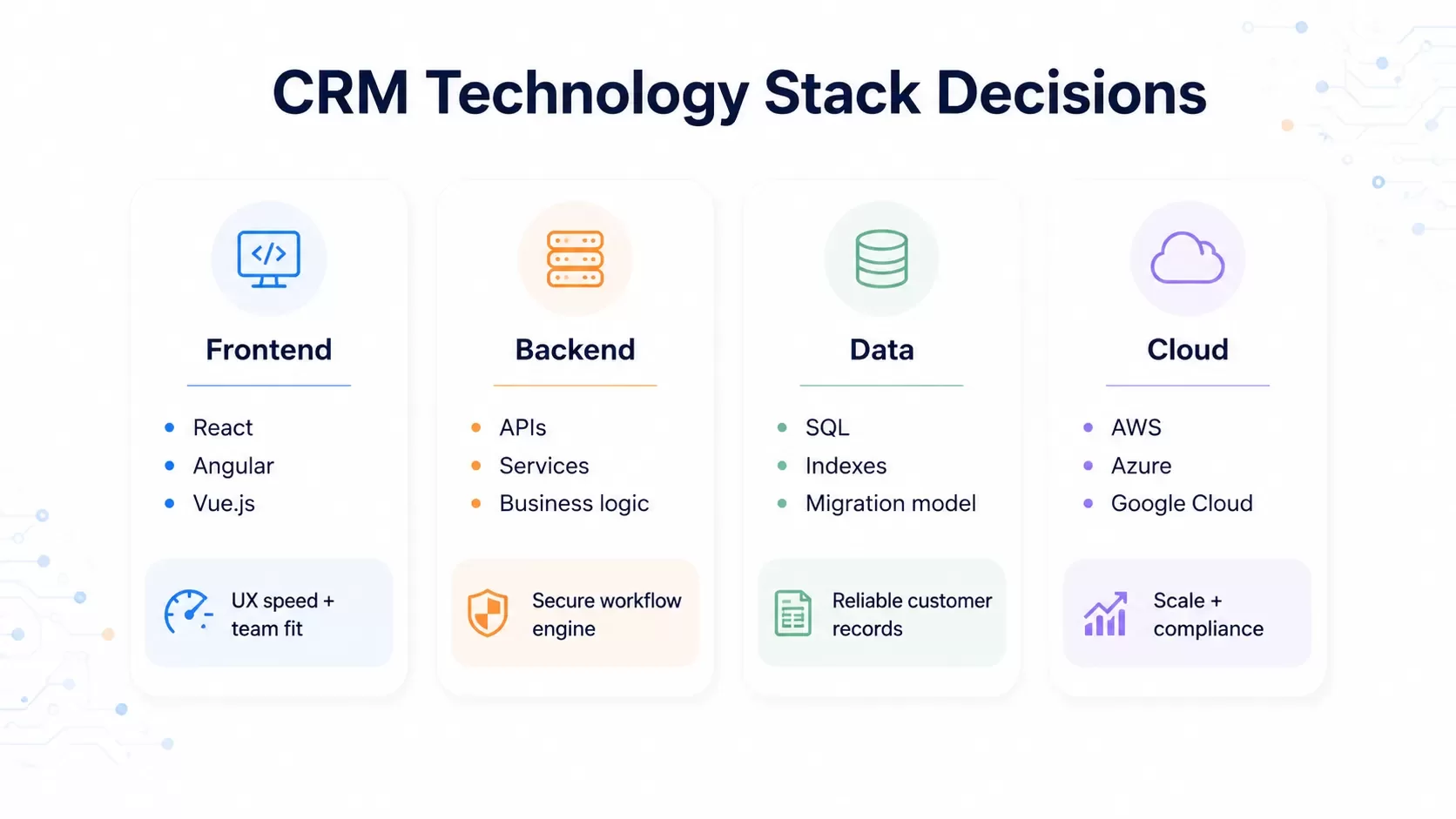
The right technology stack determines how fast your CRM runs, how secure it remains, and how it scales with business growth. A strategic balance between performance, long-term sustainability, and development efficiency separates systems that evolve from those that require expensive rebuilds.
Frontend Framework Selection (React, Angular, Vue.js)
Over 61% of professional developers use React in production environments[6]. React offers a component-based architecture with a vast ecosystem and reduces hiring friction for scaling startups. Angular provides detailed enterprise discipline with built-in tools like form validation and routing. This makes it suitable for internal management systems that require strict governance. Vue.js delivers a gentle learning curve with lightweight design. Developers achieve productivity within 2-3 weeks[6]. Choose React for flexibility and ecosystem breadth. Angular works best for standardized enterprise pipelines. Vue balances simplicity with performance.
Backend Infrastructure and Database Design
Database normalization minimizes data redundancy and boosts integrity. Structure your CRM database around core entities like contacts, customers, orders, and products[9]. Define relationships with care: one-to-many for customers to orders, many-to-many for orders to products using link tables[9]. Foreign keys maintain consistency. Use appropriate field types and add only necessary indexes to balance query performance with insert speed[9].
API Architecture and Third-Party Integrations
Integration patterns fall into three categories: data integration for synchronization and process integration for cross-application workflows[10]. Design APIs with proper error handling, authentication mechanisms like OAuth 2.0, and clear documentation[1]. Salesforce maintains configurable timeouts up to 120 seconds for API calls[10]. Plan for rate limiting, versioning in URLs, and consistent naming conventions across all resources[1].
Cloud Platform Selection (AWS, Azure, Google Cloud)
AWS holds 33% of the global cloud market with presence in 25 geographic regions and 81 availability zones[8]. Azure captures 18% market share across 60+ regions and integrates easily with Microsoft ecosystems[8]. Google Cloud Platform operates in 27 regions with 82 zones and optimizes for data analytics and machine learning[8]. Evaluate each provider against your engineering culture, compliance requirements, and cost predictability needs[11].
Security Protocols and Data Protection Standards
Data encryption protects information both in transit and at rest. Compromised data remains unreadable[12]. Two-factor authentication adds a verification layer beyond passwords[12]. Salesforce research shows that 89% of customers are more likely to recommend brands after positive experiences. This emphasizes how security builds trust[12]. Apply regular updates to address vulnerabilities and conduct user security awareness training[12].
Scalability Planning for Future Growth
Build modular architectures where components can be updated without breaking the entire system[13]. Adopt an API-first model that ensures CRM components remain available for consumption across the organization[5]. Data archiving and purging strategies optimize storage costs, as data represents a major expense as systems grow[5]. Design data models that prevent exponential growth while maintaining performance under increasing loads[5].
Development and Implementation Best Practices
Execution separates successful CRM projects from abandoned ones. These best practices guide you through building crm system features and ensure smooth deployment with high user adoption.
Core Feature Development (Contact Management, Sales Automation)
Contact management serves as your CRM foundation. It stores customer names, addresses, emails, and phone numbers in searchable databases. Sales automation reduces manual effort and handles quote generation, follow-up sequences, and lead routing automatically. Interaction tracking captures every customer touchpoint, from messages to service requests. This creates a 360-degree view that keeps teams synchronized.
User Interface Design and UX Principles
User-focused design adapts systems to match how salespeople and support staff work. Sales teams report excessive time spent on manual data entry as their main frustration. Automate data capture through email and calendar integrations to minimize input requirements. Display recent customer interactions before calls and show deal progress with upcoming tasks. Provide contextual insights when users need them most.
Agile Development Methodology for CRM Projects
Agile methodology divides crm software development into two-week sprints. Each cycle produces working features at its end. Teams select backlog items during sprint planning and develop and test throughout the sprint. They demonstrate completed features in review meetings. Retrospectives identify process improvements and create feedback loops that strengthen each subsequent sprint.
Data Migration Strategy and Execution
Data migration follows the ETL process: Extract data from legacy systems, Transform it by cleaning duplicates and standardizing formats, Load it into your new CRM. Clean data before migration by merging duplicate contacts, validating email formats, and standardizing company names. Run pilot migrations with small user groups first. This catches errors before full deployment.
Integration with Existing Business Tools
CRM integration connects third-party applications so data flows automatically between platforms. When marketing updates a contact, that change appears instantly in your CRM. Integrated systems eliminate manual updates and provide complete customer views. They enable richer analytics by combining data from multiple sources. Focus on calendar syncing, email tools, accounting software, and communication platforms based on user research priorities.
Mobile-First Development Approach
Mobile-first design prioritizes small-screen experiences before desktop versions. More than 63.38% of internet traffic occurs on mobile devices[14]. Design touch navigation with buttons sized at least 48x48 pixels. Optimize loading speed through image compression and ensure core functionality works offline. This helps field sales teams working remotely.
Testing, Deployment, and Continuous Optimization
CRM implementation involves planning, designing, testing and deployment. Ongoing optimization adapts the system to evolving business needs.
Unit and Integration Testing Procedures
Unit tests get into individual components in isolation. They focus on single functions or modules. These tests run quickly and provide immediate feedback on code quality. Integration testing confirms how multiple modules work together. It uses dependencies like databases and APIs. Unit tests pinpoint exact failures. Integration tests catch interface misconfigurations that isolated testing misses.
User Acceptance Testing (UAT) Process
UAT represents the final stage where business users confirm end-to-end workflows in real-world scenarios. Actual employees execute test cases in separate UAT environments and evaluate results against business acceptance criteria. This phase identifies procedural issues before full rollout. It reduces risk and builds user confidence in the system.
Deployment Strategy and Rollout Planning
Launch the system one step at a time rather than flipping the switch for everyone at once. Phased rollouts reduce risk. Deploy to one team or feature set at a time. You can monitor the effect and gather feedback this way. Big bang approaches suit small implementations with high risk tolerance. Complex projects benefit from incremental releases.
Team Training and Onboarding Programs
Start with power users who will champion the system and assist others. Provide role-specific training through live demos, recorded walkthroughs and quick reference guides. Address concerns early when users express frustration. Fix workflows or show long-term benefits to build adoption instead of resentment.
Performance Monitoring and Analytics
Track usage metrics beyond simple logins. Monitor whether users log data accurately. Check if records remain complete and whether data quality holds up over time. Run regular check-ins. Ask what frustrates users, what features are missing and what would simplify their work.
Ongoing Maintenance and Feature Updates
Regular CRM maintenance supports optimal performance through data cleaning, system updates and security patches. Monitor key metrics including user satisfaction, adoption rate, data quality and system uptime. Continuous improvement plans keep systems aligned with evolving business needs. They maximize ROI and maintain competitive advantage.
Conclusion
You need methodical execution across planning, architecture selection, development and deployment phases to build a CRM system from scratch. I've walked you through proven strategies that transform customer relationships and accelerate measurable business growth. Note that success depends on technical excellence and user adoption as you move forward with your CRM project. Start with clear objectives and choose technologies that match your team's expertise. Prioritize continuous optimization. Your investment in strategic CRM development will deliver long-term competitive advantages without doubt.
FAQs
The foundational pillars of CRM include understanding your Customer, mapping the Customer Journey, enabling Customization, building system Capability, ensuring Convenience, managing Customer Data effectively, and maintaining clear Communication. These elements work together to create strong, personalized customer relationships that drive business success.
Yes, CRM systems have become essential for staying competitive. Research shows that approximately 71% of small businesses now use CRM systems. Without one, businesses risk falling behind competitors who benefit from faster follow-up processes, cleaner customer data, and more organized relationship management.
Development timelines vary based on complexity and scope. Using Agile methodology with two-week sprints allows teams to produce working features incrementally. A basic CRM with core contact management and sales automation features can take several months, while enterprise-level systems with extensive integrations and custom features may require 6-12 months or longer.
Key performance indicators include user adoption rate, data quality and completeness, customer satisfaction scores (NPS, CSAT, CES), sales productivity improvements, and system uptime. Additionally, monitor whether sales increased by the targeted percentage (such as the 29% revenue increase cited in industry research) and if customer retention goals are being met.
A mobile-first approach is recommended, as more than 63% of internet traffic now occurs on mobile devices. This design strategy prioritizes small-screen experiences with touch-friendly navigation, optimized loading speeds, and offline functionality—essential features for field sales teams and remote workers who need access to customer information on the go.
Planning a custom CRM or CRM modernization project?
Hexagon IT Solutions builds CRM platforms, workflow automation, API integrations, mobile-ready interfaces, and scalable customer data systems for growing teams.
References
[1] https://dzone.com/refcardz/api-integration-patterns
[2] https://www.leadsquared.com/learn/sales/crm-best-practices/
[3] https://www.salesforce.com/blog/sales/customer-pain-points/
[4] https://www.zendesk.com/blog/customer-experience/customer-journey/customer-pain-points/
[5] https://www.dhruvsoft.com/blog/future-proof-salesforce-crm-scalability-adaptability/
[6] https://www.gitnexa.com/blogs/react-vs-vue-vs-angular
[8] https://nix-united.com/blog/comparison-overview-with-nix-united-azure-vs-gcp-vs-aws/
[9] https://www.engineeredit.com/database-consulting/database-design-best-practices
[10] https://architect.salesforce.com/docs/architect/fundamentals/guide/integration-patterns.html
[11] https://www.bairesdev.com/blog/aws-vs-azure-vs-gcp/
[12] https://www.veeam.com/blog/crm-data-security.html
[14] https://www.wix.com/blog/mobile-first-vs-responsive-design-all-you-need-to-know
[15] https://codewave.com/insights/crm-development-from-scratch/
[16] https://www.sciencedirect.com/science/article/abs/pii/S0019850108000874
[17] https://www.salesforce.com/marketing/customer-journey/mapping/
[18] https://uxpressia.com/blog/touchpoints-and-channels-customer-journey-mapping
[19] https://marketingguys.com/blog/customer-journey-mapping-in-your-crm-strategy/
[20] https://www.dhruvsoft.com/blog/crm-implementation-kpis-for-cios-it-heads/
[21] https://bespoke-crms.com/blog/crm-requirements-gathering-guide


