






For disconnected purchasing, inventory and production, best overall: Microsoft Dynamics 365 Supply Chain Management. Best for coordinated supply planning: Kinaxis Maestro; best for a modular warehouse starting point: Odoo Inventory—this 2026 guide separates full operational systems from planning tools so you choose the right category first.
- Microsoft Dynamics 365 Supply Chain Management is the best supply chain management software default for integrated operational workflows.
- Kinaxis Maestro fits coordinated planning; SAP Integrated Business Planning fits planning centered on a SAP environment.
- Oracle Fusion Cloud SCM and NetSuite suit different operational scopes; evaluate the processes you need before choosing.
- Odoo Inventory fits modular warehouse operations, not a substitute for every enterprise supply planning requirement.
Why this matters
A warehouse system answers where stock sits. A planning platform helps decide what to buy or produce. An operational suite connects those decisions to purchasing, production and fulfillment. Buying the wrong category leaves your team reconciling decisions across systems.
For your 2026 shortlist, start with the business process that breaks most often: replenishment, supplier coordination, production scheduling or order fulfillment. A consultation with Hexagon IT Solutions should begin with that process and its handoffs, not a feature checklist.
The best system is the one that connects your next operational decision to the people and records needed to execute it. That matters more than a long list of capabilities your team will not use.
What makes the best supply chain management software
Use these criteria before reading the ranking. They distinguish a useful operational fit from a product that simply covers the right terminology.
- Process coverage: Identify whether you need planning, procurement, inventory, manufacturing, warehouse execution or a connected combination.
- System fit: Check how customer orders, supplier records, item data and financial transactions move between existing applications.
- Decision support: Require a demonstration of shortages, changing demand and supply constraints using your own business rules.
- Execution visibility: Follow an exception from detection to an assigned action, rather than stopping at a dashboard.
- Implementation ownership: Name the people responsible for data, configuration, integrations and user acceptance.
- Usable scope: Choose capabilities that match your operating model; do not make advanced planning a prerequisite for fixing basic inventory records.
In 2026, a broad suite and a focused planning platform remain different buying decisions. Establish which decision you are making before comparing vendors.
Supply chain software at a glance
The table ranks these options by their distinct use cases. It is a fit-based shortlist, not a claim that every product serves the same buyer.
| Rank | Software | Best for | Standout capability | Scope boundary |
|---|---|---|---|---|
| 1 | Microsoft Dynamics 365 Supply Chain Management | Connected operational workflows | Procurement, inventory, manufacturing and warehouse management | Operational breadth requires deliberate process and data setup |
| 2 | Kinaxis Maestro | Coordinated supply planning | Concurrent planning across connected supply chain decisions | Planning does not replace transactional execution systems |
| 3 | SAP Integrated Business Planning | Planning centered on SAP | Demand, supply and inventory planning | Separate the planning requirement from warehouse execution |
| 4 | Oracle Fusion Cloud SCM | Supply chain alongside Oracle finance | Connected procurement, manufacturing and logistics applications | Evaluate the specific applications and integrations required |
| 5 | NetSuite | Distribution tied to financial management | Inventory and order management within an ERP environment | Validate requirements beyond core distribution workflows |
| 6 | Odoo Inventory | Modular warehouse operations | Stock movements, locations and replenishment rules | Broader workflows require additional applications and configuration |
1. Microsoft Dynamics 365: best for connected operations
Microsoft Dynamics 365 Supply Chain Management covers operational functions including procurement, inventory, manufacturing and warehouse management. It belongs at the top of the shortlist when your problem spans several departments rather than a single planning task.
A manufacturer, for example, needs a customer order to inform material requirements, production activity and warehouse fulfillment. Assess those handoffs together. A strong warehouse demonstration alone does not establish that the entire process fits.
Microsoft Dynamics 365 Supply Chain Management pros:
- Covers multiple operational functions within the Dynamics application family.
- Supports manufacturing and warehouse requirements alongside inventory management.
- Provides a relevant evaluation path for organizations already using Microsoft business applications.
Microsoft Dynamics 365 Supply Chain Management cons:
- Broad coverage increases the configuration and ownership decisions involved.
- An existing Microsoft environment does not remove the need to validate integrations.
- A focused inventory problem does not automatically justify the full application scope.
Best for: Businesses connecting purchasing, production, stock and fulfillment under a shared operational model.
Verdict: Buy when the connected workflow fits; skip the full scope when your problem is confined to a simpler stock process.
2. Kinaxis Maestro: best for coordinated supply planning
Kinaxis Maestro focuses on concurrent supply chain planning. It connects planning decisions so teams can evaluate changes across demand, supply and related constraints rather than treating each planning activity as an isolated exercise.
Consider it when a demand change forces repeated revisions across purchasing, production and fulfillment plans. Your evaluation should show what changes, which constraints matter and who acts on the revised plan.
Kinaxis Maestro pros:
- Centers the evaluation on connected planning decisions.
- Supports scenario analysis for changing demand and supply conditions.
- Fits organizations that need coordinated planning across functions.
Kinaxis Maestro cons:
- A planning platform does not replace the systems recording warehouse movements and financial transactions.
- Useful scenarios depend on reliable operational inputs.
- Planning ownership must be defined across participating teams.
Best for: Organizations whose main bottleneck is coordinating plans across a complex supply network.
Verdict: Buy for the planning problem; skip it as a replacement for a basic warehouse transaction system.
3. SAP Integrated Business Planning: best for SAP-centered planning
SAP Integrated Business Planning supports supply chain planning, including demand, supply and inventory planning. Its strongest shortlist position is an organization evaluating planning alongside an existing SAP environment.
Keep the evaluation specific. Demonstrate how a forecast change affects the supply plan and how approved decisions reach the operational applications that execute them. The planning application and the execution system serve different purposes.
SAP Integrated Business Planning pros:
- Covers several related supply chain planning disciplines.
- Provides a SAP-centered option for connecting planning with existing business processes.
- Supports scenario-based planning discussions rather than relying only on static reports.
SAP Integrated Business Planning cons:
- Planning capability does not establish warehouse execution coverage.
- Existing SAP use does not eliminate data preparation or integration work.
- Teams need agreement on planning assumptions and decision authority.
Best for: Businesses seeking coordinated planning in a SAP-centered application environment.
Verdict: Buy when SAP-centered planning is the requirement; hold until planning-to-execution handoffs are demonstrated.
4. Oracle Fusion Cloud SCM: best alongside Oracle finance
Oracle Fusion Cloud SCM includes applications for supply chain functions such as procurement, manufacturing and logistics. It belongs on the shortlist when the buying decision involves both supply chain operations and their relationship with Oracle financial applications.
Do not evaluate the suite name as though it were a single workflow. Identify the applications needed for your business, then trace purchasing, receipt, production or fulfillment through the relevant records.
Oracle Fusion Cloud SCM pros:
- Covers multiple supply chain functions within the Oracle Fusion application family.
- Supports an evaluation that connects operational processes with financial records.
- Addresses requirements extending beyond inventory tracking alone.
Oracle Fusion Cloud SCM cons:
- Broad scope still requires application-level selection and process design.
- Connections to non-Oracle systems need explicit validation.
- A suite-level demonstration is insufficient without your operational exceptions.
Best for: Organizations evaluating supply chain applications alongside Oracle financial processes.
Verdict: Buy when the required applications fit together; hold if the demonstration stops before financial reconciliation.
5. NetSuite: best for distribution tied to finance
NetSuite combines ERP capabilities with inventory and order management. For a distributor, that makes it a relevant option when stock, customer orders, purchasing and accounting need to operate from a connected business system.
Start with your order-to-fulfillment process. Then test receiving, stock adjustments and the financial consequences of each transaction. Treat specialized planning or warehouse requirements as separate acceptance criteria.
NetSuite pros:
- Places inventory and order management within an ERP environment.
- Connects operational evaluation with accounting requirements.
- Fits a distribution-focused shortlist without assuming manufacturing is the central problem.
NetSuite cons:
- ERP coverage does not establish a fit for every specialized planning requirement.
- Warehouse complexity needs its own demonstration.
- Existing applications and data still require a defined migration or integration approach.
Best for: Distributors seeking connected inventory, orders and financial management.
Verdict: Buy for the demonstrated distribution workflow; hold when specialized requirements remain unresolved.
6. Odoo Inventory: best for a modular warehouse starting point
Odoo Inventory manages stock movements, warehouse locations and replenishment rules. It fits buyers who want to begin with a defined inventory process and evaluate adjacent Odoo applications as the scope expands.
Separate Inventory from the wider application family. Purchasing, manufacturing and other business processes require evaluation of the relevant applications, not an assumption that the Inventory app covers everything.
Odoo Inventory pros:
- Focuses the initial evaluation on tangible stock workflows.
- Supports warehouse locations and replenishment rules.
- Offers a modular approach to extending the operating scope.
Odoo Inventory cons:
- Inventory functionality alone does not constitute a full enterprise planning platform.
- Broader processes require additional application decisions.
- Customizations and integrations need clear maintenance ownership.
Best for: Smaller operations starting with warehouse control and a defined expansion path.
Verdict: Buy for the inventory use case; skip it as an assumed substitute for advanced network planning.
How the ranking works
This 2026 ranking prioritizes process coverage, system fit, decision support, execution visibility and manageable implementation scope. Microsoft Dynamics 365 Supply Chain Management takes the default position for connected operational needs; the other options take distinct planning, ecosystem or warehouse slots.
The ranking does not imply a hands-on benchmark or measured implementation results. Product scope follows the vendors' established product documentation; the recommendations distinguish business requirements rather than promise revenue gains or deployment timelines.
Run a workflow test before signing
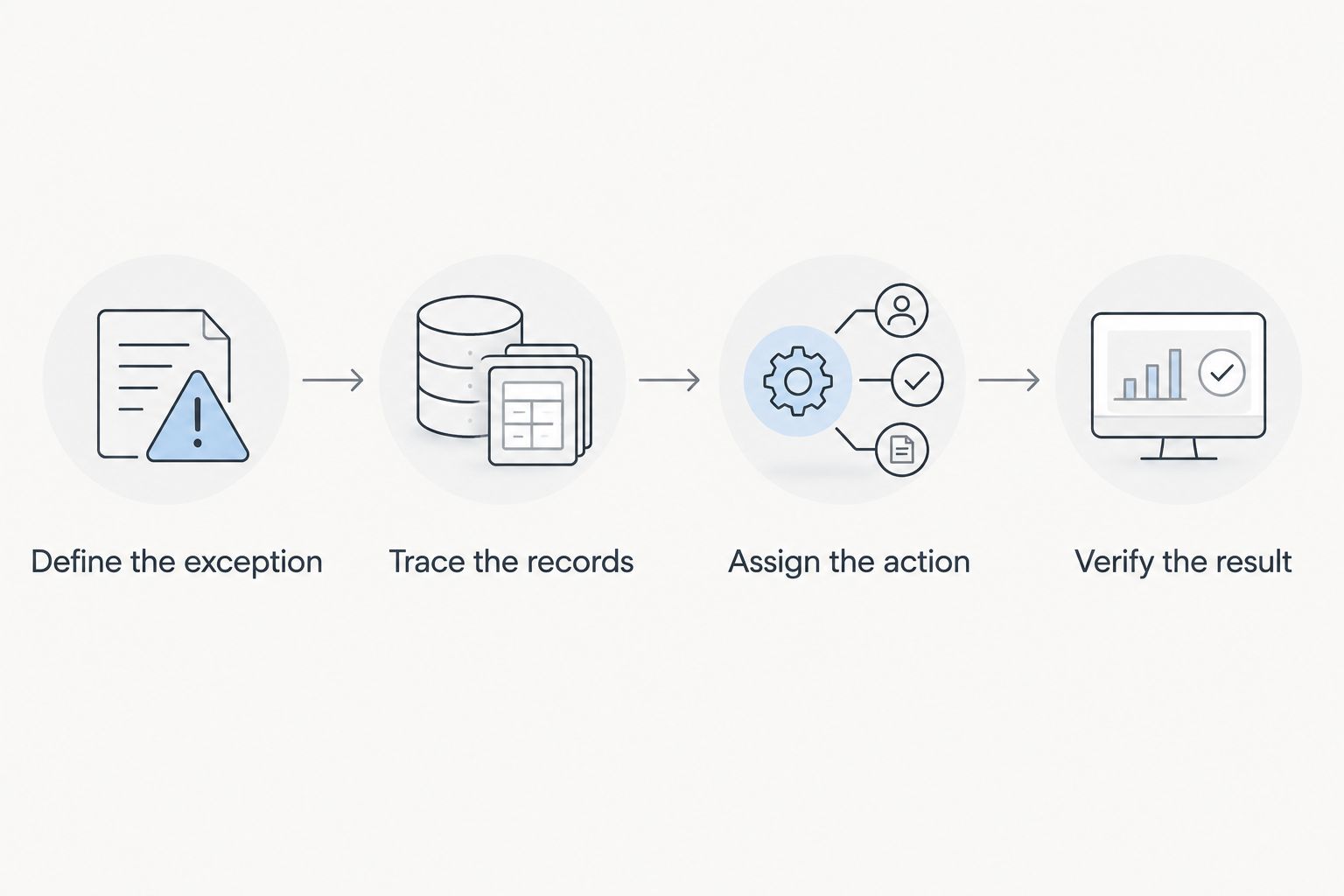
Use 3 workflow tests in your 2026 evaluation: routine replenishment, a supplier delay and an order change after allocation. These are suggested acceptance tests, not a performance benchmark.
Each test should follow the same sequence. Require the vendor to show actual records and decisions, not just describe what the software supports.
Define the exception
Write down what happened, what business outcome you need and which constraints cannot change. For a supplier delay, specify the affected item, order and required fulfillment decision.
Trace the records
Follow the relevant purchasing, inventory, planning and order records. Confirm which application owns each record and how updates reach the other systems.
Assign the action
Name 1 process owner for each tested exception. Show how that person sees the issue, approves the response and communicates the decision to the execution team.
Verify the result
Check the resulting stock position, order status and financial treatment where relevant. Confirm what happens if the integration fails or the transaction needs correction.
Compare 2 operating models before committing: the current handoff and the proposed handoff. Record which manual tasks disappear, which remain and which new responsibilities the software introduces. That comparison gives your buying team a concrete basis for evaluating the change.
Which supply chain software should you choose?
Choose Microsoft Dynamics 365 Supply Chain Management as the default for connected operational workflows. Choose Kinaxis Maestro when coordinated planning is the central problem, and SAP Integrated Business Planning when that planning decision sits in a SAP environment.
Oracle Fusion Cloud SCM belongs in an Oracle-centered operational evaluation. NetSuite belongs in a distribution-and-finance evaluation. Odoo Inventory belongs in a modular warehouse evaluation.
For a 2026 decision, narrow the category before narrowing the vendor. A consultation with Hexagon IT Solutions is best for buyers who need to define system handoffs before committing to supply chain software.
FAQ
What's the best supply chain management software in 2026?
Microsoft Dynamics 365 Supply Chain Management is the default recommendation for connected operational workflows in this shortlist. Kinaxis Maestro is the planning-focused choice, while Odoo Inventory fits a modular warehouse starting point.
Is supply chain software the same as ERP?
No. ERP connects business functions such as finance and operations, while supply chain software can focus specifically on planning, procurement, inventory or logistics. Some ERP suites include supply chain applications.
Should a small business choose Odoo Inventory or NetSuite?
Choose Odoo Inventory for a defined modular warehouse evaluation, and NetSuite for an inventory, order and finance evaluation. Demonstrate your purchasing and fulfillment process before selecting either option.
Does a planning platform replace warehouse software?
No. A planning platform helps determine what should happen, while warehouse software records and directs physical inventory activity. Evaluate the handoff between the planning decision and its execution.
What should I ask during a supply chain software demo?
Ask the vendor to demonstrate a supplier delay, replenishment decision and order change using your business rules. Follow each exception through its records, assigned owner, operational action and final result.
One last thing
Ask who can correct a wrong item record after launch. Planning, replenishment and fulfillment all depend on those records; an impressive dashboard cannot settle ownership disputes.
Put the answer in the acceptance criteria. Require a named owner, an approval path and a correction process before expanding the implementation scope.
Related guides
- Best ERP software for manufacturing businesses
- Best POS systems for retail businesses
- Best CRM software for small businesses
- Best digital transformation consulting firms
Schedule your supply chain consultation
Discuss process ownership, system handoffs and the workflows your software must support.


