




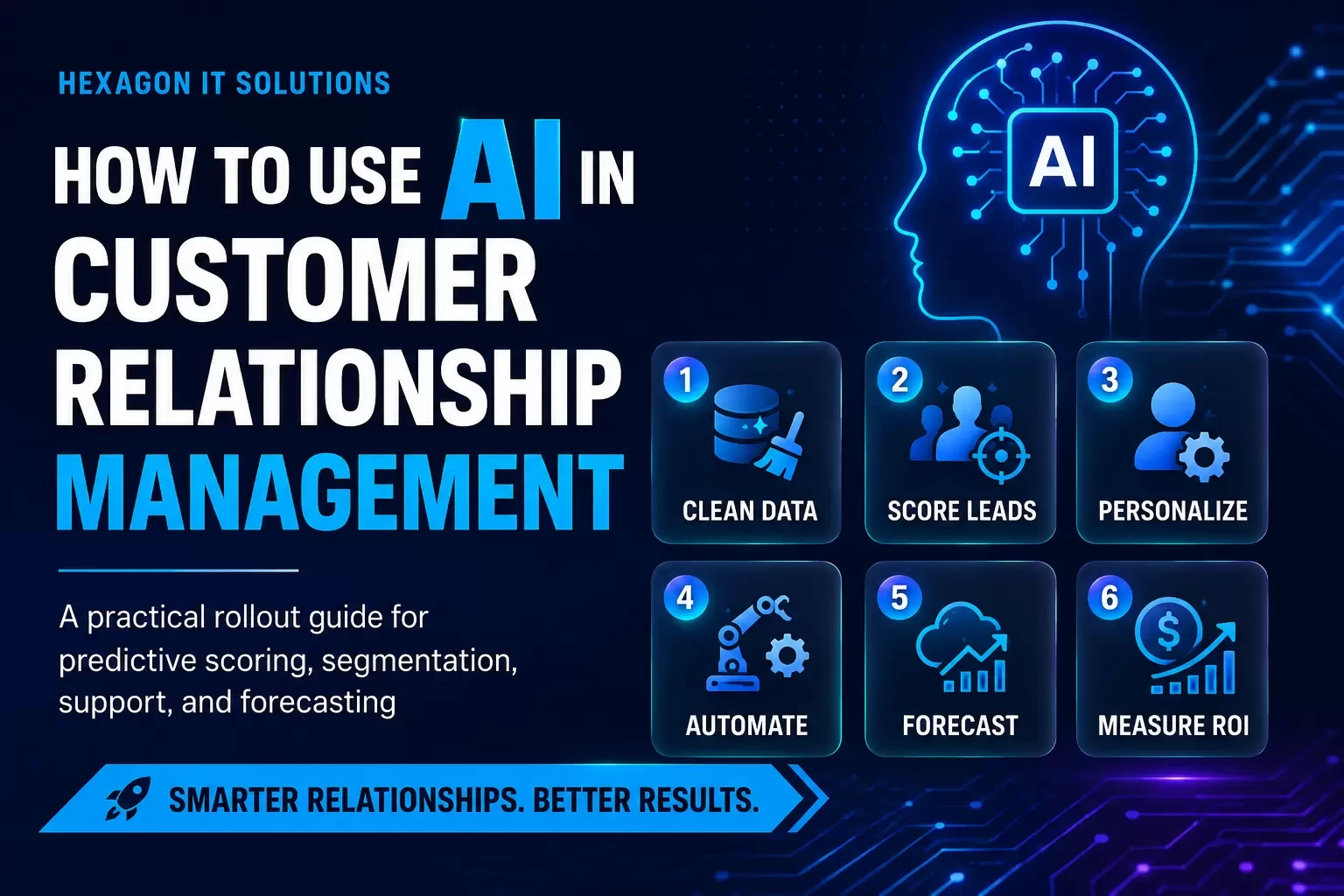
AI in CRM works when it is tied to clean customer data, measurable business goals, and clear workflows. Start with one high-impact use case, prove ROI, then expand.
Companies using AI in customer relationship management see 41% higher revenue per salesperson and 35% better customer retention rates[8]. The transformation is clear: AI powered CRM systems predict customer churn, identify upsell opportunities, and personalize interactions based on behavioral patterns no team could spot manually[47]. Yet many businesses struggle with where to start when implementing artificial intelligence for CRM. This piece walks you through choosing the best AI CRM software and deploying AI capabilities step-by-step to revolutionize your customer relationships.
What is AI in CRM and Why It Matters
Understanding AI-Powered CRM Systems
AI in customer relationship management integrates artificial intelligence directly into business processes to organize and manage customer information while automating complex workflows. AI powered CRM analyzes customer behavior through machine learning algorithms, predicts outcomes using historical patterns, and recommends actions without waiting for manual input, unlike systems that store data alone. The technology combines natural language processing, predictive analytics and automation to create what functions as an intelligent system of action rather than just a record-keeping tool. The rise started with customer databases that accounting departments used. These systems incorporated features for marketing, sales and support teams as businesses expanded. But customer expectations grew faster than traditional systems could handle. The volume of data generated from multiple touchpoints became overwhelming for manual processing. Generative AI tools entered the CRM space and changed how organizations interact with customers to address this challenge. Companies now access platforms like IBM watsonx Assistant, Salesforce Einstein GPT, HubSpot ChatSpot, Freshworks Freddy AI, Zoho Zia and Pipedrive AI Sales Assistant. AI CRM connects customer data from multiple sources on one platform and enables teams to create tailored experiences through secure and trusted AI. Every employee in sales, service, commerce, marketing and IT can generate and act on customer insights instantly. The system monitors trends, analyzes behavioral patterns and identifies opportunities that would remain hidden in manual reviews. Organizations gain unified intelligence with one consistent approach to data collection and analysis as a result.
Key Differences Between Traditional and AI CRM
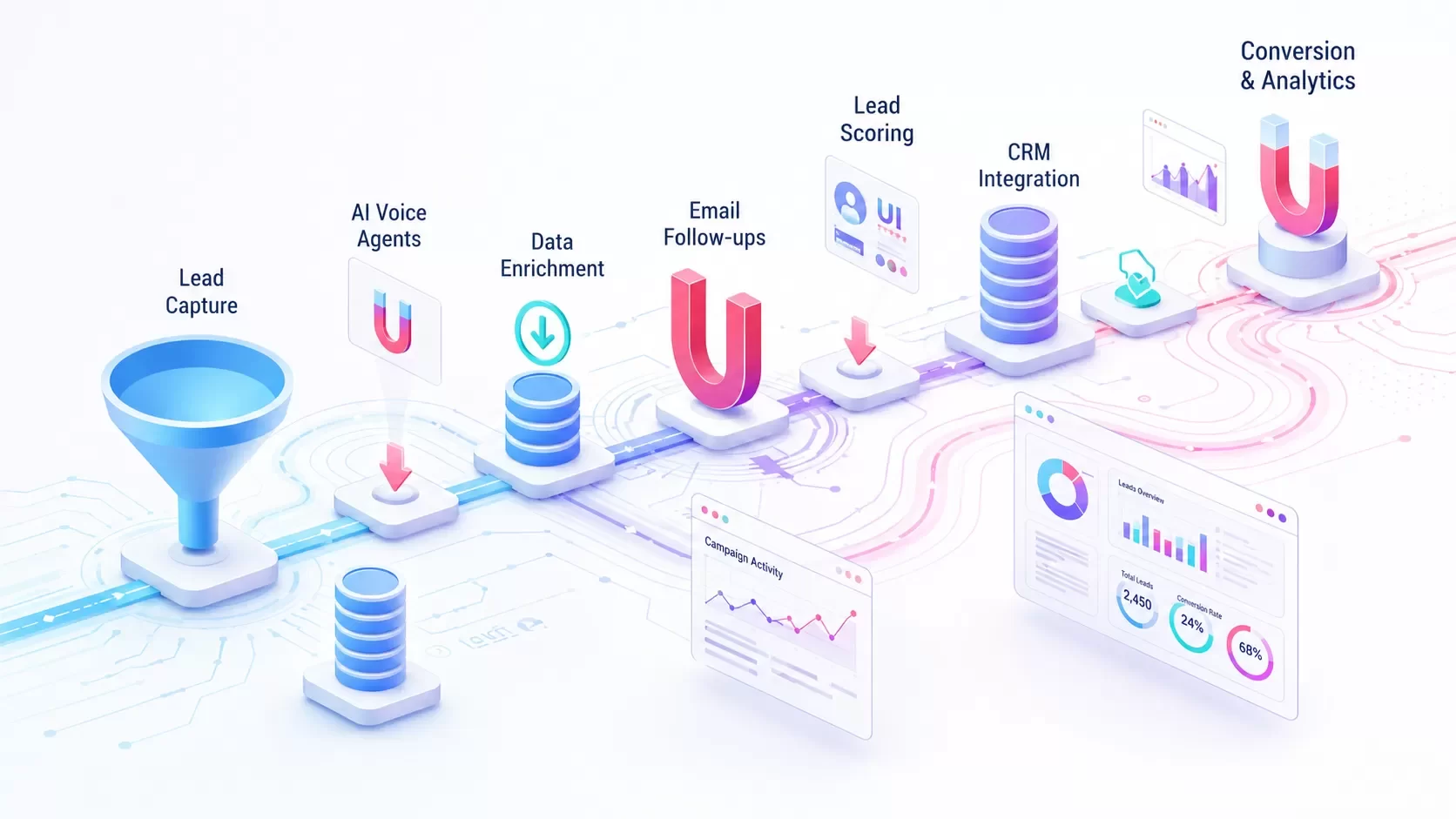
Traditional CRM systems depend on manual data entry, static workflows and retrospective reporting. Teams maintain records manually and use reports to gather insights reactively. Personalization requires segmenting audiences and tailoring outreach based on what appears in customer records. This approach works when data integrity remains strong but falls short when information is incomplete or teams become too busy to follow processes. AI CRM transforms this dynamic through proactive and adaptive design. The system captures activity automatically, surfaces predictive insights live and helps businesses see results rather than reacting to past events. Lead scoring moves from manual qualification to AI-driven analysis with 89% accuracy[49]. Marketing campaigns move beyond segmentation to personalized one-to-one experiences at scale. Sales forecasting improves from spreadsheet-based estimates to AI predictions with 91% accuracy[49]. Customer service evolves from reactive ticket resolution to proactive issue prevention. AI agents can summarize interactions, hand them to the next team member, recommend or initiate next steps automatically and reduce administrative tasks. These agents operate independently within workflows and initiate outreach, execute next-best actions, adjust campaigns live and resolve requests with minimal human involvement. AI implementation in CRM has the potential to increase leads by more than 50%, reduce costs by up to 60%, and cut call time by up to 70%[2].
Business Benefits of Using AI in Customer Management
Predictive analytics stands as one of the most valuable AI contributions to CRM. The technology analyzes historical data and customer behavior to provide insights for sales forecasting, demographic targeting and churn management. AI determines what message to send, the timing and the channel to ensure each interaction feels relevant rather than generic. Automation and AI work together to handle routine inquiries through chatbots and virtual assistants that provide round-the-clock support. Teams prioritize leads more efficiently and assess conversion likelihood through AI-driven scoring. Data entry, cleaning and enrichment happen automatically and maintain an accurate foundation for all AI processes spanning the business. Organizations adopting AI CRM report 127% improvement in campaign engagement rates, 3x faster guide qualification, 65% reduction in case resolution time and 40% improvement in Net Promoter Scores[49]. The investment delivers 300-500% ROI through improved customer engagement, operational efficiency and competitive advantages[49]. Tasking AI agents with resolving common customer service issues will result in a 30% reduction in operational costs by 2029[2]. The technology reduces manual effort while improving conversion rates and customer retention. AI agents cut operational time by hours or days by autonomously triggering actions, updating data and moving processes forward without human input. Mature AI adopters reported 17% higher customer satisfaction[50]. Teams gain more time for high-value activities like building relationships and resolving complex cases while AI handles repetitive work.
Assessing Your CRM Readiness for AI
Evaluating Your Current CRM Infrastructure
Assessing system architecture reveals where AI solutions can streamline processes and boost functionality. Get into whether your CRM handles large sets of unstructured data, which AI models need to generate predictions and recommendations. Systems that cannot process customer emails, chat transcripts, or social media interactions limit what AI can accomplish. Integration capabilities with AI platforms determine implementation success. Salesforce Einstein GPT and Zoho CRM integrate AI features naturally and expand functionality without requiring complete system overhauls.
Your evaluation should identify gaps, inefficiencies, and bottlenecks that hinder performance. Can your platform support modern CRM processes to manage data and automation efficiently? Cloud-based systems often integrate AI more naturally than legacy architectures. Infrastructure must provide compute capacity, API ecosystems, security posture, and scalability to support AI workloads without requiring complete rebuilds. Map every integration point to identify what connects, what breaks, and what is missing. Then you'll understand whether your existing architecture can accommodate AI or if upgrades are necessary first. Cultural alignment matters as much as technology. Teams must embrace AI as an enabler rather than viewing it as a threat to their roles. Only 33% of CIOs say they keep pace with competitors on AI progress[51], which indicates many organizations struggle with readiness beyond technical requirements. Employee preparation determines whether AI adoption succeeds or becomes another underused tool in your technology stack.
Identifying Data Quality and Integration Gaps
Data quality determines AI performance directly. Duplicate records within CRM systems reach up to 20%[52] and create confusion in customer records while impeding operational efficiency. 65% of companies still rely on manual methods such as Excel to scrub their data[52], which highlights the gap between modern data challenges and available tools. Organizations spend between 10-30% of revenue on handling data quality issues[53]. Four primary data problems undermine AI effectiveness: duplicates from manual entry and multiple platforms feeding into your CRM, incomplete information like missing contact details or purchase history, outdated records as people change jobs and update priorities, and inconsistent data across systems that create productivity barriers. Poor data quality leads teams toward flawed predictions and missed opportunities. AI learns from historical patterns, so inaccurate inputs generate unreliable outputs that erode team trust. Integration issues fragment data across isolated systems. Real-time data integration achieves a 28.3% compound annual growth rate compared to traditional data integration's 17.1%[52], and organizations implementing it report revenue growth up to 20%[52]. Synchronization protocols, API connections, permission frameworks, and transformation layers must work together to enable intelligent data processing. AI cannot access the complete customer picture needed to analyze accurately without these components functioning properly.
Setting Clear Goals for AI Implementation
Start with a clear vision that arranges with business objectives and customer experience goals. Stakeholders must understand desired outcomes and the role AI will play in achieving them. AI automates routine tasks and provides predictive insights, but it's not a solution to everything. Leadership must communicate realistic expectations about what AI enables and what it cannot do down through the organization. Define specific problems AI will solve. Are you improving lead scoring? Boosting customer segmentation? Reducing manual processes? Focused goals ensure measurable implementation. SMART goals (Specific, Measurable, Achievable, Relevant, Time-bound) provide direction and benchmarks. To name just one example, increase average lifetime value of customers affected by AI-driven initiatives by a certain percentage within a specified timeframe. Budget AI feature enablement within the context of a master data strategy. Participate with finance teams on how to fund implementation of data architecture and AI project interdependencies along with required resources and expertise. Involve Enterprise Architecture teams to provide guidance on overall application portfolio strategy. AI initiatives lose momentum without funded mandates from the C-suite and clearly defined outcomes with deadlines. Think over growth trajectories when selecting solutions. Fast-growing companies need systems that scale rather than requiring migrations that get pricey within two years.
Choosing the Right AI CRM Software for Your Business
Selecting AI CRM software requires moving beyond feature checklists to review how AI executes within your workflows. Many platforms advertise AI capabilities, but not all can act on insights. Prioritize solutions with AI agents or automated workflows that complete tasks rather than simply generating recommendations. The best AI powered CRM systems improve how your teams already operate instead of forcing adaptation to rigid structures.
Key Features to Look for in AI CRM Tools
Lead scoring stands as table-stakes functionality. The system identifies prospects most likely to convert based on engagement patterns, company fit, and interaction frequency[54]. Predictive forecasting provides deal probability, revenue predictions, and pipeline health insights. This enables quota planning based on information rather than guesswork[54]. Follow-up emails triggered based on prospect behavior eliminate repetitive manual work and free teams to focus on selling[54]. Next-action recommendations reduce decision fatigue by telling you exactly what to do: call specific prospects who opened emails multiple times, send proposals to engaged leads, or follow up with webinar attendees[54]. AI tools should embed into sales, marketing, and service workflows rather than existing as separate platform layers. Look for solutions offering configuration without heavy development, such as no-code platforms that adapt quickly as needs evolve[2]. Mobile access makes deal management possible from anywhere and keeps field sales teams connected with current data[54]. Setup should take minutes, not months. The platform is too complex if you need consultants to implement it[54]. Email and calendar sync should log communications and pull scheduling information without manual entry[54]. Integration with common business tools like Slack, accounting software, and email platforms makes the CRM fit existing workflows. So platforms supporting composable architectures offer greater flexibility than those creating vendor lock-in[2].
Comparing Top AI CRM Platforms
HubSpot offers free-tier access with built-in AI tools for email generation, interaction summarization, and deal management. Starting at no cost with paid plans from $25 per user monthly, it connects marketing, sales, and service data in one system[54][6]. Zoho CRM features Zia assistant providing predictive lead scoring, anomaly detection, and communication insights starting at $14 per user monthly[54][7]. Freshsales powered by Freddy AI delivers intelligent lead scoring, deal forecasting, and conversation insights from $19 per user monthly[7]. Pipedrive's AI Sales Assistant analyzes pipeline activity and recommends follow-ups, deal prioritization, and workflow improvements from $15 per user monthly[54][122].
Salesforce Einstein GPT offers automated marketing campaign creation through natural language prompts, advanced lead scoring, and AI agents for sales and service tasks starting at $25 per user monthly[8][9]. Nutshell provides detailed AI capabilities including next-action recommendations with pricing from $13 to $19 per user monthly and ease-of-use rated 5 out of 5[54].
Matching AI Capabilities to Your Business Needs
Start with the business problem, not the software. Define specific goals before you review platforms[10]. AI excels at analytics, efficient decision-making, and using information at speed and scale. This translates to predicting deal outcomes, prioritizing leads, identifying churn risk, and improving forecast accuracy in CRM contexts[10]. Work within realistic budget parameters. Many CRMs stack advanced AI tools in higher-priced tiers[10]. Match platform technical requirements to your team's skills. Choose simpler out-of-the-box tools without in-house developers[10]. Book your free Workflow Audit to identify optimization opportunities if you're struggling to arrange the right AI capabilities with your workflows. Review data readiness before adoption. AI effectiveness depends on clean, complete, and properly structured information[2]. Choose CRMs that unify customer information from multiple sources and update in real time[2]. Prioritize transparency and control with visibility into how recommendations are made and human-in-the-loop approaches[2]. Make sure platforms support strong AI governance, data security, and compliance with role-based access controls and clear auditability[2].
Step 1: Clean and Prepare Your Customer Data
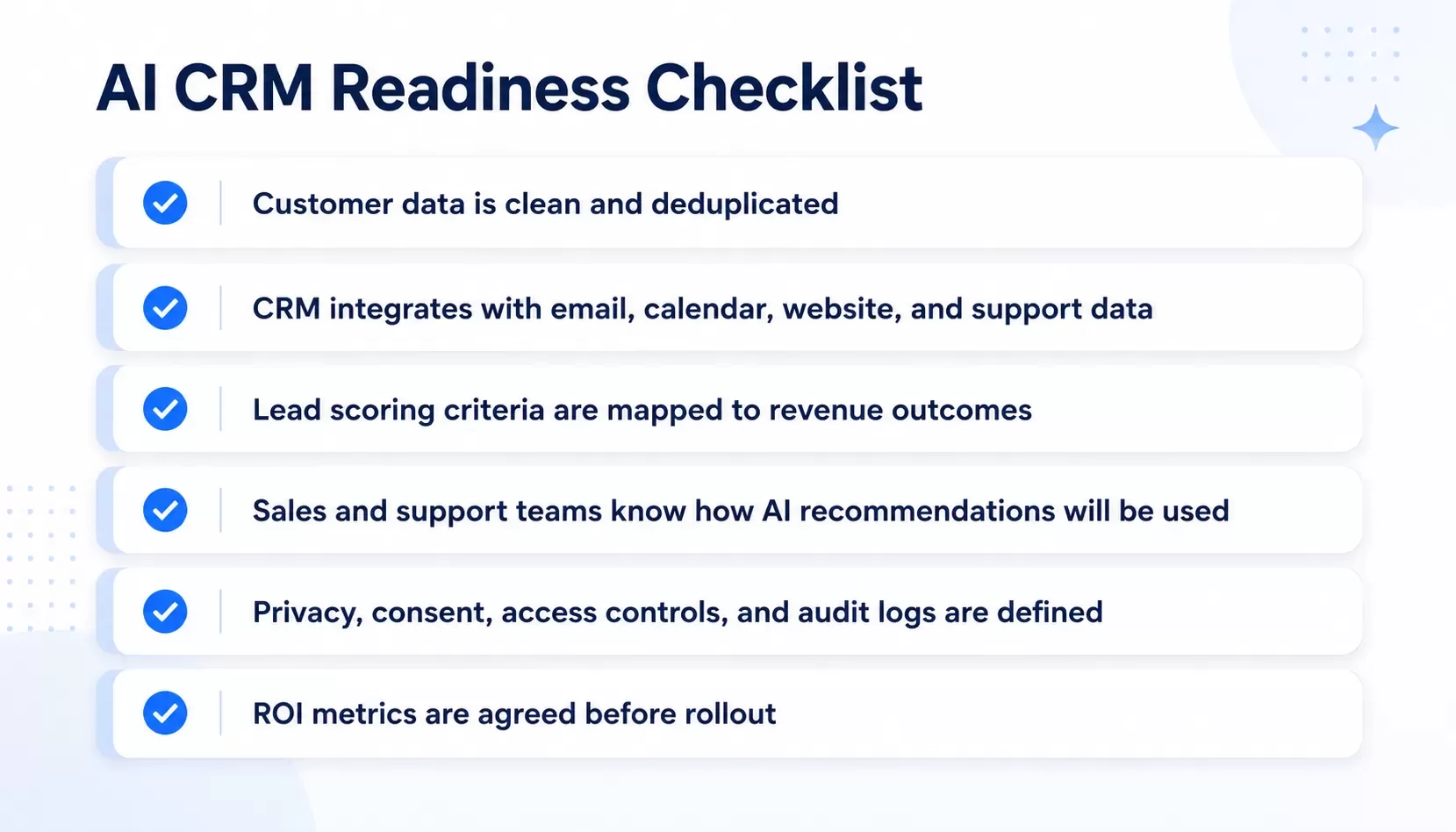
Data preparation determines whether your AI CRM generates accurate predictions or unreliable noise. Clean customer information serves as the foundation for every AI capability, from lead scoring to churn prediction. Organizations spend between 10-30% of revenue handling data quality issues[11]. This makes preparation a financial priority rather than optional groundwork.
Removing Duplicate Records and Inconsistencies
Duplicate detection requires more than simple matching. Customer records often contain slight variations in name spelling, address formatting, or phone number structure while representing the same entity. Advanced cleaning processes implement fuzzy matching algorithms to identify these near-duplicates and establish canonical representations[12]. This prevents AI models from treating similar customers as multiple distinct entities, which breaks segmentation accuracy and inflates customer counts. AI-based deduplication algorithms analyze data trends and merge duplicate records[13]. The process examines fields like email addresses, company domain names, and phone numbers to find matches even when formatting varies. Phone numbers might appear as "(555) 123-4567", "555-123-4567", or "5551234567"[12]. Human analysts recognize these as equivalent, but machine learning algorithms treat them as different values without standardization. CRM platforms handle deduplication through various mechanisms. Some systems deduplicate contacts using email addresses and companies using domain names[14]. Others allow you to define custom deduplication rules based on multiple field combinations. A winner row is selected based on merge priorities such as most filled, most recent, or least recent when duplicate records are identified[15]. Data from non-winner rows remains available during matching steps to improve accuracy by allowing information like previous phone numbers to help identify matching records.
Standardizing Data Formats Across Systems
Format consistency extends beyond data types to business-specific standards that AI models depend on. Date fields arriving in multiple formats like "MM-DD-YYYY" versus "DD-MM-YYYY" must be standardized to prevent model training failures[16]. Clear guidelines will give uniformity across the organization. All dates should follow YYYY-MM-DD format to avoid confusion in time-based analyzes[17]. Phone number formatting should follow specific and consistent patterns, using international standards like E.164 that most software and hardware products support[18]. Contact names require capital letters for first and last names without middle initials or salutations in name fields[19]. Address standardization involves spelling out street types instead of abbreviations and keeping suite numbers in the address line[19]. Data type standardization lets AI models process inputs reliably. Implement validation rules at the point of entry to highlight potential errors[17]. A salary field showing a negative number should trigger automatic review. Mandatory fields, format checks, and automated scripts verify data accuracy upon entry[20]. This upstream validation prevents incorrect or incomplete information from entering the system and saves time later.
Ensuring Compliance with Data Privacy Regulations
Data privacy compliance means following laws designed to protect personal information you collect, store, and process[21]. Regulations like GDPR and CCPA impose strict requirements and penalties for non-compliance[21]. GDPR violations can lead to fines of up to €20 million or 4% of annual global turnover, whichever is higher[11]. Compliance foundations revolve around getting proper consent before collecting data, transparency about how data will be used, and providing options to access, correct, or delete information[21]. Your CRM should manage opt-ins through fields providing granular options based on communication type and channel[22]. The system must allow deletion of contact records, which removes all associated entries and data while recording who performed the deletion and when[22]. Implement technical safeguards such as encryption for data transmission and storage, access controls using strong passwords and multi-factor authentication, and role-based access that lets only authorized individuals access sensitive data[21]. Regular data privacy audits review internal processes, policies, and systems to verify effectiveness and compliance[21]. Establish data retention schedules and automate deletion processes to remove customer data after specified periods or upon request[11].
Step 2: Set Up AI-Powered Lead Scoring and Qualification
Configuring Predictive Lead Scoring Models
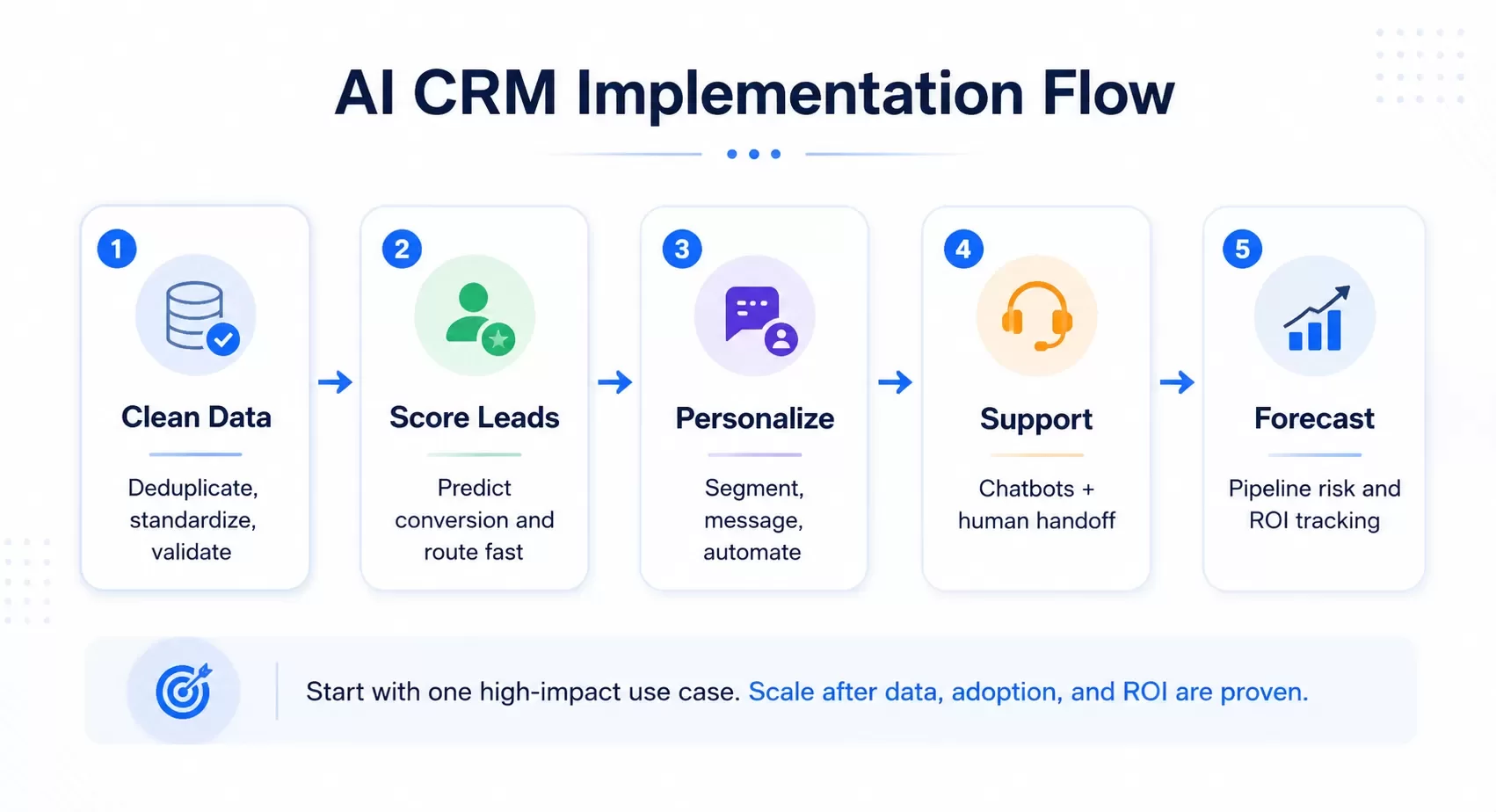
AI-powered lead scoring ranks prospects by conversion likelihood. The system uses behavioral signals, firmographic data and historical patterns rather than arbitrary point assignments[23]. The model assigns probability scores between 0 and 100 to each lead based on signals from contact and account data[24]. Leads scoring 80-100 show the highest conversion potential. Those between 50-79 require nurturing, and anything below 50 indicates low intent[25]. Your organization needs at least 40 qualified and 40 disqualified leads within your selected training timeframe to build a scoring model[26]. Predictive models using machine learning require a minimum of 1,000 historical converted leads to train well[5]. Choose a timeframe between three months and two years when you create your model. The more leads you include for training, the better your prediction results become[26]. HubSpot users can access Marketing > Lead Scoring and select Create score with AI. Choose between contact engagement score or fit score, then enter a name and select the lifecycle stage changes that define conversion, such as Subscriber to Sales Qualified Lead. Select your evaluation timeframe, then click Create score[27]. Contact evaluation takes up to one hour. You can monitor progress through the AI Evaluation column[27]. Once complete, review the score criteria and edit settings as needed. Turn on the score to begin assigning values to each contact[27]. Live scoring calculates values within minutes of saving or importing new leads. Scores for existing leads refresh every 24 hours[24]. The system displays score trends that show whether leads are improving, declining or steady by comparing current scores against previous values[24].
Defining Qualification Criteria with AI
AI models weigh multiple variables at once to determine lead priority. Job titles with VP+ seniority receive higher scores. Company size gets weighted by ICP match, and pricing page visits score highest among website behaviors. Multiple email clicks increase scores further[28]. Bottom-funnel content consumption like case study downloads scores higher than top-funnel whitepaper access[28]. Implement score decay to ensure scores reflect current intent rather than historical activity. Both HubSpot and Salesforce Einstein support automated score decay[5]. Manual systems can achieve similar effects through quarterly audits that zero out scores older than 90 days[5]. This prevents leads from maintaining high scores based on past engagement without recent interaction.
Automating Lead Routing to Sales Teams
Configure CRM workflows to assign leads when they cross the MQL threshold. The system should assign to the appropriate sales rep, send internal notifications and enroll leads in outreach sequences[5]. Response within five minutes versus 24 hours creates a 3x difference in contact rates[5]. HubSpot's predictive lead scoring identifies the best leads in seconds using machine learning[3]. Active Lists identify qualified leads based on score thresholds and product interest signals[3]. Automated routing cut response time by 90% for one company by eliminating manual assignment delays[3]. Sales teams using AI lead scoring report 35-50% improvement in rep efficiency[5].
Step 3: Implement AI for Customer Segmentation and Personalization
Creating Dynamic Customer Segment
AI customer segmentation divides audiences into groups using machine learning algorithms that analyze behavioral data, purchase patterns, demographics, and psychographic information[29]. Traditional static segmentation relies on fixed criteria. Dynamic segmentation continuously analyzes evolving data and updates classifications live[29]. Marketing teams can respond promptly to changes in customer behavior, priorities, and market trends with this approach[29]. AI marketing automation analyzes hundreds of variables to uncover patterns and create micro-segments based on behavior, priorities, and predicted needs[30]. An AI system might notice that a segment responds better to emails sent on Tuesday mornings and automatically adjust delivery timing[30]. Clustering models like K-means and neural networks identify correlations between user engagement with help articles and their likelihood to upgrade[31]. Customer behavior changes due to seasonality or product launches. AI updates segmentation without manual intervention[31].
Tailoring Communication Based on AI Insights
Seventy-one percent of consumers expect companies to deliver tailored interactions, and 76% get frustrated when it doesn't happen[32]. AI-driven personalization analyzes browsing history, purchase patterns, and live behavior to create tailored content, product recommendations, and offers through email, websites, and ads[4]. Netflix uses AI to analyze viewing habits and recommend tailored selections[33]. Starbucks utilizes its Deep Brew program to offer individualized promotions by analyzing customer data[33]. AI determines optimal send times by examining when each recipient is most likely to engage. This boosts open and click rates by a lot[30]. Dynamic content creation tailors product recommendations, subject lines, and imagery based on individual customer behavior patterns[34].
Automating Targeted Marketing Campaigns
AI marketing automation triggers tailored campaigns for high-risk churn segments, adjusts ad bids live to focus on high-value audiences, and serves dynamic content based on predicted interests[4]. Marketing automation platforms merge directly with CRM systems to access customer history and engagement records. Decisions are based on complete, current information[35]. Segments update continuously as users browse, click, or purchase[35].
Step 4: Enable AI Chatbots and Automated Customer Support
Chatbots handle customer questions around the clock. They resolve issues instantly at the time a customer reaches out at 2 AM by pulling order history, previous conversations and priorities from your CRM. This automated support maintains satisfaction while freeing support teams to handle complex issues during business hours. Customer service expectations matter. 66% of B2B and 52% of B2C customers will stop buying after a poor service interaction[36]. Responsive support plays a critical role in retention. Setting Up AI-Powered Chatbots for 24/7 Support Identify customer interaction points where automation boosts efficiency first. Companies adopting chatbot solutions expect up to a 70% reduction in human support services. This enables round-the-clock availability through automation[36]. AI chatbots reduce response time by 70%[37] and deliver instant answers that eliminate frustrating wait times. Chatbot solutions should be chosen based on ease of use, scalability and integration compatibility with your existing AI CRM software. Gartner predicts that by 2029, AI agents will autonomously resolve 80% of common customer service issues and eliminate human intervention in routine cases[2]. The system handles customer questions instantly, classifies tickets and escalates complex issues to human agents at the time it's needed. Training Virtual Assistants on Common Questions Your chatbot needs training with resources like
FAQs, knowledge articles, price lists and policy documents to ensure precise, relevant answers[36]. Upload company-specific materials and connect your website to build a solid knowledge base. Common questions should be pulled from support tickets, chat logs and contact forms using the exact phrasing customers type. Review this knowledge base regularly and update it, especially at the time you launch features, change pricing or update policies. Integrating Chatbots with Your CRM Workflow Your chatbot must access the CRM data it needs to deliver individual-specific interactions. Employ API integrations or native connections offered by CRM providers to link chatbots[36]. The system automatically logs every conversation in your CRM and provides complete interaction history. Chatbots detect intent at the time users request human help and smoothly transfer conversations to available agents with full context. This prevents customers from repeating information.
Step 5: Use AI for Sales Forecasting and Pipeline Management
Analyzing Historical Data for Predictive Analytics
AI forecasting analyzes CRM data, sales rep activity, customer involvement, and historical deal outcomes. It predicts which chances will close and when. Machine learning algorithms identify patterns in thousands of past deals and determine actual predictive factors without emotional bias. Companies using predictive analytics for sales forecasting achieve 10-20% higher forecast accuracy compared to traditional methods[38]. Traditional forecasting relies on sales rep intuition and stage-based percentages. It achieves only 67% accuracy[39] and creates uncertainty that affects hiring decisions and investor communications.
Identifying At-Risk Deals and Chances
AI flags revenue risks like deal collapses and customer churn. It analyzes behavioral signals, pipeline data and external conditions. Einstein Opportunity Scoring improved win rate by 14%[40]. It measured conversion probability and identified at-risk pipelines. The system detects deals stalling beyond expected stage windows, buyers going silent, or late-stage chances missing economic buyer participation. A deal stuck in legal review for three weeks might show as commit in your CRM. AI marks it high risk based on historical patterns though.
Monitoring AI-Driven Sales Metrics
Track forecast accuracy percentage. It measures how predicted sales arrange with actual results. Deal slippage rate shows chances not closing within forecasted timeframes, and win rate by forecast category[41]. AI-driven metrics include account reach and involvement, plus average interaction value[42]. Sales forecast accuracy monitors how predictions match outcomes. This helps refine forecasting models and improve strategic planning[1]. To decide which numbers to track for each rep, this guide to sales rep productivity metrics groups them into activity, efficiency, pipeline and outcome metrics.
Measuring Success and Optimizing AI Performance
Tracking Key Performance Indicators
Predictive accuracy improvements serve as your north star metric. You need to track how AI predictions match actual customer behavior over time. Lead scoring accuracy, churn prediction precision, and sales forecasting reliability should improve as systems learn from data. Customer Satisfaction Score (CSAT) measures satisfaction with products or services, while Net Promoter Score (NPS) gages recommendation likelihood[43]. Customer Effort Score (CES) assesses resolution ease, and First Contact Resolution (FCR) indicates issues resolved during first interaction[43]. Automation efficiency translates to cost savings. AI powered CRM systems increase sales productivity by 27%, boost revenue by 30%, and improve conversion rates by 30%[44]. Companies report case resolution 29% faster and customer retention increases of 27%[44]. Organizations that employ artificial intelligence for CRM report a 20% increase in customer satisfaction due to tailored interactions[45].
Calculating ROI from AI CRM Investment
You can calculate ROI using this formula: (Net return on investment / cost of investment) x 100[46]. Revenue increases from AI-identified opportunities exceed cost savings by 3-5x[47]. Labor cost reductions from automated lead qualification, data entry, and routine communications should be documented. If you're struggling to calculate AI effect, book your free Workflow Audit to identify measurement opportunities.
Continuous Improvement Through Machine Learning
AI performance metrics like predictive accuracy, automation efficiency, and user involvement need to be tracked. Feedback loops allow teams to fine-tune algorithms and arrange them with evolving business needs[48].
Conclusion
Right now, you have a complete roadmap to improve how you connect with customers through AI. The steps are clear: clean your data, configure predictive scoring, automate personalization, deploy chatbots and monitor performance metrics. Results won't appear overnight, but companies see higher conversion rates and improved retention by doing this. Measurable ROI appears within months. Start with one area where AI solves your biggest pain point. Don't try implementing everything at once. Choose the right platform and prepare your data well. Measure your progress continuously. Focus on business outcomes rather than technology for its own sake. Your AI CRM investment will deliver results that grow over time.
FAQs
AI in CRM automates repetitive tasks like data entry and email responses, provides predictive analytics to forecast customer behavior, scores and prioritizes leads based on conversion likelihood, personalizes marketing communications at scale, and powers chatbots for 24/7 customer support. It also analyzes customer interactions to uncover insights about preferences and sentiment that help businesses tailor their offerings more effectively.
Traditional CRM systems rely on manual data entry, static workflows, and retrospective reporting, requiring teams to maintain records and analyze data reactively. AI-powered CRM systems automatically capture activity, provide real-time predictive insights, and proactively recommend next actions. AI CRM achieves significantly higher accuracy in lead scoring (89%) and sales forecasting (91%) compared to manual methods, while reducing administrative workload and enabling personalized customer experiences at scale.
You need clean, complete, and properly structured customer data for AI to work effectively. This means removing duplicate records (which can reach up to 20% in some systems), standardizing data formats across all fields like dates and phone numbers, filling in missing information, and ensuring data consistency across integrated systems. Organizations typically need at least 1,000 historical converted leads to train effective predictive models, and maintaining ongoing data quality is essential for accurate AI predictions.
AI-powered lead scoring analyzes behavioral signals, firmographic data, and historical patterns to assign probability scores between 0 and 100 to each lead, indicating their likelihood to convert. The system weighs multiple variables simultaneously—including job titles, company size, website behaviors, and email engagement—to prioritize leads more accurately than manual methods. Companies using AI lead scoring report 35-50% improvement in sales rep efficiency and can respond to qualified leads much faster through automated routing.
Companies using AI in CRM typically see 300-500% ROI through improved customer engagement and operational efficiency. Specific benefits include 41% higher revenue per salesperson, 35% better customer retention rates, 27% increase in sales productivity, 30% boost in revenue, and 29% faster case resolution. AI implementation can increase leads by more than 50%, reduce costs by up to 60%, and improve customer satisfaction scores by 20% through personalized interactions.
References
[1] https://www.ibm.com/think/insights/sales-metrics
[2] https://www.creatio.com/glossary/ai-crm
[3] https://blog.hubspot.com/sales/lead-routing-automation
[4] https://improvado.io/blog/ai-marketing-automation
[5] https://www.involvedigital.com/insights/ai-powered-lead-scoring-guide
[6] https://www.hubspot.com/products/crm/ai-crm
[7] https://technologyadvice.com/blog/crm/ai-crm/
[8] https://www.ibm.com/think/topics/ai-crm
[9] https://www.itransition.com/ai/crm
[10] https://www.emailvendorselection.com/best-ai-crm/
[12] https://www.getdbt.com/blog/ai-clean-data-requirements
[13] https://www.expressanalytics.com/blog/ai-data-cleaning
[14] https://knowledge.hubspot.com/records/deduplication-of-records
[15] https://learn.microsoft.com/en-us/dynamics365/customer-insights/data/data-unification-duplicates
[16] https://www.ibm.com/think/topics/data-cleaning
[17] https://www.domo.com/blog/the-best-ai-starts-with-clean-data-step-by-step-guide
[18] https://blog.insycle.com/data-standardization
[19] https://www.prialto.com/blog/5-tips-standardizing-crm-data
[20] https://www.dckap.com/blog/crm-data-quality-best-practices/
[21] https://www.salesforce.com/platform/data-privacy-compliance/what-is-data-privacy-compliance/
[22] https://www.act.com/crm-systems-and-gdpr-compliance/
[23] https://www.demandbase.com/blog/ai-lead-scoring/
[24] https://learn.microsoft.com/en-us/dynamics365/sales/work-predictive-lead-scoring
[25] https://www.activecampaign.com/blog/predictive-lead-scoring
[26] https://learn.microsoft.com/en-us/dynamics365/sales/configure-predictive-lead-scoring
[27] https://knowledge.hubspot.com/scoring/build-lead-scores-with-ai
[28] https://monday.com/blog/crm-and-sales/ai-lead-management/
[29] https://mailchimp.com/resources/ai-customer-segmentation/
[30] https://www.atlassian.com/agile/agile-marketing/ai-marketing-automation
[31] https://www.hockeystack.com/blog-posts/ai-customer-segmentation
[34] https://clickdimensions.com/blogs/hyper-personalization-ai-crm-data-driving-email-success/
[35] https://www.ibm.com/think/topics/ai-marketing-automation
[36] https://www.chatbase.co/blog/crm-chatbot
[37] https://www.beconversive.com/blog/how-ai-chatbot-crm-integration-powers-the-modern-sales-engine
[38] https://www.autobound.ai/glossary/predictive-analytics-for-sales
[39] https://www.marketsandmarkets.com/AI-sales/ai-sales-analytics
[40] https://www.salesforce.com/sales/ai/
[41] https://revenuegrid.com/blog/sales-analytics/
[42] https://www.gartner.com/en/articles/ai-driven-sales-metrics
[43] https://www.salesforce.com/blog/ai-customer-success/
[44] https://crmexpertsonline.com/10-ways-ai-powered-crm-increases-sales-performance/
[45] https://evinent.com/blog/crm-with-machine-learning
[46] https://www.netsuite.com/portal/resource/articles/crm/crm-roi.shtml
[47] https://fayedigital.com/blog/ai-powered-crm-transforming-customer-relationships/
[48] https://callminer.com/blog/ai-enhanced-crm-benefits-and-implementation
[49] https://www.business-software.com/blog/ai-crm-vs-traditional-crm-the-complete-2025-comparison-guide/
[50] https://www.ibm.com/think/topics/ai-in-customer-service
[51] https://www.salesforce.com/au/crm/ai-crm/overcoming-crm-challenges/
[52] https://www.glean.com/perspectives/best-practices-for-crm-data-integration-with-ai-systems
[53] https://www.workbooks.com/resources/blog/improving-crm-data-quality-key-issues-and-solutions/
Want AI CRM without the implementation guesswork?
Hexagon IT Solutions helps teams clean CRM data, connect tools, automate follow-ups, build dashboards, and deploy AI workflows that support revenue operations.


